What is a VPN protocol?
A VPN protocol is a ruleset that determines how to encrypt and move your online data between a device and a virtual private network (VPN) server. You can think of it as a virtual guidebook that provides specific rules for secure data transmission. VPN providers use these protocols to deliver a stable and secure VPN connection for their users. Typically, each protocol focuses on a specific combination of features, for instance, compatibility and high speed, or robust encryption and network stability.
However, no VPN protocol is perfect. Each may have potential vulnerabilities, documented or yet to be discovered, that may compromise your online security or connection speed. Learning how VPN protocols work helps understand these weaknesses, which can be useful when choosing the right protocol for your needs.
How do VPN protocols work?
VPN protocols work by setting the rules for a secure tunnel between your device and a VPN server. This process includes stages, such as authentication, encapsulation, and encryption. First comes authentication, where the VPN protocol defines the verification process between the VPN server and your device to establish each other’s identity. That is necessary to ensure secure data exchange between your device and a VPN server.
Once authentication is done, the VPN tunnel is established. From that point on, every data packet that leaves your device gets VPN encryption, making it unreadable before it travels through the network. At the same time, each encrypted packet gets wrapped, or encapsulated, inside a new packet to hide the original headers (such as your IP address). When the data reaches the VPN server, the server decrypts the data packets and sends them to the target website.
Types of VPN protocols
Though VPN providers offer a variety of VPN protocols, we’ll review the most popular ones widely used within the industry.
WireGuard
The WireGuard VPN protocol is one of the fastest modern VPN tunneling protocols available today. It uses advanced cryptography that far outshines other VPN protocols. The key benefits of WireGuard are its minimal codebase and low resource consumption. It also uses the ChaCha20 cryptographic algorithm, which provides lightning-fast encryption even without the specialized hardware that other algorithms rely on. Along with its stability, speed, and reliability, Wireguard also works exceptionally well on mobile devices and is widely adopted by most of the top VPN providers worldwide.
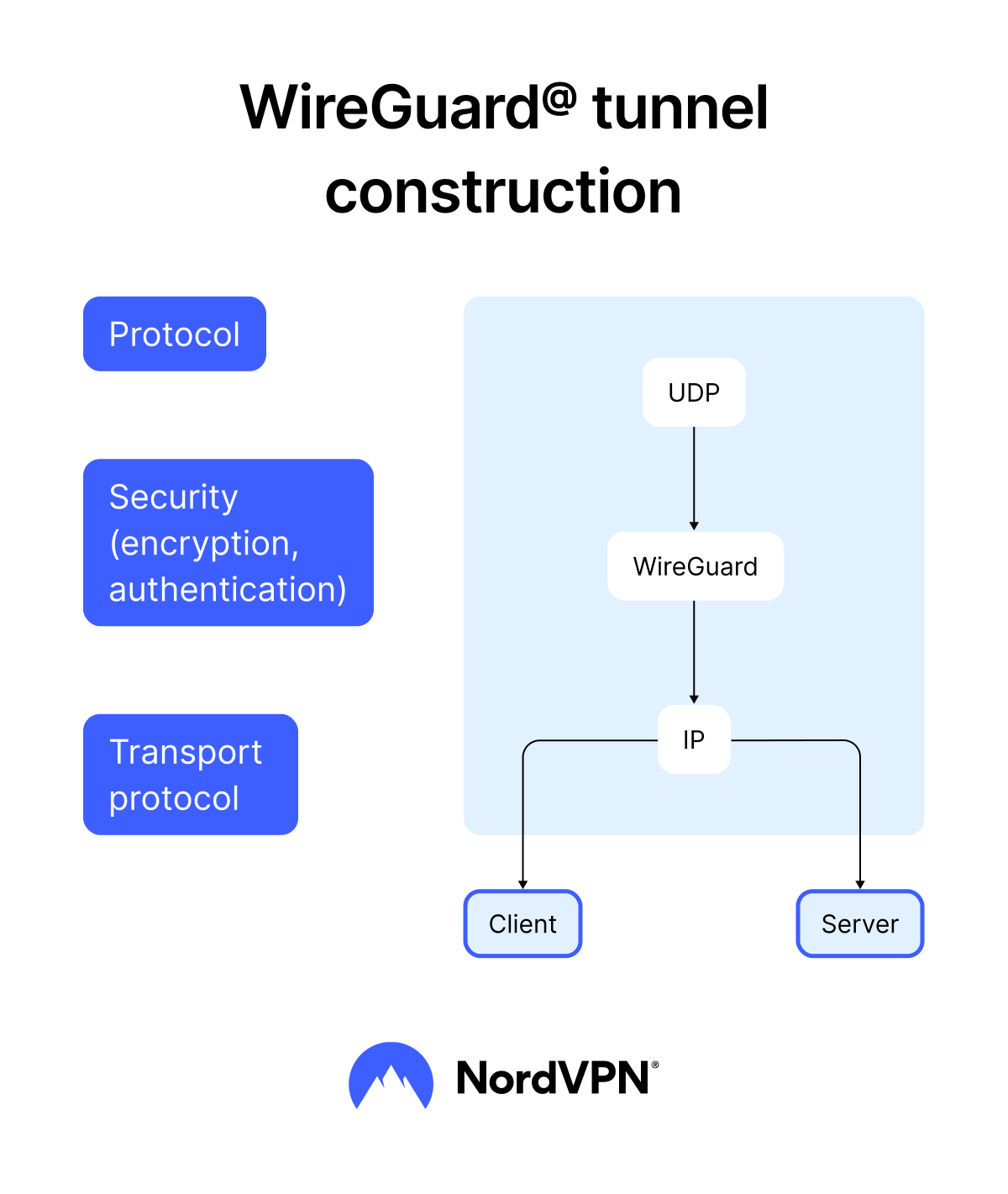
Pros
Free and open source. Anyone can look into its code, which makes it easier to deploy, audit, and debug.
Modern and extremely fast. It consists of only 4,000 lines of code, making it “the leanest” protocol of them all. In comparison, OpenVPN’s code has tens of thousands of lines.
Highly secure. WireGuard uses cryptographic algorithms such as ChaCha20 and Poly1305, offering strong resistance against modern cryptographic attacks.
Efficient and resource friendly. The protocol consumes fewer resources, making it ideal for mobile devices with limited processing power or battery. That allows WireGuard to offer seamless performance even on low-end hardware.
Cross-platform with built-in Linux support. WireGuard comes integrated into the Linux kernel by default, which has increased its adoption and ensures excellent performance on Linux-based devices. It also works on Windows, macOS, iOS, and Android.
Cons
Limited built-in privacy features. WireGuard temporarily logs IP addresses on the server to manage connections. While this data isn't logged by default, it requires VPN providers to implement additional privacy-preserving techniques, such as NAT or periodic key regeneration, to achieve true no-log functionality.
Lack of support for older devices. Since WireGuard uses modern encryption schemes, it may not work on outdated devices or legacy systems that rely on older encryption protocols.
Lack of advanced configuration options. While WireGuard’s simplicity is a strength, it lacks the configuration options and flexibility provided by protocols like OpenVPN, which may limit its use in highly specialized or niche setups.
When to use it. Use WireGuard whenever speed and safety are a priority: streaming, online gaming, or downloading large files.
OpenVPN
The OpenVPN protocol is a highly configurable industry-standard protocol used by many VPN providers. It runs on either the TCP (transmission control protocol) or UDP (user datagram protocol) internet protocol and uses AES-256 encryption — a highly secure encryption algorithm. OpenVPN’s TCP guarantees that your data is delivered in full and in the right order, while UDP focuses on ensuring fast speeds. Many VPNs, including NordVPN, let users switch between the two, depending on the need.
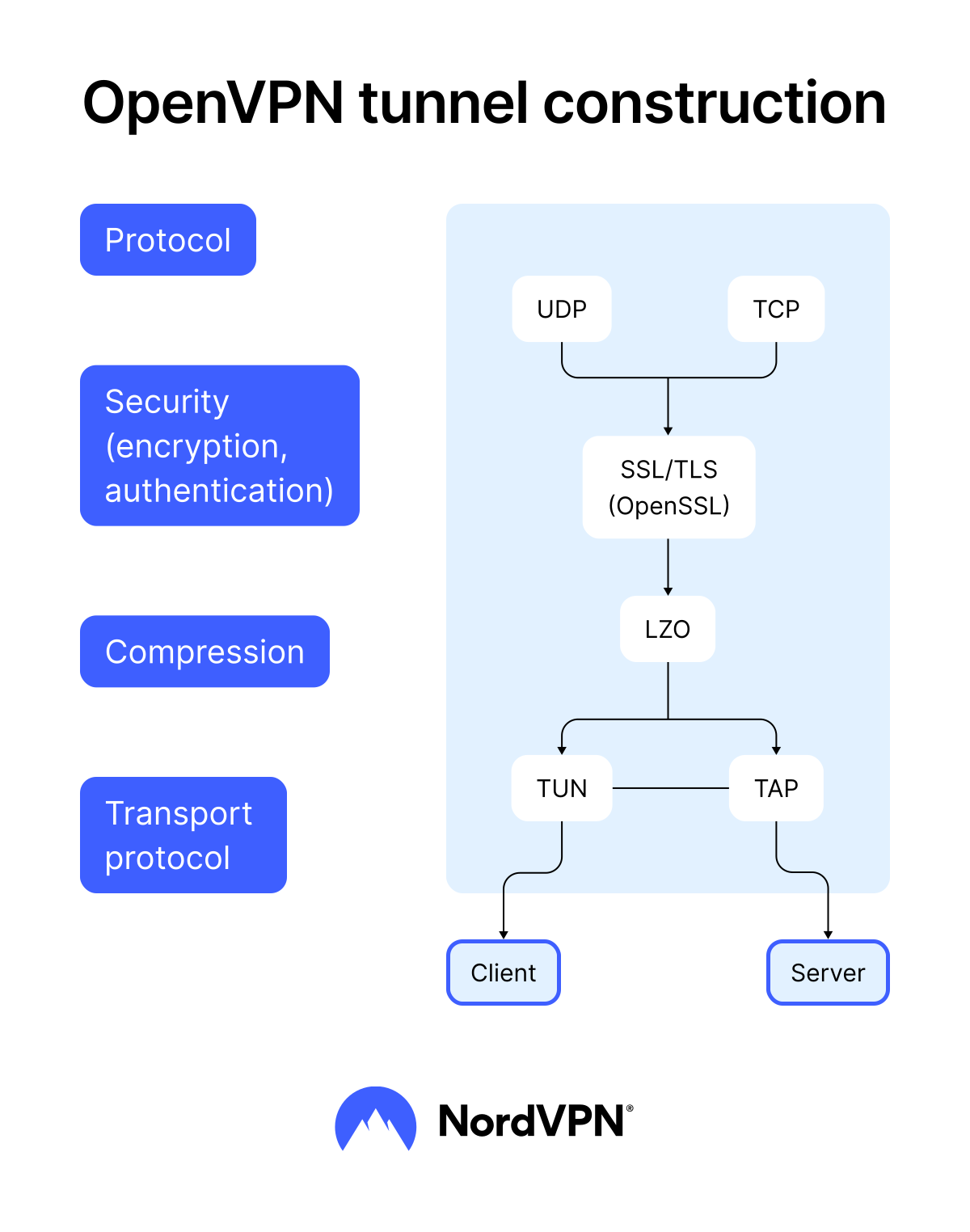
Pros
Open source. Anyone can check OpenVPN’s code, making it easy to test and audit for hidden backdoors or vulnerabilities that might compromise your VPN’s security.
Versatile. OpenVPN works with different encryption and traffic protocols, and can be configured to be as secure or light as you need it to be.
Secure. OpenVPN uses AES-256 cryptography, which is a gold standard for banking, medical records, and secure communication encryption.
Capable of bypassing most firewalls. Firewall compatibility isn’t an issue if you use a VPN service (such as NordVPN), but it can become one if you ever try to set up your own VPN. OpenVPN helps you bypass most firewalls easily, making it a great option for hands-on users.
Cons
Complex in its setup. Its versatility means that most users may be paralyzed by choice and complexity if they try to set up their own OpenVPN server.
Not as quick as WireGuard. While OpenVPN is among the quickest VPN protocols, it can’t match WireGuard’s speed. If a speedy connection is your main priority, OpenVPN might not fully suit your needs.
When to use it. OpenVPN is a good choice when you need comprehensive security and stable connections, especially when browsing on insecure public Wi-Fi.
IKEv2/IPsec
The IKEv2/IPsec protocol is widely regarded as the strongest option for mobile devices, capable of establishing an authenticated and encrypted connection. Developed by Microsoft and Cisco, it has native support on iOS and is part of the IPsec internet security toolbox — a framework that combines various IPsec tools to provide comprehensive VPN coverage.
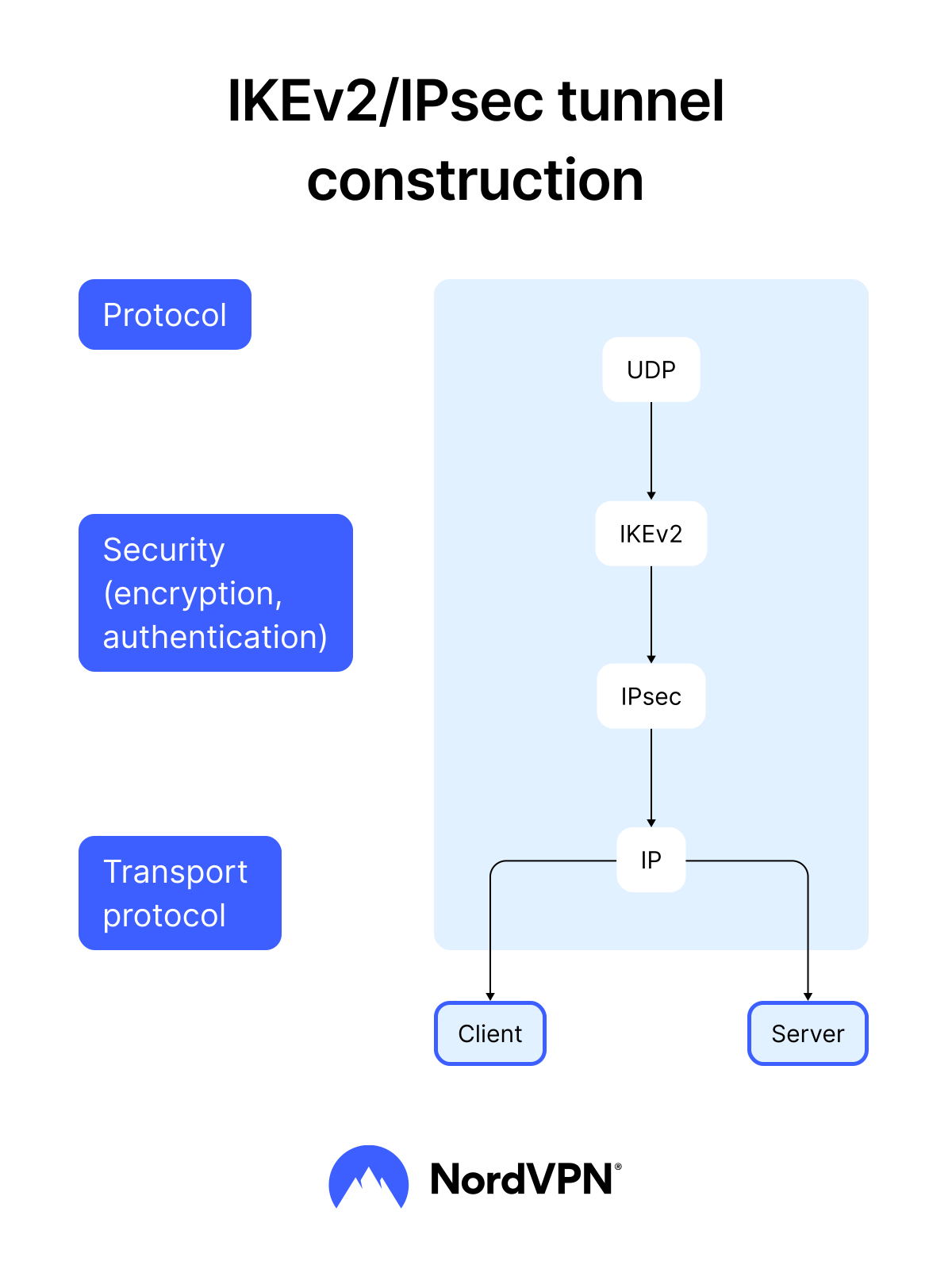
Pros
Stable. IKEv2/IPsec uses a tool called the Mobility and Multi-homing Protocol, which supports a VPN connection as you move between internet connections. This makes IKEv2/IPsec a dependable and stable protocol for mobile devices.
Secure. As part of the IPsec suite, IKEv2/IPsec supports AES-256 encryption and Diffie-Hellman key exchange (a robust encryption key exchange mechanism), making it a highly secure VPN protocol.
Fast. IKEv2/IPsec uses minimal bandwidth when active and establishes connections quickly, making it one of the faster VPN protocols available.
Capable of bypassing firewalls. IKEv2/IPsec’s built-in NAT (Network Address Translation) traversal allows it to navigate firewalls more effectively than some other VPN protocols.
Cons
Complex in configuration. Setting up IKEv2/IPsec requires good knowledge of networking concepts and might be too complicated for a beginner VPN user.
Partially proprietary. While open-source alternatives exist (for example, strongSwan), the protocol is less transparent than fully open-source options like WireGuard or OpenVPN.
When to use it. With IKEv2/IPsec, you won’t lose your VPN connection when switching from Wi-Fi to mobile data, so it’s ideal if you’re frequently on the move. Its fast speeds and effective firewall navigation also make it attractive for everyday browsing.
NordLynx
NordLynx is NordVPN's proprietary VPN protocol built on WireGuard. It inherits the speed and lightweight codebase of WireGuard while addressing one of its key weaknesses — privacy. NordLynx uses a custom double NAT system that ensures no identifiable user data is stored on the VPN server, delivering WireGuard-level performance without sacrificing privacy.
Pros
Speed. Built on the minimal codebase of WireGuard, NordLynx delivers the fastest connection speeds among all NordVPN protocols, making it the recommended choice for gaming, streaming, and downloading large files.
Enhanced privacy. Unlike standard WireGuard, which temporarily logs user IP addresses on the server, NordLynx's double NAT system ensures your real IP address is never stored.
Strong encryption. NordLynx uses the same ChaCha20 encryption and Poly1305 authentication as WireGuard, providing robust protection against modern cryptographic attacks.
Seamless mobile performance. Like WireGuard, NordLynx is lightweight and resource efficient, resulting in minimal battery drain and smooth performance on mobile devices.
Cons
Exclusive to NordVPN. NordLynx is a proprietary protocol, meaning it's only available through NordVPN's apps. You can't use it with third-party VPN clients or export configurations to standard WireGuard apps.
Partially proprietary. While WireGuard itself is open source, NordVPN's double NAT implementation is proprietary. Independent researchers cannot fully audit the privacy-enhancing layer that differentiates NordLynx from standard WireGuard.
When to use it. NordLynx is the best choice whenever speed is a priority — gaming online, streaming your TV shows, or downloading large files. If you're a NordVPN user and don't have a specific reason to use another protocol, NordLynx is your go-to option.
NordWhisper
The NordWhisper protocol is a custom NordVPN protocol designed to bypass network restrictions and firewalls. It provides users with reliable VPN access on restricted networks where traditional protocols may have difficulty connecting because of network filters. The protocol is built on web tunnel technology, using it to blend VPN traffic with regular web traffic. That makes it harder for networks to detect and restrict VPN connections — all without compromising security or privacy.
Pros
Works on restrictive networks. It is designed to help connect to the VPN on networks that typically limit traditional VPN traffic, such as hotel Wi-Fi, corporate offices, universities, and public hotspots.
Secure. NordWhisper upholds the same strong security and privacy standards as other NordVPN-supported protocols.
Cons
Potentially slower. In some situations, it may be slightly slower than other protocols because of the web tunneling.
Exclusive to NordVPN. NordWhisper is a proprietary protocol only available through NordVPN's apps. It cannot be used with third-party VPN clients.
When to use it. NordWhisper is a good choice when you need to connect to networks with strict filters, like public Wi-Fi at airports, cafes, or hotels, where traditional VPN protocols might not work.
L2TP/IPsec
The L2TP (Layer 2 Tunneling Protocol) doesn’t actually provide any encryption or authentication. It’s simply a legacy VPN tunneling protocol that creates a connection between you and a VPN server. L2TP relies on IPsec (Internet Protocol Security) to form L2TP/IPsec — a protocol that encrypts your traffic and keeps it private and secure. While it is widely compatible with a lot of devices and operating systems, L2TP also wraps data packets twice — once for tunneling, and once for IPsec encryption (double encapsulation). That can significantly reduce connection speed, making L2TP one of the less attractive protocols around (L2TP is not among the supported NordVPN protocols).
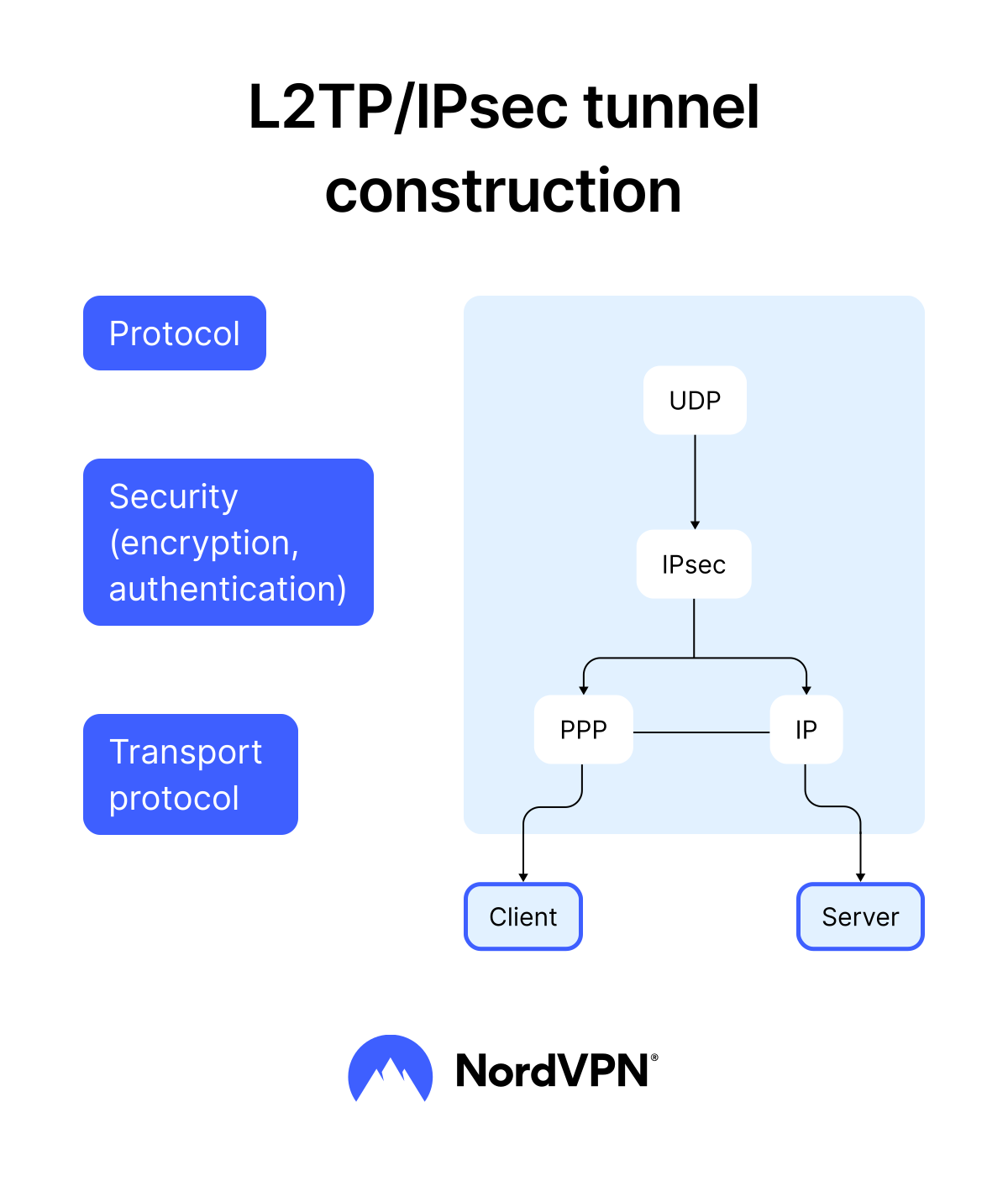
Pros
Adaptable. While L2TP alone is not secure, its separation from encryption allows it to be customized and flexibly paired with various security protocols.
Widely available. L2TP is available on almost all modern consumer systems, meaning admins will have no trouble finding support and getting it running.
Cons
Slow. The protocol’s double data encapsulation makes it slow in comparison to modern VPN encryption protocols.
Has difficulties with firewalls. Unlike other VPN protocols, L2TP has no clever ways to get through firewalls. Network administrators can easily detect and block this protocol.
Limited in its security. As a standalone protocol, L2TP is not secure at all. Users should only use it when paired with other VPN protocols.
When to use it. You can still use L2TP when dealing with older systems or situations where simplicity and compatibility are key priorities. Some might also use the protocol to connect several company branches into one network. However, it’s important to note that, due to its limitations in speed and firewall evasion, it’s no longer a top choice for most modern VPNs.
SSTP
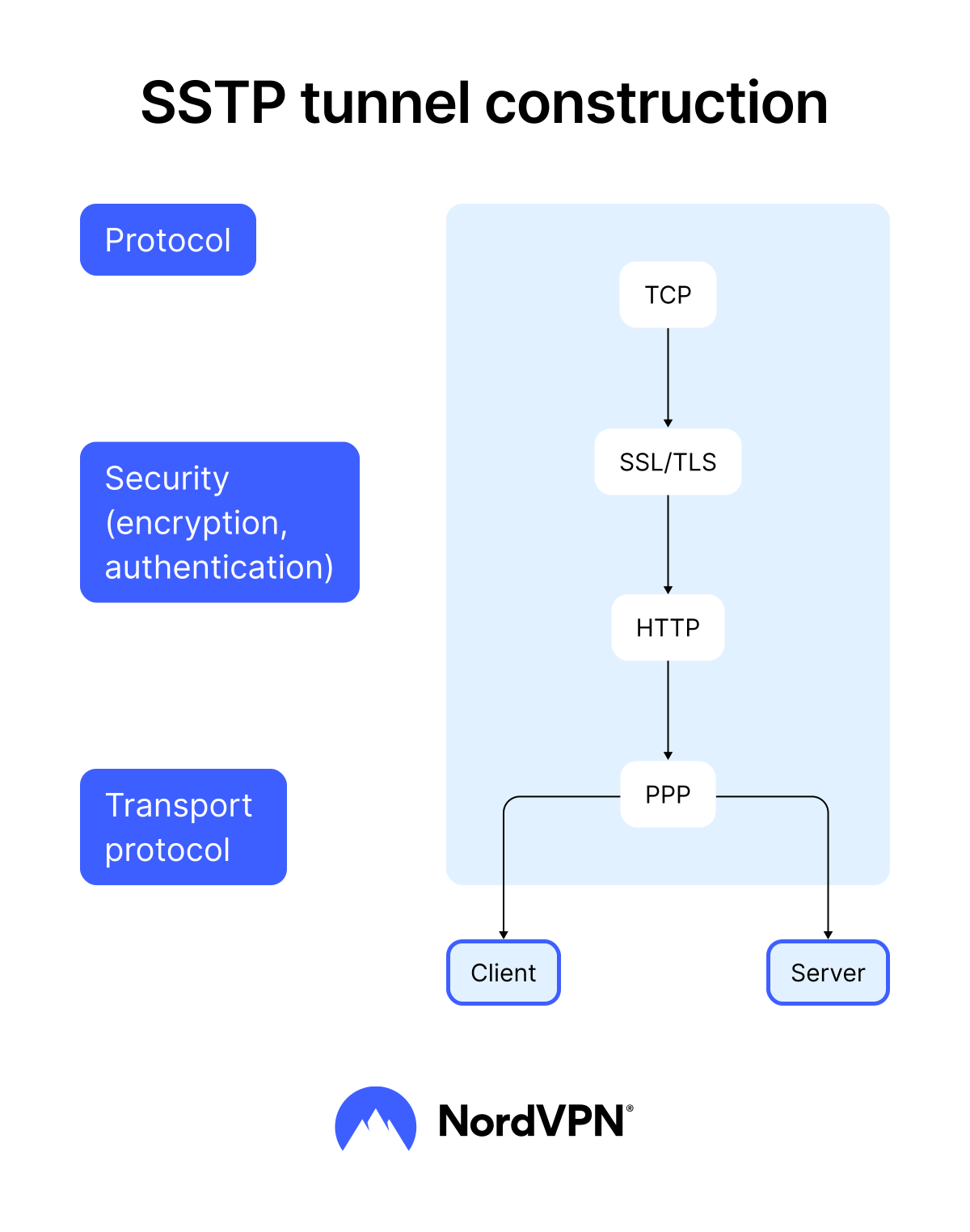
SSTP is a relatively secure and capable VPN protocol created by Microsoft. While it was designed primarily for Windows users, the protocol is available on other systems, such as Linux or Android. SSTP works well for bypassing firewalls and network restrictions because it uses port 443, the same port as HTTPS. However, while it offers strong encryption, SSTP is not supported by many privacy-focused VPN providers, including NordVPN.
Pros
Secure. SSTP supports the AES-256 encryption algorithm and uses SSL/TLS encryption — a highly secure protocol used in HTTPS communications.
Capable of bypassing firewalls. SSTP works over port 443, allowing the protocol to get through most firewalls without interrupting your communication.
Cons
Owned by Microsoft. Since SSTP is a Microsoft product, its code isn’t available to security researchers for testing — one of the reasons why many privacy-focused VPN providers choose not to support it.
Unpopular among VPN providers. SSTP is supported by far fewer VPN providers compared to OpenVPN or WireGuard, and cross-platform support often requires manual configuration.
Not as fast as newer protocols. SSTP tends to be slower than newer protocols like WireGuard due to its reliance on SSL/TLS. The protocol may have slower connections and higher latency, which is noticeable when streaming or gaming.
When to use it. SSTP is generally good for enhancing privacy while browsing the internet. It’s also useful if you’re trying to use a VPN in countries with tight content restrictions and censorship.
PPTP (legacy — not recommended)
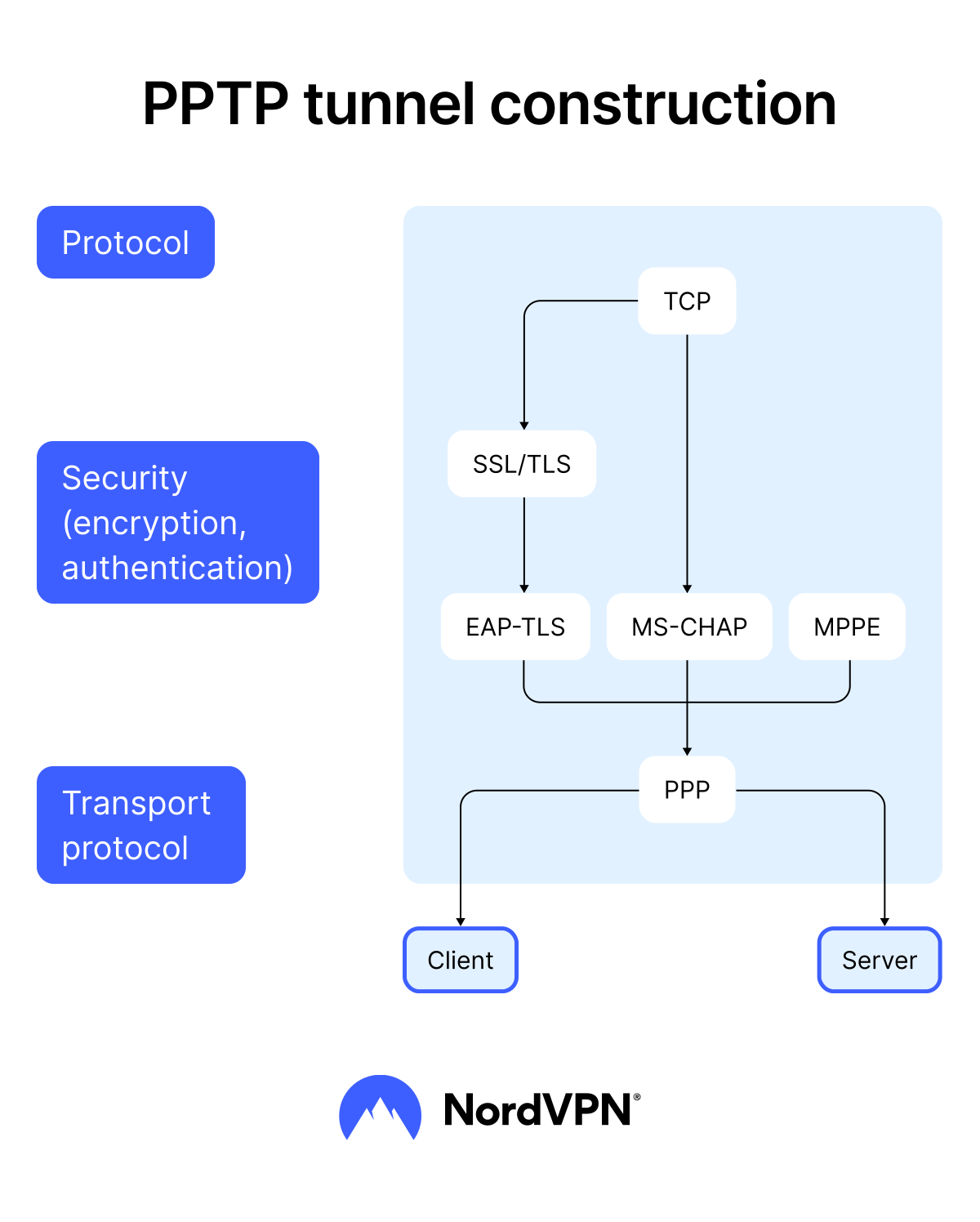
PPTP (Point-to-Point Tunneling Protocol) was created in 1999 and was the first widely available VPN protocol designed to tunnel dial-up traffic. While quick, PPTP is a legacy protocol that uses some of the weakest encryption ciphers of any VPN protocol on this list and has plenty of security vulnerabilities. (PPTP is not a supported NordVPN protocol.)
Pros
Fast. It doesn’t require a lot of resources to run, so modern machines operate PPTP very efficiently.
Highly compatible. In the years since it was made, PPTP has become the bare minimum standard for tunneling and encryption. Almost every modern system and device supports it, which makes it easy to set up and use.
Cons
Unsecure. Numerous vulnerabilities and exploits have been identified for PPTP. Some, though not all, have been patched, but even Microsoft has encouraged users to switch to L2TP or SSTP.
Cracked by the NSA. The NSA is said to routinely decrypt PPTP traffic, meaning it offers virtually no protection against government-level surveillance or other advanced decryption methods.
Weak against firewalls. Since it’s an outdated protocol, PPTP connections are easier to block via a firewall. If you’re using this protocol at a school or business that blocks VPN connections, you’re likely to face connection problems.
When to use it. PPTP is outdated and insecure, so it's better to avoid it entirely. If your only option is PPTP or no VPN at all, it’s better to use PPTP, but any modern alternative is preferable.
VPN protocol comparison
With tons of VPN protocols to choose from, you may be interested in seeing how they compare against each other. Here’s a simplified comparison of the most popular VPN protocols.
| VPN protocol | Speed | Best for | Available in NordVPN app |
|---|---|---|---|
| WireGuard (NordLynx)* | Very fast | Gaming, 4K streaming, large downloads | Yes |
| OpenVPN | Fast | Secure browsing, especially on public Wi-Fi | Yes |
| IPsec/IKEv2 | Fast | Mobile users frequently switching networks | Yes (requires manual setup) |
| NordWhisper | Fast | Connecting on restrictive networks (hotels, airports, offices) | Yes |
| SSTP | Medium | Bypassing firewalls in restrictive regions | No |
| L2TP/IPsec | Medium | Older systems where compatibility is a priority | No |
| PPTP | Fast | Not recommended — outdated and insecure | No |
* Our NordLynx protocol is built around WireGuard, and you can find it on the NordVPN app.
IMPORTANT: This table provides a general comparison based on typical performance characteristics. Performance may vary depending on your network conditions, server location, and VPN provider.
What is the best VPN protocol?
The best VPN protocol is a question of preference. It depends largely on your needs, priorities, and the contexts in which you will use your VPN. Every VPN protocol has its own advantages and disadvantages, which you should consider before making your choice of VPN.
Best VPN protocol for speed
For quick and seamless connections, WireGuard and NordLynx protocols are the top choices. WireGuard protocol excels in speed because of its minimal codebase and modern cryptography. NordLynx is heavily based on WireGuard, so it has inherited speed while adding a double NAT system for enhanced privacy. If you’re looking for the fastest VPN, NordVPN's NordLynx protocol is the right option.*
*Information related to “Fastest VPN” is based on testing conducted by West Coast Labs in October 2025, with the full report available here. This is further supported by other multiple sources, including editorially independent evaluations and insights, internal tests, as well as statements from media articles, some of which were published through paid partnerships.
Best VPN protocol for security
When configured correctly, all modern protocols used today have robust security features, making security less about which protocol you choose and more about how it's configured. Whether you choose WireGuard, NordLynx, OpenVPN, or IPsec/IKEv2, the right configuration matters when ensuring your VPN security.
Best VPN protocol for streaming
Streaming requires a fair amount of network resources, so speed-oriented VPN protocols like WireGuard, NordLynx, or OpenVPN (UDP) work best here. Both WireGuard and NordLynx offer minimal buffering and speedy connections, while OpenVPN’s UDP works as a slightly slower, but capable alternative.
Best VPN protocol for gaming
Unlike streaming, gaming requires less bandwidth but low latency (ping), making NordLynx, WireGuard, and IKEv2 the best VPN protocols for gaming. While NordLynx and Wireguard have the lowest latency, IKEv2 provides stable connections and quick reconnections (if connection drops) — a must-have for any VPN for gaming.
Best VPN protocol for mobile
IKEv2 is the strongest mobile protocol — it reconnects seamlessly when switching between Wi-Fi and mobile data and has native iOS support. NordLynx and WireGuard are also excellent picks, offering faster speeds with low battery consumption. All three handle network switches well, making them ideal for mobile VPN use.
How to change the VPN protocol in NordVPN
If you’re experiencing slow speeds when connected to a VPN, changing your protocol might help. NordVPN users can easily switch between protocols by opening the NordVPN app and:
- 1.Select a person icon on the top right in the desktop app.
- 2.Go to “Settings.”
- 3.Click “VPN Protocol.”
- 4.Select your preferred VPN protocol.
For mobile app users, the process is almost identical:
- 1.Select a person icon on the bottom right in the mobile app.
- 2.Go to “Settings.”
- 3.Tap “Protocol.”
- 4.Select your preferred VPN protocol.
NordVPN offers NordLynx, NordWhisper, and OpenVPN’s UDP and TCP protocols. While you won’t see it in the app, the IKEv2 protocol is also available (but requires manual setup). Unless you choose otherwise, the service automatically sets NordLynx as the default VPN protocol. If switching protocols doesn't resolve the issue, factors like server distance and network congestion may also be affecting your speed.
Online security starts with a click.
Stay safe with the world’s leading VPN
