·
A VPN client: Download VPN software and protect your traffic
Get a dedicated VPN client for an instant connection.
Choose from different VPN protocols for the best speed and security.
Use NordVPN on multiple devices at the same time.
Easily access NordVPN’s advanced features.
Available on
Available on
How to get a VPN client
The best VPN clients are designed with regular internet surfers in mind and make it very easy to use a VPN.
01
Choose a VPN provider
Get a subscription from a VPN provider that meets your needs, create an account, and download the VPN client.
02
Log in
Once installed, open the VPN app and log in with your VPN account credentials.
03
Connect to a VPN server
Pick a server in a country you want (or use the automatic connection feature if your VPN client has it).
04
Customize your VPN client
Explore your VPN client’s settings to customize your preferences — change the VPN protocol, enable security features, or set up a kill switch.
What is a VPN client?
A VPN client is a software-based solution that establishes a secure, encrypted connection between your device and a VPN server. In other words, a VPN client service reroutes your internet traffic through a secure server, protecting your online activities from prying eyes. Most VPN providers have their own VPN client software, designed to allow easy access to the provider’s VPN servers and offer advanced security features (like NordVPN’s Threat Protection Pro™).
Do I need a VPN client?
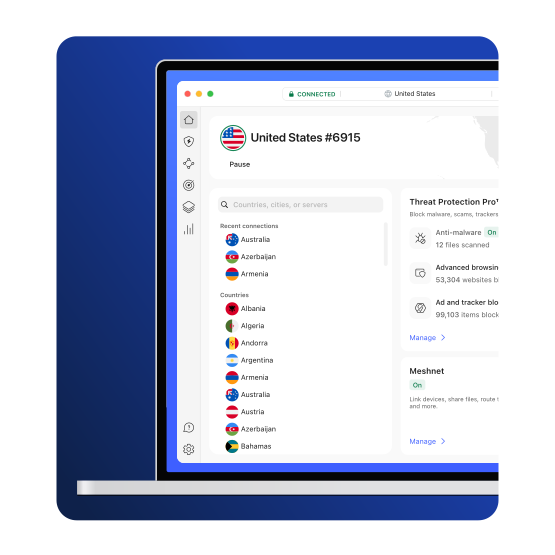
You need a VPN client to connect to a VPN server — and you specifically need your provider’s VPN client to unlock the full features of your VPN subscription. While you can manually set up a generic VPN client to access your provider’s VPN servers, it can’t replicate the unique cybersecurity tools built right into the official app.
For example, the Windows version of the NordVPN app (which serves as your VPN client) comes with Threat Protection Pro™, a suite of cybersecurity tools that block many common online threats while you browse. This powerful feature is part of your NordVPN subscription — but it’s built into the NordVPN app and unavailable if you use NordVPN with the OpenVPN client.
Types of VPN clients
There are three main types of VPN clients: system-based, protocol-based, and service-based.
System based (native)
Some operating systems offer native VPN clients, letting users establish a VPN connection without having to download any third-party software. This option is available on many Windows, macOS, Linux, and Android systems.
Protocol based
Several VPN protocol developers (such as OpenVPN and SoftEther) have created their own VPN clients. These clients are not tied to any single VPN provider — but they also typically only support VPN connections using the developer’s own VPN protocol.
Service based
Most VPN providers have their own VPN client apps. These VPN clients are configured to connect to the provider’s servers, let you freely choose between multiple VPN protocols, and usually offer extra security features (such as NordVPN’s Threat Protection Pro™ or Meshnet).
How does a service-based VPN client work?
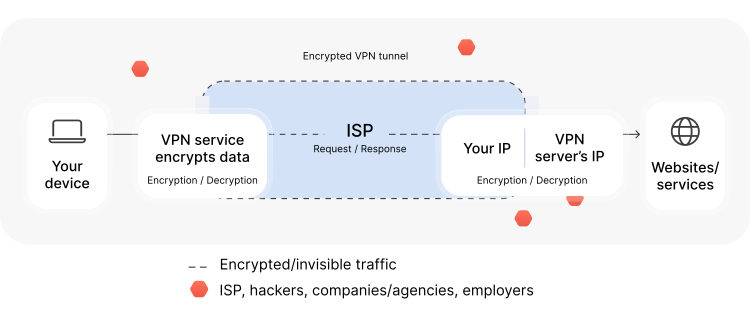
Your service-based VPN client uses VPN protocols to create an encrypted “tunnel” between your device and your chosen VPN server. From that point on, all online traffic between you and the VPN server is encrypted and shielded from prying eyes. The VPN server decrypts the received data and safely passes it on to its final destination (such as a website).
Technical specifications for VPN clients
Check out what your devices need to run NordVPN smoothly.
Requirements for the Windows VPN client
Application: Windows 10 (64-bit), Windows 11
OpenVPN manual (the latest version): Windows 7, Windows 7 Service Pack 1, Windows 8, Windows 8.1, Windows 10 (version 1507+), Windows 11
IKEv2 manual: Windows 10 (version 1507+)
Not supported: Anything older than Windows 7
Is there a free VPN client?
Free VPN clients do exist, including the simple VPN interfaces built into Windows, Android, macOS, and other operating systems. Even proprietary VPN clients may be free to download, although they may only work with specific VPN providers. However, a VPN client by itself won’t do you any good — you also need a VPN service to protect your connection.
Unfortunately, free VPNs do not always protect you to the extent you think. A free VPN may try to cut costs by pushing ads and not investing in speed or connectivity. In rare cases, it might even resort to selling clients’ data or using their devices as exit nodes for paying VPN users.
By contrast, paid VPN providers like NordVPN offer both speed and security. With thousands of servers in all corners of the world, you’re bound to find one close by for the best possible VPN speed.
Get 70% off NordVPN
Browse, work, and play safer online with our user-friendly VPN client. Easily protect your online traffic on up to 10 devices with just a few clicks or taps.
VPN client solutions for business
Looking for a VPN for your organization? Look no further. One of the world’s fastest VPN service offers optimized VPN solutions for businesses and teams.
Check out NordLayer — an easy-to-use cybersecurity tool designed to provide secure remote access to the company network for everyone in your team.