Types of malware: What are they?
Cybercriminals leverage various forms of malware and exploit common online vulnerabilities. Being familiar with the different types of malware attacks is the first step to staying protected.
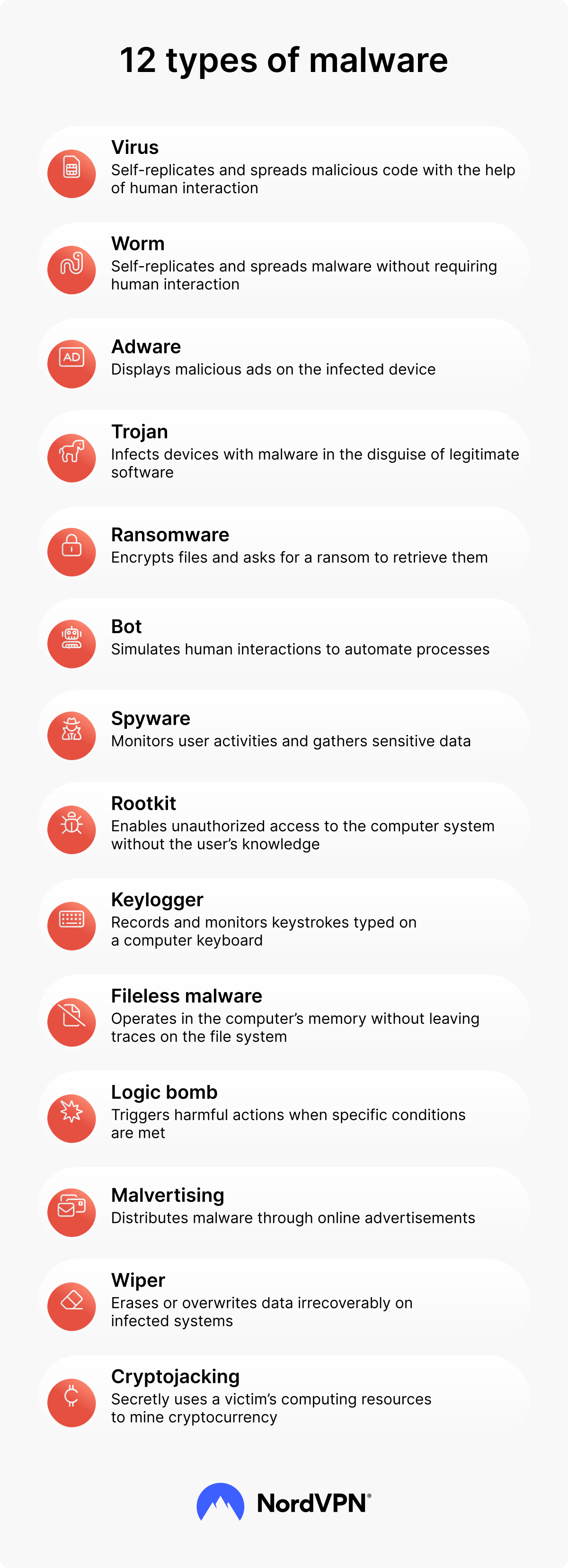
The table below outlines the most common types of malware.
The table below outlines the most common types of malware.
| Malware | Description | Example |
|---|---|---|
| Malware that attaches to legitimate files or programs and replicates itself to spread and corrupt systems when the host is executed. | Melissa | |
| Self-replicating malware that spreads across networks without needing a host file or user action, infecting many devices quickly. | ||
| Malware that delivers unwanted advertisements and tracks behavior, often bundled with software to generate ad revenue and degrade system performance. | Fireball | |
| Malware disguised as benign or useful software that, once installed, allows attackers to steal data, install additional malware, or control systems. | ||
| Malware that encrypts or locks access to files or systems and demands payment for decryption or restoration of access. | RYUK, LockBit | |
| Malicious software that monitors and collects user data and activity without consent, frequently for financial theft or surveillance. | Pegasus | |
| Individual malware-infected devices (or bots) controlled from a central hub, used for DDoS attacks, spam, or other coordinated malicious activities. | ||
| Malware that embeds into a system’s core infrastructure to hide its processes and give cybercriminals persistent, undetected control of the device. | Zacinlo | |
| Hidden malware that runs in system memory or trusted processes without writing malicious files to disk. | Astaroth | |
| Malware that secretly records a user’s keystrokes to steal passwords, financial information, and other sensitive data. | Olympic Vision | |
| Malware that injects malicious code into online ads to deliver malware or redirect users to harmful sites. | Greatness | |
| Malicious code hidden in software that remains dormant until specific conditions are met, then executes a destructive payload such as data deletion or corruption. | | |
| Malware designed to erase or overwrite data irrecoverably on infected systems, often used in sabotage or advanced attacks. | WhisperGate | |
| Malware that secretly uses a victim’s computing resources to mine cryptocurrency, slowing down systems and increasing their power consumption. | CoinMiner |
1. Virus
A virus is a piece of malicious code that inserts itself into computer systems, self-replicates, and spreads to other systems and devices. Viruses usually attack when triggered, for instance, when the victim opens the malicious file they’ve downloaded. Once launched, a computer virus attempts to encrypt, distort, and steal your data or conduct more elaborate malware attacks.
Typically, viruses need to be let into the devices by their victims. To reach this goal, cybercriminals use various social engineering techniques to trick users into downloading viruses through email attachments, network shares, infected websites, or removable media (e.g., USB drives).
One real-life example of a virus is the ILOVEYOU cyberattack that emerged in May 2000. The virus was distributed through an email attachment that was supposed to be a love letter. Once opened, the virus replaced files on the infected computer and sent copies of itself to other unsuspecting users in the victim’s Microsoft Outlook address book.
2. Worm
A worm is self-replicating malware that searches for vulnerable points in the operating system to get into the network. Typically, worms attack devices’ memory or hard drives and are designed to interrupt networks and exhaust bandwidth. Sometimes they also steal sensitive data or can be used in launching more elaborate cyberattacks.
Unlike viruses, worms don’t require interaction with humans or attach themselves to software to spread. Worms usually enter computer systems through backdoors built into software or its vulnerable points. They also can spread through flash drives, email, or message attachments.
In 2008, a computer worm called Conficker exploited a vulnerability in Microsoft Windows operating systems and quickly spread across millions of computers worldwide. This worm targeted systems that hadn’t updated their security and spread through network shares and removable media. Once a system was infected, Conficker established a network of compromised computers under the control of threat actors.
3. Adware
Adware is advertising-supported software that displays unwanted or malicious advertisements on a user’s device. It tracks users’ activity online and collects data to provide targeted advertising. Adware is a type of grayware because it’s not inherently harmful, but it can hinder your device’s performance and may lead to downloading other types of malware.
Adware is often installed alongside the desired software without the user’s knowledge. It’s developed to put advertisements on the victim’s screen, often in a web browser or a popup. Adware may also include potentially unwanted programs (PUPs), which users often install unintentionally and are typically bundled with legitimate applications. While not always malicious, PUPs are considered risky because they degrade system performance, reduce privacy, and can introduce security vulnerabilities.
In 2017, a large-scale adware campaign called Fireball emerged, which spread by piggybacking on legitimate software. The adware hijacked the browser, modified its settings, redirected search queries, and tracked user activity to deliver targeted advertisements. Reports suggested that the Fireball campaign infected over 250 million computers globally.
4. Trojan
A trojan is malware disguised as a harmless and legitimate piece of software, application, or game, tempting users to download it. Once a trojan infiltrates the system, it grants the attacker unauthorized control over devices or spreads malware without the user’s knowledge. This step includes stealing sensitive information, modifying files, taking control of a system, or creating backdoors for remote access.
Trojans are typically distributed through social engineering techniques like email phishing, fake software updates, or compromised websites. This type of malware can’t spread by itself and can only be executed by a person.
Emotet was a sophisticated trojan campaign that emerged in 2014. It spread mainly through authentic-looking emails containing infected attachments or malicious links. Emotet stole heaps of sensitive information and served as a delivery platform for other malware, including ransomware and banking trojans.
5. Ransomware
Ransomware is a time-sensitive cyberattack when a hacker encrypts user files or devices and holds them for ransom until a certain deadline. Even after the victim proceeds to pay the release payment, they have no guarantee that their files or devices will be decrypted.
Ransomware attacks can be initiated through malicious files, exploit kits, compromised websites, or malware-infected downloads and links. Attackers also tend to tailor specific messages to the targeted victims. After ransomware is installed, it creates a backdoor for a hacker to access the victim’s device and encrypt the data inside.
The WannaCry ransomware attack that took place in 2017 targeted thousands of computers in over 150 countries. It spread rapidly through a Windows SMB vulnerability, encrypting files and demanding ransom payments in Bitcoin. SMB vulnerabilities are responsible for this and many other famous malware attacks, including the Petya/NotPetya ransomware that affected users globally.
6. Spyware
Spyware is software that secretly monitors and collects information about a user’s activities, often without their knowledge or consent. It’s designed to gather sensitive data, such as passwords, browsing habits, personal information, or financial details, and transmit it to a remote attacker.
Spyware can be disguised as legitimate software or be delivered through malicious email attachments or infected websites. This type of malware is often used as a first stage of a data breach for a hacker to explore the system.
One example of spyware is a long-running cyberattack campaign called Darkhotel, which focuses on high-profile business travelers. The attack’s name derives from the mode of tracking travelers’ plans: Malware infiltrates victims’ devices with spyware via the hotel’s Wi-Fi. The Darkhotel attack typically aims to steal the sensitive data of high-position government officials.
7. Bot and botnets
A bot is a malicious software application designed to create a network of infected devices — a botnet, which is under the control of a hacker. Once a device is infected with a bot, it becomes part of the botnet, allowing the attacker to control and command the compromised devices remotely.
Botnets launch broad, remotely controlled cyberattacks through the infected computer networks, steal sensitive information, or launch large-scale spam campaigns. Bots are typically spread using social engineering tactics or software vulnerabilities while they roam the internet and search for ways to breach security infrastructures.
The botnet Mirai, which emerged in 2016, was set to target internet of things (IoT) devices, such as routers, cameras, and digital video recorders (DVRs). Once infected, they became part of the Mirai botnet and were used in a later launched massive distributed denial-of-service (DDoS) attack.
8. Rootkit
Rootkit is malware that enables unauthorized access to a computer system, obtaining administrative privileges. Rootkits are usually the first step in a data breach used to hide and spread other malware infections. It can also steal sensitive information, modify files, capture keystrokes, or intercept network traffic.
Rootkits are designed to maintain a long-term presence on an infected system and remain undetectable by both the user and security software. This malware can automatically reinstall or reactivate itself after the system has been restarted or security measures applied. Rootkits are usually spread through phishing attacks, unsolicited malicious downloads, or compromised shared files.
An example of a sophisticated rootkit attack is Zacinlo, which emerged in 2018. The goal of this rootkit was to perform click fraud. It hijacked web browsers, injected fraudulent ads into web pages, and attracted user clicks for those ads to generate revenue for threat actors.
9. Fileless malware
Fileless malware is a memory-based malware program that operates in the computer’s memory without leaving traces on the file system. Fileless malware is often used in targeted attacks to gain long-term access to the computer system. It’s evasive and able to bypass traditional security measures, making this malware program an attractive choice for sophisticated cyberattacks.
Fileless malware affects legitimate programs in the device, making changes to files, applications, protocols, or software. Because all these elements are inherent to the operating system, antivirus software struggles to detect fileless malware.
A real-life example of a fileless cyberattack is Astaroth (also known as Guildma). This malware attack, discovered in 2018, showed persistence on infected computer systems by modifying the Windows registry and creating scheduled tasks. It communicates with its command-and-control servers to receive updates, download additional payloads, and steal data. Astaroth is not always completely fileless since it can also spread via email attachments, functioning much like a trojan alongside its fileless malware capabilities.
10. Keylogger
A keylogger is malicious software or hardware devices that record keystrokes typed on a computer keyboard. It is designed to capture and log sensitive information, such as usernames, passwords, credit card details, and other confidential data users enter.
Keyloggers are often difficult to detect because they can run in the background, bypass antivirus software, and capture keystrokes without the user’s knowledge.
A keylogger attack called Zeus, or Zbot, emerged in 2007 and targeted numerous financial institutions worldwide. Zeus was distributed through phishing emails and exploit kits, and once installed, it implemented a keylogger component on the victim’s device to capture sensitive information.
11. Malvertising
Malvertising, a compound word made from “malicious” and “advertising,” is the distribution of malicious content through online advertisements. Malvertising can deliver various types of malware, such as viruses, ransomware, spyware, or adware.
Malvertising typically uses legitimate and reputable websites to deliver harmful payloads. One unaware click on the ad may trigger malware to automatically download and carry through the victims’ devices without their knowledge.
The Kyle and Stan malvertising campaign that occurred in 2016 affected a number of major websites. The malicious advertisements exploited vulnerabilities in users’ browsers or plugins and delivered various types of malware, including ransomware and banking trojans. The malware aimed to steal sensitive information, encrypt files for ransom, and gain unauthorized access to the victim’s device.
12. Logic bomb
A logic bomb is a pre-set attack run through malicious code or software. It remains inactive until triggered by a specific condition or victims themselves. Logic bombs are usually set with computer viruses or worms and can sabotage systems, extort victims for financial gain, or create system-wide disruption.
Sophisticated logic bomb attacks can be accomplished through approved software or network infrastructure, making them harder to detect. This type of cyberattack is usually triggered by either a positive catalyst (e.g., when a particular file is opened) or a negative catalyst (e.g., when no one deactivates the attack).
One famous logic bomb attack was carried out by a San Francisco city employee who planted a logic bomb in the city’s network infrastructure in 2008. The logic bomb was meant to sabotage the city’s computer network the next time it shut down for maintenance.
13. Wiper
Wiper malware is a destructive type of malware designed to permanently delete or overwrite data on infected systems, rendering them unusable rather than using them to access a device or system. Most wiper malware attacks deliberately target a specific operating system (typically Windows), though newer variations are cross-platform.
What makes wiper malware particularly dangerous is that if you’re not prepared with countermeasures (like an external backup of your device), data recovery is highly unlikely. Unlike spyware or ransomware attacks, a wiper has no other goal aside from completely destroying your IT infrastructure.
A well-known example of a wiper malware attack is WhisperGate (an attack analyzed by CrowdStrike), which targeted Ukrainian organizations. It initially disguises itself as ransomware but overwrites the master boot record and corrupts files.
14. Cryptojacker
A cryptojacker is malware that secretly hijacks someone’s computing resources — like CPUs, GPUs, or cloud servers — to mine cryptocurrency for the attacker without the victim’s consent. It slows performance and increases operating costs while remaining largely undetected.
Cryptojacker attacks have grown in frequency as more companies and institutions increasingly adopt cryptocurrency or blockchain technologies. The companies that use these technologies become vulnerable if they don’t implement robust monitoring and endpoint security.
One example of a recent attack of this type of malware is the WannaMine fileless cryptojacking malware that uses PowerShell/WMI to mine Monero. The malware lurks in memory on infected Windows systems without touching the disk, combining the exploits of both fileless malware and cryptojackers.
What is hybrid malware?
Hybrid malware is malicious software that blends features from different types of malware to boost its capabilities and evade detection. It can be a combination of two or more malware types, such as viruses, worms, trojans, or ransomware.
This type of malware can employ various techniques to dynamically alter its code or structure, making it challenging to detect by security solutions. For instance, a trojan can become a worm or virus once it has entered a system. As with other types of cyberattacks, hybrid attacks might spread through software vulnerabilities, social engineering techniques, infected websites, or compromised network devices.
How do common types of malware spread?
Malware attacks vary widely in their approach, usually exploiting one or more vulnerabilities in IT systems. Some can be targeted toward specific individuals or organizations, while others are deployed broadly to affect large numbers of systems.
- Virus: Attaches to files and spreads when infected files are shared via email attachments, downloads, removable media (USB), or file sharing.
- Worm: Self-replicates and spreads independently across networks by exploiting software vulnerabilities and unpatched systems, often via email links or network shares.
- Adware: Bundled with free or pirated software downloads and installed when users accept bundled offers, or through malicious ads.
- Trojan: Delivered through social engineering — disguised as legitimate apps or files in email, downloads, or installers that trick users into running them.
- Ransomware: Often delivered via phishing emails, malicious links, drive-by downloads, or exploited vulnerabilities in remote access technologies.
- Spyware: Installed silently through bundled downloads, trojans, vulnerabilities, or malicious websites.
- Botnet: Usually delivered via trojans, worms, or other malware that create backdoors.
- Rootkit: Often installed by other malware (trojans, worms) to hide malicious code and persists by exploiting system-level privileges and software vulnerabilities.
- Fileless malware: Uses legitimate system tools (e.g., PowerShell) and scripts delivered via phishing or compromised sites, then runs in memory to evade detection.
- Keylogger: Delivered via trojans, malicious downloads, or scripting attacks that install software.
- Malvertising: Spreads by embedding malicious code in online ads that redirect or automatically load malware when viewed or clicked.
- Logic bomb: Hidden within legitimate software or file code and triggered by specific conditions; often placed through insider access or bundled malware.
- Wiper: Delivered via phishing, compromised apps, or trojans.
- Cryptojacking: Injected via compromised websites, malvertising, phishing, or exploited server/cloud vulnerabilities.
How to protect yourself from the most common types of malware
The best way to prevent your device from being exposed to malware attacks is to use software security tools and stay aware of online threats.
Follow these easy but effective tips to keep yourself safe from online threats:
- Use multi-factor authentication (MFA). MFA strengthens your login process with an additional step that you need to take before accessing your account. Usually, it’s a code — a time-based one-time password (TOTP) that is valid only for a short period of time. Since the code changes every time you connect to the system, it becomes useless for future authentication attempts.
- Use antivirus software. Consider installing reliable antivirus software because it will monitor, detect, and stop many types of malware before they can breach your data or paralyze your network. It is also beneficial to use additional malware protection solutions to boost your safety online and help to deal with more case-specific online threats.
- Be aware of social engineering schemes. Suspicion is your key to noticing the signs of malware and staying safe online. Avoid answering messages, clicking links, or downloading files from unsolicited or suspiciously looking email addresses — always use spam filters. If you see an advertisement that seems too good to be true, then it’s probably the case, so make sure to never click on links that aggressively encourage you to do so to avoid downloading malicious code.
- Avoid suspicious links and attachments. Most malware spreads through attachments and files sent via email, frequently combined with phishing attacks to deceive recipients. Always verify if any links and attachments in an email are legitimate, and consider using security solutions like email protection.
- Limit admin privileges. Some malware (especially those that target mobile devices) specifically work by exploiting admin-level privileges. Ensure that only trusted programs have admin privileges on your device. You can also explore security tools and resources, such as guides on how to remove malware from your Android.
- Avoid third-party app stores. Only download apps from official platforms like the Google Play Store or Apple App Store. Apps from unofficial or third-party stores may not meet standard security practices or provide sufficient transparency.
- Enable a firewall. An active firewall reduces your risk of downloading malicious code and malware by monitoring and filtering incoming and outgoing network traffic. It can block unauthorized connections and known malicious sources before they reach your device. Firewalls can also prevent malware from communicating with command-and-control servers, limiting its ability to download additional payloads or spread further.
Online security starts with a click.
Stay safe with the world’s leading VPN