·
The usual suspects: Everyday online threats in numbers
You face cybersecurity threats every day — even if you don’t notice them. What should you be worried about in your daily online life?
NordVPN’s Threat Protection Pro™ feature guards you against common online threats — but just how much danger is the average internet user exposed to everyday? Our researchers have analyzed aggregated Threat Protection Pro™ data over a prolonged period to determine the kinds of threats that you’re most likely to encounter on the internet.
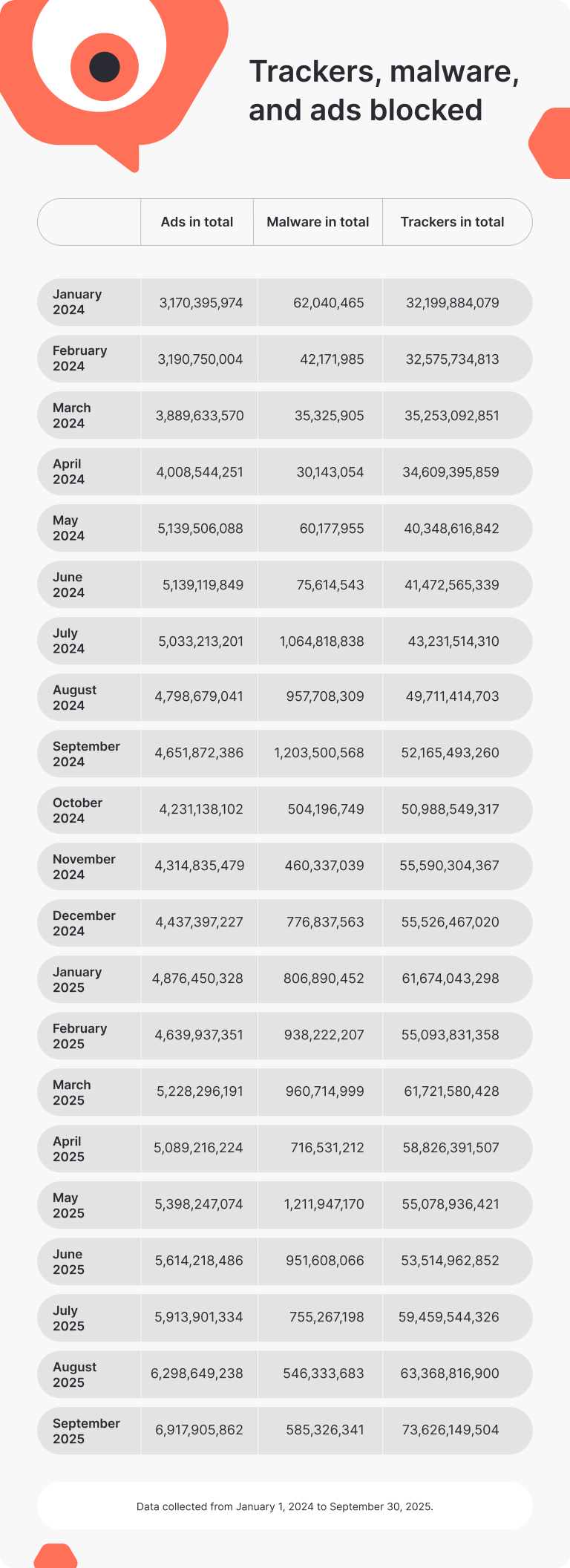
All data was processed in accordance with NordVPN’s Terms of Use and Privacy Policy. Our findings were derived only from aggregated Threat Protection Pro™ usage statistics.
Malware: Hiding in plain sight
Malware refers to any kind of programming that was deliberately designed to harm you or your device. This includes malicious software like viruses, trojans, ransomware, and spyware. Malware can steal sensitive data, encrypt important files, or even take over the machine, putting the criminal in complete control.
Most common malware blocked by Threat Protection Pro™
450,176 attacks intercepted
APC
A virus that often targets system configurations and automated processes to cause disruptions.
219,354 attacks intercepted
/APC
A virus that often targets system configurations and automated processes to cause disruptions.
128,018 attacks intercepted
APC.AVAHC
A variant of the APC virus known for its ability to avoid detection and persist in infected systems.
43,866 attacks intercepted
APC.YAV
A variant of the APC virus family that changes system files and settings.
43,298 attacks intercepted
Redcap.ovgfv
A specific strain of the Redcap trojan, used for data exfiltration and system manipulation.
31,367 attacks intercepted
OfferCore.Gen
Adware that generates intrusive ads and can install unwanted software on infected devices.
25,927 attacks intercepted
CoinMiner
A virus designed to hijack system resources to mine cryptocurrency without the user's consent.
23,503 attacks intercepted
Dropper.Gen
A trojan that installs other malicious software on the infected system.
21,623 attacks intercepted
/YAV.Minerva.ae9757
A trojan that performs activites without the user’s knowledge.
19,050 attacks intercepted
Redcap
A trojan that steals data and creates backdoors in infected systems.
11,266 attacks intercepted
APC.Griffin
Malware that changes the system files and settings on your computer.
10,293 attacks intercepted
Agent.fpgny
A trojan that’s used as a downloader for other malicious software.
10,267 attacks intercepted
AD.BitcoinMiner
Adware that also mines Bitcoin using the infected system's resources.
9,967 attacks intercepted
/APC.YAV
A variant of the APC virus family that changes system files and settings.
9,145 attacks intercepted
Crypt.XPACK.Gen
Ransomware that encrypts files on the victim's device, demanding payment for decryption.
8,712 attacks intercepted
Dropper.MSIL.Gen
A generic name for a .NET-based dropper trojan that installs additional malware.
8,347 attacks intercepted
/APC.AVAHC
A variant of the APC virus known for its ability to avoid detection and persist in infected systems.
8,347 attacks intercepted
/AVI.Agent.yegzr
A trojan that’s used as a downloader for other malicious software.
7,191 attacks intercepted
Vuze.NB
Potentially unwanted software distributed through infected torrent downloads.
6,740 attacks intercepted
APC.Gendit
A variant of the APC virus, designed to disrupt processes on the infected device.
Data collected from January 1, 2024 to September 30, 2025.
How malware infects your device
Unlike zero-day exploits and bugs, malware is not present on machines from the get-go — it must be actively brought onto your device, such as by downloading an infected file. One of the most common ways to get infected with malware is through phishing attacks. Scammers use deceptive misspellings of popular brands (such as spelling “Amazon” as “Arnazon”) to trick victims into clicking phishing links and downloading infected files.
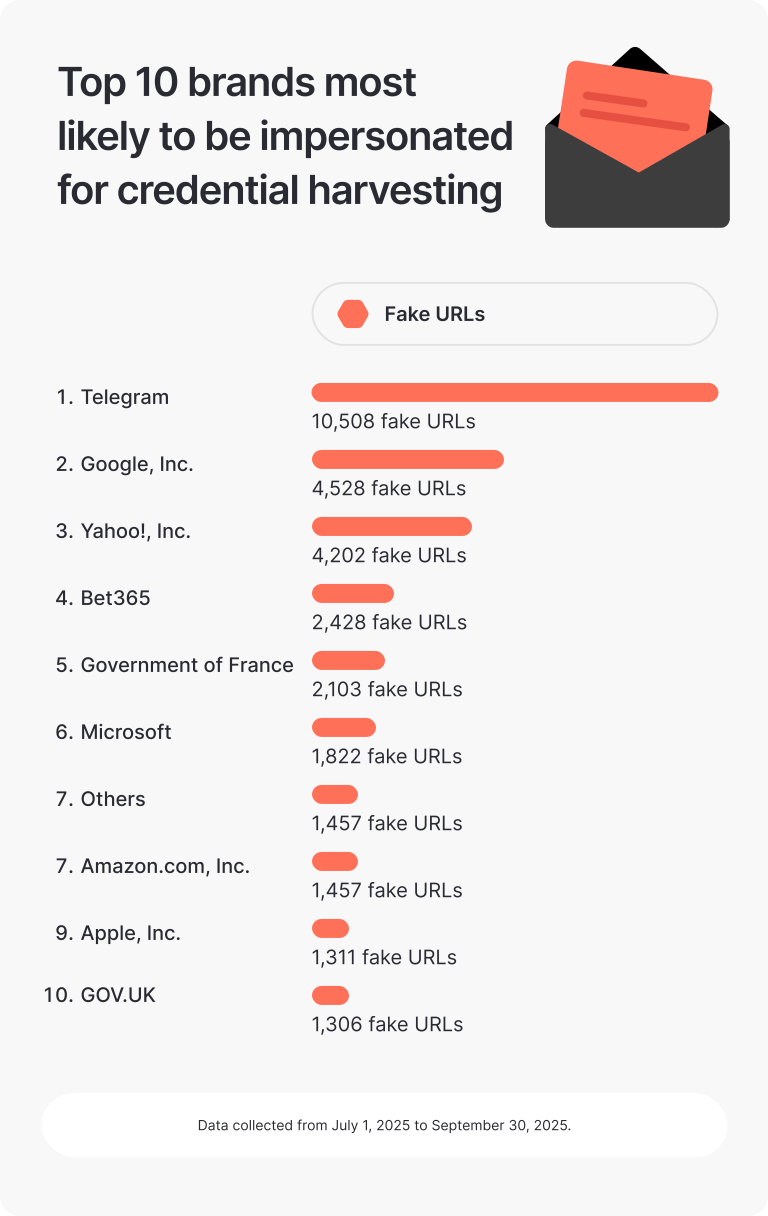
In fact, 99% of all phishing attacks use just 300 brands for deception. The brands themselves are not at fault — such fakes hurt their reputation as well, forcing companies to actively hunt them down. But high brand awareness can lull victims into a false sense of security and get them to lower their guard.
While hackers can disguise malware as any file by renaming the executable and using double extensions, a few file types are much more likely to hide malware than others. Our research shows that users should be particularly careful when downloading files with the following extensions from the internet:
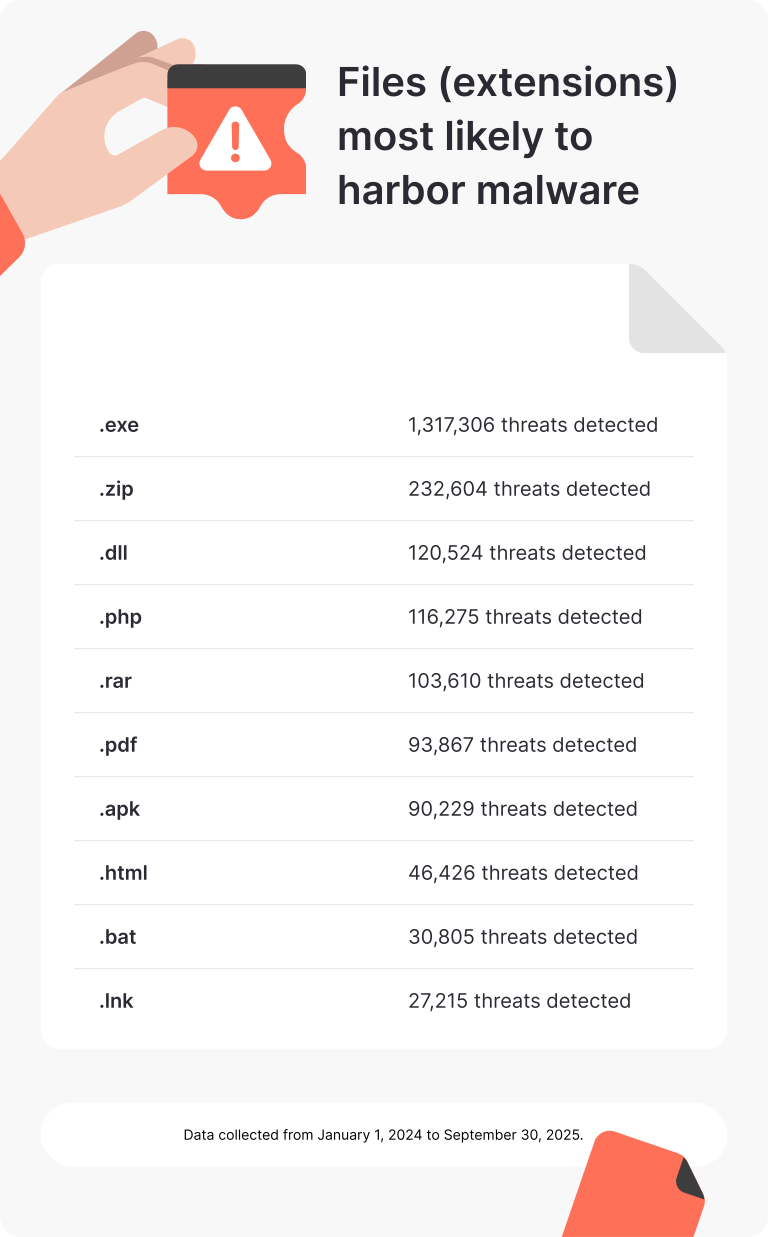
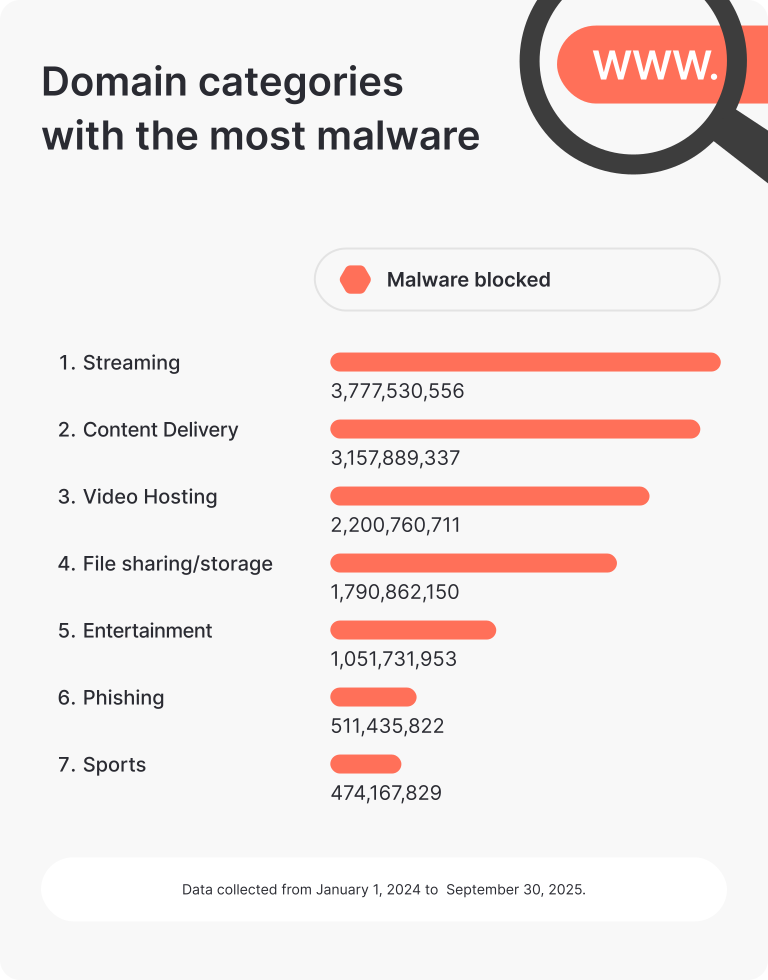
Malware is also not distributed equally across the internet. Some web domain categories are particularly prone to harboring malware, with over half of all malware blocked by Threat Protection Pro™ coming from pages with adult content. According to our findings, users should be particularly careful when visiting websites within the following categories:
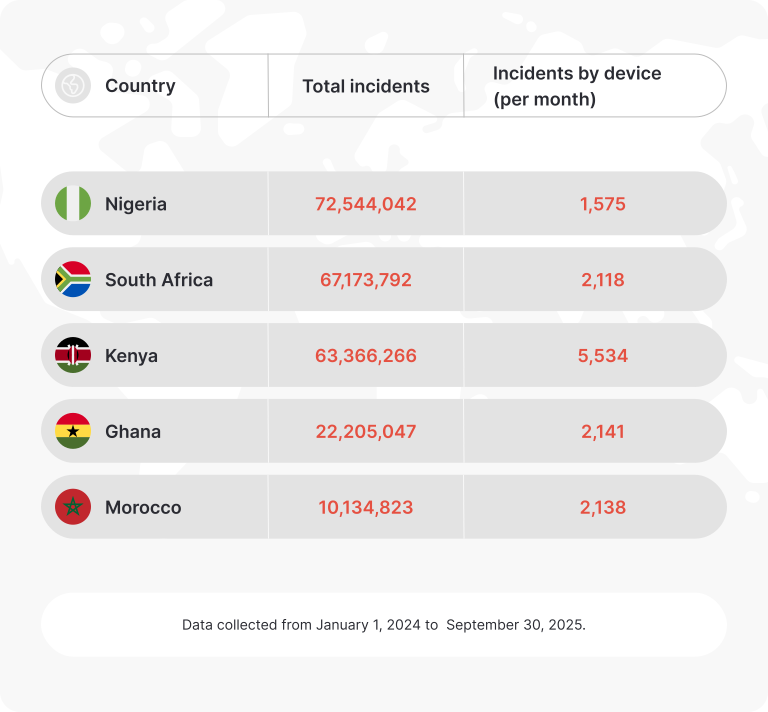
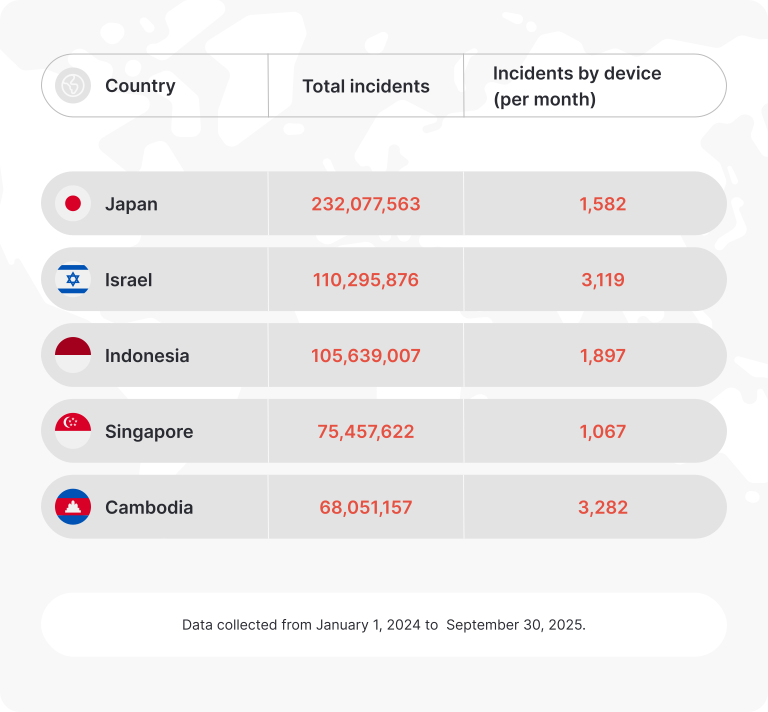
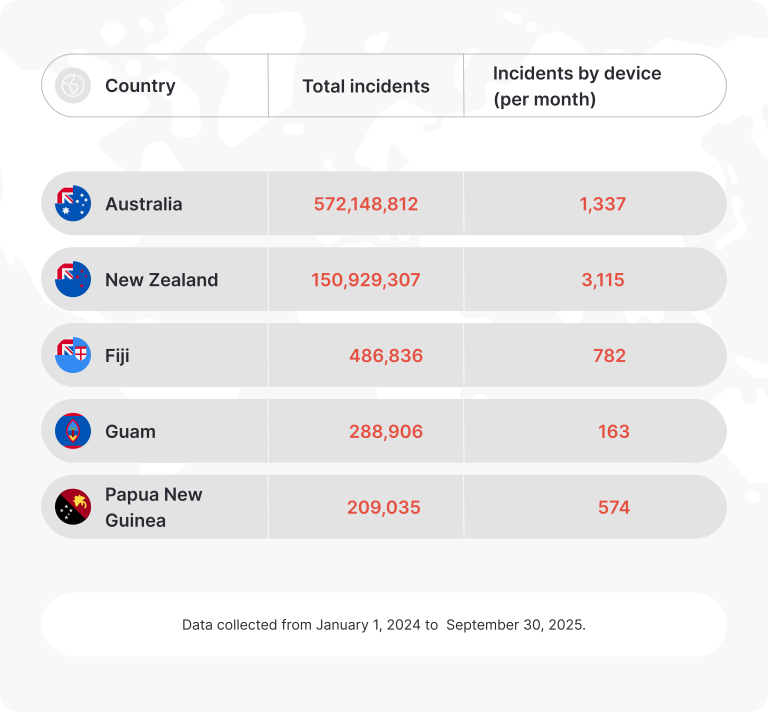
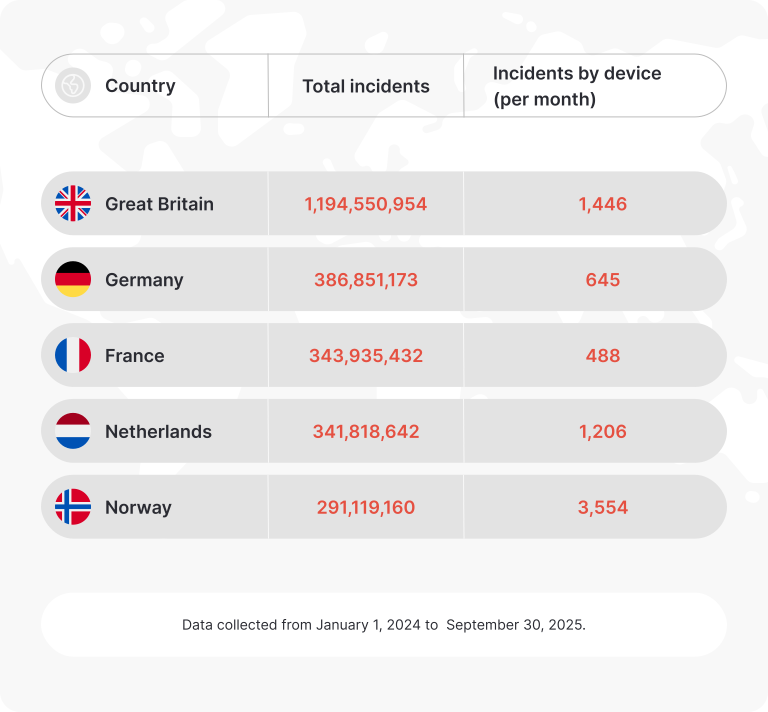
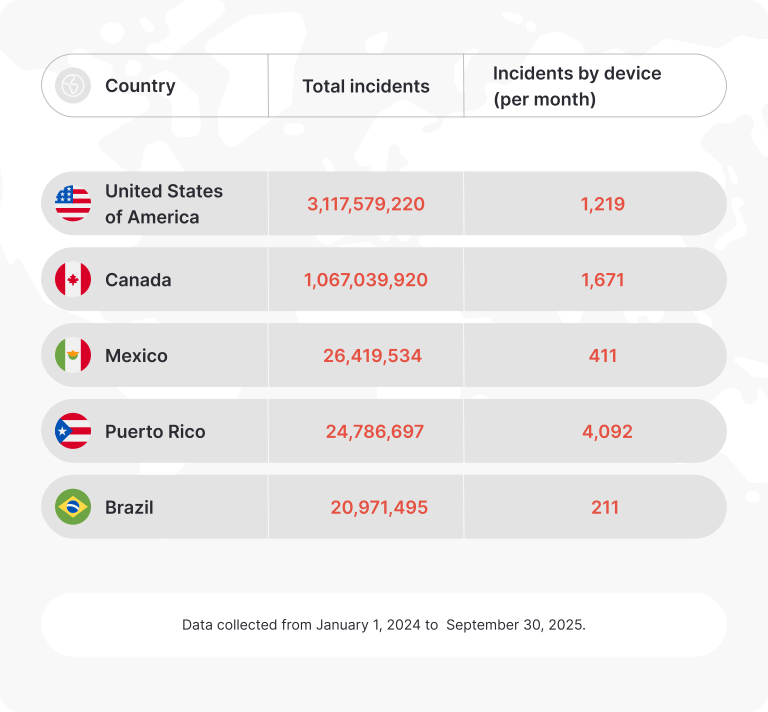
Our research shows that the risk of getting infected with malware also varies by geographic region. The differences could be attributed to the varying levels of internet connectivity, economic development, and cybersecurity awareness between countries. From aggregated Threat Protection Pro™ data, we can infer that users in the following locations are most at risk of malware:
Countries most affected by malware
More than a fake website: Detecting phishing and scams
Scam and phishing websites are designed to trick you into giving away your personal information, making payments for products that don’t exist, or simply downloading malware. They work by luring you in through email, social media, or banners, where they promise too-good-to-be-true deals. Once you engage, you may fall victim to identity theft, financial loss, or malware attacks.
How phishing and scam websites are identified
Young domains
Most scammers change domains really fast. Once their clients realize they were tricked, the domain starts getting bad reviews on review sites and through social media posts, so the scammers have to drop it and create a new one. If the domain’s been active for just a few months, it may be the sign of a scam.
Typosquatting
Attackers use typosquatting to create scam websites that mimic real ones by making slight changes to the domain names. They omit a letter, add extra characters, or use visually similar letters (like 'rn' to mimic 'm'). The changes are enough to register the website as new and unique, but they are also so small that users don't notice there's something wrong with them.
Suspicious user reviews
The quality and quantity of user reviews are also important when analyzing a domain for scams. Many scam websites have good reviews on their pages, while trusted reviewing platforms like Trustpilot show consistent 1-star ratings.
Aggressive advertising
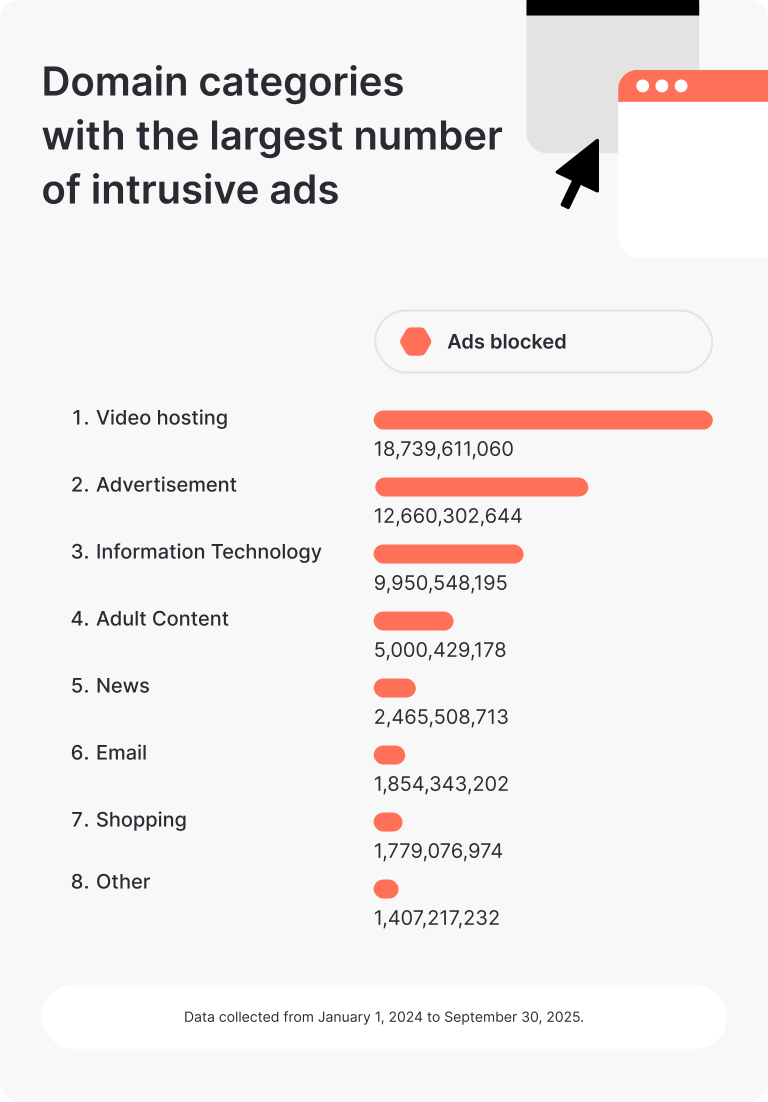
Excessive pop-ups and view-obstructing banners that make it difficult to navigate through a page might signal that the website is unsafe. If it’s trying to push users to act immediately by downloading or buying something, the website’s probably a scam.
Poor security features
Websites using HTTP, self-signed SSL certificates, and outdated SSL/TLS protocols is a red flag. Scammers don't care about their clients' privacy one way or another, so they're unlikely to spend extra time on data protection mechanisms.
Poor-quality content
If the texts and images on the website are amateur, look like they've all been copied from some other brand, or created with AI tools, chances are, the website is a fake. Authentic, high-quality content is not only a sign of a credible business but also crucial for compliance with copyright laws and effective SEO.
Unbelievable deals
Scammers often use too-good-to-be-true deals to lure consumers to their websites. High-value items or services at exceptionally low prices and unrealistic returns on investments are all signs of a scam.
Suspicious payment methods
A legitimate site will offer multiple payment options. Scammers usually try to force the user to pay through non-reversible and non-traceable payment methods, like gift cards and cryptocurrencies.
Unreliable contact details
Legitimate websites will often list a phone number, an email address, and a contact form, along with various social media profiles. Scammers are likely to hide their information as much as possible. Using an email address from a free provider like Gmail instead of a corporate domain is also a clear sign that the website is not to be trusted.
Non-existent policies
Questionable or non-existent return and privacy policies are significant red flags. Legitimate websites will provide clear privacy policy and terms of service — they must have them available to comply with various data protection laws. If these can’t be found on a website, it’s probably a scam.
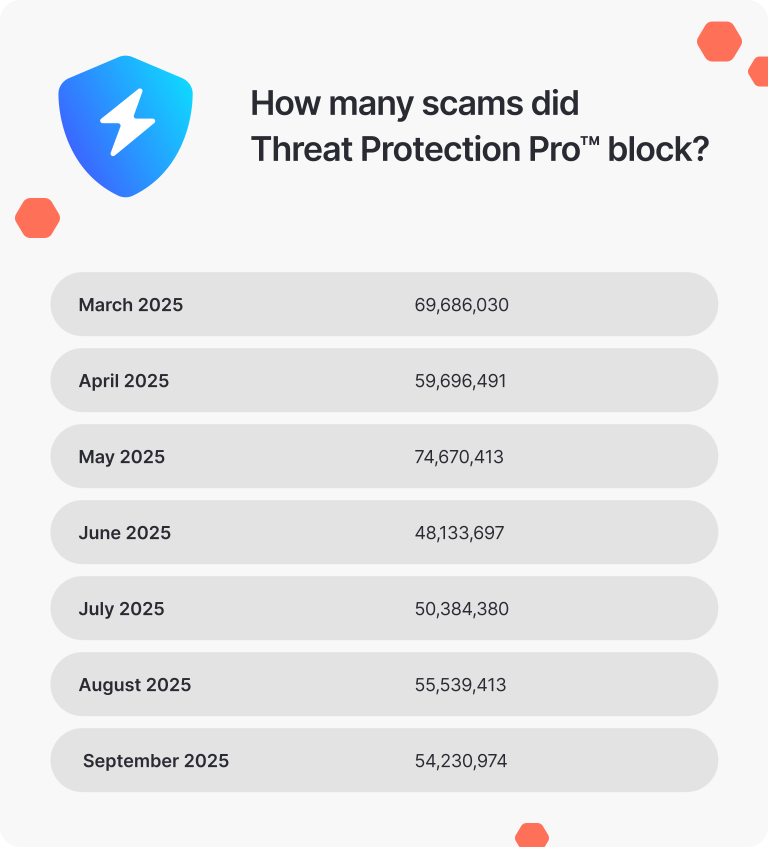
Will Threat Protection Pro™ help me avoid phishing and scams?
Yes! Get Threat Protection Pro™ to significantly lower your chances of falling for an online scam. It blocks millions of scams every month:
Beyond malware: Web trackers and ads
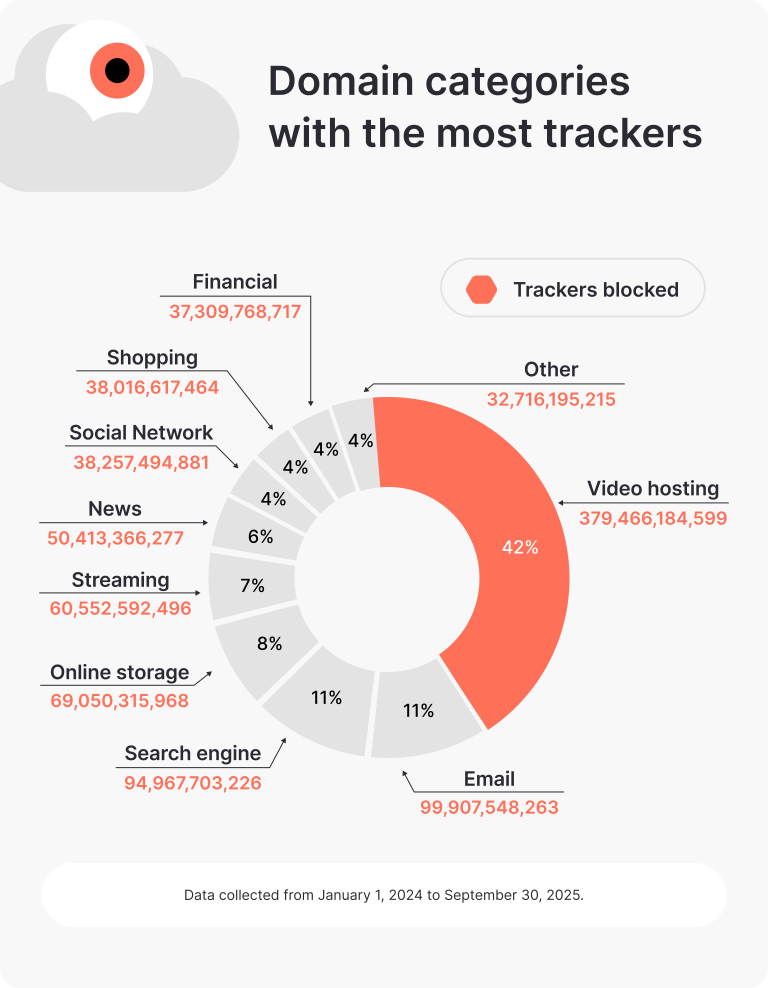
Web trackers are a broad category of privacy-invading tools that collect information on user activity. Trackers typically take the form of special scripts, browser cookies, or tracking pixels. Businesses use trackers to paint an accurate picture of you for targeted advertising — but if they suffer a data breach, the stored tracker data could end up falling into the hands of cybercriminals. The following domain categories feature the most trackers:
How to stay safe from common cyberthreats
These threats have one thing in common
They were all stopped by NordVPN’s Threat Protection Pro™. Get NordVPN to enjoy more security in your online life.
30-day money-back guarantee