What is NordVPN?
NordVPN is an all-in-one* digital security app that combines advanced VPN technology and next-gen antivirus with scam, phishing, and malware protection. It adds privacy and security protections to everyday browsing, whether you’re at home, using public Wi-Fi, or managing common online risks.
At its core, NordVPN creates an encrypted connection between your device and a VPN server, helping protect your internet traffic and change your visible IP address. It also includes tools like Meshnet, Kill Switch, Dark Web Monitor, and DNS leak protection, giving you more control over how your devices connect and stay protected online.
*“All-in-one” refers to the VPN, scam protection, phishing protection, tracker and ad blocking, and other features available within the NordVPN app, depending on your device and the plan you choose.

How does NordVPN work: step-by-step
When you connect, NordVPN handles several steps in the background to help keep your traffic private, protect it from network-level snooping, and change the IP address websites usually see.
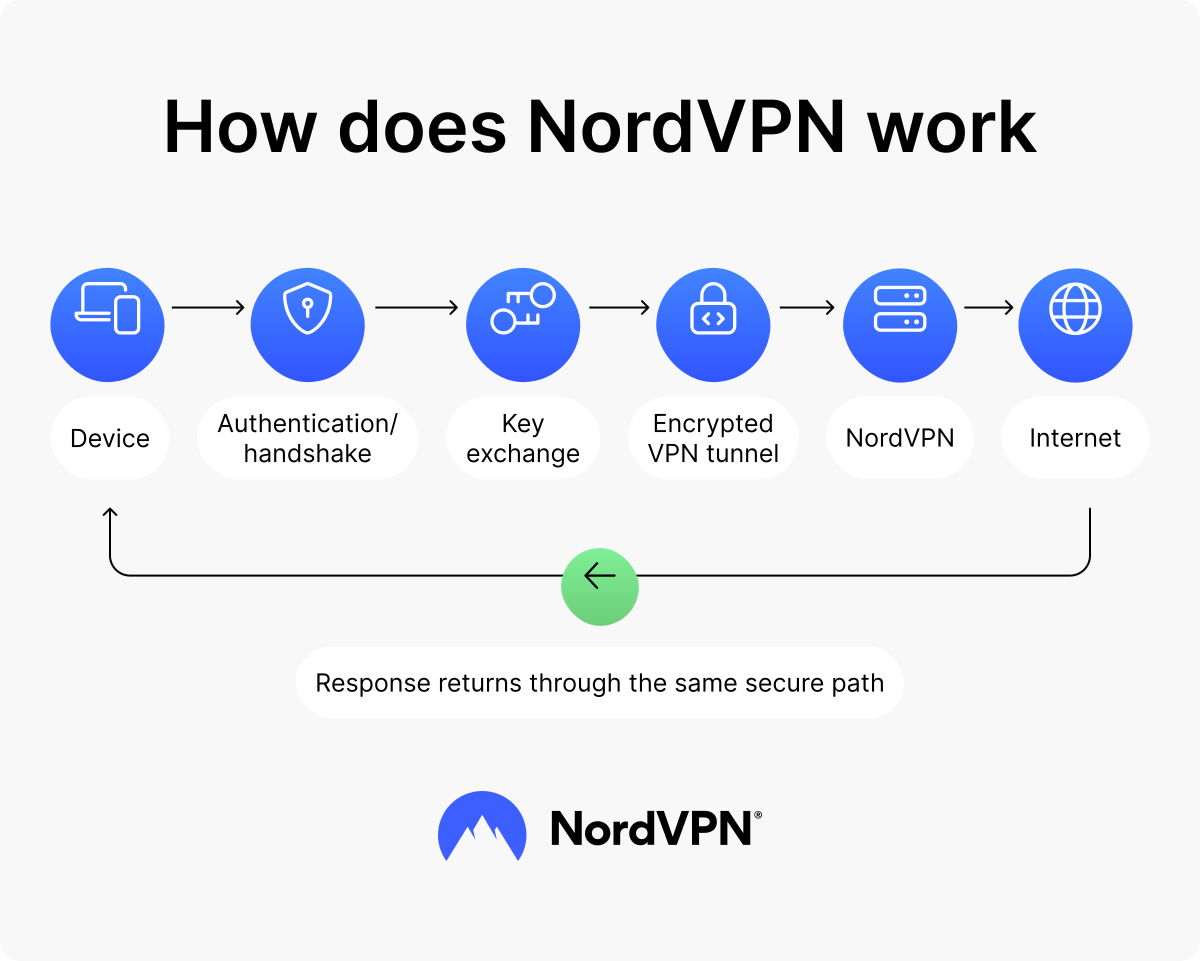
Authentication and handshake
When you open the NordVPN app and connect to a server, the app authenticates you as a valid user and starts a secure session between your device and the VPN server. This happens in the background, so you don’t have to manage technical settings yourself.
The VPN protocol then performs a handshake — a quick setup exchange that helps your device and the VPN server agree on how to protect the connection before your traffic starts moving.
Key exchange and encryption setup
After authentication, the VPN protocol performs a secure key exchange. Your device and the VPN server agree on encryption keys — temporary codes used to lock and unlock the data moving through the VPN tunnel.
VPN encryption and VPN protocols handle different parts of this setup. VPN encryption scrambles your data, while a protocol decides how the VPN tunnel is created, encrypted, and maintained.
Depending on your device, NordVPN can use different VPN protocols, such as NordLynx, OpenVPN, NordWhisper, and IKEv2/IPsec. These options affect how the VPN connection is created, secured, and maintained.
NordVPN also offers a VPN with post-quantum encryption on Linux, Windows, macOS, Android, iOS, Android TV, and tvOS apps when you connect with NordLynx. This feature is designed to add protection against potential future risks from quantum computers.
Tunneling and encapsulation
Once the VPN tunnel is established, your device breaks your traffic into small protected packets and sends them through the tunnel. Encapsulation means your protected data gets wrapped in another layer that tells the internet where to send it — in this case, to the NordVPN server.
Think of it like placing a sealed letter inside a delivery envelope. The outer layer helps the packet reach the VPN server, while the content inside stays protected as it moves through the tunnel. Encryption and encapsulation happen continuously — VPN protocols keep applying them as your traffic moves.
VPN server routing and decryption
When the protected packets reach the NordVPN server, the server unwraps them and forwards your request to the website, app, or online service you want to use. The response then travels back to the NordVPN server, where it is encrypted, encapsulated, and sent back through the VPN tunnel to your device.
Because this routing process sends traffic through a VPN server, websites and services usually see the server’s IP address instead of the IP address assigned by your network provider. You may see this called “IP masking.” In plain terms, NordVPN changes your visible IP address while helping secure your connection.
How does NordVPN work on different devices?
NordVPN works across major platforms through dedicated apps, VPN proxy browser extensions, router setups, and manual configuration options. How NordVPN works can vary slightly by device, because apps, browser extensions, routers, smart TVs, and consoles support different setup options and features.
How does NordVPN work on desktop (Windows and macOS)?
On Windows and macOS, NordVPN protects app and browser traffic after you connect. You can use “Secure my connection” to let the app choose a server automatically or select a server, protocol, or specialty server manually.
Supported Windows and macOS versions can also include next-gen antivirus, depending on your plan. It can help block scam and phishing websites, scan downloads for malware, and reduce tracking while you browse. Meshnet can connect approved devices for remote access, file sharing, or LAN-style gaming.
For Windows devices with ARM processors — chips designed for power-efficient laptops and tablets — NordVPN uses a native ARM app. Current ARM builds support the core Windows VPN app, split tunneling, and next-gen antivirus, though exact availability can still depend on your app version and plan. NordVPN’s Windows VPN and Mac pages explain setup in more detail.
How does NordVPN work on mobile (Android and iOS)?
On Android and iOS, NordVPN encrypts your phone or tablet connection after you tap “Secure your connection” or choose a server. Supported mobile tools include Kill Switch, Meshnet, scam and phishing protection, and call and message protection, though availability can vary by app version, operating system, and plan.
On Android, you can install the Android VPN from an app store or use NordVPN’s official APK. Feature availability can differ between the app store and APK versions, including ad-blocking support, so check the current Android download page before installing. On iOS, the iOS VPN app supports Siri shortcuts and Apple’s voice control for hands-free commands.
Does NordVPN work on an iPhone?
NordVPN works on iPhones and iPads running iOS 16.0 or later, and NordVPN’s VPN on iPhone guide explains setup in more detail.
How does NordVPN work on Linux?
On Linux, NordVPN works through an open-source app with a graphical interface and command-line options. After you log in and connect, the app routes your device’s traffic through NordVPN servers.
NordVPN officially supports Ubuntu 22.04+, Debian 12+, Fedora 43+, Linux Mint 21+, and Raspberry Pi OS. The graphical version is available on GNOME or KDE, two of the most common Linux desktop environments. You can download the app and check setup options on NordVPN’s VPN for Linux page.
How does NordVPN work in browser extensions?
NordVPN browser extensions work as lightweight VPN proxy tools for supported browsers. They protect browser traffic only, not traffic from other apps on your device.
They can also support browser-level features such as website split tunneling, scam and phishing protection, WebRTC-related IP leak protection, and browser-level Kill Switch. WebRTC helps browsers make direct connections for online calls and live chat, but it can sometimes reveal your real IP address outside the VPN.
How does NordVPN work on routers?
A router setup lets NordVPN work at the Wi-Fi network level. Instead of installing the app on every device, you configure NordVPN on a compatible router, and connected devices can use the VPN connection as long as they are connected to that Wi-Fi network.
Using a VPN on a router can help with devices that do not support VPN apps directly, such as some smart TVs, game consoles, and IoT devices. Depending on your router, you may be able to set up NordVPN manually, use a preconfigured VPN router, or use NordVPN Lite for supported router setups.
Before setup, check NordVPN’s list of compatible routers and follow the step-by-step router setup guide for your model.
PRO TIP
Use the code NORDVPNROUTER at checkout and get $20 off a VPN router at FlashRouters.com opens in a new tab. Privacy Hero II VPN router comes with a 1-year NordVPN subscription.
How does NordVPN work on smart TVs?
NordVPN works on smart TVs through a native app where supported, a VPN-enabled router, or a shared VPN connection from another device. Android TV, Fire TV, and Apple TV devices with supported tvOS versions can use native NordVPN apps. Other TVs, such as many Samsung models, usually need router setup, SmartDNS, or connection sharing because they do not support native VPN apps.
NordVPN’s guide to using a VPN for a smart TV explains setup options, while its streaming with a VPN guide covers the limits to keep in mind.
That said, when streaming, use NordVPN only to access your paid subscription from your home country while temporarily abroad, or to stream from legal sources available in your home country. Always follow applicable laws and the terms of the services you use.
How does NordVPN SmartPlay work?
SmartPlay combines VPN protection with SmartDNS technology. SmartDNS helps route DNS requests in compatible device or network setups, while the VPN connection encrypts your traffic and changes your visible IP address. In NordVPN apps, SmartPlay turns on automatically when you connect to a VPN server.
How does NordVPN work on gaming consoles?
Most gaming consoles connect to NordVPN through a VPN-enabled router or a shared VPN connection from a computer because they do not support native VPN apps. A router setup or shared connection adds another step between your console and the game server, so speed and latency can vary.
Once connected, console traffic is routed through the VPN server. In peer-to-peer gaming, this can reduce the risk of IP-based DDoS attacks — traffic floods meant to overwhelm a connection — because other players are less likely to see the IP address assigned to your home network.
However, a VPN cannot stop attacks against game servers, and gaming platforms or third-party apps may still collect account-based activity data.
How does LAN gaming with Meshnet work?
Meshnet can help approved devices connect through private, encrypted tunnels, even when they are not on the same Wi-Fi network. This setup may work for games that support LAN-style direct IP connections.
- 1. Addresses and routing. When Meshnet is enabled, each device gets a Meshnet IP address and name. If the game allows manual connection, players can use the host device’s Meshnet details to connect.
- 2. Finding a LAN game. Some games automatically show local sessions, but that may not always work over Meshnet. If the game lets you type in an IP address, use the host device’s Meshnet IP address or name.
- 3. Host and client devices. The host device runs the game session, while client devices connect using the host’s Meshnet details. Meshnet then carries the game traffic between the devices in the background.
Key NordVPN features and how they work
NordVPN brings several security tools into one app, but its features do not all work in the same way. Some build the VPN connection, some help protect you from online risks, and others monitor for issues that may affect your digital security.
Connect: How NordVPN secures your connection
NordVPN’s connection features control how your traffic moves between your device, NordVPN servers, and the internet. They help you choose the VPN route you want, decide which traffic should use it, or connect approved devices to each other.
VPN server connection
When you connect to NordVPN, the app establishes an encrypted VPN tunnel between your device and a VPN server. Your traffic travels to the server through that tunnel, and the server then forwards it to the websites, apps, and services you use.
As a result, those services usually see the VPN server’s IP address instead of your network IP address. Your ISP can see that you are connected to a VPN server, but it cannot normally see the specific websites you visit through the VPN tunnel.
NordVPN uses RAM-based servers, which means they run on temporary memory that is wiped when the server restarts. This helps reduce the amount of data that can remain on a server.
Dedicated IP and dedicated server
A dedicated IP is an optional add-on that gives you an IP address assigned only to you. It works like a standard shared VPN connection, but instead of using a shared VPN IP address, you connect through your own fixed VPN IP.
NordVPN also offers a dedicated server add-on if you need more control over your VPN setup. A dedicated server gives you a private VPN server with its own hardware resources and a static IP address. A dedicated IP gives you a fixed VPN IP address, but not the same private server setup.
These options can help when you need a more consistent VPN IP for services that rely on IP-based checks or remote access.
Specialty servers
Specialty servers are designed for specific connection needs. Double VPN routes your traffic through two VPN servers instead of one, adding another step to the VPN route. Onion Over VPN sends your traffic through a NordVPN server before connecting to the Tor network, a privacy network that routes traffic through several volunteer-run servers.
These options add extra routing steps for situations where you want more privacy than a standard VPN connection provides. Because your traffic takes a longer route, speeds may be lower. Availability may depend on your app, device, and selected server location.
Split tunneling
Split tunneling lets you choose which apps or websites use the VPN connection and which ones use your regular internet connection. It works like a traffic rule: selected traffic goes through NordVPN, while excluded traffic bypasses the VPN.
For example, you could route your browser through NordVPN while letting another app use your regular internet connection. Each connection follows one route or the other — VPN or non-VPN — instead of being partly encrypted. Split tunneling is available on selected platforms, including Windows, Android, Android TV, and browser extensions for websites.
Meshnet
Meshnet lets approved devices connect to each other through private, encrypted tunnels. Instead of routing traffic only between your device and the internet, Meshnet helps your own devices, or trusted external devices, communicate directly and securely.
Each device gets a Meshnet name and IP address, so you can use it for remote file access, remote device connections, or LAN-style gaming when supported. Meshnet works across several major platforms, but exact features may vary by device.
Protect: How NordVPN helps reduce online risks
NordVPN’s protection features help reduce online risks beyond the VPN tunnel itself. They can block risky websites, reduce tracking, and prevent accidental traffic leaks.
Next-gen antivirus
NordVPN’s next-gen antivirus is built into the NordVPN app and can help protect you before a risky site, scam page, tracker, or malicious download causes damage. Depending on your device, app version, and plan, it can help block scam and phishing websites, malicious sites, intrusive ads, trackers, and malware in downloads.
These protections work alongside the VPN, so NordVPN can help reduce risks both through an encrypted VPN connection and through additional scam, phishing, tracker, ad, and download protection. You can learn more in NordVPN’s next-gen antivirus whitepaper.
VPN safety features
NordVPN also includes features that help protect your VPN connection. Kill Switch can block internet traffic if the VPN connection drops, and DNS leak protection helps keep DNS requests — the lookups your device makes to find websites — inside the VPN tunnel. These safeguards help reduce accidental exposure if connection problems occur.
Monitor: How NordVPN keeps an eye on your online safety
NordVPN also includes monitoring features that help you notice potential security issues sooner. Some of these tools can work even when you are not connected to a VPN server, depending on your device, enabled features, and plan. They can alert you when something may need attention, such as exposed login details, risky search results, or suspicious account activity.
Dark Web Monitor
Dark Web Monitor checks whether credentials linked to your email address appear in leaked data found on the dark web. If NordVPN detects a match, it alerts you so you can change affected passwords and secure your accounts faster.
Threat alerts and safety indicators
Depending on your device, app version, plan, and enabled features, NordVPN can show statistics and alerts for blocked or flagged risks, such as vulnerable apps on Windows, potentially stolen login sessions, unsafe search results, scam emails, fraud attempts, and suspicious crypto wallet addresses.
How to start using NordVPN
Getting started with NordVPN only takes a few steps:
- 1. Choose a NordVPN plan and create your account.
- 2. Download the NordVPN app for your device.
- 3. Log in.
- 4. Tap “Secure my connection” to let NordVPN choose a server automatically, or pick a server location manually.
- 5. Check your connection in the app to make sure the VPN is active.
Once connected, your traffic is encrypted and routed through a NordVPN server. You can also adjust settings, turn on extra protection features, or choose specialty servers depending on your device and plan. For a more detailed walkthrough, learn how to check if your VPN is working.
How does NordVPN’s 30-day money-back guarantee work?
NordVPN’s 30-day money-back guarantee lets you request a refund within 30 days of buying an eligible plan. Canceling auto-renewal stops future charges, but it does not automatically create a refund request, so you need to request the refund separately. You can learn more in NordVPN’s guide on how to cancel or get a NordVPN refund.
NordVPN accepts several payment methods, including payment cards, PayPal, cryptocurrency, Apple Pay, Google Pay, prepaid cards, and local payment options where available.
How do NordVPN bundle deals work?
NordVPN bundle deals combine the VPN with extra tools in one plan. Depending on the offer, they may include cloud storage, a password manager, and a personal data removal tool. Exact features and prices may vary by location and current active deals.
Where can I get help if NordVPN isn’t working?
If NordVPN isn’t working as expected, you can find setup guides, troubleshooting steps, billing information, and live support in the NordVPN customer support center.
Online security starts with a click.
Stay safe with the world’s leading VPN
