
How a VPN works step-by-step
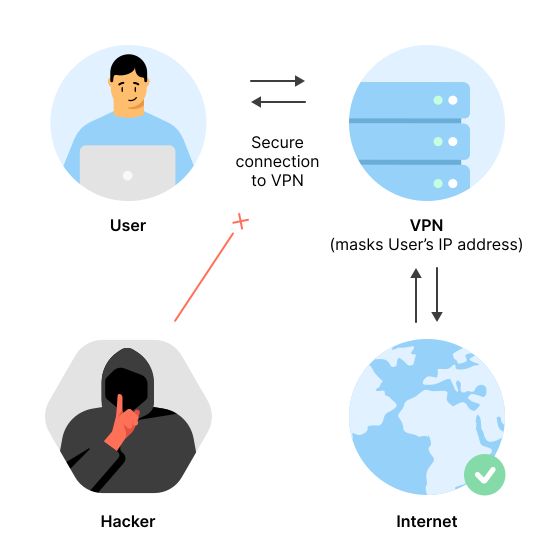
Connecting to a VPN takes only a tap, but behind that tap is a flurry of activity (if you need a refresher on what a VPN is, see our VPN definition). Your device and the VPN server authenticate, establish encryption for the connection, and create a tunnel to hide your digital traffic. Each step builds on the last until you have a much safer, more private connection.
Step 1: VPN client initialization
You open the VPN client (the app on your device), pick a server location, and tap “Connect.” Your device then prepares to create a secure session.
Step 2: Authentication with the VPN server
The app sends your credentials or keys to the server. The server checks them to confirm the request is valid and trusted.
Step 3: Establishing an encrypted tunnel
Once authenticated, your device and the server agree on encryption keys. With those keys, they create a secure VPN tunnel that keeps your data hidden in transit.
Step 4: Data encryption and transmission
Your device encrypts all traffic before it leaves. Anyone attempting to observe it in transit would only see scrambled information.
Step 5: Server-side decryption, IP masking, and routing
At the VPN server, your traffic is decrypted and processed. The server masks your real IP address by replacing it with its own before sending the request to the website you want to access.
Step 6: Response data encryption and return
When the website responds, the VPN server encrypts the data again and sends it back through the tunnel. Your device decrypts it locally so you can view the page, message, or file as normal.
How does VPN encryption work?
VPN encryption is the process that makes the data inside a VPN tunnel unreadable to third parties. It ensures that even if your internet traffic is observed while moving across the internet, it can't be understood without the right decryption keys.
Types of VPN encryption protocols
When you connect to a VPN, the app has to decide which encryption protocol to use. That choice affects how fast the connection feels, how stable it is, and how well your data is protected. These are the main protocols you’ll see offered today:
- OpenVPN. Widely used and considered highly secure, suitable for most situations.
- IKEv2. Fast and stable, especially good for mobile devices that switch between Wi-Fi and mobile data.
- WireGuard. A newer protocol known for its speed. NordVPN’s NordLynx is built on WireGuard.
- L2TP/IPSec. Older, still supported, but slower due to double encapsulation.
- PPTP. One of the earliest VPN protocols, no longer recommended because of serious security weaknesses.
These VPN protocols use a mix of algorithms: symmetric encryption (like AES) to secure the actual data and asymmetric encryption (like RSA or Diffie-Hellman key exchange) to safely agree on keys between your device and the server.
How does a VPN tunnel work?
A VPN tunnel is the secure pathway your data takes between your device and the VPN server. It’s created once both sides authenticate and agree on encryption keys. Every request you send and every response you receive moves through this tunnel, shielded from outside access.
Why is tunneling essential for VPN functionality
Tunneling ensures your online activity cannot be read while in transit. Even if someone observes the traffic on the network, the data looks like random, scrambled code. This protection is especially important on open Wi-Fi, where attackers might try to monitor connections. By keeping your activity inside a protected channel, tunneling provides privacy, secures sensitive information, and makes it much harder for third parties to trace your online activity.
How do VPN servers work?
VPN servers are the backbone of the service. They do far more than just forward your traffic. Each server runs specialized software to handle encryption, manage session keys for every user, and route data securely across the internet.
To support thousands of simultaneous connections, many servers use hardware acceleration and load balancing, spreading traffic across clusters to keep speeds stable. Some VPN providers also design their servers to run without traditional hard drives, relying on RAM-only systems that wipe all data on reboot.
Combined with strict no-logs policies and independent audits, these technical and operational choices determine how trustworthy and effective a VPN service really is.
How VPN servers process your encrypted data
When your device sends traffic through the tunnel, the VPN server uses the session key negotiated during setup to decrypt it just enough to know where it should go. The server forwards the request to the destination site or service, then encrypts the response before sending it back to your device. This happens continuously in the background, fast enough that you won’t notice a delay.
How VPN servers change your real IP address
A VPN server also plays an essential role in privacy. Instead of forwarding requests with the IP address given by your internet provider, it substitutes its own. From the website’s perspective, the traffic appears to come from the server’s location. This is how a VPN helps hide your real IP address and makes your online activity harder to associate with your home or mobile connection.
Why provider policies matter
Not all VPN servers are managed in the same way. Some providers use cloud-based infrastructure, while others rely on dedicated, in-house hardware. Policies also differ: Some keep temporary logs, while others enforce strict no-logs practices that prevent user activity from being recorded at all. Providers may also invest in measures like RAM-only servers or independent security audits to strengthen privacy guarantees.
What VPN services actually do
The concept of a VPN is simple: Create an encrypted tunnel and route traffic through a server. But commercial VPN services do much more than just set up that connection. Their role is to manage large networks of servers, develop user-friendly apps, and maintain the infrastructure that keeps the service secure and reliable.
A VPN service typically provides:
- Apps and interfaces. Instead of requiring manual setup, most services offer dedicated apps that automate server selection and encryption. This makes using a VPN possible with just one tap.
- Server networks. Providers maintain hundreds or even thousands of VPN servers in different locations. This distribution helps with performance and gives users more choice in how they connect.
- Security and privacy backing. Some services enforce strict no-logs policies, run RAM-only servers, and undergo independent audits to prove that user activity is not recorded.
- Updates and improvements. VPN apps receive regular updates that improve speed, stability, and compatibility with new devices and protocols.
- Customer support and education. VPN services often include setup guides, tutorials, educational materials, and other support channels to help users get started and understand privacy risks.
How paid vs. free VPN services work differently
A free VPN can look appealing, but it usually comes with trade-offs. Free services may limit bandwidth (the amount of data you can transfer), offer fewer servers, or rely on advertising to generate revenue. Paid services invest more in infrastructure, provide stronger privacy guarantees, and usually perform better under heavy load. The difference between free and paid VPN services is not only in speed but also in the level of trust you can place in the provider.
How does a personal VPN work?
A personal VPN creates a secure, encrypted tunnel between your device and a VPN server, just like any other VPN. Once connected, all of your internet traffic travels through that tunnel, and the server substitutes its own IP address for yours.
What makes a personal VPN distinct is that it’s built for individual use rather than corporate networks. It’s designed to be easy to install, straightforward to manage, and flexible enough to run on multiple devices without requiring technical expertise. The goal is to give everyday users greater privacy online while keeping the process as simple as possible.
How personal VPNs differ from business VPNs
A personal VPN is designed for individuals. It’s simple to install, works across multiple devices, and prioritizes privacy, keeping your activity harder to link back to your real IP address.
A business VPN, on the other hand, is managed by a company’s IT department. It provides employees with secure access to internal resources, often requires multi-factor authentication, and enforces strict policies. Unlike personal VPNs, business versions may control which traffic routes through the tunnel and which does not, depending on compliance needs.
How personal VPN services protect individual users
The core protection a personal VPN offers comes from encrypting your traffic and replacing your real, visible IP address with the server’s. But for individual users, protection also depends on how usable and trustworthy the service is in practice. If the app is too complex, or the connection drops frequently, that protection breaks down.
That’s why good personal VPN services nail:
- Ease of use. Simple apps, quick setup, and clear onboarding so users can stay protected without much technical knowledge.
- Performance. Reliable speeds, smooth switching between devices, and stable connections, which ensure the encrypted tunnel doesn’t collapse mid-session.
- Privacy commitments. Clear and strong privacy policies, including no-logs rules and independent audits, to show that your activity is not stored.
- Education and support. Guides and informational materials that explain and help people understand privacy risks and use the VPN correctly.
- Extra flexibility. Some services include split tunneling, which lets you choose which traffic goes through the VPN and which uses your regular connection — useful for balancing privacy and performance in everyday use.
How do VPN apps work?
VPN apps work by integrating directly with your device’s networking stack. They create a virtual network adapter (using TUN/TAP interfaces) to capture all outgoing network traffic and modify system routing tables so that data flows exclusively through the VPN tunnel. The app then encrypts this traffic using protocols such as OpenVPN, WireGuard, or IKEv2/IPSec. These protocols rely on established cryptographic libraries and secure key exchange mechanisms to set up a secure connection with the VPN server.
How VPN apps simplify the connection process
VPN apps streamline the VPN experience by automating most complex processes. When you install a VPN app, it handles server selection, authentication, and connection setup with a single click.
The entire process (tunnel setup, encryption/decryption, handshake protocols, and session management) is automated behind the user-friendly interface, simplifying the complexity of secure data transmission.
This automated configuration eliminates the need for manual setup and makes secure, private browsing accessible to everyone.
Online security starts with a click.
Stay safe with the world’s leading VPN
How does a VPN work on a computer?
On a computer, a VPN works the same way as described earlier: It encrypts your internet traffic and routes it through a secure tunnel to a VPN server. The difference is that the VPN app integrates with your operating system, creating a virtual network adapter and adjusting routing rules so all traffic flows through the tunnel. From the user’s perspective, you simply connect through the app and browse as usual.
VPN for Windows
Windows includes a built-in VPN client that can be configured through the “Network & internet” settings. It supports multiple protocols such as IKEv2, L2TP/IPSec, and PPTP. While IKEv2 remains a secure and reliable option, PPTP and L2TP/IPSec are considered outdated and should be avoided because of known vulnerabilities.
VPN connections integrate with Windows features through the Network and Sharing Center, where users can configure settings via a step-by-step wizard. The operating system also works alongside Windows Defender and system-level firewall settings to add an extra layer of protection.
With Windows, you have two connectivity options. You can either set up a VPN manually using the built-in client or install a third-party VPN app. Using a VPN app for Windows typically streamlines the process with one-click connection, built-in leak protection, and more intuitive server management than the manual setup allows. It also gives you more VPN protocol options than the built-in client.
You also have access to modern VPN protocols, which aren’t always available through the built-in client.
VPN for macOS
If you’re on a Mac, you can configure a VPN through the Network pane in System Settings. MacOS supports protocols such as IKEv2 and L2TP/IPSec, though PPTP has been removed in newer versions because of its known security flaws. The setup process is straightforward, with options to add a new VPN interface and manage connections from the menu bar.
MacOS integrates VPN connections with its Keychain feature, which securely stores credentials, certificates, and authentication data. This makes recurring connections simpler and ensures that sensitive information is managed in a protected environment. The operating system also offers the option to route all traffic through the VPN, adding consistency to your privacy settings.
While macOS supports manual configuration, many users find a VPN app for Mac more practical. These apps make everyday use simpler. You’ve got quick-connect options, automatic reconnection if the network changes, and built-in safeguards against leaks. Apps also handle updates and server lists so the user doesn’t need to manage those settings manually.
How does a VPN work on a phone?
A mobile VPN works in much the same way as on a computer: It creates an encrypted tunnel between your device and a VPN server, then routes all traffic through that tunnel. The main difference is mobility. Phones frequently switch between networks — from Wi-Fi at home to mobile data on the go — and a VPN app has to maintain the connection during those transitions. Protocols like IKEv2 are especially useful in this context because they are designed to handle network changes without a hitch.
VPN for Android
A VPN for Android can be set up directly through the device’s settings or by using an app. Android supports native configuration for IKEv2 and L2TP/IPSec. Many providers also offer apps that add support for OpenVPN and WireGuard, giving users more choice in how they connect.
When a VPN is active, the Android system creates a virtual network interface that directs traffic through the encrypted tunnel. The VPN app takes care of encryption, decryption, and session keys, ensuring your data stays protected whether you’re on Wi-Fi or mobile data.
VPN for iOS
A VPN for iOS can be configured directly in the device settings or managed through the app. Apple’s mobile operating system supports IKEv2, L2TP/IPSec, and IPSec by default, while protocols like OpenVPN or WireGuard can be added through third-party apps.
Apple’s system also places emphasis on secure credential handling. VPN details, certificates, and keys can be stored in the Keychain or the Secure Enclave, keeping sensitive information isolated from the rest of the system. Once connected, iOS automatically routes designated traffic through the encrypted tunnel and maintains that routing even as apps move between foreground and background. This integration makes VPN use consistent without requiring extra input from the user.
How does a VPN work on Wi-Fi?
A VPN protects your connection on Wi-Fi by encrypting the traffic that leaves your device before it reaches the VPN server. The same process applies whether you’re on your home router or a hotspot. Even if someone monitors the hotspot on public Wi-Fi, the data appears scrambled and unreadable without the correct keys. This makes VPNs especially useful in airports, cafés, hotels, or any place where the same network is shared by many strangers.
A VPN can also work without Wi-Fi. The connection only requires internet access — through mobile data like 3G or 5G or even a wired Ethernet link. No matter how you connect to the internet, the VPN tunnel applies the same encryption and IP masking.
How does a VPN work on home networks?
A VPN on a home network works the same way as already described — it encrypts your traffic and routes it through a secure tunnel to a VPN server. What changes is where you set it up. If the VPN runs on your individual device (like a laptop or phone), the network administrator at home cannot see your online activity inside the tunnel. If you configure the VPN on your router instead, all devices connected to that router are covered by the same encrypted connection.
How home VPN usage differs from public networks
Home networks are generally safer than public hotspots because they’re protected by personal firewalls, passwords, and limited access. Still, a VPN can add value at home by keeping your browsing private from your internet provider and changing your IP address. On public networks, the focus shifts to protection — encryption is essential because those networks are easier to monitor. In both cases, the VPN serves the same role, but the risks and reasons for using it differ.
Benefits of using a VPN on your router
When a VPN is set up on your home router, every device that connects through it is automatically protected. That includes laptops, phones, and even internet of things (IoT) gadgets that don't normally support VPN apps. Using a VPN for a smart TV through your router is particularly useful since many smart TV operating systems don't support native VPN applications. Router-level coverage also keeps your traffic private from your internet provider. Managing the VPN in one place can be more convenient for families or households with many connected devices than installing apps separately.
How to use a VPN for work
To use a VPN for work, start by opening your VPN app before you log in to any work accounts. Pick the server your employer recommends, or the closest one for the best speed, and connect. Once connected, the VPN encrypts the link between your device and the server. Anyone trying to monitor your activity on the network will only see unreadable data, and websites will register the server’s IP address instead of your own. From your side, nothing changes — you just work as usual, but with the added layer of security in place.
When using a VPN for work, it’s best to:
- Connect to a VPN before you start any online activity, be it web browsing, messaging, or online banking.
- Select the company’s internal server or the one closest to your location for better speed.
- Keep essential features like the kill switch on to prevent accidental leaks if the VPN connection suddenly drops.
- Periodically confirm your connection is active. Check your IP address and run domain name system (DNS) leak tests — these are a quick way to check if your VPN is properly routing all traffic and working correctly.
- Update your software whenever it's up for an update. Don't delay. Regular updates for your VPN client software will ensure you’re using the latest security features and patches.
How to set up a VPN to work properly
A VPN setup for work depends on whether you’re connecting to a work VPN provided by your employer or installing it on a personal service. In most cases, you only need to install the VPN client, enter your login details, and connect to a server. For personal use, VPN services usually provide step-by-step instructions on how to set up a VPN across different devices and operating systems.
Best practices for VPN usage
Using a VPN is only part of protecting your online activity. How you use it matters just as much. To make sure you’re getting the strongest protection and best experience from your VPN, remember to:
- Turn on auto-connect. Configure your VPN to start with your device so you don’t have to remember to enable it manually.
- Use trusted networks with care. Even at home, keep the VPN active if you want privacy from your internet provider.
- Test for leaks. Run occasional IP or DNS leak tests to confirm all traffic is routed through the tunnel.
- Limit insecure protocols. Avoid using outdated options like PPTP or L2TP/IPSec, which are vulnerable to known weaknesses.
- Protect all devices. Install the VPN on your phone, tablet, and laptop, or use a router-based VPN for whole-home coverage.
- Stay informed. Keep up with provider updates, feature changes, and privacy audits so you know your VPN is delivering on its promises.
Do VPNs really work?
Yes, VPNs really work — they encrypt your internet traffic and change your IP address, making your online activity more private and your connection harder to monitor. A VPN is especially effective against network-level surveillance, like what your internet provider or a Wi-Fi hotspot operator could see. It also gives you more control over how your location appears online, since websites register the VPN server’s IP address instead of yours.
That said, a VPN is not a silver bullet for online privacy. It won’t stop websites from tracking you with cookies or browser fingerprinting, and it doesn’t hide personal information you choose to share deliberately, like your name or email address. Speed can also drop a little with a VPN depending on the server, network congestion, and the protocol in use.
If you use a VPN correctly, there’s a very good chance it will end up being a reliable tool that protects your connection and online activity. But don’t leave your privacy and digital security only in the hands of a VPN. Combine the use of it with other good security habits such as strong passwords, multi-factor authentication, and cautious browsing.
Is your VPN working?
If you want to check if your VPN is working, the simplest way is to look up your IP address before and after connecting. If the address changes to match the VPN server’s location, the VPN is active. You can also run DNS and web real-time communication (WebRTC) leak tests to confirm that no data is slipping outside the encrypted tunnel.
Online security starts with a click.
Stay safe with the world’s leading VPN
