What is internet security?
Internet security is a set of practices, tools, and technologies used to protect your online activity, personal data, and digital devices from cyber threats. Also known as cybersecurity, it covers everything from preventing malicious software infections to stopping phishing scams, ransomware attacks, and data breaches that can expose sensitive information.
In simple terms, internet security — or information security and cybersecurity — keeps the connection between your device and the wider web safe. It protects the data you send and receive, ensures that websites and apps you use are legitimate, and blocks attempts by hackers to gain unauthorized access.
Effective internet security involves several layers, including browser security, network security, and website protection — all working together to defend your private information and financial details from cybercriminals.
The importance of internet security today
Think about how many internet-ready devices you own. With all the phones, laptops, desktop computers, smart speakers, smart TVs, connected cars, watches, kitchen appliances, thermostats, and other devices, you are constantly connected to the internet. More connections, however, means more routes malicious actors have to take advantage of you. Their techniques are constantly changing and becoming more advanced.
Internet security measures can protect against data breaches that result in leaked sensitive data and have already cost companies an average of $4.45 million in 2023. As many as 3,000 attacks last year compromised over 350 million victims globally. Cyberattacks led by phishing, ransomware, and social media scams continue to threaten to disrupt our lives. Luckily, more and more users are learning about internet security and taking steps to minimize their online risks.
The most common internet security threats
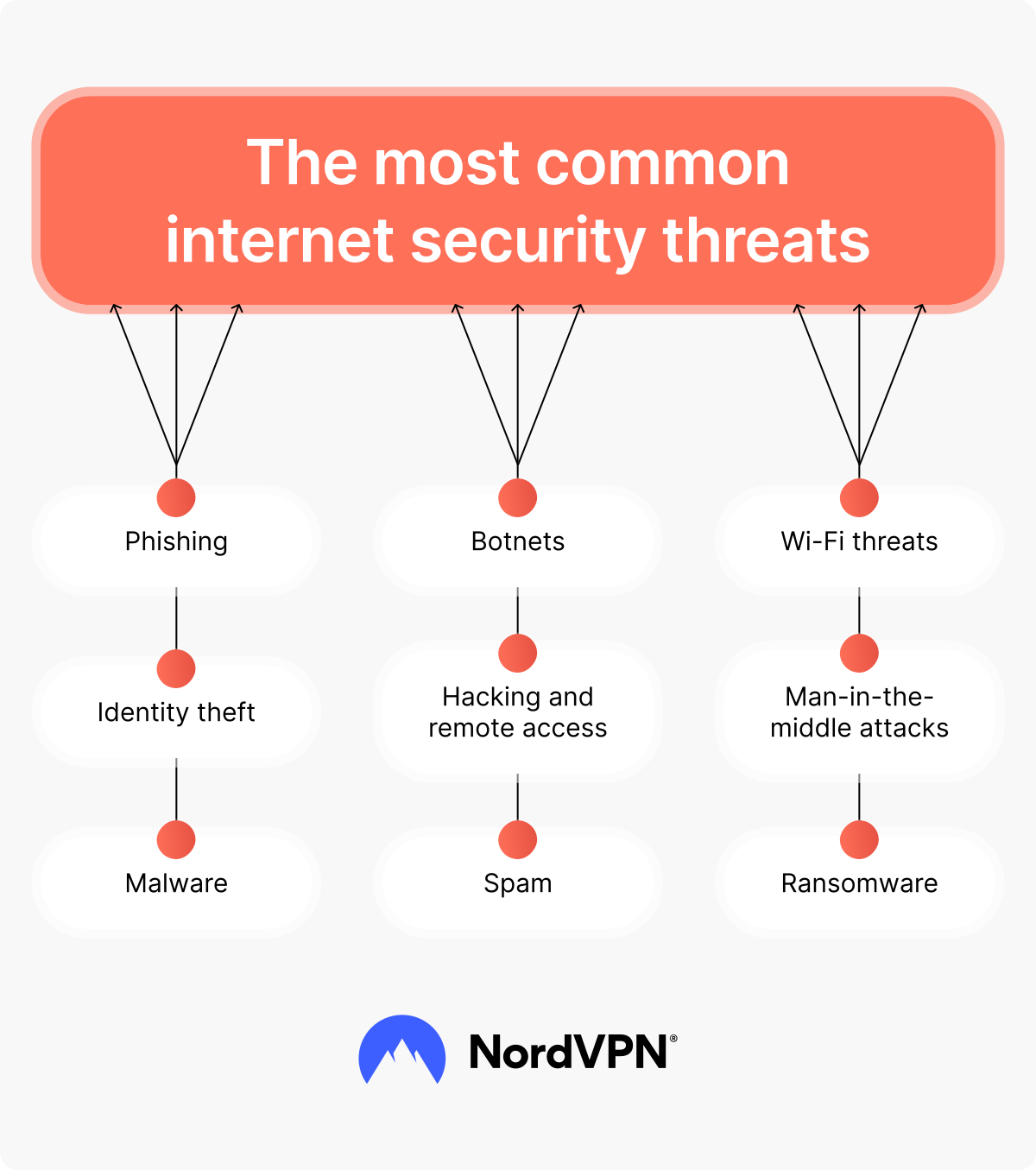
Cyber threats come in many forms — from software infections to scams that target personal data and digital transactions. Knowing how these attacks work helps you recognize weak points and understand which protection measures to take.
Hacking and remote access
Hacking is simply gaining unauthorized access to digital systems. It’s malicious if the hacker’s intention is to steal sensitive information, corrupt or delete data, or interfere with a system. Hackers may work from inside local networks or find their way into vulnerable servers and networks through password cracking and other techniques.
Gaining remote access allows them to steal data, disrupt systems, or control the affected device. A new technique called screen hacking can even let a nearby hacker get control of your touchscreen and perform activities on your device when you think it’s turned off.
Malware
Malware refers to malicious software that attacks computer users by interfering with their security and privacy. Common types of malware include viruses, worms, ransomware, spyware, wipers, and keyloggers. These malicious programs help cybercriminals disrupt, damage, or gain access to computer systems for malicious purposes.
Ransomware
Ransomware is one of the most prevalent types of malware today. This malicious software infects devices and typically encrypts the user’s files, holding them for a monetary ransom in exchange for a decryption key. An estimated 46% of organizations can’t counteract these attacks and end up paying the requested ransom to regain access to their data.
Phishing
Phishing attacks involve luring victims into sharing their passwords, sensitive information, or even financial data with scammers. These scammers contact their victims in seemingly legitimate ways and usually direct them to fake websites where they unwittingly give their data away. Most phishing is done by email, but smishing (SMS message phishing) and vishing (voice message phishing) are newer variations of this widespread scamming tactic.
Wi-Fi threats
Wi-Fi connections are designed to make internet networking easy and convenient, and free connections are available all around us. While you can use public Wi-Fi safely, some public networks can also pose risks. Threat actors can try to access these networks and intercept data flow or even convince users to connect to fake networks. They may be able to steal passwords, redirect financial transactions, or install malware on your device.
Man-in-the-middle attacks
A man-in-the-middle attack happens when a hacker secretly positions themselves between two parties — for example, between your device and a website. The aim is to intercept the information being sent. Such attacks allow cybercriminals to steal login details, payment information, or other sensitive data without you even realizing anything is wrong.
Botnets
Botnets are networks of internet-connected devices. Malicious actors use malware to enslave vulnerable devices and use them in attacks, most commonly distributed denial-of-service (DDoS) attacks. DDoS attacks can overload and disable website servers, making them unable to provide service to legitimate users.
Spam
Spam messages are unsolicited, unwanted communications like emails or text messages. Most spam is annoying as it fills your inbox with messages you don’t want to read. However, some spam messages are malicious, delivering malware onto your device if you open them or click on the links placed inside the message.
Identity theft
Identity theft happens when another person uses your personal information to perform activities while pretending to be you. Identity thieves may steal passwords and other login information to gain access to your files or financial accounts. They may also make purchases in your name that never get delivered to you or even leave reviews using your name to improve their reputation, like in brushing scams.
How to secure your online data
With so many threats on the internet, keeping your information private can be difficult. Reliable internet security solutions and smart habits can help protect your files, passwords, and financial details. Tools like encryption, firewalls, and data loss prevention systems add another layer of safety, reducing the risk of leaks or unwanted access.
Use antivirus/anti-malware software
Antivirus/anti-malware software identifies viruses and other malware threats. When possible, they block suspicious software scripts from being loaded onto your device. They also scan for, detect, and remove malware that has found its way into your system. IT experts are constantly developing and updating antivirus/anti-malware software to protect you from known threats, including many of the latest ones.
Use a VPN
A virtual private network (VPN) provides an encrypted connection that you can use to connect to the internet. A VPN protects your internet traffic by changing your IP address and encrypting it. This tool can also protect you from some of the most common types of hacking, like session hijacking and DDoS attacks. For example, NordVPN has malware protection features that can help users spot malware and prevent cyberattacks.
Online security starts with a click.
Stay safe with the world’s leading VPN
Create strong passwords
If your password is your name followed by your birth year or 1234, you have one of the weakest, most easily guessed passwords out there. Weak passwords can make you vulnerable to even the most inexperienced hackers. In contrast, strong passwords that use long strings of randomly generated numbers, letters, and symbols are nearly impossible to crack. You should also use unique passwords for the different online services you access so that your other accounts can stay safe even if one is compromised.
Use 2FA
Two-factor authentication (2FA) provides a second layer of protection when you access online accounts and services. 2FA usually involves a password as one protection factor and a temporary security token or biometric data as the second factor. Threat actors may be able to compromise one of these factors, but they’re much less likely to be able to crack both of them.
Use a secure browser
You can choose from plenty of web browsers, but the white-list ones are more secure. The most secure browsers, like Tor, Chrome, Firefox, and Brave, allow private browsing, block pop-ups, scan for phishing attempts, and prevent access to known malicious websites. These browsers help to maintain your online privacy and protect you against malicious scripts.
Avoid clicking on malicious links
When you receive a message from what looks like a real institution, such as your bank, the post office, or another government institution, you might trust it outright. Don’t. Instead, think about how and why the organization is contacting you and whether it would have any legitimate reason to do so. You can hover over the links to see where they lead without clicking on them. Don’t click the link if you don’t recognize the website it connects to.
Use a firewall
A firewall acts as a barrier between your device and the internet, monitoring incoming and outgoing traffic. It helps block unauthorized access, filters harmful data packets, and prevents malicious software from spreading across your network. Firewalls can be hardware based, software based, or built into your operating system — each helping to identify and stop suspicious activity before it reaches your device.
Update your software
Threat actors are constantly looking for ways to breach computer security. At the same time, software developers work non-stop to look for vulnerabilities and fix them by offering updates. If you update your software regularly, you can prevent hackers from exploiting vulnerabilities and close the door to malware infections. Updating your software also improves its speed and functionality, so you have nothing to lose.
How to maintain your mobile security
Your phone holds more personal information than ever — from messages and photos to payment details and location data. Because it’s always connected, it can be an easy target for hackers. Taking a few simple protection steps can help to keep your device safe and your data private wherever you go.
Check if your phone has been hacked
Your phone is one of the easiest devices to compromise because it’s always connected, packed with apps, and often used to store sensitive information. A single malicious download, unsafe Wi-Fi network, phishing link, or outdated operating system can give attackers a way in. Once that happens, someone else may gain access to your messages, accounts, photos, or even financial services linked to your device.
If a phone is hacked, several things can go wrong — attackers may steal account credentials, intercept one-time codes, install spyware to monitor activity, or use your device to spread malware further. In some cases, they can make purchases, reset passwords, or take over your identity.
Common signs of a compromised phone include unfamiliar apps you didn’t install, sudden setting changes, unusually slow performance, and rapid battery drain. If you notice any of these signs, secure your accounts, update your passwords, and run a full scan with trusted antivirus software to limit further damage.
Remove spyware
Spyware is a type of malware designed to collect sensitive information and transmit it back to a malicious actor. Spyware could be placed on your phone if you let someone unreliable use it or through a Trojan that may infect your phone when you download unofficial apps.
Spyware can track your whereabouts, listen in on your calls, read your messages, and even collect your passwords. Again, you’ll need to scan your device with antivirus/anti-malware software and remove suspicious apps or those you don’t recall downloading.
Delete your social media accounts
If you have a social media app tied to an account you don’t use anymore, it’s a good idea to delete the account and the app. Unused accounts present excellent opportunities for hackers to attack your internet security. These accounts can be tied to logins for other services that you may have used your credit card for, and they contain your personal information, which means they make you vulnerable to fraud and identity theft. You don’t have to completely delete yourself from the internet, but cleaning up old traces can increase your security.
Delete the cache
You can increase your smartphone security by deleting the cache of your apps, browsers, and the entire system. Clearing the cache not only helps speed up your phone, but it also removes outdated files that cybercriminals could exploit.
How to secure your internet network
Your home or office network connects all your devices and allows data to move between them. If a hacker gains access to even one device, they could reach everything else on the same network. Taking steps to secure it helps protect your files, passwords, and personal information from unauthorized access.
Secure your Wi-Fi router
Every device on your network connects to the internet through your router. However, router malware can infect your router and your whole network if your router software is outdated. So make sure to regularly update your router software. To protect your home Wi-Fi or business network, you should also change the factory preset logins to new ones and use strong passwords.
Control network access
To keep your network secure, you need a clear system that decides who can connect and what they can reach once they’re inside. Such approach is often called network access control and is built around three principles: authentication, authorization, and accounting.
Authentication checks that a person is who they claim to be — usually through passwords, passkeys, multi-factor authentication, or device verification. Authorization determines what that person can access once they’re connected, so sensitive areas of the network stay restricted to the right users. Accounting keeps track of activity on the network, helping you spot unusual behavior and identify suspicious connection attempts.
When these three elements work together, they create a system that blocks unauthorized users, keeps sensitive data safe, and makes it easier to detect malicious activity before it causes harm.
Implement secure web gateways
A web security gateway adds extra protection to your network. Such a security solution filters web traffic, helping to keep your network safe from websites and malicious software that can infect your systems. Inline and cloud-based gateway services stand between your network and the internet, only allowing traffic that follows strict security policies.
Secure your network against IoT threats
Smart devices like speakers, cameras, and thermostats can create new risks if they’re not properly protected. Weak passwords or outdated software may let attackers access your network through these connected gadgets. Good IoT cybersecurity practices — like regular updates, strong logins, and secure Wi-Fi settings — help keep your smart devices and data safe.
Protect your children online
Internet security for kids focuses on keeping young users safe from harmful or inappropriate content. Parents can set up parental controls, use child-friendly browsers, and adjust privacy settings to limit what their children can access.
It’s also important to talk about safe browsing habits with your children and help them learn to recognize suspicious links, messages, or websites. Regularly reviewing their online activity can further reduce risks and build awareness from an early age.
Future, trends, and challenges in internet security
Internet security is entering a new stage as digital systems expand and attackers become more resourceful. From AI-driven disinformation to large-scale ransomware operations, the threats are growing more complex and harder to detect, so it's important to learn more about online safety tips. Below are the key challenges that will shape the years ahead:
Cyber wars and AI-driven attacks
State-sponsored hackers are increasingly using artificial intelligence to launch targeted cyberattacks, spread disinformation, and disrupt vital infrastructure. These campaigns can influence public opinion, steal sensitive data, and weaken national security. As AI tools become more accessible, the line between traditional and digital warfare continues to blur, forcing governments and companies to strengthen their defenses.
Infostealers and credential theft
Infostealers are becoming one of the fastest-growing threats in cybercrime. Attackers rely on these tools because they quietly collect valuable data — passwords, logins, financial details — and require almost no technical skill to use. As long as phishing emails and malicious downloads remain common, infostealers will continue to spread attacks through the sale of stolen credentials.
Edge devices and cloud vulnerabilities
As more smart devices connect to the internet, each one becomes a potential target for attackers. Issues related to misconfigured or poorly secured IoT devices give intruders easy access to connected networks, and the problem isn’t expected to go away soon.
Together, these trends show how quickly cyberthreats take on new forms and become harder to detect. Because of this, staying aware of new risks and keeping good digital habits remains key for protecting your most sensitive data.
Online security starts with a click.
Stay safe with the world’s leading VPN