Proxy and VPN defined
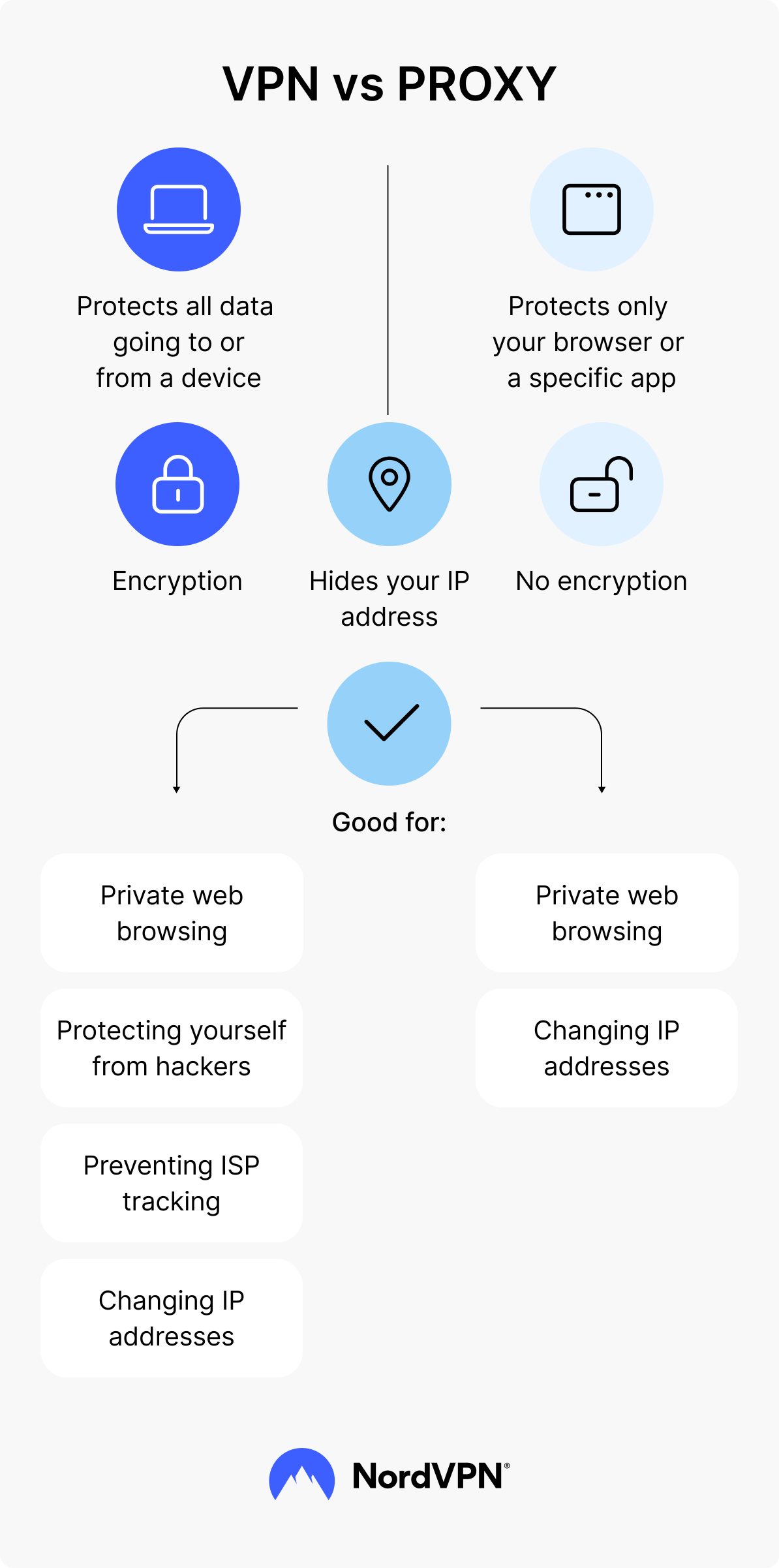
A VPN and a proxy are online services that route your internet traffic through a remote server, replacing your IP address with that of the server you connect to. But if VPN secures all of your internet traffic and encrypts it for extra security and privacy, a proxy works that way only with a single app or service and without encryption.
A VPN encrypts the connection between the device and the VPN server. That encryption functions like a sealed envelope around the online traffic while it crosses the network. A proxy generally does not create an encrypted tunnel, which means it may change your IP address and add to your privacy that way, but it does not reliably protect the moving traffic from potential misuse.
If you’re not looking to get into the technical weeds, then a proxy is like a lightweight alternative to a VPN for basic tasks like internet browsing, but it’s an alternative that won’t give you the level of security and the advanced features a VPN provides.
What is a proxy server, and how does it work?
A proxy server is an intermediary server that forwards a user’s requests to a website and returns the response. It presents its own IP address to the website, so the website sees the proxy’s IP instead of the user’s (and in some cases, the IP of another device in the proxy network).
When comparing proxies to VPNs, people almost always talk about HTTP or HTTPS proxies because these are the proxies most commonly used through browser settings or browser extensions. An HTTP proxy routes your browser’s requests to websites through the proxy server. An HTTPS proxy routes requests to secure websites (the ones that show “https://” and a padlock). HTTPS keeps the connection between the browser and the website encrypted, but the proxy does not add encryption between the device and the proxy server, and it typically affects only the browser traffic that was configured to use it.
For this article’s purposes, it is enough to know that a proxy typically reroutes traffic from one app, usually a browser, and it normally does not add encryption for other apps on the device.
What is a VPN, and how does it work?
A VPN is a tool that reroutes a device's internet traffic through a VPN server and replaces the user's visible IP address with the server's IP address (you can also check out our article on how to change your VPN location for more details). A VPN client also encrypts that traffic, which means that if anyone were to attempt to observe or tamper with it, they would only see scrambled, unreadable text and not the actual contents of the connection. So just by doing these two things, a VPN helps you change your virtual location (no one will know what country you're really browsing from) and "tunnels" your online activity, making it both more private and secure.
How does a VPN work, you ask? Well, the way a VPN actually works is pretty technical and contains a few steps (like authentication, encryption, and tunneling), but a good way to think about it is this: A VPN creates a secure, encrypted connection between your device and a remote server, and as a result, makes your browsing safer and more private.
VPNs are categorized into types, the most common of which are:
| VPN type | Design | Who typically uses it |
|---|---|---|
| Personal VPN | Protects internet traffic for a single user across apps and devices | Individuals and households |
| Business VPN | Gives employees controlled access to company tools and resources | Businesses |
| Site-to-site VPN | Connects two private networks (for example, HQ and a branch office) | IT teams linking offices |
| Remote access VPN | Connects one user device to an organization’s private network from outside the office | Remote and hybrid workers |
| Mobile VPN | Maintains a stable VPN session as a device switches networks (Wi-Fi to cellular) | People who often move between networks |
Are VPNs the same as proxies?
No, VPNs are not the same as proxies. A VPN and a proxy can both route traffic through a remote server and change the IP address a website sees, but that surface similarity hides a bigger difference in what they protect.
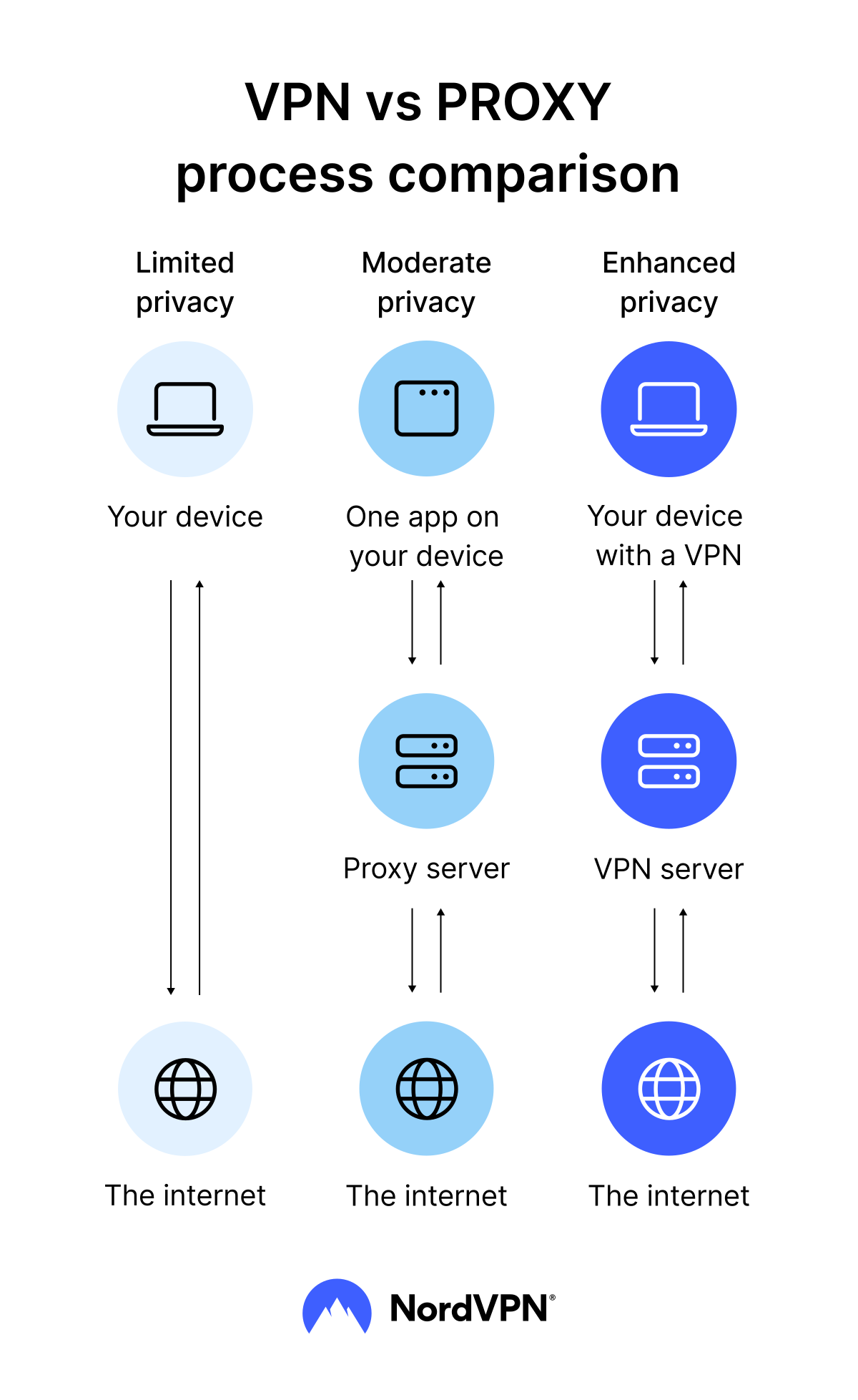
A proxy usually applies to a single app, most often a browser, and it typically does not encrypt traffic between the device and the proxy server. A VPN works at the operating system level, routes traffic from all apps, and encrypts the connection between the device and the VPN server, which gives it a much broader security and privacy role.
Proxy vs. VPN: A brief comparison
The best way to understand the difference between a proxy and a VPN is to look at them side by side.
| Aspect | Proxy (HTTP/HTTPS proxy) | VPN |
|---|---|---|
| Encryption | Typically does not add encryption between the device and the proxy server | Encrypts traffic between the device and the VPN server |
| Scope | Usually covers one app (most often a browser or browser extension) | Covers the whole device, including the browser and other apps |
| Security | Limited protection against interception because a standard HTTP/HTTPS proxy does not encrypt traffic between the device and the proxy server | Stronger protection while the traffic moves because the encrypted tunnel reduces the likelihood of interception and tampering |
| Privacy | Can change the user’s IP address but offers limited privacy beyond that | Changes the user’s IP address and reduces what third parties can observe |
| Performance | Usually has little overhead because it does not encrypt traffic between the device and the proxy server | Encryption adds some overhead, but actual speeds are largely determined by the provider, server distance, and the protocol being used |
| Typical use | Used most often for narrow tasks where only browser-level routing is needed | Used for broader, continuous privacy and security support across apps and networks |
Encryption
A VPN encrypts the connection between the device and the VPN server. That encryption protects the internet traffic as it moves across networks the user does not control.
A standard HTTP/HTTPS proxy does not encrypt traffic between the device and the proxy server. If a website uses HTTPS, the connection between the browser and the website stays encrypted, but the proxy itself is not an encryption tool.
Scope
A proxy usually covers one application. In most cases, that application is a web browser or a browser extension. The proxy changes the route for that browser’s requests, while the rest of the device continues to connect to the internet in the usual way.
A VPN covers the whole device. Once the VPN connection is active, the operating system sends internet traffic through the VPN tunnel by default, including traffic from the browser and other background apps.
Security
A VPN is designed to protect the online traffic while it travels the internet. Encrypting the connection between the device and the VPN server makes interception and tampering by third parties much harder.
A proxy is typically not designed as a security layer. It can change the IP address a website sees and route traffic for a specific app, but it does not provide the same protection against potential interception because it does not encrypt traffic between the device and the proxy server.
Privacy
A proxy can reduce what a website learns about a user by changing the user's IP address, but it does not, on its own, stop other parties along the network path from “learning” about the connection. Depending on how the proxy is set up, the proxy operator may also be able to see the traffic it handles and related metadata.
A VPN provides broader privacy protection by encrypting the traffic between your device and the VPN server. It still changes the IP address that websites see, but the larger privacy gain comes from limiting what observers on the local network or upstream connection can infer as traffic travels. The VPN provider remains a central point of trust because it operates the server your device connects to.
Performance
A proxy can sometimes feel faster because it does not add encryption between the device and the proxy server, so there is less processing overhead on each connection. In practice, though, performance still depends on the proxy’s quality, distance, and load, and free or crowded proxies are often the first to slow down or become unstable.
A VPN does add encryption, which introduces some overhead, but speed is shaped more by the provider’s infrastructure, the server location, and the VPN protocol in use. A well-run VPN can stay comfortably fast for everyday browsing, calls, and streaming-quality video, despite the extra work of encrypting the traffic.
Typical use
A proxy is best thought of as a browser-level tool. It fits situations where the main goal is to change the IP address a website sees for a single app, without altering how the rest of the device connects to the internet.
A VPN, on the other hand, is built for broader, everyday protection. It makes more sense when you want to secure traffic across the entire device, including background apps, and cut down the risk of interception on networks you don’t control.
When should you use a proxy server?
A proxy server usually makes sense for browser-level tasks, such as:
- Whenever you want to change the IP address a website sees.
- When you’re trying to access web content that only works inside a particular region or network context.
- In cases where you need to test how a website responds from a different location or IP range.
- For browser-level routing that does not affect other apps on the device.
When should you use a VPN?
A VPN is best suited for situations where you need device-wide protection and more private browsing, so you should use it:
- When you want more privacy online through encryption of your online traffic and using a different IP address for browsing.
- If you need secure remote access to work resources through a managed business or a remote access VPN.
- To limit what your ISP can see about your online activity.
- When you need coverage for more than one app, including background connections.
Proxy vs. VPN: What it comes down to
A proxy is the simpler tool. It routes a browser’s traffic through a proxy server and shows websites the proxy server’s IP address instead of the user’s, which can make the user’s virtual location appear different and keep the website from seeing the original IP address. A proxy makes sense when the task is contained for the browser — for example, when someone needs a browser-only workaround or wants to test how a site works when it’s accessed from another location.
A VPN is the more capable tool. Just like a proxy, it can replace the user’s visible IP address with the VPN server’s IP address, but it also encrypts the internet traffic between the device and that server. That encryption adds protection at the network level and applies across apps, not just inside a single browser. For a long time, VPNs were treated mainly as a way to browse the web more privately by changing your IP address, much like a proxy. But modern services such as NordVPN do more than that. They combine IP and traffic protection with additional security features, turning the VPN into part of a broader security layer rather than a simple privacy add-on.
So what it really comes down to is scope and protection. A proxy is a browser-level routing tool. A VPN is a device-level security and privacy tool. If all someone needs is to change the IP address a website sees for light, browser-based tasks, a proxy can be enough. But if they want stronger privacy and security online and protection that extends beyond a single browser to the whole device, then a VPN becomes the better choice.
Online security starts with a click.
Stay safe with the world’s leading VPN