Most common VPN myths debunked
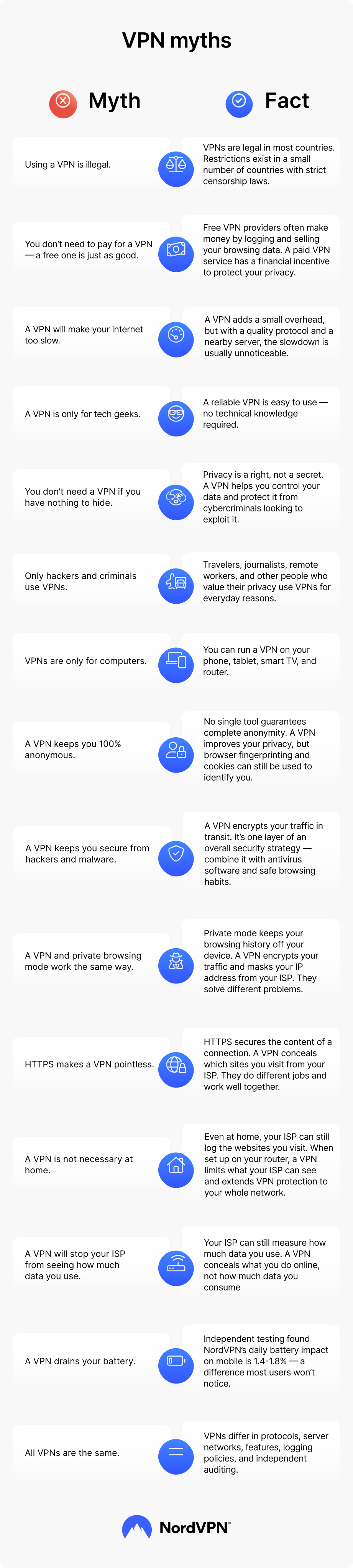
VPN myths range from harmless misunderstandings to beliefs that could put your data at risk. What follows covers the most widespread myths about VPNs and sets the record straight.
Myth 1: VPNs are illegal
The legal status of VPNs depends on the country. VPNs are legal in most countries, and millions of people use them every day to browse more privately, research sensitive topics, and protect their data while traveling.
That said, some countries ban or tightly restrict them. North Korea prohibits VPN use outright. Iraq is also often listed among countries with strict VPN restrictions, though the exact legal status is unclear. Countries like China and Russia don’t ban VPNs entirely but allow only government-approved services.
These restrictions exist because VPNs give people access to a more private and open internet, which often conflicts with the intentions of governments that rely on censorship and online surveillance to control the flow of information.
Myth 2: Free VPNs are just as good as paid VPNs
When a for-profit company gives you a free service, you’re usually the product, not the customer. That distinction matters when weighing a free VPN against a paid one.
Paid VPNs charge a fee because they don’t sell your data to cover their operating costs. They maintain larger server networks and invest in faster infrastructure. Their revenue depends on keeping you satisfied, so protecting your privacy is in their interest.
PRO TIP
Want good value without overpaying? Read our guide on whether a cheap VPN is worth it.
Myth 3: A VPN will make your internet too slow to use
A VPN can slow your internet speed — that part is true. Your internet traffic travels through an extra server, and the VPN encrypts it along the way, which adds processing load. In most cases, that load reduces your speed by 5% to 25%. With a quality VPN, the difference is usually too small to notice.
How much of an impact you notice depends on a few factors — which server you connect to, how far away it is, and which protocol your VPN uses. Connecting to a server on the other side of the world will add latency. Connecting to one nearby typically won’t add any noticeable delay.
Protocol choice has a direct impact on speed. The NordLynx protocol (NordVPN’s implementation of WireGuard) is designed to minimize latency without compromising security. It still adds some delay, as any VPN does, but in practice, the slowdown is rarely perceptible.
OUR EXPERT SAYS
A VPN can improve your internet speed in extremely rare cases. A VPN may reduce lag or latency if it routes your traffic through a faster path than your internet service provider’s (ISP’s) default route. However, encryption overhead typically adds some delay, so don’t expect a speed boost to happen regularly.
Marijus Briedis, chief technology officer at NordVPN
Myth 4: VPNs are too complex for the average person
VPNs used to require manual configuration and a fair amount of technical knowledge. That’s no longer true. Today, premium VPN service providers offer apps with intuitive interfaces that require no technical knowledge to use.
With NordVPN, connecting takes four steps:
- 1. Pick a subscription.
- 2. Download and install the app.
- 3. Log in.
- 4. Tap “Quick connect,” and you’re protected.
If you run into trouble at any point, NordVPN’s 24/7 customer support team can help.
Myth 5: You don’t need a VPN because you have nothing to hide
The benefits of a VPN are clear to people in censorship states or those handling sensitive information — journalists, lawyers, or activists, for example. But privacy matters for everyone else too. Not having secrets doesn’t mean you have nothing worth protecting.
Even data that looks harmless — the sites you visit, the searches you make, and the products you browse — can be combined into a detailed profile of you. Advertisers and data brokers collect that data, and some sell it to the highest bidder.
VPNs also add a layer of security alongside privacy. Cybercriminals target unencrypted traffic because it’s easier to intercept. A VPN encrypts your connection, which makes it far harder for them to access your data or misuse it.
Myth 6: Only criminals and hackers use VPNs
One of the most widespread myths about VPNs is that only criminals and hackers use them. Criminals do use VPNs — but so do journalists, travelers, students, and professionals who value their privacy. Many people rely on VPNs for legitimate reasons:
- Frequent travelers use VPNs to protect their data on public Wi-Fi.
- Citizens in countries with restricted internet access use VPNs to access information freely.
- International students and employees use VPNs to access services available in their home country.
- Journalists use VPNs to research and communicate more securely.
- Professionals use VPNs to protect sensitive business data.
Those are just the most common examples — plenty of other interesting uses of a VPN are worth exploring. People who value their privacy, regardless of what they do online, benefit from using a VPN every day.
The assumption that VPNs are only for criminals is wrong. A VPN doesn’t make illegal activity legal, and it doesn’t protect anyone from legal consequences.
Myth 7: VPNs are only for computers
Phones, tablets, smart TVs, and even some gaming consoles can run a VPN. Your smartphone holds more personal data than almost any other device you own, so protecting it matters just as much as does protecting your PC.
A VPN for your iPhone or Android protects your traffic from cybercriminals and network operators monitoring the connection, especially on public Wi-Fi. A VPN for your smart TV keeps your viewing habits concealed from your ISP. And a VPN for your router protects every device connected to your home network, including smart home gadgets that can’t run a VPN app directly.
Myth 8: A VPN makes you completely anonymous online
A VPN improves your privacy by masking your IP address and encrypting your traffic, but it doesn’t make you fully anonymous. An anonymous VPN doesn’t exist, and completely anonymous browsing is close to impossible.
Even with a VPN active, other tracking methods work. Websites can identify you through browser fingerprinting — a technique that profiles your device based on its unique combination of settings, fonts, and plugins. Cookies track your behavior across sessions. If you stay logged in to accounts like Google or Facebook, those platforms can still identify you regardless of your IP address.
Greater anonymity requires a layered approach — using a privacy-focused browser, turning off third-party cookies, and avoiding personal accounts. A VPN is a valuable part of that setup, but not the whole solution.
PRO TIP
Want to know what other signals can reveal your identity online? Check out our guide on whether you can be tracked with a VPN.
Myth 9: A VPN protects you from hackers and malware
A VPN secures your data in transit, but it’s not a shield against every online threat. Treating it as one can leave you exposed to risks a VPN was never designed to address.
A VPN can’t protect you from:
- Insecure third-party services. Not all websites store your credentials or payment details securely. A data breach on a service you use can expose your information regardless of whether you’re connected to a VPN.
- Social engineering scams. These attacks manipulate people rather than systems. If a scammer convinces you to grant them access, they can bypass your VPN, firewall, and antivirus software.
- Phishing attacks. A VPN isn’t designed to detect or block phishing sites. If you voluntarily enter your details on a malicious page, a VPN won’t stop the damage.
- Malware. A standard VPN is not a substitute for antivirus software. It won’t stop you from accidentally downloading a malicious file.
- Compromised devices. A VPN won’t protect you from hackers if they already have access to your device and won’t prevent them from logging your activity locally.
NordVPN extends the digital protection it offers beyond the VPN connection. Our next-gen antivirus scans for malware-infected files, flags malicious websites before you access them, and blocks internet trackers — adding a meaningful layer of security on top of encryption.
That said, NordVPN’s next-gen antivirus works independently of the VPN connection. The protection comes from NordVPN as a platform, not from VPN encryption itself. And even with it enabled, no tool covers every threat.
PRO TIP
For a full picture of what VPNs cover and what they don’t, read our guide comparing a VPN and a traditional antivirus. You can also take a look at our guide on whether VPNs are safe.
Myth 10: A VPN and private browsing mode work the same way
Private or incognito mode stops your browser from saving your browsing history, cookies, and form data on your device. It doesn’t hide your IP address, encrypt your traffic, or prevent your ISP or network administrator from seeing which sites you visit.
A VPN handles the other side of the equation. It encrypts your connection and masks your IP address so your ISP, the network host, and third parties monitoring your traffic can’t see which sites you visit. It doesn’t erase local browser history.
The two tools solve different problems. Use private browsing mode to keep your device free of stored browsing data and use a VPN to keep your connection encrypted and your IP address masked.
Myth 11: HTTPS makes a VPN pointless
HTTPS encrypts the data that travels between your device and a website. It stops anyone from intercepting the connection and reading your login credentials or payment details.
But HTTPS doesn’t hide which sites you connect to. Your ISP, your router, and network operators monitoring your traffic can see the domains you visit, even when those sites use HTTPS.
A VPN encrypts your traffic at the network level, so your ISP and network operators see only that you’re connected to a VPN — not which sites you’re visiting or what you’re doing.
PRO TIP
Curious about Wi-Fi privacy and what network owners can see? Read our guide on whether Wi-Fi owners can see which sites you visit on your phone.
Myth 12: You don’t need a VPN at home
Public Wi-Fi is the more obvious risk, but your home network isn’t automatically private either. Without a VPN, your ISP can see and log the websites you visit. Some ISPs also sell that data to advertisers or third parties. A VPN encrypts your traffic so your ISP can see that you’re connected, but not what you’re doing.
If you use a VPN on your router, it also extends protection to every device on your network, including internet of things (IoT) devices like smart doorbells and baby monitors that can’t run a VPN app on their own.
Whether you need a VPN at home depends on your priorities. If you want to limit what your ISP can see and protect a household full of connected devices, a home VPN is worth considering.
Myth 13: A VPN hides from your ISP how much data you use
A VPN prevents your ISP from seeing what you do online, but not how much data you use. Your ISP can see that you’re connected to a VPN server, how much data you consume, and how long the connection lasts. It can’t see what’s inside that encrypted tunnel.
However, if your ISP throttles — deliberately slows — your connection based on your activity, a VPN can help. Encrypted traffic is harder for ISPs to categorize, which makes activity-based bandwidth throttling more difficult to enforce.
Myth 14: A VPN drains your battery too much to be worth it
The idea that running a VPN will noticeably drain your phone battery is a myth that independent testing has put to rest. West Coast Labs (WCL) tested NordVPN’s battery impact across Android and iOS devices and found that daily battery drain attributable to the VPN was 1.4-1.8% — a difference most VPN users won’t notice.
The WCL report confirms that the battery drain concern doesn’t hold up — a VPN doesn’t significantly drain your phone’s battery. You can keep NordVPN running all day without a noticeable impact on battery life.
Myth 15: All VPNs are the same
Not all VPNs offer the same level of security, privacy, or reliability. The differences worth knowing about include:
- Features. VPN services differ in what they offer. A kill switch cuts your internet connection if the VPN drops, keeping your data from being exposed. Split tunneling lets you choose which apps route through the VPN and which connect directly. Depending on how you use a VPN, these features can matter a great deal.
- Encryption. VPNs use different protocols to encrypt your traffic. Some VPN protocols prioritize security. Others are optimized for speed. The protocol a VPN uses — and whether you can switch between them — affects both performance and protection.
- Server locations. VPN servers in or near your home country typically deliver the best speeds. If you live in a country with restricted internet access, server location becomes a different priority — you’ll need servers in countries where those restrictions don’t apply.
- Logging policies. Some VPNs log your browsing activity, connection timestamps, and IP address. Others operate under a strict no-logs policy, which means they don’t store data that could identify you. The difference matters, especially if a VPN is ever subject to a legal request.
- Independent auditing. VPN providers that submit to third-party audits give you a way to verify their no-logs policies and security practices independently. Without an audit, there’s no way to confirm the claims hold up.
Online security starts with a click.
Stay safe with the world’s leading VPN