What is a packet filtering firewall?
A packet filtering firewall is a network security system that monitors and controls which network traffic can enter or leave a network. It looks at information in a packet’s header, such as IP addresses, ports, and protocols, and compares those details against a set of predefined rules. The simplest way to picture a packet filtering firewall is as a security guard who checks credentials at a door. If the packet meets the criteria, the firewall waves it through. If it doesn’t, the firewall stops it at the gate.
While firewall technology has changed over the years, packet filtering has stood the test of time. It remains one of the oldest and most widely used firewall technologies, and many still rely on it as a first line of defense. Unlike more advanced firewalls, a packet filtering firewall only looks at header information and doesn’t inspect the contents of the packet itself. That streamlined approach allows it to process network traffic quickly while using very few system resources.
How does a packet filtering firewall work?
Every time you send an email, open a website, or stream a video, your device breaks the information into small units called packets. These packets travel across networks to reach their destination. Before they continue on their journey, a packet filtering firewall reviews them and decides whether they should continue.
To make that decision, the firewall checks information stored in the packet header, including:
- Source IP address.
- Destination IP address.
- Source port number.
- Destination port number.
- Protocol type (such as TCP, UDP, or ICMP).
- Traffic direction (incoming or outgoing).
- TCP flags (like SYN, ACK, FIN, and RST), which indicate the role of a packet within a TCP exchange (for example, requesting a connection, acknowledging data, or closing a session).
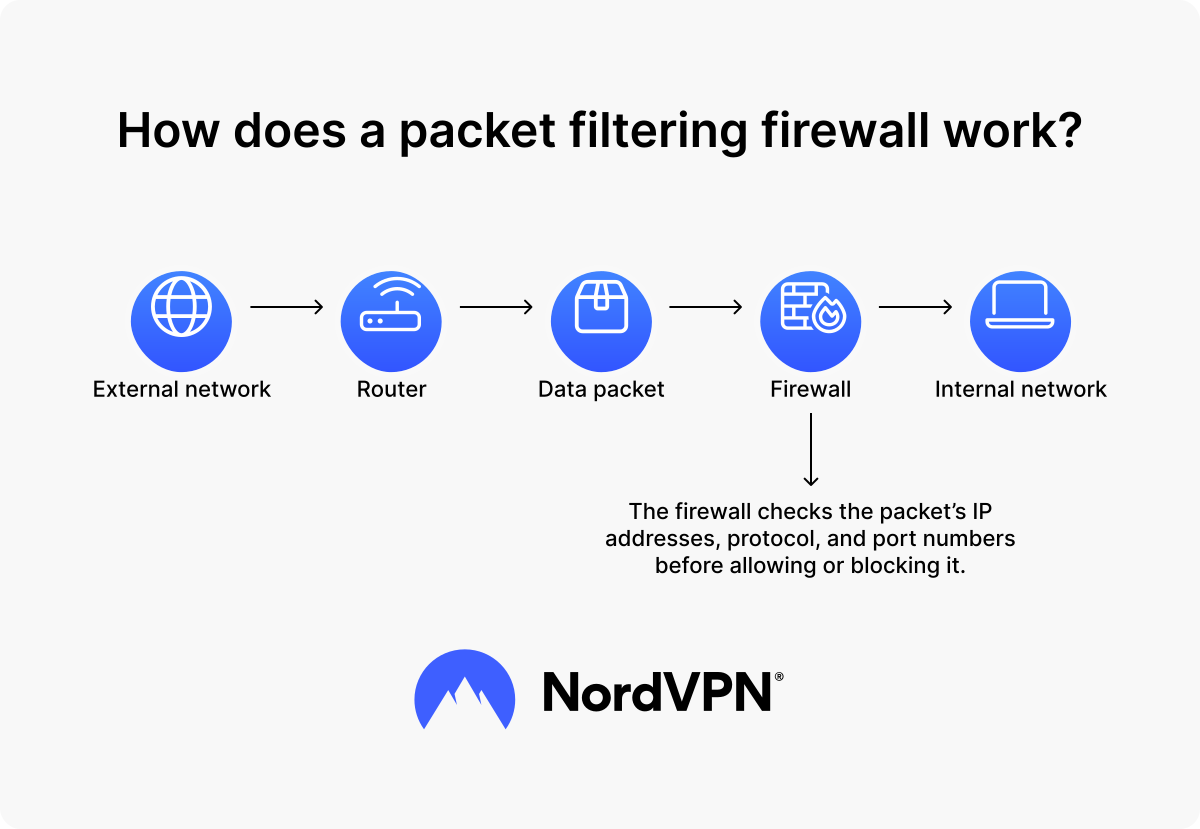
The firewall compares those details against a list of predefined rules and decides how to proceed. The entire process looks something like this:
- 1. A data packet arrives at the firewall.
- 2. The firewall examines the packet header.
- 3. The firewall compares the packet against predefined rules. If a packet matches an allow rule, the firewall forwards it. If the packet matches a deny rule, the firewall blocks it. If the packet doesn’t match any rule, the firewall applies its default policy. Most security teams configure firewalls to deny unmatched traffic by default to reduce unnecessary risk.
Because it has less information to process, a packet filtering firewall can handle network traffic quickly and efficiently. But there’s a caveat: It only looks at the packet header and doesn’t inspect the packet’s contents. As a result, it can tell where traffic comes from, where it’s going, and how it should travel across the network, but it can’t determine whether the packet contains malicious code or suspicious activity.
What are packet filtering firewall rules?
Packet filtering firewall rules tell the firewall which traffic to allow and which traffic to block. These rules are often stored in the access control list (ACL), which defines the conditions that packets must meet before they can pass through the firewall.
Each rule contains a set of conditions based on characteristics such as an IP address, protocol, or port number. The firewall compares every packet against those conditions until it finds a match.
Rules are generally processed from top to bottom, and the first matching rule determines the outcome. For example, a network administrator may create a rule that says: “Allow inbound TCP traffic to port 443 from any source.” When a packet matches those conditions, the firewall allows it through. If the packet doesn’t match, the firewall moves on to the next rule in the list.
Because rule order matters, administrators need to review and maintain firewall rules carefully. A poorly placed rule can accidentally expose network assets or block legitimate traffic.
What are the examples of firewall filtering?
Network administrators use packet filtering to control what traffic can enter, leave, or move through a network. Below are a few situations where a network administrator might use packet filtering:
- Allowing access to a public website. A company hosts a website that customers need to access online, but doesn’t want outsiders accessing other systems on its network. The packet filtering firewall allows inbound HTTPS traffic on port 443, which lets visitors load the website, while blocking unnecessary incoming requests on other ports. This setup helps reduce the attack surface while keeping the website accessible to visitors.
- Restricting access to specific services. A company may want to prevent employees from accessing a particular website, application, or server. The firewall can block outbound traffic directed to a specific destination IP address and port, preventing network access to that service from company devices.
- Protecting internal systems. A business can configure a filtering firewall to allow only approved traffic between departments or servers and block everyone else. By controlling which network connections can communicate, the organization can better protect sensitive systems and network resources.
Types of packet filtering firewalls
Not every packet filtering firewall works exactly the same way. The biggest difference is whether the firewall evaluates each packet on its own or keeps track of active connections. These two approaches are known as stateless and stateful packet filtering.
Some sources also use the terms static and dynamic packet filtering to describe how firewall rules are managed rather than different firewall architectures. Static filtering relies on manually configured rules, while dynamic filtering can temporarily adjust rules based on network activity. In practice, however, the distinction between stateless and stateful packet filtering is far more common.
Stateless packet filtering firewall
A stateless packet filtering firewall examines every packet as a separate event. When traffic reaches the firewall, it checks the packet against predefined rules without considering previous traffic or active connections. The firewall doesn’t remember whether it has seen related packets before, making stateless packet filtering fast and resource-efficient.
However, a stateless firewall can’t see the bigger picture. It treats every packet independently and doesn’t know whether it belongs to an existing connection. As a result, it has a harder time distinguishing legitimate return traffic from unsolicited or potentially suspicious traffic.
Stateful packet filtering firewall
A stateful packet filtering firewall keeps track of active connections. Instead of evaluating each packet on its own, it remembers ongoing communication sessions and uses that information when making decisions.
For example, if you visit a website, your device sends a request, and the website sends data back in response. A stateful inspection recognizes that incoming traffic belongs to an existing connection and allows it through. A stateless packet filtering firewall would evaluate the same packet without that additional context.
Because a stateful firewall understands the context behind network traffic, it can make more informed security decisions and better distinguish between expected and unexpected traffic. The trade-off is slightly higher resource usage because it must maintain information about active connections.
Advantages and disadvantages of a packet filtering firewall
Like any firewall technology, packet filtering has both strengths and limitations. It can quickly block unwanted traffic with minimal resource usage, but it cannot inspect traffic as deeply as more advanced firewall technologies.
Advantages
Packet filtering has remained a core part of network security for decades because it delivers several practical advantages:
-
Fast performance. A packet filtering firewall only examines packet headers, which allows it to process large volumes of network traffic quickly and with minimal delay.
-
Low resource usage. Because it doesn’t inspect packet contents, packet filtering requires less processing power and memory than many advanced firewalls.
-
Cost-effectiveness. Many routers and network security devices already include packet filtering capabilities, making it an affordable way to improve network security.
-
Easy deployment. Packet filtering relies on straightforward rules based on IP addresses, ports, and protocols, making it relatively simple to configure and manage in smaller environments.
-
Strong first line of defense. Packet filtering can quickly block unwanted traffic before it reaches internal systems, helping reduce unnecessary exposure to threats.
Packet filtering has stayed relevant because it does one job very well — it filters large volumes of traffic quickly without much processing power. Still, it’s easy to overestimate what it can do.
Disadvantages
At the same time, packet filtering has its limitations. Because it only examines packet headers, it lacks some of the capabilities found in more advanced firewall technologies:
-
Limited visibility into traffic. A packet filtering firewall only examines packet headers and cannot see what is contained inside the packet itself.
-
Limited application awareness. Because packet filtering primarily relies on header information, it has limited visibility into application-layer activity and may miss threats hidden within otherwise legitimate traffic.
-
Limited context. Stateless packet filtering firewalls evaluate each packet individually and do not track active connections, which limits their ability to distinguish expected return traffic from unsolicited or potentially suspicious traffic.
-
Vulnerability to spoofing and evasion techniques. Without appropriate safeguards, packet filtering firewalls may be susceptible to forged source IP addresses (IP spoofing). They can also be bypassed by evasion techniques such as IP fragmentation attacks, where malicious traffic is split across fragments to slip past rules that only inspect individual packet headers.
-
Possible difficulty in managing. As networks grow, firewall rule sets can become larger and more complex, making them harder to maintain and troubleshoot.
-
Struggles to work with some applications. Applications that use dynamic ports or frequently changing connections may require additional configuration to work properly with packet filtering rules.
From a security perspective, packet filtering is a great starting point, but we shouldn’t rely on it as the only line of defense. Most modern networks benefit from additional layers that can analyze traffic in greater detail.
Packet filtering vs. next-generation firewall (NGFW)
Packet filtering is one of the oldest and most widely used firewall techniques, but it isn’t the only way to protect a network. As security needs have evolved, firewall technologies have expanded beyond basic packet filtering to provide deeper visibility into network traffic and stronger protection against complex threats.
A next-generation firewall (NGFW) builds on traditional packet filtering by adding deeper traffic analysis and advanced security features. While a packet filtering firewall primarily examines packet headers, an NGFW can also inspect packet contents, identify applications, and detect known threats.
This broader visibility allows NGFWs to enforce more detailed security policies and identify malicious activity that packet filtering alone may miss. Many NGFWs also include features such as intrusion prevention systems (IPS), deep packet inspection (DPI), and threat intelligence integration.
Despite these differences, packet filtering remains an important part of many NGFWs. Rather than replacing packet filtering, NGFWs build on it and use it as one layer of a broader security strategy.
The table below summarizes the main differences between the two.
| Feature | Packet filtering | NGFW |
|---|---|---|
Information analyzed | Packet headers only | Packet headers, packet contents, and applications |
Security level | Limited | Advanced |
Resource usage | Low | High |
Security features | Traffic filtering based on rules | Traffic filtering, intrusion prevention, application awareness, and threat intelligence |
Use cases | Simple networks that need basic traffic control | Complex networks that need deeper visibility and threat detection |
If you’d like to learn more about different firewall technologies and how they work, check out our firewall terms glossary.
When should you use a packet filtering firewall?
Packet filtering isn’t the right solution for every environment, but it remains a practical option in situations where speed, simplicity, and efficient traffic control matter most. Packet filtering firewalls can be used for:
- Simple and predictable networks. Packet filtering works well in smaller networks with consistent traffic patterns and clearly defined access requirements. Administrators can create rules that allow only the traffic the network needs and block everything else.
- Basic traffic control. Organizations often use packet filtering to allow or block traffic based on IP addresses, ports, and protocols. This approach can help control access to websites, services, applications, and network resources.
- First line of defense. Many organizations deploy packet filtering as part of a broader perimeter security strategy to stop unwanted traffic before it reaches internal systems. While additional security layers may provide deeper inspection, packet filtering can quickly filter out traffic that clearly violates security policies.
- High-performance environments. Because packet filtering only examines packet headers, it introduces very little latency. This efficiency makes it a practical choice for environments that need to process large volumes of network traffic quickly.
- A layered security strategy. Packet filtering works best when combined with other security controls. Many organizations use it alongside stateful inspection, intrusion detection systems, and next-generation firewalls to strengthen overall network security.
We recommend thinking of packet filtering as a foundation rather than a complete security solution. It can reduce unnecessary traffic and enforce basic network policies, while other tools provide deeper protection.
PRO TIP
Packet filtering can help control which traffic enters and leaves your network, but it can’t protect you from malicious websites, phishing attempts, or malware hidden inside legitimate connections. For broader protection against online threats, consider using NordVPN’s next-gen antivirus* — a privacy-focused, proactive approach to digital threat protection built into the NordVPN desktop app that helps block scams, phishing, and malware before they reach your device.
*NordVPN’s next-gen antivirus is a comprehensive digital threat protection tool that’s available on Windows and macOS. Learn what it is and how it works in the next-gen antivirus whitepaper.