What is pharming?
Pharming is a type of cyberattack in which cybercriminals redirect a user’s traffic from a legitimate website to a spoofed one. These fake websites imitate a real service, like banking or telecommunications. If the targeted user enters their sensitive information, like their login credentials, into the website, the criminals intercept the data and use it to take over the accounts.
The name itself is a portmanteau of “phishing” and “farming.” Such attacks often target large groups of users to “farm” as much stolen data as possible. Unlike a classic phishing attack that uses emails and messages to lure the target, pharming targets the user’s web traffic directly.
Pharming relies on methods like Domain Name System (DNS) poisoning to redirect traffic to the fake website. Alternatively, cybercriminals can use malware-infected devices to manipulate the traffic. The user is often unaware of the traffic changes and doesn’t know they’re being redirected, making pharming attacks difficult to identify without technical knowledge.
What is phishing?
Phishing is a social engineering attack that uses persuasion and deception to trick users into giving away their sensitive information, like login credentials, credit card details, or Social Security numbers. Phishers can use emails, social media messengers, text messages, and phone calls to contact and scam their targets.
Over the years, scammers have developed numerous phishing strategies, which we will discuss further in the article. Most commonly, a phishing scam features at least one of two components — a phishing link or a malware-infected file.
If a user falls for a phishing link, they enter a spoofed website that copies a real service and input their login details, thinking they’re accessing their account as normal. However, they’ve actually just revealed this information to scammers, who can now use it to steal the account. If the user downloads and opens a phishing file, they can accidentally install malware on their device, which can act as a keylogger or read and steal local files.
Pharming vs. phishing
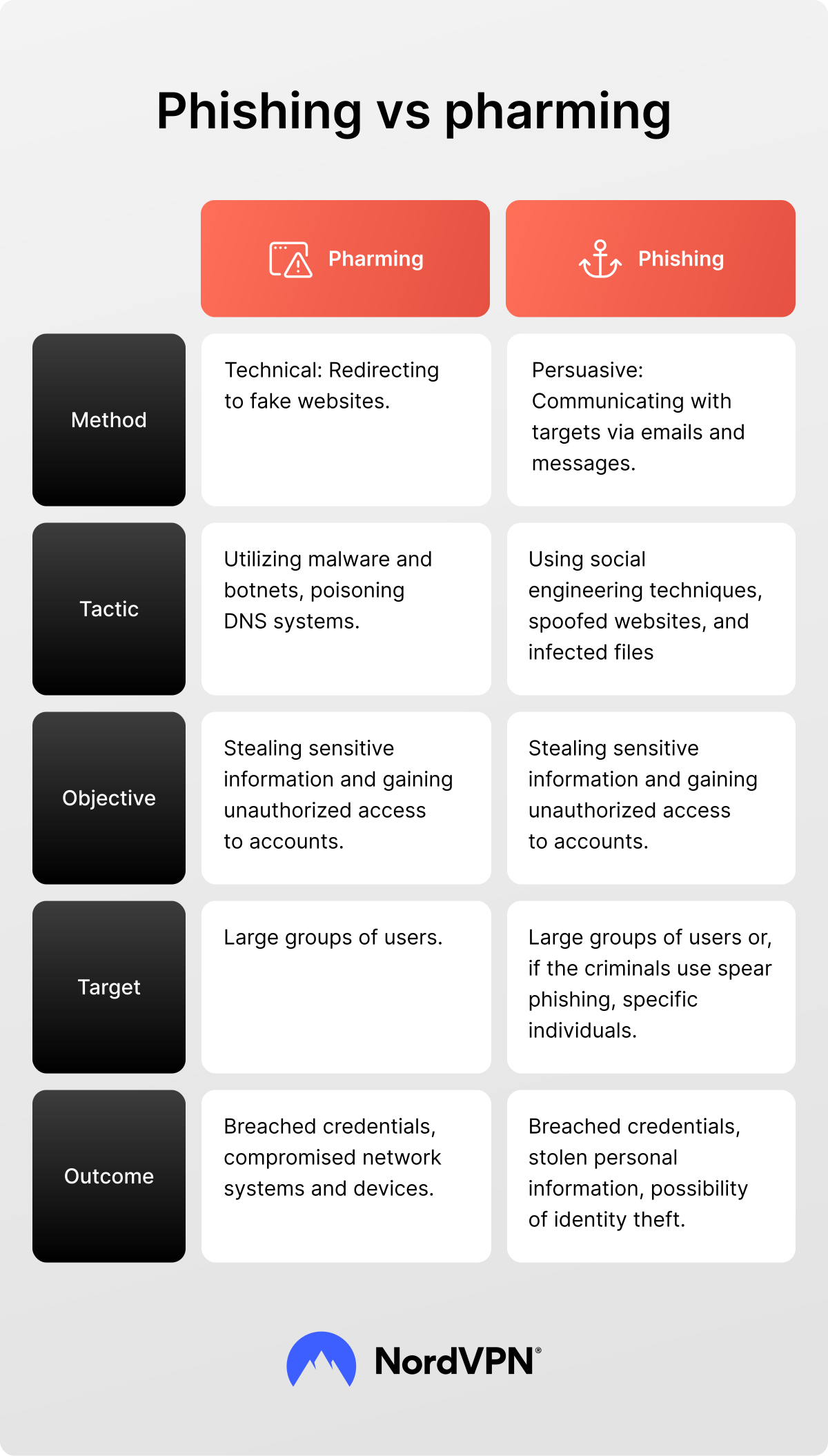
While pharming and phishing both fall under the social engineering umbrella of cybercrime, they’re fundamentally very different types of attack. Phishing requires direct interaction with the target, whereas pharming functions more as a follow-up after a phishing attack, bypassing the user altogether and going straight for the web traffic. Let’s analyze the core differences between pharming and phishing attacks.
Method of attack
The methods used to instigate pharming or phishing attacks are completely different. Phishing attacks require direct communication with the target, usually through spoofed emails or text messages. This communication needs to look convincing enough for the user to click the link or download the file attached. If the user believes the bait to be legitimate, they submit their login credentials to the cybercriminals themselves without realizing what they’re doing.
The method used for pharming attacks doesn’t require direct interaction with the user. However, phishing attacks can be used to gain resources to then commit pharming. For instance, a hacker can first send a phishing email with a malware attachment. Once the user runs the malware, their device is infected and can be used for traffic manipulation. From there, pharming can commence.
Generally, users don’t realize that they’ve been affected by pharming. They can enter a website address into their browser, and the pharmers redirect the traffic without their knowledge. The spoofed website can look similar enough to the legitimate one that the targets don’t suspect any foul play and proceed to log in or enter other personal information as normal.
Tactic
Pharming tactics require technical prowess, ranging from web design to malware development, and applying them requires a lot of time and resources. Cybercriminals need to set up both a spoofed website and use DNS poisoning to redirect traffic to that site efficiently. They must consider the cybersecurity software users might rely on to detect and block malware threats. To ensure the attacks are more efficient, pharmers may look for zero-day vulnerabilities and security gaps that would allow them to breach their targeted devices unnoticed.
Phishing tactics are easier to implement and don’t require as many resources. Although phishers may set up a full spoofed website to appear more convincing, in most cases, they only need to replicate limited web elements, like a sign-up or checkout page. Phishers rely heavily on social engineering attacks that aim to manipulate users to give up their personal information without suspecting a scam in the first place.
Objective
Both phishing and pharming attacks seek the same objective — gaining access to valuable sensitive information. Using different strategies, both pharmers and phishers coerce users into submitting their legal names and home addresses, login credentials, bank details, Social Security numbers, and other personal information that could be used to impersonate them, overtake their accounts, or that could simply be sold on the dark web for profit.
Another common objective is taking over device networks. In these cases, criminals usually target company employees and use malware to infect their devices. This can grant criminals backdoor access to company-owned equipment and help steal sensitive business information efficiently.
Target
The scope of phishing and pharming targets is broad and varies depending on the objectives. Both attacks often target individual users and aim to maximize the amount of stolen sensitive information. Spear phishing attacks are directed against specific individuals, often those in possession of hard-to-acquire professional data.
Pharming campaigns more often target large groups of users, particularly company employees. They can overtake these users’ devices to compromise network security and gain access to sensitive information
Outcome
The most common outcome of both phishing and pharming attacks is stolen sensitive information. Criminals can use it to hack into personal accounts or use them as ransomware, forcing users or organizations to pay to regain access to this data.
Such scams can also damage device security by installing malware and allowing hackers to access computers or phones without authorization. They can force these devices to become a part of botnets, increasing the criminals’ capabilities to commit the same attacks in the future.
Pharming and phishing examples
Although pharming and phishing attacks overlap in some ways, they’re two distinct cyber threats. Learning to distinguish between the two and recognize their red flags can help you stay alert and avoid accidentally compromising your personal information or device security.
Examples of pharming
Pharming attacks often involve technical meddling, so they can be harder for users to notice. Nevertheless, you can learn to identify suspicious device behavior and respond to more complex pharming threats.
- DNS cache poisoning. Cybercriminals can insert false information into the DNS cache by sending a large load of fake responses to the DNS server’s request, usually using botnets. This changes the query ID, returning a spoofed ID address and redirecting users from the real website to a falsified one.
- DNS hijacking. Using DNS hijacking, hackers redirect DNS queries from legitimate websites to spoofed pages imitating those websites. They tend to use malware to infect devices and rewrite their DNS settings configurations. Alternatively, they might meddle with the router's settings, forcing the traffic to redirect to a malicious site even when a user enters the correct website address.
Examples of phishing
Phishing encompasses a broad range of scams, from the classic fake email to more sophisticated attacks like SEO poisoning. Social engineering attacks can be used to steal personal or professional information, receive funds under false claims, or, in some cases, they can lead to hacking devices and compromising network security.
Although the tactics that cybercriminals use to scam users can vary, you can learn to identify the red flags for the most common types of phishing.
- Fake emails. One of the most common methods phishers use is sending fake emails. They pretend to be specific individuals or legitimate institutions. Typical phishing email examples include links to phishing websites where users enter their personal information, unknowingly handing it over to the hackers. In some cases, fake emails have spoofed attachments that contain malware to infect the user’s device.
- Spoofed websites. Cybercriminals create false websites that imitate a real service. The website links are usually very similar to the real ones to deceive the users. They can imitate login pages, checkout screens, or sign-up forms with input fields that let hackers easily access sensitive information that the users type in.
- Vishing and smishing. Attackers use voice message (vishing) and SMS phishing (smishing) attacks to approach targets via mobile devices. They use pre-recorded voice messages, often using AI-generated audio to convince the recipient that the call is legitimate. Smishing attacks can appear similar to phishing emails and often contain links to spoofed websites.
- Quishing. QR code phishing (quishing) requires users to scan a QR code and interact with its encoded information, which is usually a spoofed website or a malicious file. Quishing attacks can be hard to detect because QR codes don’t offer any external information to easily identify suspicious content.
- Malware-based phishing. Cybercriminals can use malware attacks to breach users’ devices and steal sensitive files from within. Malware-based phishing attacks are often combined with other tactics — for instance, attaching malware to a fake email.
- SEO poisoning. One of the more complex types of phishing attack, SEO poisoning is when cybercriminals manipulate search engine rankings to push their fraudulent website higher in the results. Users interact with a high-ranking website, assuming it’s legitimate, by creating accounts and adding personal information, which cybercriminals can then mishandle.
- Spear phishing. Some phishing campaigns are organized to target a specific individual. Such cases, called spear phishing, require cybercriminals to craft personalized communication — be it emails, phone calls, or other aforementioned methods — to extract specific information that only this person has.
How to protect against pharming and phishing attacks
Pharming and phishing attacks can both pose a serious threat to your sensitive information. However, while pharming is more difficult to detect and prevent, you’re far more likely to deal with a phishing attack. To ensure your data remains protected from scammers, you should learn how to protect yourself and your devices from these attacks.
Protection against pharming
To avoid letting pharming scans go unnoticed in your system, focus on device security:
- Look out for suspicious links. Pharming scams will use links that look very similar to legitimate websites but contain small differences, like extra dashes, replacing letters with numbers, or duplicating some characters. Carefully look at the link and avoid clicking on any that look dubious.
- Scan the websites for potential scams. Instead of putting your device at risk by clicking on a suspicious link, you can use a dedicated link checker to test if the website you want to visit is malicious.
- Take care of your router. DNS hijacking attacks can go directly after your router to intercept your traffic. Update the default router password and keep your firmware updated.
- Do not download or open suspicious files. Both pharmers and phishers use malware-infected files to breach users’ devices. Scan suspicious files before opening and delete them from your device if they appear unsafe.
- Bookmark important legitimate websites. Banking, medical care, social services, and other portals that handle highly sensitive data are often targets for spoofed links. Bookmark these portals in your browser and use them to securely access websites that scammers might impersonate.
Protection against phishing
Phishing attacks are deliberately crafted to manipulate users into giving up their personal information without suspecting foul play. Scammers use pressure tactics, personalized language, and emotional manipulation to deceive users and coerce them into handing over data or money.
- Don’t give in to the time pressure. If you receive an email, text message, or a call pressuring you to submit your personal information immediately, take a pause. Cybercriminals use such threats to coerce their targets into acting without thinking. Carefully analyze the message and don’t respond if it appears suspicious.
- Don’t open suspicious links or attachments. The best way to avoid falling for a phishing scam is to not interact with any of its elements. Do not open links that lead to spoofed websites — even if you want to check how they look. Likewise, don’t open or install any files attached to unsolicited emails.
- Use spam filters. An easy way to avoid falling for a phishing scam is to have them filtered out. Set up spam filters for your email inbox to detect suspicious emails and attachments. Some mobile devices also have built-in filters to block spam messages and calls.
- Use an extra security layer for your accounts. If your password ever gets breached, having two-factor authentication (2FA) or multi-factor authentication (MFA) set up can help you retain access to your account. Additional authentication means you need to enter a one-time code or use your biometrics to verify your login attempts.
- Use a password manager. Don’t reuse the same password for all your accounts — if it gets breached once, it puts all your credentials in danger. Instead, set up a password manager to create and store strong and unique passwords. These tools also come equipped with extra features, like data breach scans to detect compromised data or password health checkers to identify vulnerable login details.
Extra steps to stay safe online
Some strategies to secure yourself against both pharming and phishing attacks overlap. Keeping your device secure and your software updated ensures you can be prepared for digital threats and respond to them quickly.
- Keep your software up to date. Cybercriminals often exploit unpatched security vulnerabilities in old versions of software for both phishing and pharming attacks. Installing security patches and software updates helps keep your device protected from backdoor attackers.
- Regularly scan your website with an antivirus. Malware used for attacks can go unnoticed without regular security checks. Ensure you do a full device scan periodically to catch active threats in time.
- Create secure backups of your files. If your device has been compromised and your internal data damaged, a backup that you’ve regularly kept updated lets you restore essential information faster and reduce the potential damage.
- Keep track of current cyber threats. Cybersecurity awareness is essential in staying secure. Refresh your security knowledge routinely and follow the news on the latest threats and prominent cyberattacks.
- Secure your device connection. Browsing without a secure connection can expose your device to threats beyond phishing and pharming. Use a VPN to secure your connection, especially when you use public networks. A VPN can also offer extra security features, like NordVPN’s Threat Protection Pro™, which protects your device from phishing, malware, and trackers.
Online security starts with a click.
Stay safe with the world’s leading VPN
Pharming vs. phishing: Key takeaways
Although phishing and pharming operate differently from a technical perspective, they overlap in many ways, from pharming relying on phishing tactics to be more efficient to the common goal of stealing valuable data from unsuspecting users. Both types of social engineering attack can pose serious threats to individuals and businesses alike, leading to compromised accounts, stolen funds and data, breached devices, and disrupted operations.
Phishing may be more familiar to users than pharming due to its prominence, but both types of attack are equally as serious. With AI being increasingly used for malicious purposes by cybercriminals to develop social engineering attacks, it’s as important as ever for users to stay vigilant, protect their personal data, and secure their devices from lurking threats.