What is DNS filtering?
DNS filtering is a security method that prevents your device from connecting to harmful or unwanted websites at the Domain Name System (DNS) level. When you enter a domain name, DNS translates it into the IP address your device needs to connect. A DNS filtering service checks the requested domain during this lookup and can block it if it matches the service’s filtering rules.
How does DNS filtering work?
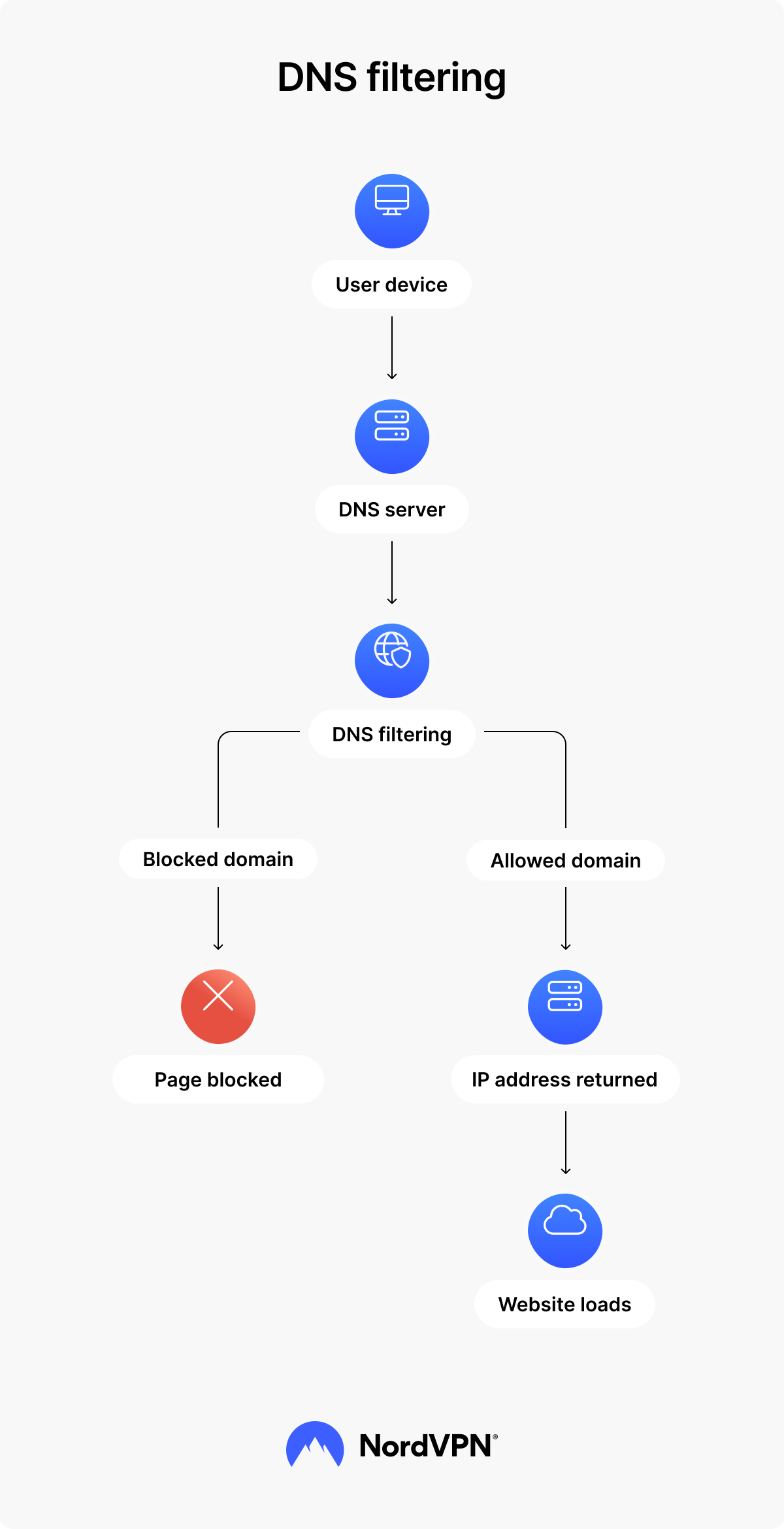
DNS filtering works during the DNS lookup process, before your browser connects to a website. When you enter a web address, your device sends a DNS query to find the IP address associated with that domain.
A DNS filter checks the requested domain against security rules, filtering lists, and reputation data — information about whether a domain has been associated with suspicious or harmful activity. If the domain is allowed, the DNS server returns its IP address, and the connection continues. If the domain is blocked, your device does not receive a usable address, preventing the website from loading.
Blocking by domain vs. by IP address
DNS filtering can block access based on either a domain name or an IP address. Domain-based filtering prevents the DNS server from resolving a specific domain, so your device never receives the address needed to connect to it.
IP-based filtering works slightly differently. The DNS lookup may identify the destination address, but the filter can withhold it if that IP address appears on a blocklist. In both cases, the connection is stopped before your browser retrieves the website.
Blocklists and allowlists
DNS filtering commonly relies on blocklists and allowlists to determine which domains you can access. A blocklist contains domains known or classified as harmful or unwanted, such as websites associated with phishing or malware. When a requested domain matches an entry on the list, the DNS filter blocks it.
An allowlist takes the opposite approach by permitting access only to approved domains. These lists may come from security vendors, threat intelligence sources that track known cyberthreats, community-maintained databases, or automated detection systems, and can be updated as new threats are identified.
DNS filtering vs. web filtering vs. URL filtering
The main difference between DNS filtering, URL filtering, and web filtering is when the filtering happens and how much information it examines. DNS filtering acts earliest, during the DNS lookup, and generally makes decisions based on domains or IP addresses.
URL filtering can target individual pages, while web filtering is a broader term that may also consider page content, keywords, and content categories. Here’s how DNS filtering, URL filtering, and web filtering compare:
| DNS filtering | URL filtering | Web filtering | |
|---|---|---|---|
When it acts | During the DNS lookup, before connecting to the website | When a specific URL is requested | Depends on the filtering method |
What it checks | Domain names or IP addresses | The full URL, including the path | Domains, URLs, keywords, or page content |
Granularity | Usually blocks or allows an entire domain | Can block individual pages within a website | Can apply more detailed rules based on content or category |
Performance impact | Typically low because the check happens during DNS resolution | Can be higher because more information needs to be evaluated | Varies and may be higher when page content is inspected |
Best suited for | Fast, broad filtering across websites | More precise control over specific pages | Networks that require detailed content or access policies |
For example, DNS filtering might block “example.com” entirely if the domain is considered unsafe. URL filtering, on the other hand, could allow the website itself while blocking a specific page, such as “example.com/download”. Web filtering can go further by applying rules based on the type of content being accessed.
DNS filtering at home, in schools, and at work
At home, you can use DNS filtering to control which websites are accessible across your network. DNS filtering for families can work alongside parental controls to block specific websites, restrict adult or gambling content, block unwanted ads, and prevent access to known malicious domains on connected devices.
In schools, DNS filtering can help restrict inappropriate or unsafe websites and support age-appropriate internet access. DNS filtering for schools may rely heavily on allowlists and category-based rules to control which online resources students can access.
At work, organizations may use enterprise DNS filtering to block phishing, malware, and other risky domains across their networks while enforcing internet-use policies. Managed DNS filtering services and other DNS filtering solutions can apply these rules across multiple users and devices.
Whether it’s used at homes, schools, or workplaces, DNS filtering works at the network level to protect multiple connected devices at once. On personal devices, it can also be built into security apps and VPN services, so the protection follows you when you connect from different networks.
Benefits of NordVPN’s DNS filtering
NordVPN delivers DNS filtering through real-time protection. When you’re connected to a NordVPN server, your DNS queries are routed through its DNS servers, which can block requests to domains that are unsafe or associated with unwanted ads and trackers. Using NordVPN’s DNS filtering can provide several benefits while you browse:
- Malicious site blocking. Malicious websites can expose you to threats such as ransomware, spyware, trojans, and keyloggers. NordVPN’s DNS filtering reduces your exposure to these threats by blocking domains known to host malware and other malicious content before you connect to them.
- Phishing protection. If a domain is known to be associated with a phishing attack, DNS filtering can block your device from connecting to it. This helps you avoid phishing websites designed to steal passwords, payment details, and other sensitive information.
- Ad blocking. DNS filtering blocks domains used to serve unwanted ads, including potentially malicious ads that could redirect you to unsafe websites. This means you see fewer intrusive ads while you browse.
- Faster page loading. Blocking ads means your browser has less content to load when you visit a website. With fewer pop-ups, banners, and other ads loading in the background, you may get to the content you came for more quickly.
How to enable NordVPN’s DNS filtering
DNS filtering works through NordVPN’s real-time protection and requires an active VPN connection. To enable it:
- 1. Open NordVPN. Launch the NordVPN app, log in, and connect to a VPN server.
- 2. Open the “Protect” tab. Select the shield icon.
- 3. Turn on real-time protection. Select “Turn on” to enable real-time protection.
Going beyond DNS filtering
DNS filtering provides a lightweight first layer of protection by blocking domains already identified as unsafe before your device connects to them. NordVPN’s next-gen antivirus adds another layer by analyzing websites and downloads, helping detect malicious websites, scam pages, and malicious downloads.
Online security starts with a click.
Stay safe with the world’s leading VPN
