What is the hijacked session alert feature?
Hijacked session alert is a NordVPN Threat Protection Pro™ subfeature that constantly checks and alerts users when their login session cookies come up for sale on the dark web (and other known data breach repositories). These cookies often contain your login information (such as email and password) used on specific websites, which makes protecting them imperative to your cybersecurity.
Malicious actors are aware of these cookies. They can use various techniques, such as fake websites (phishing) or SQL injection attacks, to quietly steal them. Once obtained, cybercriminals can use these cookies to bypass two-factor authentication and access your accounts or sell your login credentials on the dark web.
Needless to say, such exposure can cause significant financial trouble. That’s why you should consider using the hijacked session alert setting, which performs dark web monitoring and alerts you immediately upon detecting leaked session cookies.
How does the hijacked session alert work?
The hijacked session alert works by monitoring the user’s cookies during the current browsing session for some of the most popular websites. While it may sound intrusive, the setting is designed to provide as much safety and anonymity as possible.
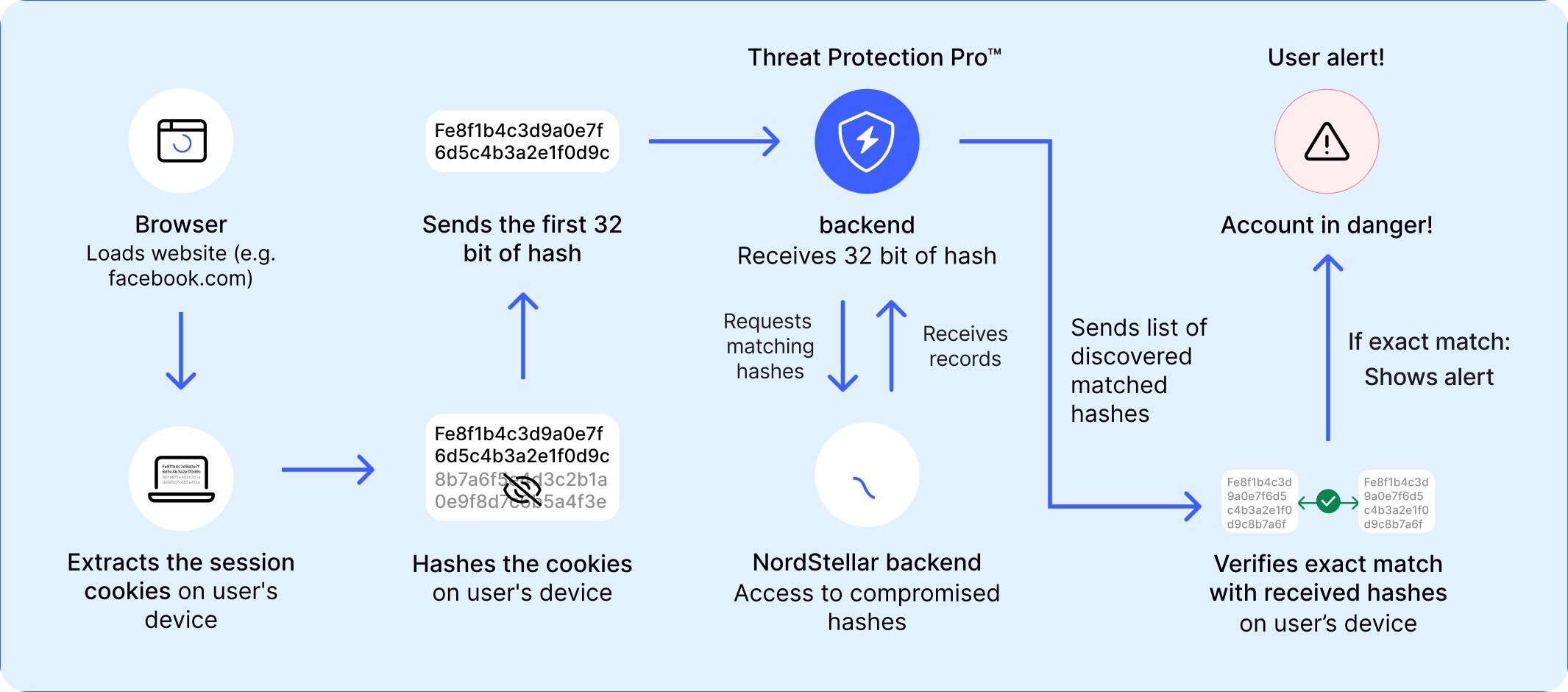
The hijacked session alert operates by checking if a specific browser window uses an authentication cookie. It then hashes (encrypts) its name, domain, and part of its value and sends the modified cookie to the backend to run a scan. After the scan, the feature may return multiple matches, which it checks on the user’s device (full session-cookie information never leaves the user's device). If it detects a cookie leak, the hijacked session alert warns the user in the browser tab from which the cookie was stolen. In addition, it advises victims to log out of all the web platforms and to change passwords in all compromised accounts immediately.
The hijacked session alert is powered by NordStellar, a cyber threat intelligence information-gathering tool that monitors the dark web 24/7 and hosts a database of 130 billion cookies from the darknet. That allows the feature to safely scan and detect leaked cookies without requiring the user’s sensitive information (such as email address or password).
Key features of the hijacked session alert
As a subfeature, the hijacked session alert has specific benefits that make it a must-have part of your online hygiene. These benefits include:
- Real-time monitoring. With the hijacked session alert on, Threat Protection Pro™ will scan the dark web and other repositories for cookies that match the ones currently used by your browser.
- Instant alert system. If the hijacked session alert detects cookie theft, you’ll get a notification, prompting you to log out of the accounts currently in use and change your passwords.
- Guided response plan. Finding out that your sensitive data might’ve been stolen is never a pleasant experience. To avoid chaos and help you gain control of the situation, the hijacked session alert will provide a step-by-step plan to mitigate the risk of data breach as soon as possible.
- Privacy protection. Threat Protection Pro™ uses strict privacy controls, so you’ll be sure that your session cookies and personal data are safe while the hijacked session alert monitors your browsing cookies. The feature protects user sessions without exposing cookie data by using a partial, hashed cookie version to scan for leaks. That is just enough to verify authenticity without revealing sensitive information.
How to turn on the hijacked session alert feature
To turn on the hijacked session alert, you need to check whether “Advanced browsing protection” is on in your NordVPN app’s Threat Protection Pro™ settings. Since the hijacked session alert is part of advanced browsing protection, it turns on automatically when you toggle the feature on.
To toggle the hijacked session alert feature on, follow these steps:
- 1.Open your NordVPN app.
- 2.Navigate to the “Threat Protection Pro™” section (the shield with a lightning icon on the left side).
- 3.Click “Advanced browsing protection.”
- 4.And then “Hijacked session alert.” Toggle the slide to turn the feature on/off.
What to do if you get a hijacked session alert
If you get a hijacked session alert notification, the first thing you should do is change the password immediately on the related website and log out of it from all other devices. Malicious actors tend to act fast, so if you want to prevent data breaches and sensitive info leaks, speed is of the essence.
Additionally, we highly recommend setting up two-factor authentication on potentially compromised websites to add an extra layer of security in case of unauthorized login. But keep in mind that if malicious actors manage to get your session cookie, they can access your account without additional verification. In addition, make sure to keep an eye on your bank accounts and other sensitive platforms for suspicious activity and report any unauthorized changes to the responsible authorities (such as your bank) immediately.
What are the dangers of a stolen session?
The dangers of a stolen session can range from data breaches to identity theft. With a stolen session cookie, cybercriminals can stay logged in to your accounts by simply copying the cookie into their own browser. They can also choose to sell your cookies (along with your email address and password) on the dark web, or in the worst case scenario, try to hijack your bank accounts, leading to financial loss on your part. Here’s an in depth description of how the stolen session cookie can be exploited.
Unauthorized access to sensitive information
A hijacked session cookie is a master-key to your online accounts. Malicious actors can use it to commit:
- Data theft. Upon stealing your browsing session data, malicious actors may try and access your accounts on the pages you browsed. Once logged in they can either try to steal additional data (perhaps a credit card number from an online shop account or a mobile phone number from your social media account) or proceed with the data they currently have (for example, try to log in to your bank account).
- Identity theft. With enough data on hand, malicious actors may try to gain access to other services that you use (typically, a bank account). If they’re successful, they can pretend to be you and try to wire money, commit credit card fraud, and otherwise crash your credit score, leading to significant financial troubles.
Unauthorized actions
A hijacked session cookie often provides unrestricted access to the victim’s online accounts. Which, in turn, can lead to:
- Privilege escalation. With access to your accounts, malicious actors may try to take it one step further and gain even more control over your account and personal data (for example, go for administrator’s permissions) — sometimes without you ever noticing it.
- Account manipulation. With complete control over your account, the hackers might try to launch unauthorized purchases, transfer money from your funds, or otherwise manipulate the information on your account (for example to pose as you to try and scam your friends).
Financial Loss
Hijacked cookies can quickly lead to substantial financial loss, typically in the shape of:
- Unauthorized transactions. This is probably the most serious threat of any cyberattack. Once hackers obtain your sensitive data, it can make it easier for them to access your bank account. And it’s not only bank accounts — hackers might use your session info to break into your payment apps and wire money to their own accounts.
- Fraudulent purchases. Financial loss can also come in the way of unauthorized or fraudulent purchases. If your session got hijacked while you were browsing an online store account, hackers are free to use that account to purchase whatever they can or want.
Reputation Damage
Believe it or not, suffering cookie theft can also result in reputational damage, particularly:
- Corporate damage. Hackers love nothing more than shining a light on big corporate entities' cybersecurity. Even such small errors as hijacked browsing sessions may cost the company significant financial outlay in the shape of stolen money, potential lawsuits, and damage mitigation.
- Personal reputation. While a hijacked browsing session may expose a company to significant financial damage, it can’t be compared to the reputational damage and loss of trust the company will endure in the eyes of investors, shareholders, and the public. Experiencing a successful cybercrime attempt can cause long-term harm in stock prices and public trust.
Legal Consequences
Along with reputational damage, hijacked browser session and cookie theft can also result in:
- Legal liability. From a corporate perspective, a hijacked browser session (or any cyberattack for that matter) is a gateway to legal headaches. Companies abide by and operate according to laws such as the GDPR or CCPA that require businesses to protect customer data. Failure to comply with these laws can expose companies to legal repercussions.
- Regulatory fines. Legal repercussions often include fines for failing to ensure the safety of sensitive data. While fines can be relatively small (or partly covered by cyber protection), compared to overall financial loss after a cyberattack, it’s still an insult to injury.
How to prevent browsing sessions from being hijacked
To prevent the hijacking of browsing sessions requires vigilance, a quick reaction, and Threat Protection Pro™. Okay, the last one may not be necessary, but it certainly improves your chances of quickly noticing an exposed browsing cookie. In addition to these tips, you can also use extra tools, such as:
- HTTPS. While technically, HTTPS isn’t something you can download or install in your web browser (since it’s an internet protocol that some websites use), you can still safeguard your device by surfing websites that use it. You can easily recognise the websites that use HTTPS by checking out the left side of your URL bar — if there’s a padlock icon, it means the website employs HTTPS. However, be aware that hackers, scammers, and phishers can also use HTTPS to make their malicious sites appear legitimate, so always stay cautious even when you see the padlock icon.
- A VPN. Yet another great tool to protect your online privacy — using a VPN will allow you browse the web via encrypted connections, adding to your online security. A VPN can also be helpful against some types of session hijacking, particularly those including man-in-the-middle (MITM) attacks. And, if you choose NordVPN, you’ll get even more benefits, including Threat Protection Pro™ and all its features.
- Logging off of websites. While a bit of a nuisance, logging off of your browser sessions (for example, signing off of your social media account after browsing) can limit the chances of cookie theft. Logging off of the website typically gets the session cookie invalidated on the server side, making stolen cookies useless even if intercepted.
Online security starts with a click.
Stay safe with the world’s leading VPN
