Does a VPN drain your battery? The short answer
Yes, a VPN uses a small amount of extra battery, but the difference is imperceptible in everyday use. In West Coast Labs’ May 2026 evaluation, running NordVPN continuously for 24 hours added 1.4% to daily battery use on Android devices and 1.8% on iOS devices.
The popular belief that a VPN kills your phone battery doesn’t hold up against those figures. Does a VPN drain battery enough to justify turning it off? The measurements say no. Over a month, the extra drain from NordVPN is the equivalent of charging a phone about half a day earlier, so NordVPN can stay on all day.
How we tested VPN battery drain
NordVPN tested VPN battery drain by measuring how much battery two Android smartphones used during 5 hours of idle time, a 2.5-hour audio stream, and a 1-hour video stream. Each phone was first tested with the VPN turned off, then with the VPN connected to the same server in Germany using the NordLynx, OpenVPN TCP, and OpenVPN UDP VPN protocols.
Each test was repeated three times on both Wi-Fi and 4G, for a total of 144 smartphone tests. We dropped the 5G tests because the phones kept switching between 4G and 5G, which made results vary too much between runs. A Windows laptop was tested separately on Wi-Fi. NordVPN used the following devices:
- Google Pixel 6, Android 13.
- Samsung Galaxy S22, Android 14.
- Lenovo ThinkPad L14 G2, Windows 11 Pro.
NordVPN’s tests used three devices and one server location, so they represent a limited testing scenario. Battery drain also depends on factors such as network conditions and device age. Another device, VPN, or usage pattern could produce different figures.
None of NordVPN’s tests included an iPhone. To cover iOS, we turned to West Coast Labs, which ran an independent evaluation of the NordVPN app on six Android and iOS devices in May 2026 across four test series. NordVPN passed all four.
The idle battery drain test
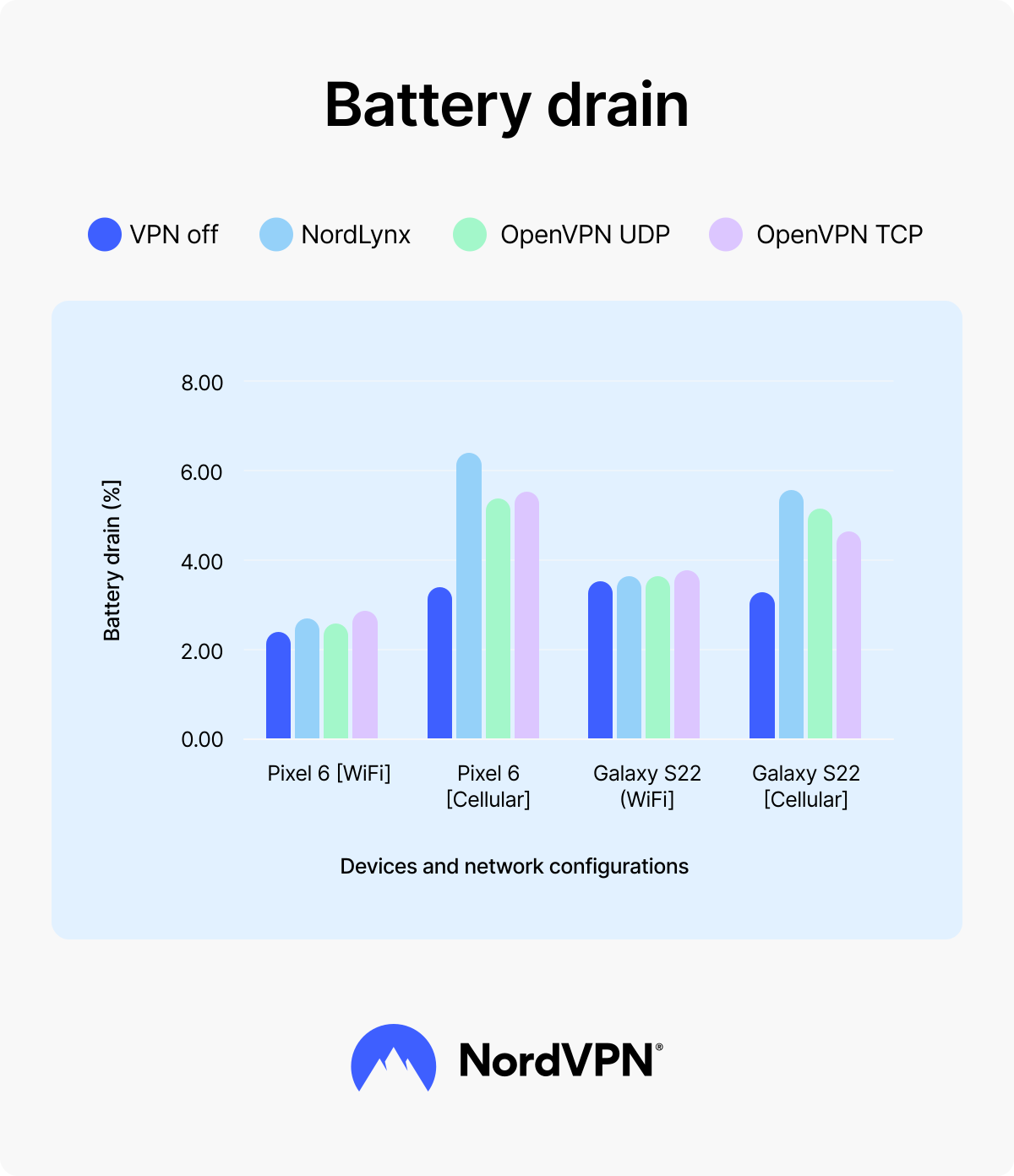
In NordVPN’s idle test, a VPN added far more battery drain on 4G than on Wi-Fi. Both phones were fully charged and then left idle for five hours.
On Wi-Fi, NordLynx and OpenVPN UDP added about a quarter of a percentage point of drain compared with no VPN. On 4G, the same two protocols added between 1.67 and 3.08 percentage points. NordLynx added the most drain of the three protocols on 4G in this test, with 3.08 extra percentage points on the Pixel 6 and 2.22 on the Galaxy S22.
Without a VPN, the two phones showed opposite results. The Google Pixel 6 used more battery on 4G (3.24%) than on Wi-Fi (2.19%), while the Samsung Galaxy S22 used slightly more on Wi-Fi (3.37%) than on 4G (3.21%).
| | VPN off | NordLynx | OpenVPN UDP | OpenVPN TCP |
|---|---|---|---|---|
Google Pixel 6 (4G) | 3.24% | 6.32% (+3.08) | 4.91% (+1.67) | 5.01% (+1.77) |
Samsung Galaxy S22 (4G) | 3.21% | 5.43% (+2.22) | 5.05% (+1.84) | 4.72% (+1.51) |
Google Pixel 6 (Wi-Fi) | 2.19% | 2.44% (+0.25) | 2.42% (+0.23) | 2.61% (+0.42) |
Samsung Galaxy S22 (Wi-Fi) | 3.37% | 3.63% (+0.26) | 3.63% (+0.26) | 5.05% (+1.68) |
Battery drain (%) over 5 hours
The audio test
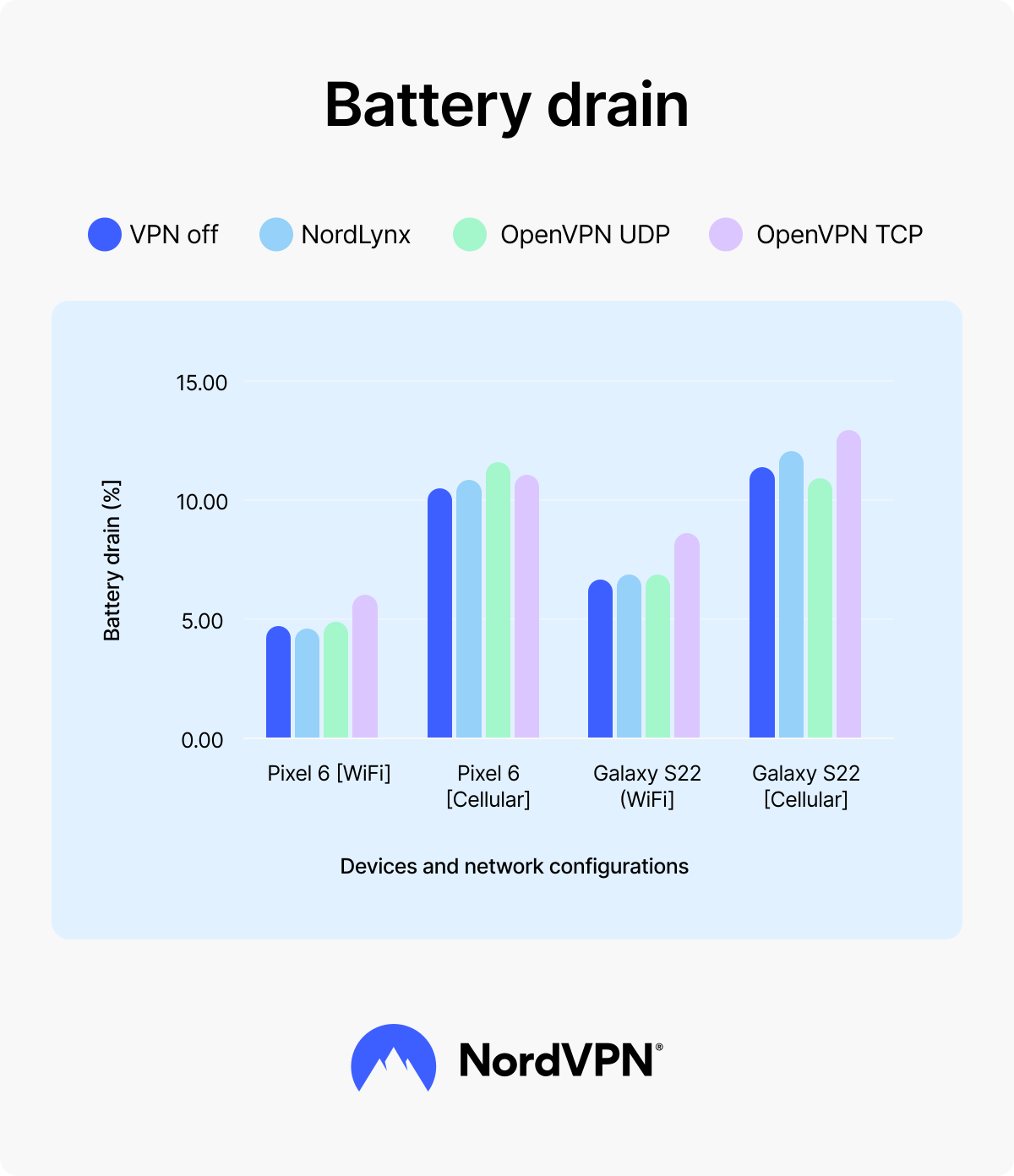
During a 2.5-hour audio stream, NordLynx and OpenVPN UDP added less than 1 percentage point of battery drain in every scenario NordVPN tested, except for OpenVPN UDP on the Pixel 6 over 4G. Both phones were fully charged before each test.
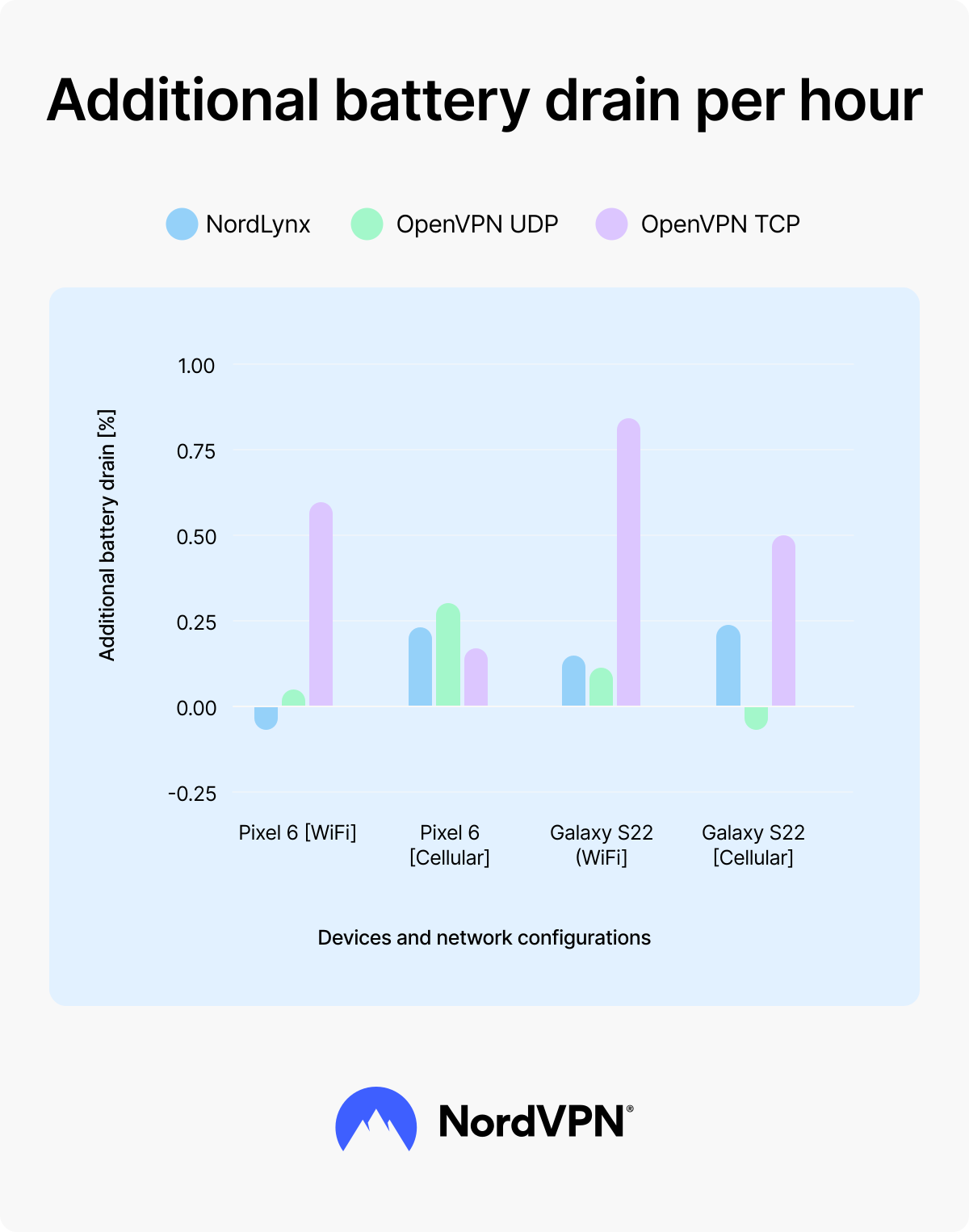
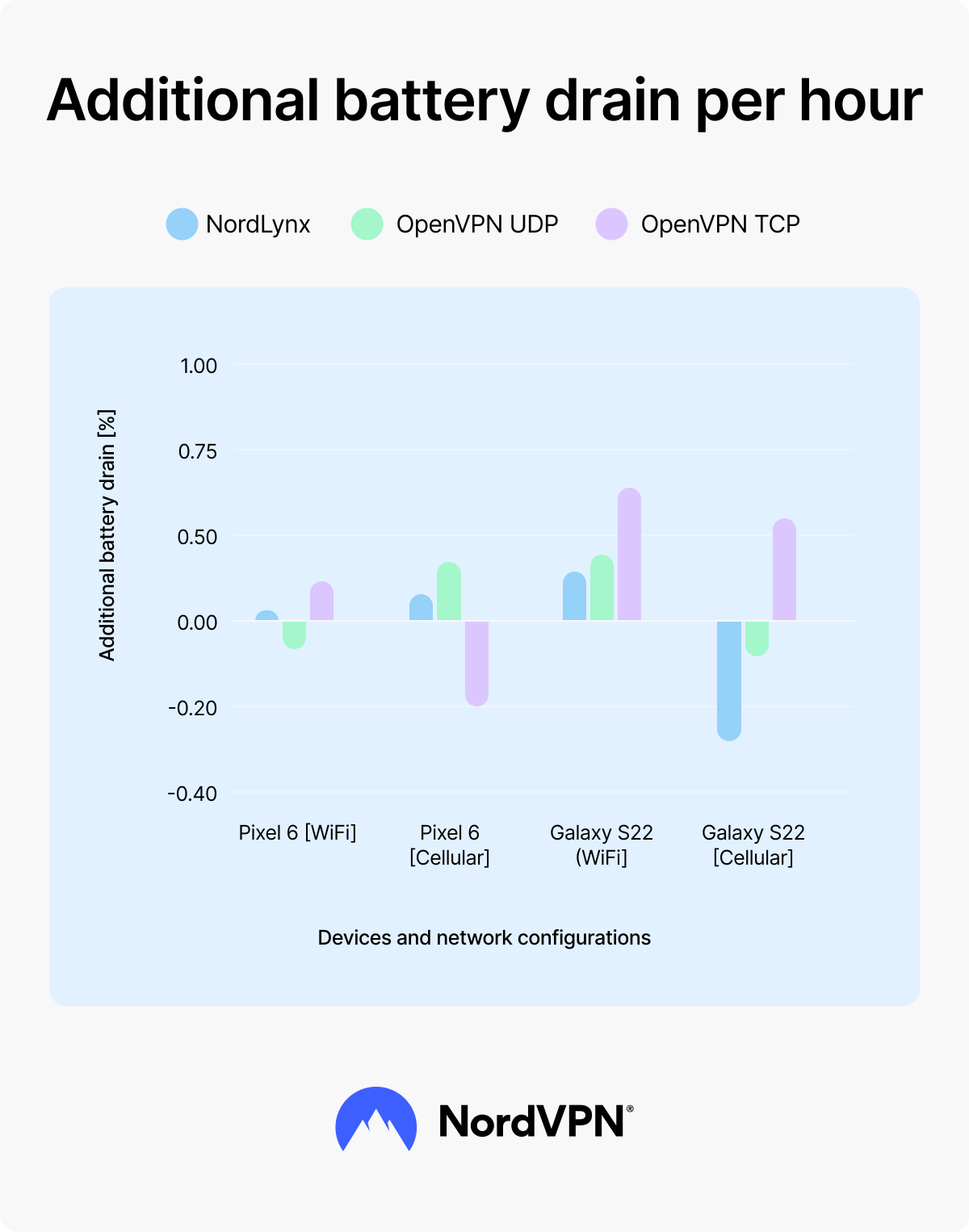
In two scenarios, the device used slightly less battery with the VPN connected than with the VPN turned off. OpenVPN UDP used 0.14 percentage points less on the Samsung Galaxy S22 over 4G, and NordLynx used 0.13 percentage points less on the Google Pixel 6 over Wi-Fi.
OpenVPN TCP drained the most battery in three of the four scenarios, adding as much as 2.09 percentage points on the Galaxy S22 over Wi-Fi. The only exception was the Pixel 6 on 4G, where OpenVPN UDP drained the most.
| | VPN off | NordLynx | OpenVPN UDP | OpenVPN TCP |
|---|---|---|---|---|
Google Pixel 6 (4G) | 10.41% | 10.98% (+0.57) | 11.15% (+0.74) | 10.82% (+0.41) |
Samsung Galaxy S22 (4G) | 11.75% | 12.35% (+0.60) | 11.61% (-0.14) | 13.04% (+1.28) |
Google Pixel 6 (Wi-Fi) | 4.80% | 4.66% (-0.13) | 4.91% (+0.11) | 6.27% (+1.48) |
Samsung Galaxy S22 (Wi-Fi) | 6.42% | 6.77% (+0.35) | 6.72% (+0.30) | 8.51% (+2.09) |
Battery drain (%) after 2.5 hours
The YouTube test
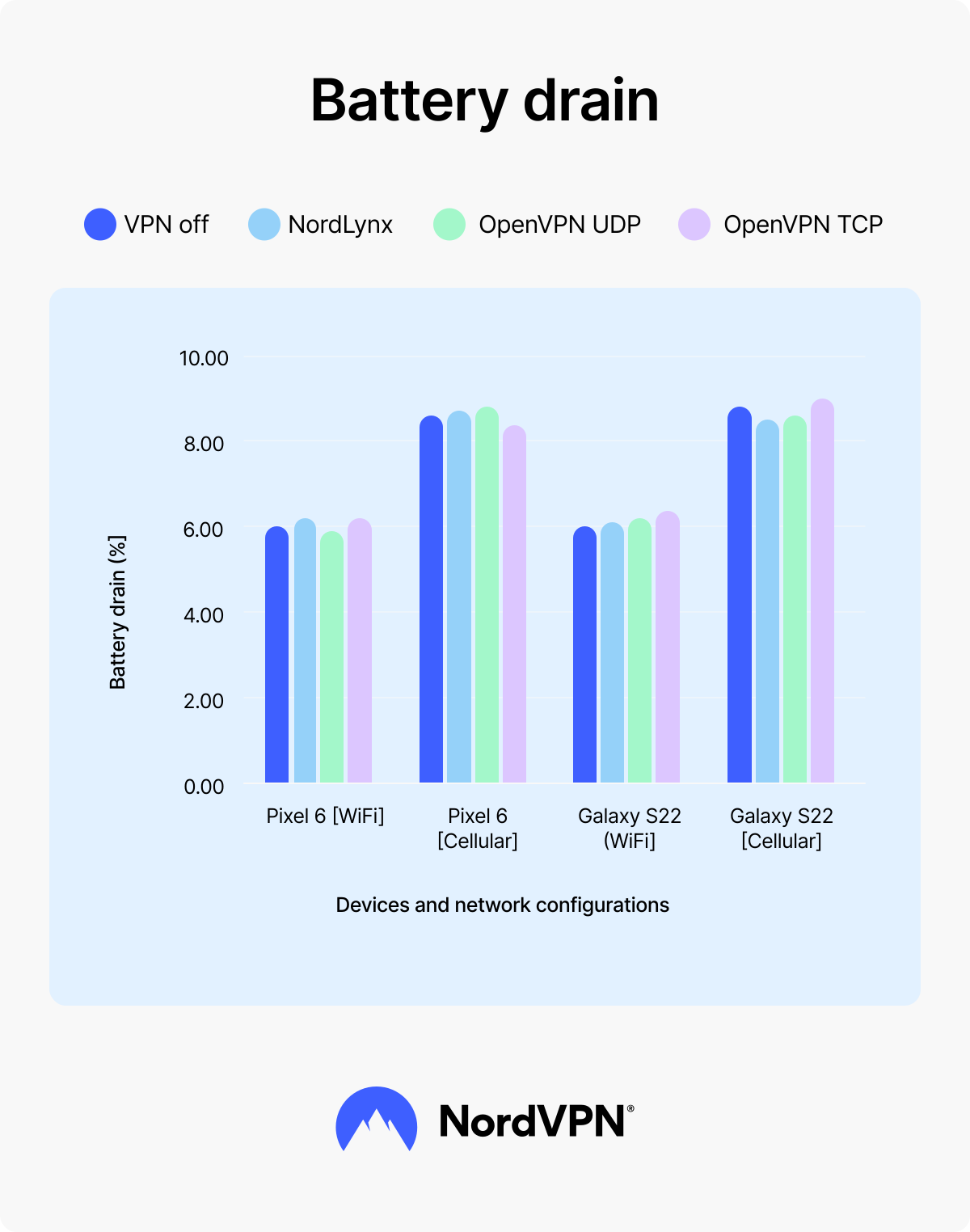
While a video played for an hour, the largest difference NordVPN measured between using a VPN and not using one was 0.29 percentage points. The Samsung Galaxy S22 on Wi-Fi used 6.09% of its battery with the VPN disconnected and 6.38% with OpenVPN TCP.
In four of the 12 VPN results, the phone used slightly less battery with the VPN on than with it off. Both phones used about 9% of their battery on 4G and about 6% on Wi-Fi, so the network type made a much bigger difference than the VPN did.
| | VPN off | NordLynx | OpenVPN UDP | OpenVPN TCP |
|---|---|---|---|---|
Google Pixel 6 (4G) | 8.78% | 8.83% (+0.05) | 8.89% (+0.11) | 8.57% (-0.21) |
Samsung Galaxy S22 (4G) | 9.08% | 8.82% (-0.26) | 9.01% (-0.07) | 9.31% (+0.23) |
Google Pixel 6 (Wi-Fi) | 6% | 6.01% (+0.01) | 5.92% (-0.08) | 6.08% (+0.08) |
Samsung Galaxy S22 (Wi-Fi) | 6.09% | 6.17% (+0.08) | 6.21% (+0.12) | 6.38% (+0.29) |
Battery drain (%) after 1 hour
What did independent testing find about NordVPN’s battery impact?
West Coast Labs found that NordVPN has no significant effect on battery life, with a real-world daily impact of just 1.4% on Android and 1.8% on iOS. The independent evaluation took place in May 2026 and tested the NordVPN app on six devices — the Samsung Galaxy S24, Samsung Galaxy S25 Ultra, Google Pixel 9, iPhone 15, iPhone 16, and the latest iPad. NordVPN passed all four test series, and West Coast Labs described the difference in everyday use as imperceptible.
To measure real power use, West Coast Labs connected hardware instruments directly to each device and recorded the current leaving the battery. West Coast Labs also recorded what each phone’s own battery screen reported, to compare the operating system’s estimate with the measured draw. Most of the testing was performed on Wi-Fi, and West Coast Labs notes that people who spend more of their day on mobile data may see figures toward the higher end of the ranges in the table below.
Streaming figures compare the same one-hour stream with and without NordVPN. The iOS column includes two iPhones and an iPad running iPadOS.
A detailed breakdown of each test series is available in NordVPN’s summary of the West Coast Labs report and in the actual full report opens in a new tab.
| Test series | What West Coast Labs tested | Android | iOS | Result |
|---|---|---|---|---|
24-hour simulation | Added daily battery use with NordVPN on all day | 1.4% | 1.8% | Pass |
Battery screen vs. actual draw | Extra power used during a 1-hour stream with NordVPN on | 1.6–1.9% | 1.9–2.2% | Pass |
Battery screen vs. actual draw | Battery used per hour while idle with NordVPN connected | Under 0.5% | Under 0.5% | Pass |
Commuter simulation | Extra battery used over a 2-hour commute with about 14 network switches | 5.1% | 6.8% | Pass |
Protocol benchmark | Battery saved by NordLynx compared with OpenVPN UDP | 31% less | 24% less | Pass |
Why a VPN uses battery life
A VPN uses battery life because a phone has to encrypt data, keep a secure connection open, and send traffic through a remote VPN server. Each task matches a step in how a VPN works, and testing shows each task has a small, measurable effect on battery life.
- Encryption processing. A VPN encrypts outgoing data and decrypts incoming data, and the phone’s processor does that work. In West Coast Labs’ May 2026 protocol benchmark, NordLynx kept CPU use at about 6% on an Android phone during a 10 Mbps download, compared with 14.8% for OpenVPN UDP.
- Connection maintenance. A VPN app keeps the encrypted tunnel open in the background by sending small keepalive signals to the VPN server. With NordVPN connected and the screen off, West Coast Labs measured less than 0.5% of battery capacity used per hour on both Android and iOS.
- Network routing. All traffic travels through a VPN server before reaching its destination, which adds network activity. On mobile data, the extra activity can keep a phone’s cellular radio working slightly longer, a pattern consistent with NordVPN’s idle test, where the VPN added more drain on 4G than on Wi-Fi.
The VPN protocol determines how much of this work a phone has to do. NordLynx, NordVPN’s proprietary implementation of the WireGuard® protocol, runs on a much smaller code base than OpenVPN and sends keepalive signals only when needed. OpenVPN keeps up a constant signaling schedule. In West Coast Labs’ tests, NordLynx used 31% less battery than OpenVPN UDP on Android and 24% less on iOS.
Newer phone processors also include dedicated hardware for AES encryption, which lowers the cost of encrypting data with protocols such as OpenVPN and IKEv2. NordLynx uses a different cipher, ChaCha20, which was designed to run efficiently on standard processors without that hardware support.
Does a VPN drain your computer battery?
A VPN has very little effect on laptop battery life. In NordVPN’s tests on a Lenovo ThinkPad L14 G2, NordLynx used at most 1 percentage point more battery than when the VPN was turned off across three everyday tasks.
NordVPN tested the laptop on Wi-Fi only, since it has no cellular connection. The three tests left the laptop idle for two hours, played a YouTube video for one hour, and covered two hours of writing in Google Docs with some web browsing. The idle and video tests were repeated three times, while the writing test was run once with each VPN protocol. Battery readings were recorded in whole percentage points, so differences smaller than 1 point don’t show up in the results.
NordLynx matched the no-VPN result in the idle and video tests and added 1 percentage point during writing. Both OpenVPN protocols used more battery in every test. The writing test produced the largest figures of all — OpenVPN UDP added 7 percentage points and OpenVPN TCP added 5.
| | VPN off | NordLynx | OpenVPN UDP | OpenVPN TCP |
|---|---|---|---|---|
The idle battery test | 1% | 1% | 2% | 2% |
The YouTube test | 23% | 23% | 25% | 26% |
The writing test | 32% | 33% | 39% | 37% |
Lenovo ThinkPad battery drain test results
On laptops, the impact NordVPN has on battery life is nearly immeasurable. Lowering screen brightness, for example, saves far more battery than turning the VPN off, because the display is one of the largest power draws on most laptops. But there’s also a way you can run a VPN without it using any of the laptop’s processing power. You can set up a VPN on your router, which then encrypts traffic for every device connected to it at home.
Why a VPN might drain your battery faster
Every VPN can slow your connection to some degree, but the best VPNs keep the difference small enough that you’re unlikely to notice it. Battery use works much the same way. Every app uses some power, VPN apps included, but a well-optimized VPN keeps that extra battery use to a minimum.
NordVPN’s tests and West Coast Labs’ evaluation both found NordVPN’s effect on battery to be small, so if your device’s battery discharges noticeably faster than it used to, the culprit is probably not the VPN. At least seven factors can make a device work harder:
- Encryption. A VPN needs resources to encrypt and decrypt data, but the extra work translates to minimal differences in battery drain, even when a lot of data is involved, such as during video streaming. In NordVPN’s 1-hour video test, the largest difference with a VPN on was 0.29 percentage points.
- Weak signal. When a cellular signal is weak, a phone increases its radio power to stay connected, which uses more battery whether a VPN is turned on or not.
- Distant VPN servers. Connecting to a VPN server far from your location adds distance to every request, which can keep the device’s network connection active for longer and use more battery in the process. With NordVPN, you can just tap or click the blue “Secure my connection” button on the home screen — it automatically picks a nearby server for you.
- Apps active in the background. Some apps keep running even after you close them, and a stuck background process can chew through your battery fast. Restarting the device usually clears it.
- Screen brightness. The display is one of the largest power draws on a phone or laptop. Lowering brightness helps on any device, and dark mode also reduces drain on devices with OLED screens.
- Malware. Malicious software can use processing power and drain a battery faster, particularly on Windows computers. As a preventive measure on Windows and macOS, you can use NordVPN, which is equipped with a next-generation antivirus* that scans downloaded files and quarantines or removes malicious files before they can run. And on Android and iOS, NordVPN helps protect against scams and phishing and blocks websites known to host malware.
- Battery age. A lithium-ion battery holds less charge with every charge cycle, so an older device typically drains faster even with the same apps and settings. When a battery has degraded significantly, replacing the battery or the device is the most effective fix.
* NordVPN’s next-gen antivirus is a comprehensive digital threat protection tool available for Windows and macOS. You can find more information in the next-gen antivirus whitepaper.
Why is my battery draining from 70% to 20% in 10 minutes?
A battery that drops from 70% to 20% in 10 minutes has an issue that can’t be pinned on the VPN. For context, in West Coast Labs’ testing, NordVPN used less than 0.5% of battery capacity per hour while idle. A 50-point drop in minutes points to a failing battery, a runaway background process, or malware. To find the cause:
- 1. Restart the device to stop any stuck background processes.
- 2. Read the battery health figure in the device’s battery settings.
- 3. Look through the battery usage screen for an app using far more power than usual.
- 4. Scan the device for signs of a malware infection.
If the battery health reading is low, the battery likely needs replacing.
How much battery does a VPN use compared to other phone activity?
A VPN running on NordLynx uses far less battery than the tasks most people spend their phone time on, such as watching videos or navigating with GPS.
| Activity | Approximate battery use | Source |
|---|---|---|
Screen at high brightness | High | General estimate |
Mobile gaming | High | General estimate |
GPS navigation | High | General estimate |
Video playback | About 6% per hour on Wi-Fi, about 9% on 4G | NordVPN’s tests |
Audio streaming | 4.8–6.4% over 2.5 hours on Wi-Fi, 10.4–11.8% on 4G | NordVPN’s tests |
Idle phone | 2.2–3.4% over 5 hours | NordVPN’s tests |
NordVPN turned on all day (NordLynx) | 1.4% on Android, 1.8% on iOS, across 24 hours | West Coast Labs, May 2026 |
Not all of these figures were measured under the same conditions, so the table is best read as a rough indication of scale. NordVPN’s figures come from tests with the VPN turned off. Rows marked “General estimate” were not tested by NordVPN or West Coast Labs.
Activity that keep the screen bright or the processor busy for long stretches account for most of a phone’s daily battery use. Running a VPN on a lightweight protocol like NordLynx adds little compared to that.
How to minimize VPN battery drain on your device
The best ways to reduce the extra battery a VPN uses are to switch to Wi-Fi when possible and use the NordLynx protocol. Those were the factors that made the biggest differences in testing. In order of impact:
- 1. Connect to trusted Wi-Fi networks. Cellular networks use more battery than Wi-Fi, with or without a VPN. When a Wi-Fi network you trust is in range, use it.
- 2. Use NordLynx. NordLynx is NordVPN’s default protocol, and West Coast Labs found it used less battery than NordWhisper and OpenVPN in its protocol benchmark. If you’ve switched away from it, going back can help your battery last longer.
- 3. Connect to a nearby server. A server close to your physical location keeps the route your data travels short. Unless you need a specific location, a nearby server is the most battery-friendly choice.
- 4. On Android devices, allow NordVPN unrestricted battery use. Android’s battery saver can close the NordVPN app in the background, and every restart of the app forces NordVPN to rebuild its encrypted connection. In West Coast Labs’ testing, rebuilding the connection was the point where VPN battery use peaked. To change the setting, open your phone’s settings, go to “Apps,” select NordVPN, and set its battery usage to “Unrestricted.” Menu names vary by phone manufacturer.
- 5. Set up a VPN on your router. A VPN uses resources to encrypt and decrypt your data traveling through the internet. If you employ your router to perform these tasks, your mobile device will use less battery.
- 6. Use split tunneling. Not all apps on your device need a VPN connection. If you feel like leaving a VPN on all the time drains your device’s battery too much, you can use split tunneling to choose which apps use the VPN connection and which don’t.
How to check VPN battery usage on an iPhone and Android
iPhones and Android devices both list battery use by app in the “Battery” section of the settings, where NordVPN appears alongside your other apps. Reading that list correctly matters, though, because phones assign more battery to a VPN than it actually uses.
On an iPhone:
- 1. Open “Settings.”
- 2. Tap “Battery.”
- 3. Scroll down to the per-app battery usage list.
- 4. Tap “All battery usage.”
- 5. Find NordVPN in the “Battery usage by app” list.
- 6. Tap NordVPN to see its share of battery use.
On an Android phone (the exact path may differ depending on your phone’s make and model):
- 1. Open Settings.
- 2. Scroll down to “Device care.”
- 3. Tap “Battery.”
- 4. Tap “View details.”
- 5. Find NordVPN in the list of apps.
- 6. Tap NordVPN to see its share of battery use.
Does NordVPN drain your phone’s battery?
NordVPN has a small effect on how long a charge lasts and no effect on a battery’s long-term health. West Coast Labs found no significant impact on battery life when NordVPN ran around the clock on Android and iOS devices.
Does NordVPN drain battery capacity over time? No. Battery wear comes from age, charge cycles, and heat, and NordVPN affects battery health no differently from any other app running on the phone.
Every lithium-ion battery loses capacity over time. The chemical reactions that let it store and release energy gradually wear down the materials inside, and that wear can’t be reversed. It starts from the battery’s first charge and builds with every full charge cycle.
Heat speeds that process up. Apple recommends using an iPhone in ambient temperatures between 0°C and 35°C (32°F to 95°F). Note that leaving any phone in direct sun or a hot car can cause lasting damage.
Keeping a battery from sitting at 100% for long stretches slows wear as well. The iPhone 15 and later models offer an 80% charging limit in battery settings, and Samsung Galaxy phones have a similar option called “Protect battery.”
So should you keep your VPN on?
Yes, you can keep NordVPN on all day without it making much of a dent in your battery. Your screen and the apps you use account for most of the daily drain, and NordVPN’s share is small by comparison.
In return, NordVPN encrypts your internet traffic and changes your IP address on every network you join, so you get more online privacy and security wherever you connect. NordVPN also helps protect against online threats, offering a next-gen antivirus on computers and scam and phishing protection on phones. A percentage point or two of battery is a fair trade for that.
Online security starts with a click.
Stay safe with the world’s leading VPN