
What is OAuth 2.0 in cybersecurity?
OAuth 2.0 (Open Authorization 2.0, pronounced "oh-auth") is an authorization framework that allows a website, platform, or application to access resources hosted in another resource server or database on behalf of a user. It replaced OAuth 1.0 in 2012, being adopted as the industry standard for online authorization. OAuth 2.0 is designed for authorization. While it can be used with protocols like OpenID Connect, it’s not a token-based authentication protocol.
OAuth 2.0's capability to share client information without compromising client credentials has made it essential in modern cybersecurity practices. Previously, granting access meant giving up your login credentials to each website that needed to access your data. OAuth 2.0 eliminates the need to share user credentials, making the process more secure and streamlined.
How does OAuth 2.0 work?
You've likely encountered OAuth 2.0 in action even if this is the first time you've heard of it. If you've ever authorized an app to access your data from another app or used the "log in with your social media account" option, you've already used OAuth 2.0.
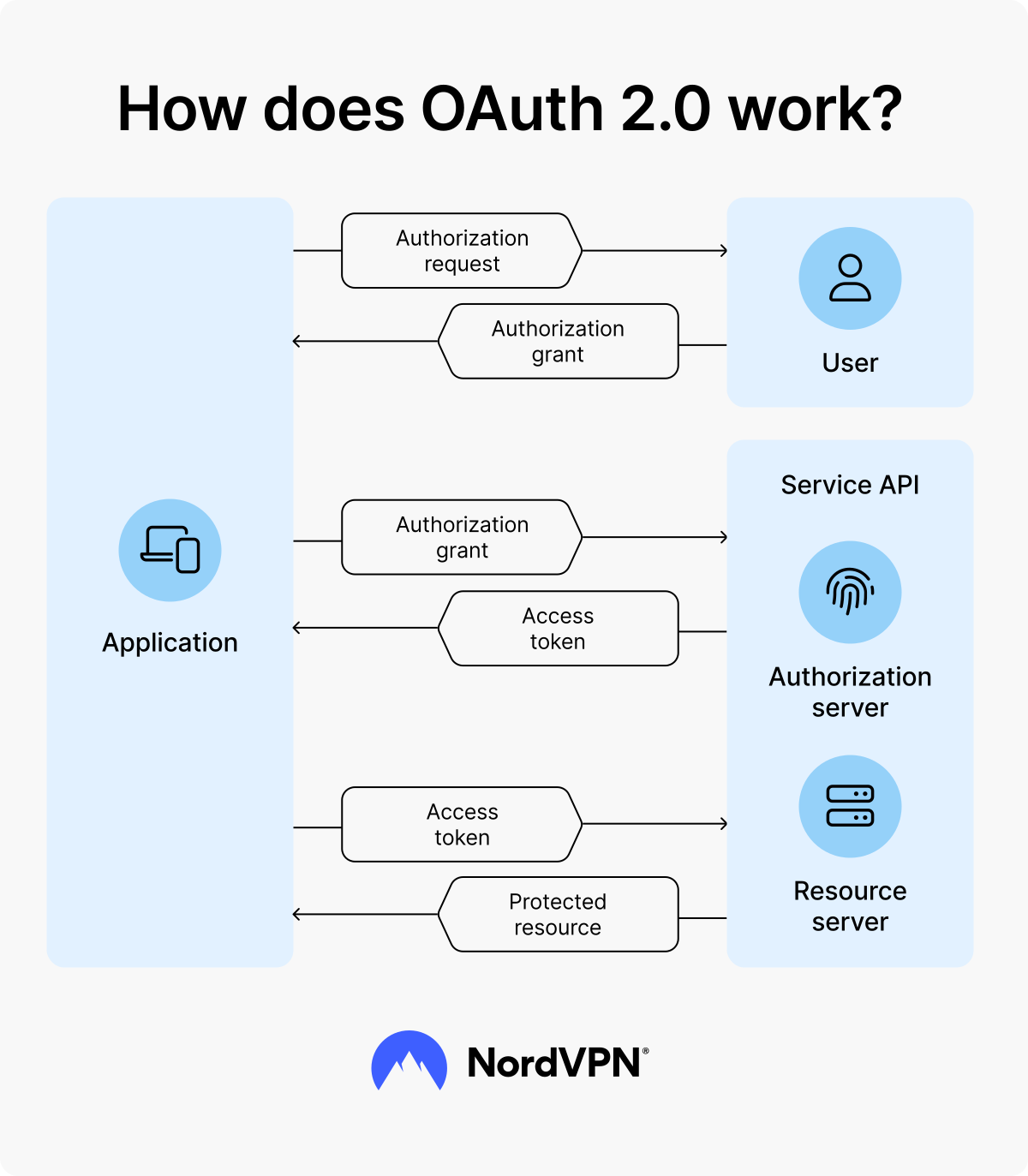
Let's break down a common scenario involving OAuth 2.0 processes, with Google as an example. Through OAuth 2.0, many sites typically allow you to log in or use their services once linked to your Google Account.
- 1.You (the resource owner) log in to a website (the client) via your Google account.
- 2.The website sends an authorization request to Google's authorization server, outlining the data that it's trying to access.
- 3.Google's authorization server prompts you to confirm your consent, defining the scope of data and actions the website is allowed to access.
- 4.You approve the client’s request via Google's authorization server, typically with an authorization code.
- 5.Once you consent, Google's authorization server sends an access token to the website, allowing it to access your information within Google's resource server.
- 6.Clients can also grant the website longer access to your data by requesting refresh tokens.
- 7.The website accesses the data it needs from Google's resource server, such as your name, profile photo, and other information you’ve authorized it to access from your Google account.
- 8.You can now log in to the website and use its services without giving it your username and password or creating an account.
This process only takes a few minutes, so it’s a significant improvement over the traditional method of signing up, creating a username and password, and entering other details.
Why is OAuth 2.0 important for protecting sensitive data?
OAuth 2.0 enables secure data sharing across services and websites without the need for repeated login processes. By relying on an authorization framework, you can use a token issued by one site to access the services of another.
Using OAuth 2.0 means you'll only have to enter your username and password once on one service, then authorize other services to access your data and use it to access other websites and services. This approach is convenient and helps minimize the risk of your credentials being compromised in the event of a hack or data breach.
Ideally, you'd have one website, service, or platform that contains your data, with other services accessing it via OAuth 2.0's access token system. This way, even if the other services are compromised, your data remains protected, as long as the main service is secure. The fewer sites that store your login credentials, the lower the risk of those credentials being stolen.
Key OAuth 2.0 components for securing online systems
Before diving into how OAuth 2.0 works, it’s important to familiarize yourself with a few key terms.
- Client: The application requesting your data, usually a website or service.
- Resource server: The service or API the client wants to access
- Resource owner: You, the user. The resource refers to your data or any information about you that the client needs from the resource server.
- Authorization server: The server that authorizes the client to access the resource owner's data from the resource server.
- Access token: This is a token given by the authorization server to the client, which allows them to access the information they need from the resource server.
- Refresh token: A special type of token given by the authorization server to a client alongside the access token, allowing the client to request new access tokens after the original expires.
These terms are integral to understanding OAuth 2.0 and its workflow, but you may already have encountered them in some form. We'll explore those potential scenarios shortly.
OAuth 2.0 scopes
Scopes define the actions a client can perform with the data it requests from the resource server. These actions can be as simple as using publicly available data (such as your name) or more complex actions like posting or interacting with services on your behalf. A client can only obtain permission for these actions once you give approval through the authorization server.
Access tokens vs. refresh tokens: Cybersecurity implications
Access tokens are central to OAuth 2.0's functionality. However, depending on the client’s needs, refresh tokens play an equally crucial role in managing data access. Access tokens are initially granted by an authorization server following your consent. Meanwhile, refresh tokens are used when the client needs continued access to your data after the initial access token has expired.
Refresh tokens enable clients to obtain new access tokens without further user interaction, provided they’re securely stored and managed. However, refresh tokens can only "re-issue" your initial permissions. Clients can't access more data or perform more actions outside of the scope you agreed to.
In terms of cybersecurity, it's crucial that the issuance of access tokens is carefully controlled and based on the resource owner’s consent. At the same time, refresh tokens may be issued to clients since they streamline the process of requesting, receiving, and interacting with users' data. These tokens enhance the user experience and contribute to a more secure ecosystem for information sharing since they reduce the need to repeatedly share sensitive credentials.
OAuth 2.0 grant types
When an authorization server asks for your consent to release your information to a client, it does so through a grant. OAuth 2.0 can use different types of grants to release an access token to a client, with the following being the most commonly used:
Authorization code grant: Stronger protection in cybersecurity
Authorization code grants are the most frequently used grant type in OAuth 2.0. With this grant type, after you consent, the authorization server issues a one-time authorization code to the client. The client then sends that code to the authorization server to obtain its access token.
Using an authorization code grant is generally considered more secure because the authorization code is exchanged server to server between the client and the authorization server, minimizing the risk of exposing sensitive data.
Client credentials grant: Machine-to-machine authentication
The client credentials grant type is used when the client is also the resource server, meaning it's requesting an access token to look for data already stored within itself. This grant type is commonly used in machine-to-machine (M2M) authentication since it doesn't require user interaction.
With a client credentials grant, you can also allow the client to access data from other resource servers you've previously approved or configured. As a result, you reduce the number of times you'll be asked to approve the client's requests for access.
Implicit grant: Speed over security
Implicit grants immediately give your client an access token after you consent. No authorization code is involved, and the client gets the access token fragment from the redirect URL sent from the authorization server.
While this flow is fast, it's significantly less secure since access tokens are exposed in the redirect URL and can be intercepted. This vulnerability can potentially allow unauthorized parties to access your data in the resource server. For this reason, this grant type is often avoided in favor of more secure alternatives.
Resource owner password credentials grant: Client logging in as user
The resource owner password credentials grant gives your login details directly to the client (your username and password). The client then submits your login details to the authorization server to obtain an access token.
Like implicit grants, most security experts don’t recommend using this grant type because it exposes your credentials. Essentially, your client is "logging in" to your resource server on your behalf to get your information instead of obtaining scope-limited access through the authorization server via a code.
What are the common cybersecurity risks and challenges with OAuth 2.0?
While convenient and secure, OAuth 2.0 isn't immune to vulnerabilities. The most common security risk associated with OAuth 2.0 (and most often exploited by cybercrimes) is improper implementation.
Key security risks and vulnerabilities include:
- Insecure storage of access tokens
- Interception of access tokens when using implicit grants
- Tampering with the redirect URL after authorization
- Incorrect scope validation, giving the client excessive access to your data
- Leakage of authorization codes and access tokens
These vulnerabilities highlight the importance of proper implementation to minimize potential risks.
Best practices for implementing OAuth 2.0 securely
Correct implementation significantly mitigates the risks and vulnerabilities associated with OAuth 2.0. While the specifics may vary depending on the websites or services involved, you can follow general best practices to ensure your OAuth 2.0 setup remains secure, such as the following:
Use the appropriate type of grants
Grants are crucial to ensuring access tokens are issued securely. However, if implemented incorrectly, they can also create friction in the user experience. The key to successful implementation is to understand how your users interact with and authorize your website or service. By selecting the right grant type, you can ensure secure access token issuance while minimizing disruptions to the user experience and navigation.
Ensure that multiple scopes are properly authorized
Scopes are an effective way to ensure that clients don't gain more access than the user allows. These permissions aren’t always fixed. Users can adjust the level of access they grant a client, depending on their trust in the service. Properly implementing scopes can minimize the risk of unauthorized access to the resource server or user data.
Opt for incremental authorization
Developers must limit the level of access a user can grant to a client. Incremental authorization can control how often an access token is granted to a client, which means authorization only happens when needed to fulfill a function. This approach also provides clarity on scopes, helping users understand the permissions they’re granting to a client.
The future of OAuth 2.0 in cybersecurity
OAuth 2.0 remains an industry standard in cybersecurity, with ongoing efforts to enhance the framework through OAuth 2.1. This new version seeks to consolidate and simplify OAuth 2.0 by incorporating best practices and removing deprecated features. It’s currently a draft and has not yet been finalized.
While OAuth 2.1 is still in draft form, OAuth 2.0 will remain a fundamental security protocol and trusted framework for secure data exchange.
Online security starts with a click.
Stay safe with the world’s leading VPN