What is network security?
Network security covers the hardware, software, policies, and practices used to protect a computer network. It determines who and what can connect, what resources they can access, and how suspicious activity is detected and handled.
A network security system may protect anything from a home Wi-Fi or office LAN to cloud infrastructure spanning data centers, mobile devices, and remote workers. It protects data that’s at rest on connected systems, moving across the network, or processed by applications.
Network security overlaps with cybersecurity and information security but has a narrower scope. Cybersecurity protects digital systems, applications, devices, and networks. Information security protects information in digital and physical forms. Network security focuses specifically on connections, traffic, infrastructure, and network access.
The main objectives of network security operations follow the CIA triad:
- Confidentiality. Only authorized people and systems can access data.
- Integrity. Data can’t be altered without authorization or detection.
- Availability. Systems and information remain accessible when needed.
This video explains it all in simple terms:
How network security works
Strong network security works in layers — it ensures that only authorized users access resources and blocks internal and external threats. These layers are physical, technical, and administrative. Together, they provide defense in depth, so a failure in one area doesn’t expose the entire network.
Physical network security
Physical controls prevent unauthorized access to network hardware and facilities. Even a well-configured firewall can’t help if someone walks into a server room and removes a drive or connects an unauthorized network device directly to a switch.
Security measures like locked doors, keycards, biometric readers, alarms, security personnel, and CCTV cameras can protect routers, switches, servers, cables, and data centers from theft, damage, and tampering.
Technical network security
Technical controls rely on hardware and software to protect systems and data. Firewalls filter network traffic, encryption scrambles intercepted data, and intrusion detection tools look for suspicious behavior. This layer also covers endpoint protection, antivirus software, secure gateways, and network access controls.
The right setup depends on the network, its users, and the sensitivity of the information it handles.
Administrative network security
Administrative controls define how people are allowed to use and manage the network. They include security policies, account permissions, authentication requirements, employee training, incident response procedures, and rules for adding or removing users.
Two principles are particularly important:
- Defense in depth uses several overlapping protections instead of trusting one product.
- Least privilege gives each user, device, and application only the access needed to perform its role.
The four pillars and core goals of network security
The CIA triad is the standard model for describing the three core goals of network security: confidentiality, integrity, and availability. Some extended models add a fourth pillar — authentication or accountability — to cover identity verification and traceability.
| Goal | What it protects | Example controls |
|---|---|---|
Confidentiality | Data against unauthorized access | Encryption, access control |
Integrity | Data against unauthorized changes | Cryptographic hashes, digital signatures |
Availability | Reliable access to network resources | DDoS protection, redundancy |
Authentication | Verified user and device identities | Multi-factor authentication, identity and access management |
These goals come with trade-offs — heavy encryption can slow network performance, while clunky authentication often frustrates users. And yet network security standards help organizations apply the right controls without losing sight of performance and usability.
Main types of network security controls
A secure network infrastructure protects systems, devices, and data from unauthorized access and a range of known and emerging threats. The right mix of controls depends on the network’s size, architecture, risks, and regulatory obligations.
1. Antivirus solutions and anti-malware
Traditional antivirus and anti-malware tools protect devices from malicious software such as viruses, ransomware, spyware, and worms. They scan files, monitor suspicious behavior, block risky sites, and quarantine infected downloads.
For example, NordVPN’s next-gen antivirus focuses on stopping online threats before they reach your device. It blocks malicious websites, phishing pages, scams, intrusive ads, and trackers as you browse. It can also scan downloads in real time, detect threats such as double-extension malware, and quarantine or delete infected files.
The feature evolved from Threat Protection Pro. It expands on traditional antivirus by putting greater emphasis on safer browsing and preventing web-based threats.
| Protection | Traditional antivirus | NordVPN’s next-gen antivirus |
|---|---|---|
Main focus | Malware already on or entering the device | Web threats before they cause harm |
Dangerous websites | Varies by product | Blocks malicious, phishing, and scam sites |
Downloads | Scans files for known malware | Scans downloads in real time and removes threats |
Ads and trackers | Usually not included | Blocks intrusive ads and web trackers |
Detection | Primarily file and process scanning | Uses threat intelligence, rules, and machine learning |
NordVPN’s next-gen antivirus combines web protection, scam and phishing detection, download scanning, and privacy features in one tool. Read our next-gen antivirus whitepaper for a closer look at how it works.
2. VPNs and encryption
Virtual private networks (VPNs) create an encrypted connection between a device and a VPN server. This helps protect data on untrusted networks such as public Wi-Fi. Organizations also use remote-access VPNs, such as NordLayer, to give authorized users secure access to corporate networks and resources.
However, VPN encryption is only one piece of the puzzle. It won’t replace firewalls, endpoint protection, segmentation, strong passwords, or access control.
3. Intrusion detection and prevention (IDS/IPS)
An intrusion detection system (IDS) monitors traffic and detects network security attacks such as brute-force attempts, denial-of-service (DoS) attacks, and known exploits. An intrusion prevention system (IPS) goes further by automatically blocking or rejecting malicious traffic.
Both IDS and IPS provide logs that help security teams investigate events.
4. Firewalls
A firewall checks inbound and outbound traffic against a set of rules that define which network users, services, and connections are allowed. It creates a boundary between trusted and untrusted networks and can block traffic based on factors such as an IP address, port, protocol, application, or connection state.
Today’s network security often incorporates next-generation firewalls, which add features such as malware detection and protection against application-layer attacks.
5. Access control
Access control verifies users and devices before they connect to a network or resource. It evaluates passwords, multi-factor authentication (MFA), device health, location, job role, and other risk signals.
Network access control can also reject or isolate endpoints that fail security checks. For example, it could block a laptop with outdated antivirus software or place a guest mobile device on a restricted network.
6. Network segmentation
Network segmentation divides a network into separate zones based on the function, risk, or role of the assets they contain. A company might keep guest Wi-Fi, employee devices, and payment systems on separate network segments — so if one is compromised, the separation limits lateral movement into other systems.
Microsegmentation applies the same idea more precisely, sometimes restricting communication between individual workloads, such as allowing a web server to reach its database but nothing else.
7. Cloud and 5G network security
Cloud network security protects cloud workloads, virtual networks, APIs, containers, and connections between users and cloud services. Common cloud security risks include excessive permissions, exposed storage, and configuration errors. Many cloud security solutions adapt familiar network security measures — such as firewalls, network access control, and VPNs — to cloud environments. However, organizations need consistent security policies and shouldn’t assume that a cloud provider secures everything on the customer’s behalf.
5G security vulnerabilities are different. Vast numbers of connected devices, software-defined infrastructure, network slicing, and dependence on telecom suppliers expand the attack surface. Security must scale across many devices at the network edge, supported by strong identity controls, secure device management, isolation, and continuous monitoring.
Common network security threats
Network attacks take many forms. A layered security program should account for different types of cyber threats, both deliberate and accidental, without assuming that every incident inevitably leads to stolen data.
Malware and ransomware
Malware spreads through malicious downloads, risky sites, vulnerable services, and infected devices. Ransomware goes a step further, locking down your files and demanding a payment to get them back.
Network segmentation, traffic filtering, limited access permissions, and continuous monitoring can restrict that spread and reduce the damage.
Phishing and social engineering
Phishing targets people instead of network protocols. Attackers pose as trusted colleagues or brands to steal logins and spread malware.
Email filters and staff training reduce the risks, while MFA and tight permissions limit the damage if someone falls for an attack.
Man-in-the-middle attacks
In a man-in-the-middle attack, someone intercepts or alters data while it’s moving between two systems. You can prevent these attacks by only visiting sites that use HTTPS, sticking to encrypted Wi-Fi, certificate validation, and using a VPN on untrusted networks.
DDoS attacks
A distributed denial-of-service (DDoS) attack floods a service with junk traffic from multiple devices, slowing it to a crawl or taking it offline entirely.
Traffic filtering, rate limiting, redundant infrastructure, and specialist DDoS protection help maintain availability.
Insider threats and misconfigurations
Insider threats aren’t always malicious. Many come down to simple mistakes, like an exposed cloud database, loose permissions, or an open firewall rule.
Enforcing least privilege, auditing configurations, and active monitoring help prevent both deliberate misuse and accidents.
Network security solutions, services, and software
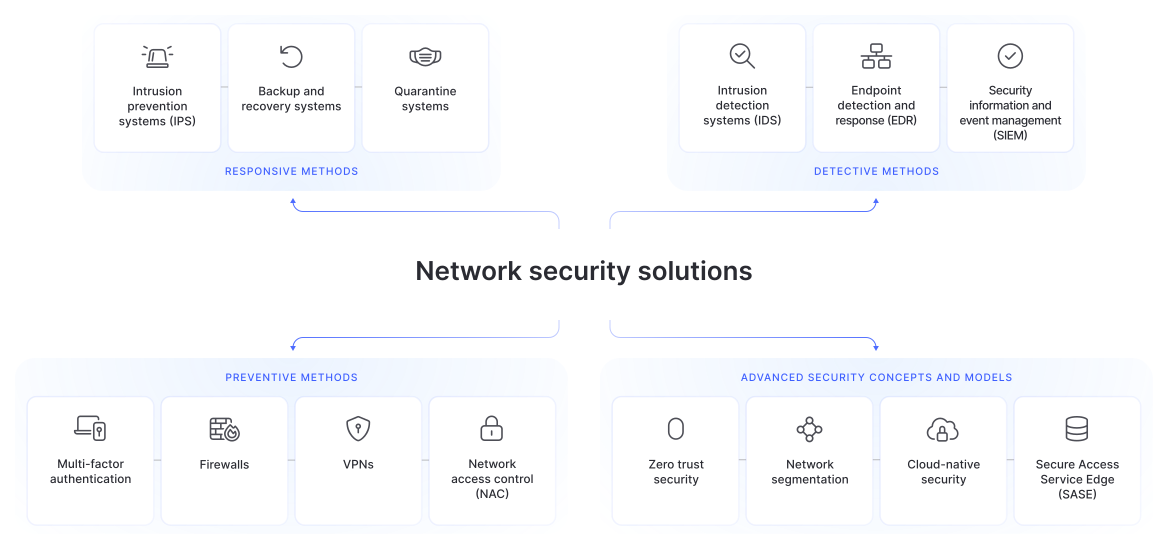
Network security solutions range from standalone products to platforms combining firewalls, access management, monitoring, endpoint security, and cyber threat detection.
Organizations can manage network security software in-house with a network security engineer or a security team. This approach provides more control but requires specialist knowledge and, for continuous monitoring, round-the-clock coverage.
Outsourcing network security gives smaller teams expert support without the cost of an in-house security operations center (SOC). Such network security services handle everything from firewalls and updates to alert reviews and compliance reports.
Network security monitoring is the continuous collection and analysis of traffic, device, identity, and security event data. It flags unexpected data transfers, failed logins, malware, and configuration changes. Network monitoring tools support this work with dashboards, automated alerts, traffic analysis, and historical logs.
Network security best practices
Security tools are only as good as the processes behind them. I recommend treating these practices as an ongoing checklist rather than a one-time setup.
1. Keep systems patched and updated
Patch operating systems, routers, firewalls, applications, and connected devices as soon as updates appear. Remove products that are no longer supported and turn on auto-updates wherever they won’t interfere with critical operations.
2. Enforce strong authentication and MFA
Use unique passwords and MFA for sensitive accounts, especially admin, cloud, and email. Disable unused accounts promptly and never share admin credentials.
3. Apply least privilege and segment your network
Give users, devices, and applications only the access they need. Separate users, servers, guests, and IoT devices into distinct network segments and update permissions whenever roles change.
4. Encrypt data in transit and at rest
Protect network traffic with secure protocols such as HTTPS and SSH, and encrypt sensitive stored data. Manage encryption keys securely and use a trusted VPN on unsecure networks.
5. Monitor traffic and run regular assessments
Network security monitoring establishes a baseline for normal activity and flags unexpected behavior. Review alerts, failed logins, new devices, firewall changes, and unusual outbound traffic.
Cybersecurity risk assessments can uncover exposed services, misconfigurations, outdated systems, excessive permissions, and endpoint security gaps before they turn into data breaches. Run them on a routine schedule and always after major infrastructure updates.
6. Adopt a zero-trust mindset
Zero-trust security assumes no user or device should be trusted simply because it’s already inside the network. Verify each request, grant only the access required, and reassess it when the level of risk changes.
Zero-trust network access setup with NordLayer
NordLayer’s zero-trust network access (ZTNA) verifies every user and device before letting them access specific resources. It reduces your attack surface and limits lateral movement if an account or device is compromised.
Home network security
Home networks now connect phones, computers, TVs, cameras, speakers, game consoles, and appliances. That means home Wi-Fi security takes more than installing one security app and forgetting about the router.
Secure your router and change default credentials
Change the router’s default admin logins, stay on top of firmware updates, and turn off WPS and remote management. Use a guest network for visitors and keep smart devices isolated on their own network.
Watch for newly disclosed router flaws and follow your manufacturer’s security notices and firmware updates.
Use encryption on public and home Wi-Fi
WPA2 or WPA3 encrypts traffic between your device and home router, but not the rest of the connection. HTTPS encrypts traffic to compatible websites, while a VPN adds an encrypted connection between your device and the VPN server.
NordVPN provides this extra layer of security at home and on untrusted public wireless networks. It should be used alongside secure router settings, software updates, and strong account protection.
PRO TIP
NordVPN does more than encrypt your connection. It’s an all-in-one digital security app* that combines advanced VPN protection with a next-gen antivirus to help protect you from scams, phishing, and malware. It also includes Dark Web Monitor to alert you if your credentials appear in known data leaks.
* “All-in-one” refers to the VPN, scam protection, phishing protection, tracker and ad blocking, and other features available within the NordVPN app, depending on your device and the plan you choose.
What is a network security key, and how do I set a strong one?
A network security key is the password used to connect to a protected Wi-Fi network. It may also be labeled a Wi-Fi password, WPA key, or wireless security key. You can change it in your router’s settings.
Pick a long, unique password without predictable details such as your name, address, or phone number. Use WPA3 where available or fall back to WPA2-AES if WPA3 isn’t supported. Avoid WEP and the original WPA standard — their encryption has been broken and no longer protects your network.
How to check and assess your network security
For a basic self-check, I’d start with the router. Confirm that it uses WPA3 or WPA2-AES, has a unique admin password and current firmware, and doesn’t allow remote management unless needed.
Check connected devices and investigate anything you don’t recognize. Turn off unused port forwarding rules, extra services, and idle guest networks. Update connected devices and replace equipment that no longer gets security patches.
Businesses need a more structured security assessment. This review may include asset discovery, configuration audits, vulnerability scans, access reviews, log analysis, architecture testing, and penetration testing. The final report should rank your biggest risks and recommend actions.
Bring in a network security engineer or specialist service if the network handles sensitive data, faces regulatory requirements, has suffered an incident, or is too complex to assess in-house.
Online security starts with a click.
Stay safe with the world’s leading VPN