
What is a proxy server?
A proxy server is a computer or system that acts as a middleman between your device and the internet. This proxy server definition means proxies send traffic from a computer, smartphone, or other device to a destination server that hosts a website you want to reach. Routing the traffic through a proxy server hides your IP address, which is helpful for keeping your location private and accessing global web content. However, the exact functionality and benefits depend on the specific type of proxy server you use.
How does a proxy server work?
Proxy servers work by routing your web traffic through an intermediary server, which then forwards it to the destination. The web traffic you receive also moves through the server before reaching your device. Here’s how proxy servers work in more detail:
- 1. The client (your device or web browser) requests web content or service from a destination server.
- 2. Instead of directly contacting the destination server, the request goes to the proxy server first.
- 3. The proxy server checks whether the client’s request follows predefined rules.
- If it does, the proxy server forwards the request to the destination server on the client’s behalf.
- If it doesn’t, the proxy server may show the client an error message or redirect it to another server.
- 4. The destination server processes the request and responds to the proxy server.
- 5. The proxy server can make changes to the response. For example, it can cache it for future use, filter it to remove unwanted content, or require authentication before the client can see it.
- 6. Finally, the proxy server sends the (modified) response to the client. The client sees the web content or uses the service as if it is connected to the destination server directly.
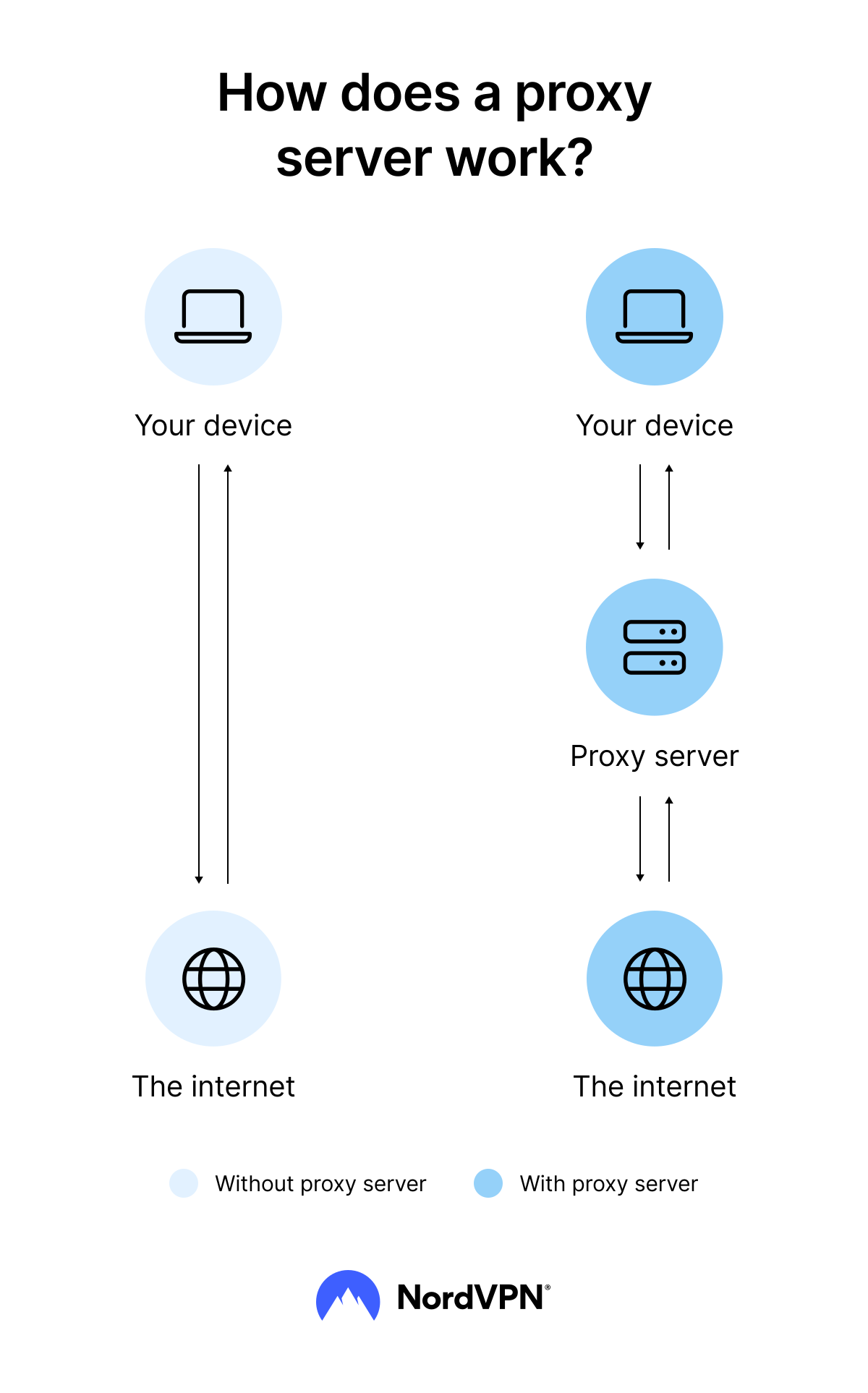
Some users set up proxy servers as part of their network infrastructure on the server side. Any client the proxy server communicates with thinks it is communicating directly with the destination server. Some organizations set up proxy servers on their networks to filter or cache web content or to track user activity without users’ knowledge.
Both proxy servers and VPNs route your web traffic through an intermediary location, which hides your IP address. However, VPNs always encrypt your web traffic, but not all proxies do.
What is a proxy server used for?
People use proxy servers for security, privacy, and network efficiency. Here are some of the most common uses of proxy servers.
- Network filtering. You can use proxy servers to filter or block access to certain websites or types of content. In this case, the proxy server prevents users on the network from accessing dangerous, illegal, or inappropriate content. However, some organizations use this strategy to censor their users’ online activity.
- Caching. Proxy servers store frequently accessed resources like web pages, images, and videos. Instead of fetching content from the original server every time, they use the cached data to deliver content to the end user faster.
- Load balancing. Proxy servers distribute client requests across multiple servers so no single one gets overloaded. They can also detect and redirect requests from overloaded servers to other servers that haven’t reached capacity.
- Accessing restricted content. If your network has blocked certain sites or content types, you can use a proxy server on the client side to access them.
- Masking your IP address. A proxy server connects to the internet on your behalf, so the web destination sees the server’s IP address instead of yours.
- Encryption and decryption. Some proxy types can handle SSL/TLS encryption and decryption. This offloading lets the web server focus on processing requests rather than cryptography.
- Routing. A proxy server can route requests through specific servers based on predefined criteria, such as content type or the client’s location.
- Business. Some businesses use proxy servers as part of their marketing strategy. For example, you can use a proxy server to verify that your digital ads are working or conduct market research of your target audience.
Types of proxy servers
You can choose different types of proxy servers based on your privacy and performance needs. Proxy servers fall into five categories. Here’s their breakdown:
| Proxy type category | How it works | Example types |
|---|---|---|
Traffic flow | Handles traffic between the client and the server in a specific direction | Forward proxy, reverse proxy |
Origin | Handles traffic based on its location | Residential proxy, data center proxy, mobile proxy |
Anonymity level | Provides a specific level of privacy | Transparent proxy, high-anonymity proxy |
Accessibility | Controls who can access the proxy | Public proxy, shared proxy, private proxy |
Protocol | Handles traffic for specific web protocols and activities | HTTP proxy, HTTPS proxy, DNS proxy |
Let’s explore these different types of proxy servers in more detail.
Proxy servers by traffic flow
The most common proxy server classification considers the direction of the traffic flow and the location of the proxy in relation to the client and server.
Forward proxy
A forward proxy is a proxy server acting on behalf of the client to request resources from the internet. The forward proxy is located on the client’s network, so it’s also known as a client-side proxy.
The internet sees the forward proxy as the client, while the client sees the forward proxy as the internet. Forward proxies hide the client’s IP address and identity, help bypass content filters, and access restricted websites.
Reverse proxy
A reverse proxy is a proxy server acting on behalf of the web server to receive requests from clients. Since a reverse proxy is located on the server’s network, it’s also called a server-side proxy.
The web server sees the reverse proxy as the client, while the client sees the reverse proxy as the web server. Many organizations use a reverse proxy server to keep their web applications secure and reliable.
Reverse proxies are also effective for load balancing and caching to prevent servers from getting overloaded. You can also use a reverse proxy server as a single access point for multiple web servers, which makes scaling websites or applications easier.
The 502 bad gateway error can appear when the reverse proxy fails to communicate with the server.
Proxy servers by origin
Another way to classify proxy servers is based on their location and operators.
Residential proxy
A residential proxy is an intermediary server with an IP address assigned by an internet service provider (ISP) to a homeowner or a business.
Your computer could work as a residential proxy if you let someone outside your household route traffic through it. In that case, you’d be the operator of the residential proxy, and it would have the IP address of your device.
A residential proxy uses include web scraping, data mining, ad verification, and other online activities that require high anonymity and IP rotation. Since residential proxies resemble the behavior of human internet users, websites and search engines usually trust them more than other proxy types. However, getting and maintaining such proxies is also more expensive.
Data center proxy
A data center proxy is an intermediary server hosted in a data center and is usually set up specifically for proxying web traffic. Its uses include high-volume web scraping and automation tasks.
Data center proxies are much easier and cheaper to get and maintain than residential proxies. They’re also more stable and faster, but their behavior is somewhat predictable, so websites and search engines are better at detecting and blocking them.
Many modern streaming services and anti-bot tools are configured to block IP addresses associated with data center proxy servers.
Mobile proxy
A mobile proxy is an intermediary server hosted on a mobile device, such as a smartphone or tablet, and has the IP address assigned by a mobile carrier. The mobile proxy uses include mobile app testing and mobile ad verification.
Proxy servers by anonymity level
Using a proxy server can make your browsing more private, but the level of anonymity differs depending on the proxy server type.
Transparent proxy
A transparent proxy is an intermediary server that doesn’t hide the client’s IP address.
Transparent proxies don’t provide anonymity. They reveal your identity to the server, making them useless for increasing privacy online. However, they exist for a reason. You can use transparent proxies for caching to speed up your web browsing.
Level of anonymity: Low.
Anonymous proxy
An anonymous proxy is an intermediary server that hides the user’s IP address from web servers. But the anonymous proxy can reveal other information, such as the client’s browser type, language settings, or operating system. While this information doesn’t identify you directly, it helps narrow the pool of potential users.
Level of anonymity: Medium.
High anonymity proxy
A high anonymity proxy server is an intermediary that hides the user’s IP address and other identifying information sent in the HTTP headers, such as browser type or operating system.
High anonymity proxies make it more difficult to trace your activities to your IP address or device. As far as proxies go, it’s a decent choice for activities that require privacy.
Level of anonymity: High.
Distorting proxy
A distorting proxy is an intermediary server that hides the client’s IP address and provides a false IP address to the server.
Level of anonymity: Medium to high (depends on the proxy server’s configuration).
Rotating proxy
A rotating proxy is an intermediary server that uses a pool of IP addresses and rotates them periodically to provide anonymity and prevent IP blocking.
Rotating proxies can help with web scraping, data mining, and other activities requiring many requests to be sent to a server without being detected.
Level of anonymity: Medium to high (depends on the number of IP addresses in the pool and how often they are rotated).
Proxy servers by accessibility
Accessibility is another way to separate proxies into different categories.
Public proxy
A public proxy is a proxy server open to anyone. You can access it without needing to pass authentication, just like an open proxy. Naturally, such accessibility makes public proxies slower and less reliable. They have the highest risk of being blocklisted and blocked by websites and search engines.
Shared proxy
A shared proxy is a proxy server used by many users. They share the same IP address and port, but their online activities are kept separate through various software and hardware configurations. It’s also called a semi-dedicated proxy.
Shared proxies are not public, so they require authentication to access. It makes them faster and more reliable than public proxies.
Private proxy
A private proxy is a proxy server only used by a single user or organization. Private proxies provide a dedicated IP address and port to the user, so they’re also called dedicated proxies.
Private proxies offer a higher level of privacy, security, and performance. They require authentication to access and cost more than shared proxies.
Proxy servers by protocol
Some proxy servers handle traffic from specific network protocols or types of traffic. So their traffic type and protocols help to divide them.
HTTP proxy
An HTTP (Hypertext Transfer Protocol) proxy is a web proxy server that handles HTTP requests between clients and servers on the internet.
An HTTP proxy is great for caching because it can store a copy of the web content you visit frequently. It can also filter content and hide your IP address from the server. But since it handles plain-text requests, it isn’t the best choice for sensitive data.
HTTPS proxy
An HTTPS (Hypertext Transfer Protocol Secure) proxy is a web proxy server that handles HTTPS traffic between clients and servers on the internet.
An HTTPS proxy works similarly to an HTTP proxy, except your connection to the proxy server is encrypted. And since HTTPS proxies handle encrypted traffic, they cannot see or cache it.
SSL proxy
An SSL (Secure Sockets Layer) proxy is a proxy server that handles SSL traffic between clients and servers on the internet.
An SSL proxy can decrypt and inspect the traffic for security purposes, such as detecting and blocking malicious traffic or ensuring that only authorized users can access certain websites through SSL inspection.
SMTP proxy
An SMTP (Simple Mail Transfer Protocol) proxy is a proxy server that handles SMTP traffic between email clients and servers.
You can use SMTP proxies to send and receive emails securely because they can scan incoming and outgoing email messages for spam and malware. They can also help optimize email traffic by caching frequently accessed email messages and attachments.
FTP proxy
An FTP (File Transfer Protocol) proxy is a proxy server that handles FTP traffic between clients and servers. This protocol, and thus the proxies handling it, are responsible for file transferring over the internet.
FTP proxies provide security and control over the FTP traffic by filtering or modifying it. For example, they can limit the file types or sizes.
DHCP proxy
A DHCP (Dynamic Host Configuration Protocol) proxy is a proxy server that handles DHCP requests and responses between DHCP clients and servers on different network segments.
DHCP requests help obtain IP addresses and other network configuration parameters. DHCP proxies usually operate at the network layer, and primarily large networks use them for IP address allocation.
DNS proxy
A DNS (Domain Name System) proxy is a proxy server that handles DNS requests from clients. A DNS proxy intercepts the DNS queries from the client and forwards them to the appropriate DNS server.
DNS proxies can filter or modify the DNS traffic to block access to some websites or redirect requests to a different server. Meanwhile, caching DNS records improves the response time of future DNS queries and reduces the load on the DNS server.
Smart DNS proxy
A smart DNS proxy is a type of DNS proxy that receives and redirects DNS requests. These proxy servers are designed to reroute only the specific traffic needed to determine your geographic location. They can help you reach the content you already pay for at home when you travel.
SOCKS proxy
A SOCKS (Socket Secure) proxy is a proxy server that handles TCP/IP traffic from clients.
SOCKS proxies come in different versions, SOCKS5 being the latest one.
You can use SOCKS proxies for any internet traffic because they’re protocol independent.
SIP proxy
A SIP (Session Initiation Protocol) proxy is a proxy server that manages and controls the flow of SIP traffic between SIP devices in a VoIP (Voice over Internet Protocol) network.
SIP proxies can perform call routing, load balancing, and distributing SIP traffic across many servers to optimize network performance. They can also provide security features such as authentication, encryption, and denial-of-service (DoS) protection.
Please note that using NordVPN to bypass any regulatory or judicial measures, or for any other illegal activities is strictly prohibited and violates our Terms of Service. Make sure you use NordVPN in compliance with all applicable laws and regulations, as well as the terms of any websites or services you access using NordVPN.
How to use a proxy server
To use a proxy server, you’ll first need to decide which type of server you want to use and how you want to configure it. You can configure proxy servers at the device, browser, or network level.
The easiest option is a web-based proxy. You can access these web-based servers from your browser, without needing to download anything. However, these proxies often have minimal security and limited customization options. They’re slow, they don’t encrypt your traffic, and they can expose you to cyberattacks if hackers exploit them.
To set up a proxy server on Windows 11:
- 1. Open your device settings, go to “Network & internet,” then select “Proxy.”
- 2. You can choose either “Automatic proxy setup” or “Manual proxy setup.”
- 3. To set up your proxy manually, go to “Manual proxy setup.”
- 4. Toggle on “Use a proxy server” and enter the proxy server’s IP address and port.
- 5. Click “Save.”
- 6. Restart your browser. Your web traffic will run through the proxy server.
To set up a proxy server on macOS:
- 1. Open your “System Settings,” then select “Network.”
- 2. Select the active network connection, then click “Details” and “Proxies.”
- 3. Toggle on the proxy you want to use and then enter its server’s IP address and port number.
- 4. Toggle on “Proxy server requires password” and enter your credentials if authentication is needed.
- 5. Click “OK.”
- 6. Restart your browser. Your web traffic will run through the proxy server.
If you want to run a proxy on the Chrome or Edge browser, use your system’s proxy settings. If you want to run a proxy on Firefox, you can set it up in the browser by going to “Settings” and opening “Network settings.”
To set up a proxy server on mobile:
On an iPhone:
- 1. Open your connection settings and tap “Wi-Fi.”
- 2. Tap the information icon next to the network you’re connected to.
- 3. Tap “Configure proxy,” select “Manual,” and fill in the server’s IP address and port number.
- 4. Toggle on “Authentication” and enter credentials if authentication is needed.
On an Android:
- 1. Open your connection settings and tap “Wi-Fi.”
- 2. Tap the settings icon next to the network you’re connected to.
- 3. Tap “View more” and then “Proxy.”
- 4. Select “Manual” and fill in “Proxy host name” and “Proxy port.”
- 5. Add any website addresses you want to exclude under “Bypass proxy for.”
Note that the process may vary slightly depending on which device model and version you have as well as the proxy type you need.
Once your proxy is set up, check your IP address to see whether it’s working. Do the test in the same environment as the proxy configuration, for example, in the browser where the proxy was set.
If the proxy server’s IP address shows up, it’s working. If you still see your own IP address, the setup needs another look.
Free proxy servers: Are they safe?
Free proxy servers are easy to find online, but they often come with security risks. If you need privacy, security, or speed, a free proxy server won’t deliver.
Most free proxy servers don’t encrypt your web traffic, which means that other users on the network could potentially see your browsing activity or destinations. If the server is run or used by cybercriminals, it could expose you to risks such as activity logging, data harvesting, or man-in-the-middle attacks.
Free proxy servers also struggle with performance. Because so many people share the same server, connections get slower and less reliable. Some free servers also come with invasive ad injections that negatively affect your browsing experience. Popular websites also tend to block free proxy servers.
Paid proxy servers tend to provide better security and performance. If you plan on using proxy servers frequently, it’s worth exploring alternatives to free tools. Here are some of the differences between free and paid proxy servers:
| | Free proxy server | Paid proxy server |
|---|---|---|
Encryption | Usually not encrypted | Some are encrypted using HTTPS protocol |
Speed | Very slow with high latency | Faster connections |
Reliability | Frequent downtime, prone to blocklisting | Stable connections |
Logging risk | High | Low, but still possible |
Support | No | Yes |
Free or paid, proxy servers aren’t your only option. A VPN helps to keep your browsing more private by encrypting your traffic.
Proxy server vs. VPN: What’s the difference?
Proxy servers and VPNs both route your web traffic through a different server, changing your IP address in the process. But the biggest difference between most proxy servers and VPNs is encryption.
VPNs route your internet traffic through an encrypted tunnel to the VPN server, so the data stays private even if a third party intercepts it. HTTP proxies don’t encrypt your traffic, which means other users on the same network could see your browsing activity or traffic destination. HTTPS proxies support tunneling TLS-encrypted connections, but encryption is usually limited to traffic from a specific app rather than your entire device.
A VPN generally provides more privacy and security than a proxy server. NordVPN, for example, doesn't track what you do online. Free proxy servers, on the other hand, could be logging your data without your knowledge.
However, if you’re looking to improve your network’s performance through caching or load balancing, a proxy server may be the right choice. Paid proxy servers offer fast, reliable connections.
Here are the differences between proxy servers and VPNs at a glance.
| | Proxy server | VPN |
|---|---|---|
Encryption | HTTP proxies are not encrypted, HTTPS only encrypt specific traffic | Always encrypted |
Coverage | App-specific | Device-wide |
Speed | Free proxies are usually slow, while paid can be decently fast | Reliable, but can be slower than paid proxy servers |
Privacy | Limited, varies by server type | All traffic stays private if provider doesn’t track your data |
Ease of use | Requires manual configuration | Easy-to-use dedicated apps are available; manual configuration is possible when preferred |
Use cases | Caching, load balancing | Privacy, security |
Benefits of proxy servers
While proxy server types may differ, most proxy servers share the same benefits:
-
Improved security. A proxy server provides an extra layer of protection because the internal network doesn’t access the internet directly. You can also adjust proxy settings to filter traffic based on specific rules, such as blocking certain websites or protocols. It can prevent malware and attacks like DDoS from reaching the local network.
-
Better performance. A proxy server caches frequently accessed web content. It reduces the number of requests sent to the destination server and improves the response times. A proxy server can also compress data to reduce bandwidth usage and improve network performance.
-
Access control. A proxy server can help enforce internet usage policies by filtering or blocking traffic. For example, your employer can use a proxy server to block access to social networks during work hours, while an ISP can prevent users from accessing certain websites altogether.
-
Improved privacy. A proxy server masks your IP address, making it more difficult for third parties to track your internet activity. It gives you more privacy for browsing the internet.
-
Reduced censorship. If your local network is censoring your internet activity by blocking certain websites, you could use a proxy server to access them.
Drawbacks of proxy servers
Proxy servers also share a few common drawbacks:
-
Data logging. Free proxy servers are sometimes run by threat actors who could log your data and sell it to third parties.
-
Security risks. Poorly configured or maintained proxy servers are vulnerable to cyberattacks. Open ports are a particularly common weak point.
-
Lack of encryption. Most proxy servers don’t encrypt your traffic, exposing sensitive data to potential interception or surveillance.
-
Increased latency. Since traffic is not routed directly to the destination, proxy servers add additional latency to the network. It can slow down network performance and internet speed.
-
Limited capabilities. Some proxy servers only work with specific protocols or traffic types, making them useless for different applications.
-
Single point of failure. If a proxy server fails and goes offline, clients could lose access to the internet or specific services.
-
Technical know-how required. Implementing and maintaining a proxy server requires technical expertise, which can be a challenge for individuals and small businesses.
-
Cost. Setting up and maintaining a reliable proxy server comes with hardware, software, and labor costs.
-
Potential for misuse. Because proxy servers mask IP addresses, criminals can use them to hide the origin of attacks and fraud. Sneaker bots, for example, can use proxies to circumvent purchase limits and geographic restrictions on online stores.
Online security starts with a click.
Stay safe with the world’s leading VPN
FAQ
Please note that using NordVPN for any illegal activities is strictly prohibited and violates our Terms of Service. Make sure you use NordVPN in compliance with all applicable laws and regulations, as well as the terms of any websites or services you access through it.