Can someone hack my phone?
Someone can hack your phone just like any other device with internet connectivity. Phones are particularly tempting targets for hackers because these devices usually have access to a huge amount of user data, from banking information to social media passwords.
Hackers are always eager to infect your device with malware and trojans. By installing keyloggers on your phone, a cybercriminal can monitor your activity and secretly view your login data for websites and apps. In some cases, hackers can even turn hacked phones into cryptominers to generate cryptocurrency while drastically slowing down device performance.
While your smartphone is immensely useful, it can put you at risk, which is why it’s so important to know how to spot signs of hacking.
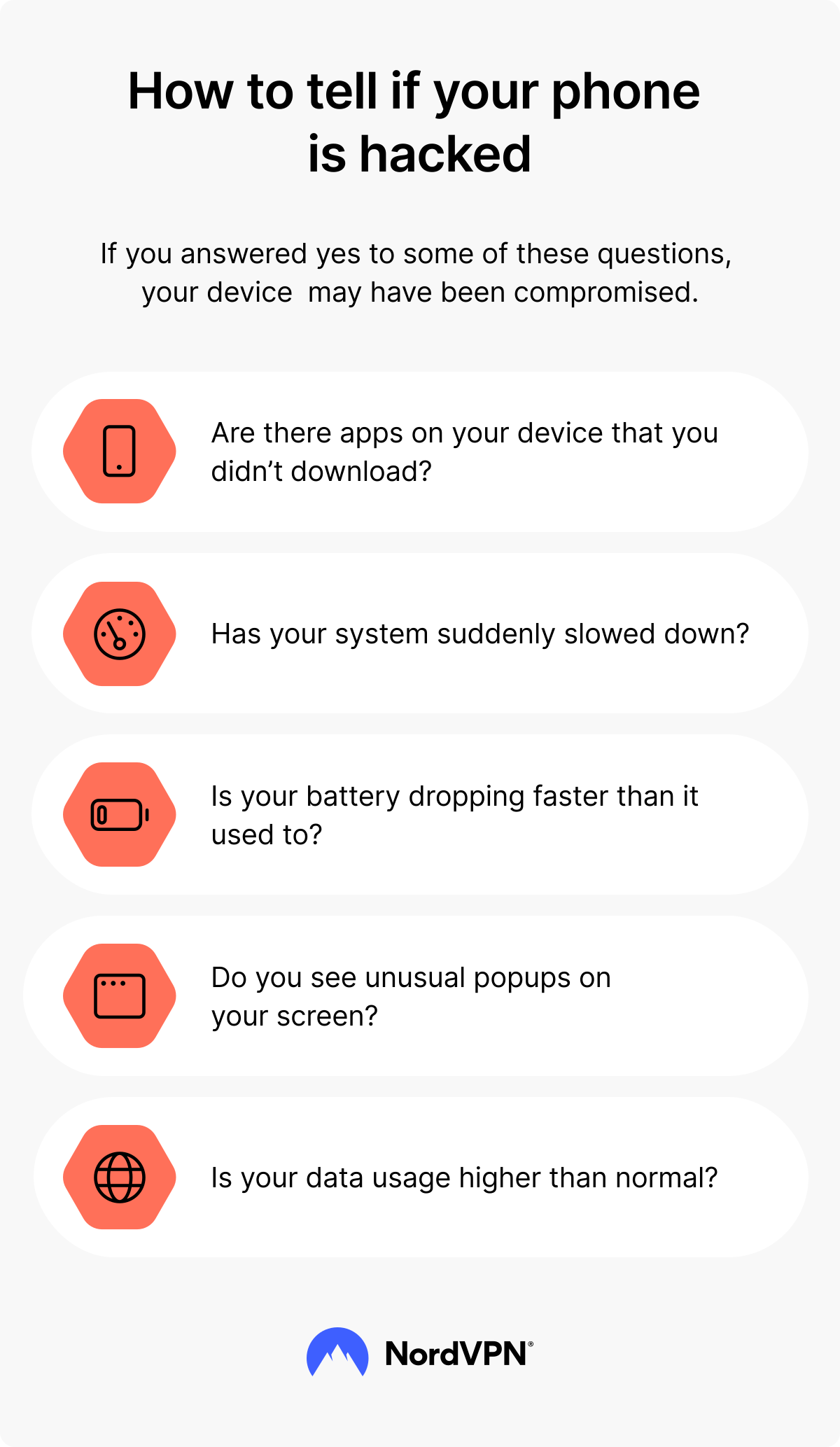
5 signs that your phone is hacked
Typically, one or more of these signs give it away that your phone has been hacked.
1. You notice something you don’t recognize on your phone
If you spot suspicious apps on your phone that you don’t remember downloading, this is a strong indicator of a compromised phone. Hackers often install malicious apps to spy on your activity or steal your personal information.
Similarly, check your call and text logs for unusual activity, such as messages you didn’t send or calls placed to unfamiliar numbers. This could mean someone else has gained access to your device.
Be cautious of unexplained charges on your phone bill as well — fraudulent purchases or premium service subscriptions could point to hacking.
2. Your phone has become slow
Has your phone become frustratingly slow? Hacked phones often suffer from sluggish performance because malicious software works in the background. Besides slowing down apps and functions, malware may cause your battery to drain much faster than normal.
You might also notice that your phone feels unusually warm, even when you’re not using it heavily — that’s often a sign that something is running non-stop, consuming resources, and causing high data usage in the background.
However, keep in mind that slow performance could also be due to an old or outdated phone struggling to keep up with modern apps and processes.
3. Mysterious data usage spikes
Unexplained spikes in your mobile data usage can be a red flag. If you haven’t recently downloaded new apps or streamed more content than usual, high data usage might indicate malicious processes running in the background.
For example, hackers could be transmitting your personal information, downloading additional harmful files, or even using your phone for activities like sending spam or participating in botnet attacks. Regularly monitor your phone’s data usage through your settings or provider app. Spotting unusual patterns early can prevent further damage.
4. Strange phone behavior
When your phone starts acting up without an obvious reason, you should take it as a warning sign. If apps you frequently use begin crashing, freezing, or refusing to open, it could mean your system has been tampered with.
Sometimes, hacked phones behave erratically — opening apps, performing actions, or even restarting by themselves. While such behavior may result from software glitches on older or outdated devices, it could also point to hidden malware or spyware interfering with your phone’s operation. Pay attention to repeated issues that seem out of the ordinary.
5. Excessive pop-ups
Lots of pop-ups that seem to appear out of nowhere can signal a deeper problem. Spyware, adware, or other types of malware can flood your screen with pop-up ads or redirect you to unsafe websites.
Excessive pop-ups aren’t just annoying or distracting — they might tempt you into clicking on links that download even more malicious software. If your phone suddenly feels like an ad-riddled mess, take it as a cue to investigate further.
PRO TIP: Let your friends and contacts know if your device has been hacked. It’s likely that hackers will use your compromised phone, as well as any messaging apps you have installed, to launch more attacks on other people.
How to know if your phone camera is hacked
If you suspect that your phone camera has been hacked and someone is using it remotely, there are a few tell-tale signs of it. For example, you may notice photos and videos in your gallery that you don’t remember taking.
Of course, you can accidentally record something, but if you keep finding new ones, it’s a sign that someone might have control over your camera. The flash lighting up when you’re not using your phone is another thing to look out for.
How do hackers hack your phone?
There are many ways to hack your phone. Some don’t even require advanced tech knowledge.
- 1.SIM wap attack. By using this attack, hackers can transfer your phone number to their own SIM card and take over your accounts.
- 2.Spyware. Some spy apps are pretty easy to get hold of and can be used by a person without advanced IT knowledge. This lets them remotely monitor your phone activities. A person can install such an app by getting direct access to your mobile device.
- 3.USB cable. Malicious actors could use a USB cable or charger lead to hack your device. When a phone is connected to another device with a USB cable — to a laptop, for example — data can be sent via the USB. That means, in theory, a computer infected with malware or viruses could automatically infect your phone if you connect the two. This is true even if you’re only using the USB link as a way to charge your phone.
- 4.Public Wi-Fi or charging stations. You might get malware via public Wi-Fi networks or charging stations. Hackers can set up fake Wi-Fi networks, called evil twin networks, to redirect you to malicious websites or steal data via USB cable at a charging station.
- 5.Phishing attacks. You could become a target of phishing emails, messages or texts that contain malicious links designed to install malware and snatch your data.
- 6.Malware infection. You might also download malware from suspicious sites while downloading apps or by clicking on malicious pop-ups or links.
Make sure to check out our video on how to know if your phone is hacked.
What to do if your phone is hacked
Think your phone might be hacked? Don’t panic. Acting quickly can help you limit the damage and protect your personal information. Here’s what you can do to take back control:
- 1.Assess the situation. Try to spot the warning signs of a hacked phone, as covered earlier in this article. Check for unknown apps and messages you didn’t send, and think if you’ve seen an onslaught of pop-ups recently.
- 2.Disconnect from the internet. Turn off your Wi-Fi and mobile data right away. This can prevent the hacker from continuing to access your device remotely or sending data back to their servers.
- 3.Power off your phone temporarily. Shutting down your phone can help stop any ongoing malicious activity and give you some breathing room to figure out your next steps.
- 4.Change your passwords immediately. Use a different device, like a trusted computer or tablet, to change your most important passwords (for your email, bank, and social media accounts). Reading our tips on how to create a strong password will help you. You can also use our NordPass app to store your strong and complex passwords.
- 5.Lock your SIM card. Once your accounts are secure, contact your service provider to lock your SIM card. This will prevent hackers from misusing your phone number for calls, messages, or SIM-swapping attacks.
- 6.Secure your phone. It’s time to take action to eliminate the malware from your device, for example, by following our step-by-step guide in the next section.
How to remove a hacker from my phone
Here’s what to do if your phone has been hacked:
- 1.Run anti-malware software. Once you’ve changed your passwords and secured your accounts as per our tips in the above section, download a reputable anti-malware app from an official app store (Google Play for Android devices and Apple’s App Store for iOS devices) and run it to detect any malicious applications and processes. Just make sure you use reliable security software that doesn’t track and gather your data.
- 2.Turn off your mobile data and Wi-Fi when not using them. This might prevent a malicious app from using your data and can disrupt its activity if it relies on an internet connection.
- 3.Remove the suspicious apps immediately. If your security apps don’t find anything, or if you don’t have any, it’s still a good idea to delete any apps you downloaded right before the problems started appearing.
- 4.Inform your friends and contacts about the hacking. Tell your close ones to ignore any suspicious messages coming from you and to not click any links.
- 5.Restore your Android phone to its factory settings. Restoring your phone to factory settings might help if tons of pop-ups or malicious apps have made your phone impossible to use. However, this is a nuclear option that erases everything on your phone, so use it only as a last resort.
If you want to learn more, you can also take a look at our guide on mobile device security.
How to protect your phone from being hacked
To prevent your phone from being hacked, do the following:
- 1.Turn off your hotspot when in public. If you do need to turn it on, make sure you’ve made the settings as secure as possible.
- 2.Avoid Wi-Fi or charging spots you don’t trust. If you must use public Wi-Fi networks, never do so without a VPN. Also, don’t forget to disconnect from public Wi-Fi once you’ve stopped using it.
- 3.Turn off Bluetooth. Switch your Bluetooth off when not using it because hackers may try to make it their access point.
- 4.Lock your phone. Use a password or lock screen to lock your phone.
- 5.Keep your phone with you. Never leave your phone unattended and don’t let people you don’t know use it.
- 6.Update your phone’s software. Update apps and operating systems regularly to make sure they have the latest security patches.
- 7.Check for unfamiliar apps. Regularly review what apps your phone has to see if there are any you don’t recognize.
- 8.Avoid public USB charging stations. If you often charge your phone in public places, consider using a USB data blocker. It’s a small device that prevents any data from entering your phone through a USB connection and can protect you from juice jacking — a method of spreading malware through public USB ports.
- 9.Avoid suspicious links and messages. Do not open suspicious messages, links, or files. They can be malware or spyware in disguise.
- 10.Install anti-malware apps. Download a reliable anti-malware app which is able to remove malware soon after it is downloaded or prevent the infection in the first place.
- 11.Don't use sites you don’t trust. They are a potential source of malware.
- 12.Use a VPN. You can use a VPN for iOS or VPN for Android to protect your phone from data snoopers and hackers.
Is there an app to see if my phone has been hacked?
There are apps that will improve your device security by notifying you of unusual activity, to ensure that you’re making use of basic security features like Screen Lock, Face/Touch ID and two-factor authentication (2FA).
Specialized spyware apps are also available; these programs can trawl your phone for hidden malware and help you identify hacks early.
Does a VPN protect you from hackers?
Using a VPN improves your security and privacy online by encrypting your internet traffic and making the data inside the VPN tunnel unreadable to third parties. So yes, a VPN can help protect you from bad actors trying to intercept your traffic.
If you’re thinking about buying a VPN subscription, take a look at what NordVPN offers. NordVPN is an easy-to-use app designed for both novice and expert users. Not only does it provide you with top-notch encryption, but it can also block suspicious ads and pop-ups, which are a common way to distribute malware. NordVPN offers an additional Threat Protection Pro™ feature that helps you identify malware-ridden files, stops you from landing on malicious websites, and blocks trackers and intrusive ads.
NordVPN also has the Kill Switch function, which will disconnect you from the web in case you lose a VPN connection. A single NordVPN account protects up to 10 devices, so you can cover your whole household.
Getting started takes just a few minutes. Begin with a free VPN download. After you download the NordVPN app, install it, create a Nord Account, and purchase the subscription plan that fits your needs. Then open the app, connect, and enjoy the protection it provides.
Online security starts with a click.
Stay safe with the world’s leading VPN