What is a VPN router?
A VPN router is a Wi-Fi router that automatically connects to a VPN server (due to its configuration). With these routers, your traffic is redirected through a VPN’s servers, allowing you to browse online completely undisturbed. All your activity will be hidden from anyone trying to spy on you, whether it’s petty thieves or data-hoarding corporations.
Still not sure why you should use a VPN on a router? The reason you’d want a VPN on your router is to provide network-wide online security. Once you set up a VPN on your router, all connected devices will be granted the benefits of VPN protection. That includes devices that may normally not have the ability to utilize VPN software to its fullest, like a lot of smart home devices. Here’s a video explaining exactly how a router VPN works.
How does a VPN router work?
A VPN creates an encrypted connection between a device and the internet, protecting your browsing activity from prying eyes. You can use a VPN for home network security by configuring a VPN on your router. This setup protects all traffic going out to the internet and is distinct from a home VPN server, which allows you to securely connect to your network from the outside.
Once you’ve set up a router VPN, every single device connected to your router will have its traffic sent through the encrypted tunnel. Your PC, your laptop, your home entertainment system, and even your smart IoT toaster.
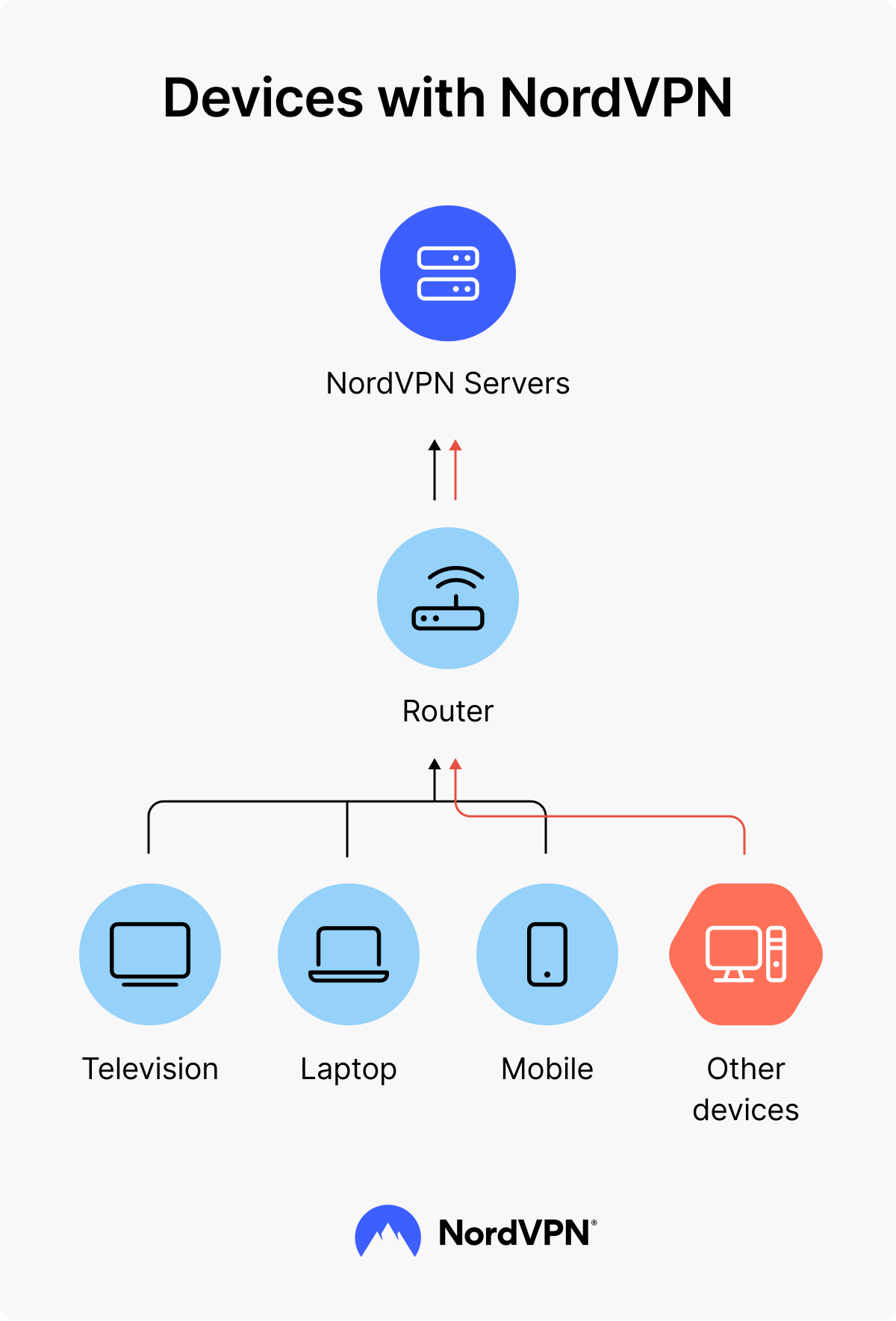
Secure all your devices with a VPN router — stay protected at every click.
How do I know if my router is VPN compatible?
Not all routers are VPN compatible. To find out whether your Wi-Fi router supports VPN connection, it’s important to know the make of your router device. For example, you can’t directly install a VPN on Starlink routers unless you have purchased a static IP upgrade from the satellite internet provider. To find out more about compatibility:
- Check the manual. If you have the user manual of your Wi-Fi router nearby, take a look through it. You should find a section detailing the router’s connection configuration options or VPN compatibility.
- Check online. Search for your router’s make and model number online. You can usually find it written on the router itself or the box it came in.
PRO TIP: If you’re buying a new router, it’s also a good idea to make sure it’s VPN compatible before you purchase it. There are plenty of excellent home VPN routers on the market, including the popular Privacy Hero 2.
It is worth noting that most ISP routers and modems don’t support a VPN connection. However, you can combine an ISP modem with a VPN-supported router for a VPN to work.
If you’re looking for a VPN-supported router, here are a few suggestions that will benefit both home users and SMEs:
- Asus RT-BE58U Go (WiFi 7 Travel Router)
- Asus RT-BE88U (WiFi 7 High Performance)
- Asus RT-BE96U (WiFi 7 Premium)
How to set up a VPN on your router
The first thing you need to do is select a VPN that supports router connections. If you want one of the fastest VPNs on the market, then NordVPN is a safe choice.
Next, you’ll have to see if your router supports VPN functionality. To find out if your router can run NordVPN, check out our tutorial page and see the list of supported routers and firmware with relevant tutorials. Some routers there will also include NordVPN router setup instructions.
The specifics for NordVPN router installation will vary between brands and models, but the general steps are typically as follows:
- 1.
Log into your router. You can access your router configuration panel by entering your router’s IP address in your browser’s URL bar. To find your router’s IP address, type “ipconfig” in the Command Prompt window and check the “Default gateway” row.
- 2.
Look for the “VPN client” tab in the advanced settings of your router. The location of this section depends on your router’s model and brand. (If there is no “VPN client” tab, it means your router is not compatible with a VPN.)
- 3.
Follow your VPN client’s guidelines to set up the VPN on your router. You can find the list of NordVPN setup guidelines for different routers below.
- 4.
Verify the connection. Once you’ve applied the settings to the router, check your IP by using NordVPN’s tool to confirm that your public IP address has changed to one from the VPN server's location.
NordVPN setup guidelines for different routers
Here is a list of instructions on how to set up the NordVPN service for various router models:
- Privacy Hero NordLynx Router
- Asus Router
- AsusWRT Merlin
- DD-WRT
- GL.iNet
- MikroTik IKEv2
- Netduma
- OPNsense 21
- OpenWrt CI
- Padavan
- Sabai
- Tomato
- pfSense 2.4.4
- DrayTek Vigor IKEv2
- EdgeRouter and Ubiquiti
- Routers that don’t support NordVPN
Still don't know how to install a VPN on your router?
If you’re experiencing issues and don’t know how to install a VPN, no problem. NordVPN has award-winning 24/7 live customer support in multiple languages. If these tips didn’t help you and you’re still lost, our support experts will help you find a way to put NordVPN on your router. Contact us at support@nordvpn.com, through the live chat, or other means available.
Is it worth putting a VPN on your router? Pros and cons
Yes, putting a VPN on a router is worth it for users who want to protect all devices on their network, including those that can't run VPN apps. It’s also a great option for those who want a "set it and forget it" solution. Here’s a more detailed breakdown of all the pros and cons of having a VPN on a router:
Pros
The best benefits about routers with VPN configuration are:
Always-on security and privacy. With a router VPN, you’ll always be connected to the VPN server. You’ll never forget to secure yourself because you’ll be part of the VPN protection as long as your router is working. If any of your devices initiate any automatic connections, like account balance updates for a personal finance app, they will be secured even if you’re sleeping.
Comprehensive home security. That always-on VPN server connection will apply to every device connected to your home router VPN. It will cover new devices you get with no additional setup, and it will even cover your guests when they visit and use your Wi-Fi. But make sure to change your Wi-Fi password regularly if you’ve shared it with many people in the past.
Protection of devices that don’t support VPNs. There are plenty of Wi-Fi-connected devices that don’t support VPN coverage on their own but could certainly benefit from it. Security is always essential, no matter what device you’re using.
Opportunity to connect more devices. NordVPN allows you to connect up to 10 devices, which is already more than enough for most users. But did you know that your NordVPN-enabled router counts as only one device? If your laptop, smartphone, and desktop PC all connect over your VPN-enabled router, that’s still technically only one device connected. It’s not a good idea to abuse this feature because your connection speed and stability may suffer, but it’s an easy way to expand the number of devices your NordVPN subscription covers.
Cons
Like everything, a router with VPN configuration also comes with some shortcomings, including:
A more complex management for VPN settings. Because your router doesn’t have its own user interface (beyond a few simple buttons), you’ll have to access it through another device in order to adjust your VPN settings. Turning your VPN tunnel on and off or changing the country it’s connected to is much more convenient using NordVPN’s app. It’s still possible on your router, but not as convenient.
Router dependency. Most routers lack the power to run anything more than the most basic encryption or tunneling protocols. You may want to upgrade to a VPN router that supports more secure protocols (like the Privacy Hero 2, which comes pre-installed with our ultra-fast NordLynx protocol) or simply research what your chosen VPN protocol does and doesn’t protect you from.
Potential blocks for some incoming connections. By its very nature, a VPN is designed to block incoming unauthorized connections. You’ll have an easier time initiating connections using your laptop, computer or smartphone to get around this limitation because they have user interfaces. Your less-accessible devices, like your router, will probably remain unreachable from outside since they can’t initiate connections. This doesn’t apply to automated processes on user devices, however — your computer will still receive emails and notifications.
Lack of security for traffic between devices and the router. Because encryption occurs on the router, traffic between the device and the router will not yet be encrypted. If you have a secure home Wi-Fi setup and your mobile devices aren’t set to auto-connect to other networks, this shouldn’t be a huge issue. This only becomes a serious security issue if random strangers are capable of connecting to your network.
Different types of VPN routers
Depending on your preference, you can choose from at least a few types of VPN routers:
- Routers that support a VPN client.
- Routers that need upgrading their firmware in order to install a VPN client.
- Routers that already come with a certain VPN service pre-installed.
- VPN router boxes designed to connect to your router.
Having an online VPN service pre-installed is the easiest way to secure your network, as you don’t need to do any additional configuration. But if you need to upgrade your firmware to use a VPN, it takes more time and requires some technical skills.
If your router supports a VPN client, it doesn’t take more than a couple of minutes to set up a VPN.
Tips for using your VPN router
While it’s relatively easy to set up a VPN router, managing it can be tricky. Here are a few tips to make your VPN router easier to use:
Avoid unnecessary double coverage
With NordVPN working on your router and out of sight, you may forget it’s switched on. If you use NordVPN on another device while at home, your NordVPN encrypted tunnel will still be sent through the encrypted tunnel set up on your router. This can be a powerful and useful feature when using our Double VPN setting, but NordVPN was not designed to function this way through your VPN router. To avoid significant speed reductions or instability, use one method or another to connect to NordVPN’s servers.
Bookmark your router settings page
Connecting to your router to change the settings might be inconvenient, but you can bookmark the address to make this part just a bit easier.
To avoid double coverage, set up a separate router
Most Android devices that you carry with you throughout the day (phones, laptops, and tablets) will be able to support a VPN for Android. This will keep you safe while outside the house, but if you forget to switch the app off in your home, the two overlapping VPN connections can cause a drop in internet speed.
If you have two routers, you can connect your phone or tablet to the one that isn’t configured with a VPN. Meanwhile, any devices that don’t support a VPN app (some smart TVs and gaming consoles, for example) can run on your VPN router. All your hardware will be protected, without risking any reduction in speed. Alternatively, if you’re adding an additional router, you can use bridge mode to avoid routing conflicts and ensure a smooth VPN experience.
NordVPN now also supports a headless package for OpenWrt routers, making it easier for Linux users to configure their VPN connections. The new package runs NordLynx protocol and provides safer connection to all devices on the OpenWrt router network.
Check out these NordVPN reviews to find out more about the NordVPN experience. Whether on your router or your other devices, NordVPN will keep you secure and private online. Get started today and use a NordVPN coupon to find the best deal possible.
Online security starts with a click.
Stay safe with the world’s leading VPN