What is threat intelligence?
Cyber threat intelligence is collected and analyzed data about current or potential cyber threats. It turns security signals into practical guidance, helping organizations understand which attacks they may face, who could carry them out, how they might happen, and what can reduce the risk.
Useful threat intelligence does more than list suspicious IP addresses, malware names, or attack reports. It should explain who or what may be targeted, why the threat matters, and which action could reduce the risk. For example, a security team may need to know whether a phishing campaign targets its audience.
Why is cyber threat intelligence important?
Cyber threat intelligence helps organizations prepare for future attacks instead of only reacting after the damage occurs. It can support earlier detection, clearer prioritization, faster investigation, and smarter security spending.
- Proactive defense. Threat intelligence can reveal patterns in phishing campaigns, malware activity, exposed credentials, or attacker behavior before they lead to serious damage. When security teams know what to watch for, they can strengthen defenses and reduce weak points earlier.
- Better context. A security alert on its own may only show that something unusual happened. Cyber threat intelligence can explain who may be targeting an organization, how similar attacks have worked before, and how those risks fit the wider threat landscape — the bigger picture of cyber threats affecting a company, industry, or region.
- Faster investigations. When analysts know which indicators, tactics, and attack patterns matter most, they can prioritize high-risk alerts instead of treating every signal the same way. This helps teams reduce false positives and focus on threats that are more likely to cause harm.
- Lower costs. Preventing a breach, blocking a known malicious domain, or detecting an attack early is usually less expensive than dealing with data loss, downtime, legal exposure, and recovery work. Used alongside cyber threat monitoring, threat intelligence helps teams make more informed security decisions sooner.
Types of threat intelligence
Security teams usually group threat intelligence by the kind of decision it supports. You can think of threat intelligence in five practical categories: strategic, tactical, operational, technical, and contextual threat intelligence.
Strategic threat intelligence
Strategic threat intelligence gives leaders a high-level view of cyber risks, attacker motives, and long-term trends. It helps decision-makers understand how issues such as ransomware, data breaches, new regulations, or nation-state threat actors — hacking groups linked to governments — could affect budgets, policies, and long-term security priorities.
Tactical threat intelligence
Tactical threat intelligence focuses on the techniques, tactics, and procedures attackers use. It may show common attack vectors — the routes or methods attackers use to reach a target — such as phishing emails, exploited software weaknesses, compromised accounts, or suspicious traffic that can indicate botnet operations. Security teams can use this information to adjust detection rules, strengthen defenses, and train employees to recognize suspicious activity.
Operational threat intelligence
Operational threat intelligence focuses on specific, planned, ongoing, or recent attacks. It helps teams understand who may be behind an attack, what they are targeting, when and how they may act, and which systems or users could be affected. This intelligence often comes from monitoring attacker activity, leaked data, hidden cybercrime forums, or messages shared by attackers.
Technical threat intelligence
Technical threat intelligence involves analyzing technical clues that may show an attack has happened or could happen, such as suspicious IP addresses, malicious domains, file hashes, identified exploits, and attack patterns. Security teams use these details to improve detection rules, blocklists, and other cybersecurity tools.
Contextual threat intelligence
Contextual threat intelligence focuses on the circumstances of a particular sector, organization, or user group. For example, government agencies may focus more on nation-state cyber activity, while retail or luxury goods companies may pay closer attention to brand impersonation, fraud, fake websites, and customer-targeted scams.
The threat intelligence lifecycle
The threat intelligence lifecycle turns raw threat data into useful intelligence. Teams use it to set priorities, collect and prepare data, analyze findings, share conclusions, and improve future work through feedback.
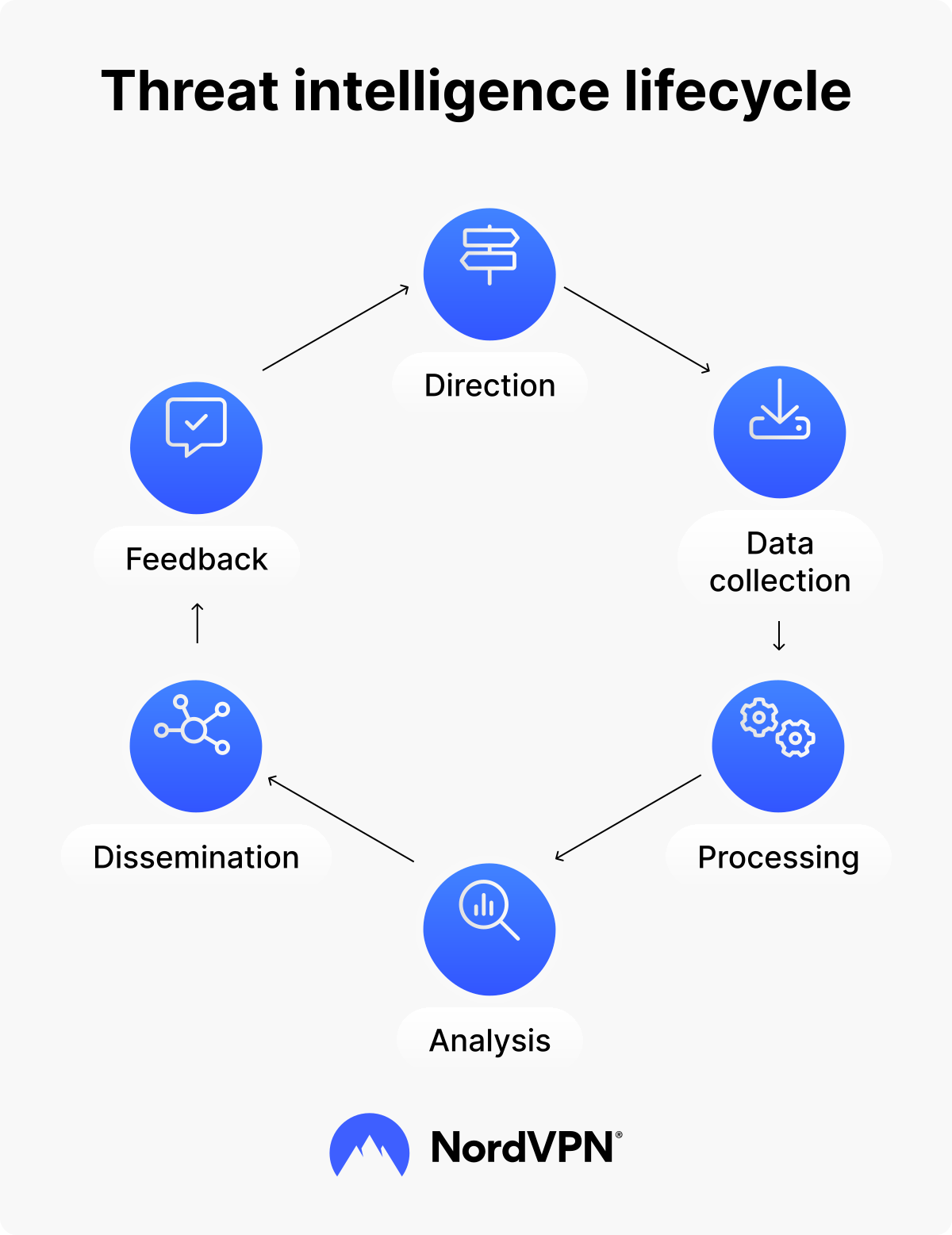
1. Direction
Teams define which threats, assets, systems, or business risks they need to understand. They may also consider insider threats — risks from employees, contractors, partners, or other people with legitimate access — and decide which information would support better security decisions.
2. Data collection
Once the goals are clear, teams collect threat intelligence data from internal and external sources. These may include internal security logs, endpoint alerts, network activity, vulnerability reports, dark web sources, malware databases, and open-source intelligence — publicly available information gathered from websites, forums, social media, public records, and other accessible sources.
3. Processing
Raw data often arrives in different formats and with uneven reliability. During processing, teams clean, organize, filter, deduplicate, and structure the data so analysts can compare related indicators and prepare the data for analysis.
4. Analysis
Analysts look for patterns, connections, and meaning behind the collected data. This stage can also support threat modeling, which maps how an attacker could target a system and which defenses could reduce that risk.
5. Dissemination
Teams share finished intelligence with the people who need it. Security operations teams may need malicious domains or suspicious IP addresses, incident responders may need containment guidance, and executives may need a clear summary of business risk and recommended action.
6. Feedback
Teams review whether the intelligence answered the original questions, helped them prioritize risks, and improved security outcomes. Feedback helps refine future requirements, sources, tools, and reporting methods.
Threat intelligence tools and platforms
Security teams use threat intelligence tools to collect data, compare it with known threats, and turn it into alerts or reports. Some tools focus on one task, while a threat intelligence platform, or TIP, brings threat feeds, suspicious clues, added context, and reporting together in one place.
Threat intelligence feeds
Threat intelligence feeds are automated streams of threat data that security tools can use. They often include indicators of compromise, or IoCs — clues that may point to malicious activity. Examples include suspicious IP addresses, phishing domains, malware-linked file hashes, which are unique digital fingerprints of files, and URLs associated with scams or fake login pages.
Feeds can be open-source or commercial. Open-source feeds are usually free and can help teams monitor common threats, but they may require more manual review. Commercial feeds often add context, filtering, and support, such as where an indicator came from and how urgently a team should respond.
Feeds are useful, but they are not enough on their own. A long list of suspicious domains or IP addresses can create noise if no one checks whether the data is relevant. The right tools help teams compare feed data against their own systems, remove duplicates, and focus on the most important threats.
AI-powered threat intelligence
AI-powered threat intelligence uses artificial intelligence and machine learning to process large amounts of security data faster. Machine learning means software can identify patterns in data and improve its detection over time. In threat intelligence, this can help spot unusual behavior, connect related events, and highlight risks that may be missed during manual review.
AI can also support fraud detection by looking for activity that does not match a user’s usual account behavior. For example, it may flag unusual login patterns, suspicious transaction attempts, or repeated access from risky locations. These signals can help security teams investigate possible account takeover attempts before they cause more damage.
That said, AI threat intelligence does not replace human analysis. It can process data quickly, but analysts still need to check context, remove false positives, and decide what action makes sense. Used well, AI threat detection helps teams move faster without treating every suspicious signal as a confirmed attack.
How NordVPN uses threat intelligence
Threat intelligence is not only used in security reports or enterprise tools. It can also support the protection features you use while browsing, downloading files, opening links, or connecting through a VPN.
NordVPN uses threat intelligence to help identify malicious websites, phishing pages, scam domains, malware, and trackers. These signals support NordVPN’s next-gen antivirus with scam, phishing, and malware protection, helping warn you about risky pages and scan downloads before malware reaches your device.
NordVPN also uses threat intelligence to inform VPN security by analyzing potential attacks against individual users and the service as a whole.
In addition, NordVPN also shares threat intelligence to help you stay safer online. If you are interested in learning about major and emerging cyber threats, have a look at NordVPN’s cybersecurity glossary and Threat Center. Learning about current and emerging cyber threats can help you spot phishing, malware, scams, and risky websites before they cause costly problems.
Who benefits from threat intelligence?
Threat intelligence is often associated with large organizations, but it can also support the tools you use every day. Clear information about attacker behavior, risky activity, and emerging threats helps security teams, leaders, analysts, and individual users reduce risk.
- Threat intelligence analysts. A threat intelligence analyst, or cyber threat intelligence analyst, monitors threat data, studies attacker campaigns, reviews suspicious indicators, and turns findings into reports. Their work helps security teams understand what is happening, who may be behind an attack, and what action to take.
- Security teams and SOC operators. A SOC, short for security operations center, monitors an organization’s systems for possible attacks. Threat intelligence helps these teams prioritize alerts, reduce false positives, and focus on the activity most likely to put systems, data, or users at risk.
- Executives and decision-makers. Strategic intelligence helps leaders understand which threats could affect the organization, how serious the risk is, and where security resources may be needed most. This can support decisions about budgets, policies, tools, and long-term risk management.
- You. You may not read threat reports or review suspicious domains yourself, but threat intelligence can still support the tools you use. It helps security features warn you about phishing pages, scam websites, malicious downloads, and other risks before they cause harm.
Threat intelligence in action: Real-world examples
Threat intelligence becomes easier to understand when you see how it works in practice. The exact process depends on the organization, but the goal is usually the same: Spot relevant threats earlier, understand what they mean, and respond before they cause more damage.
- Tracking APT actor campaigns. Security teams may use threat intelligence to track an advanced persistent threat, or APT — a long-term, targeted attack often linked to well-resourced groups. By connecting phishing emails, malicious domains, malware behavior, and attacker techniques, analysts can identify related activity and warn organizations that may be at risk.
- Blocking known malicious activity. Threat intelligence feeds can help security tools block known malicious IP addresses, domains, file hashes, and URLs. If a domain is linked to phishing or malware, that data can help warn users or block access before the attack reaches them.
- Sharing intelligence across industries. Organizations may share threat intelligence through trusted groups, industry networks, and security partnerships. If one company detects a new phishing campaign, malware attack, or suspicious access pattern, sharing that information can help others prepare before attackers target them.
How to protect yourself from cyber threats
You do not need to analyze threat intelligence reports yourself to benefit from them. A few practical habits and security tools can help you avoid common threats and reduce the damage an attack could cause.
- Stay informed about current threats. Following cybersecurity updates and threat intelligence news can help you recognize new scams, phishing tactics, and malware campaigns. Focus on threats that could affect the devices, accounts, and services you use.
- Use tools with built-in threat detection. NordVPN’s next-gen antivirus helps detect malicious downloads and block scam and phishing websites. These protections use threat data in the background, so you can benefit from security research without reviewing technical indicators yourself.
- Keep your software updated. Updates often fix security weaknesses that attackers could exploit. Regularly update your operating system, browser, apps, and security tools to reduce your attack surface — the devices, accounts, and services an attacker could target.
- Be cautious with unexpected messages and links. Phishing messages often create a sense of urgency or imitate trusted organizations to persuade you to open a link, download a file, or share sensitive information. Check the sender and destination before taking action.
- Use a VPN on untrusted networks. A VPN encrypts the connection between your device and the VPN server. This helps protect your traffic on the local network and changes the IP address visible to websites when you use public Wi-Fi or other untrusted networks.
Help stop threats before they reach your device.
Browse with scam, phishing, and malware protection
