What are Facebook marketplace scams?
Facebook Marketplace scams can take various forms, but they all share the same goal — to trick you out of money, goods, or personal information. Scammers target both buyers and sellers — a buyer might send you a fake check or a spoofed payment notification, while a seller might ghost you after receiving an advance deposit or shipping you a counterfeit item.
Cybercriminals often rely on social engineering — psychological manipulation that exploits trust, a sense of urgency, and the desire for a bargain. Because Facebook Marketplace hosts millions of users globally, it gives scammers a vast pool of potential targets and plenty of opportunity to run new schemes. Facebook scams extend beyond the Marketplace, too, so it pays to stay alert across the platform.
Most common Facebook Marketplace scams
Below are Facebook Marketplace scams you’re most likely to encounter — whether you’re buying or selling.
Fake payment receipts
Fake payment receipts are among the most common scams on Facebook Marketplace. In these scams, a buyer sends a forged or outdated payment screenshot to convince you that the money is on its way. Some scammers go further and design a fake confirmation email from a free domain like Gmail or Hotmail to look like an official notification from PayPal or your bank.
PRO TIP: Never treat a screenshot or email as proof of payment.
Open your payment app independently and confirm the money has appeared in your account. If it’s not there, it hasn’t arrived — regardless of what the notification says.
Overpayment scams
In an overpayment scam, a buyer sends more than the listed price and then asks you to refund the difference. The classic version uses a personal check — you unknowingly deposit a fake check, send back the “overpayment,” and days later the check bounces. By then, the money you refunded is gone.
The same scheme now plays out digitally. In a common PayPal scam, a fraudster sends a fake payment notification showing an inflated amount, then asks you to refund the difference before you’ve verified that a single cent has actually cleared in your account.
PRO TIP: Never trust an “accidental” overpayment.
If a buyer overpays and immediately asks for a refund, don’t engage further — walk away from the transaction. If you want to give them the benefit of the doubt, tell them: “I’ll return the difference once my bank confirms the full payment has cleared.” A legitimate buyer will accept that condition. A scammer won’t.
Stolen or counterfeit items
If a seller lists a $500 pair of headphones for $50, there’s almost always a reason — and it’s rarely generosity. Scammers advertise brand-name electronics, luxury goods, and high-demand gadgets at prices far below market value. What arrives — if it arrives at all — is often broken, fake, or stolen.
The item in the listing exists, and it may even look legitimate — but what you actually receive is a counterfeit, a damaged product, or a stolen good passed off as genuine. A designer handbag at a fraction of the retail price is almost certainly a knockoff. Electronics sold as genuine may be clones or fakes of the original product.
Bait-and-switch scams
Where counterfeit scams are about what the product actually is, bait-and-switch scams are about what gets swapped out before or after the sale. The seller advertises a real, desirable item to attract interest — then either claims it has sold and pressures you into buying a different, inferior product, or takes your payment and ships a completely different model from what you agreed to.
You think you’re buying a specific working laptop, but you receive a broken one, or a cheaper model you never agreed to. The listing was real. The delivery wasn’t.
PRO TIP: Ask for proof of the item.
Request clear photos of the actual product and verify the exact condition, model, and serial number (where applicable) before you pay. Also, check the seller’s other listings — multiple identical listings on the same profile is a strong sign of a scam.
Shipping scams
Facebook Marketplace shipping scams cut both ways — buyers and sellers can both end up empty-handed.
In buyer-targeting shipping scams, a seller collects payment for shipping and then disappears. The item never arrives. When you try to follow up, you may receive a fake tracking number that shows an order “in transit” indefinitely.
In seller-targeting shipping scams, a buyer asks you to ship the item first, often claiming they need it for testing or because they’re buying it as a gift. Once you ship, they vanish. Scammers also send prepaid shipping labels that are fraudulent or generated under stolen accounts, which can get you on the hook for carrier fees later.
Some scammers also insist on using a specific shipping service you’ve never heard of. That’s a tactic designed to move the transaction off Facebook’s platform entirely, so there’s no record of the deal and no way to file a complaint or claim a refund if the item never arrives.
PRO TIP: Don’t ship until payment clears.
Only ship an item once payment has fully cleared in your account — confirm it directly in your banking app, regardless of any screenshots or verbal assurances from the buyer.
Advance deposit scams
In an advance deposit scam on Facebook Marketplace, you might see a listing for a musical instrument, a car, a camera kit, or another high-value item where the seller asks for a deposit to “hold” it for you. They’ll say they have other interested buyers and need to know you’re serious.
These advance payment scams typically run on multiple targets at once. The same scammer asks ten different buyers for a $200 deposit, collects the money, and never delivers the item to anyone.
PRO TIP: Recognize the pressure script.
“I have three other buyers interested” is a line, not a fact. If a seller insists on upfront payment to hold a listing, end the conversation.
Rental and apartment scams
Rental and apartment scams on Facebook Marketplace are a growing problem. According to the FTC, about half of all reported rental scams in the 12 months ending June 2025 originated on Facebook.1
Essentially, these scams are advanced deposit schemes. The setup is straightforward — a scammer steals real property photos from Zillow, Realtor.com, or other listing sites and creates a fake rental ad with a price well below the local market rate. When you express interest, they ask for a security deposit or first month’s rent upfront — before you’ve ever stepped inside the property.
Some scammers also use “ghost listings” — ads for properties that are legitimately for sale, not rent, or don’t exist at all. Others fabricate landlord identities with stolen names and photos to add credibility.
PRO TIP: Verify before you pay.
Reverse image search the listing photos to check they haven’t been stolen from another site, and video call the landlord to confirm they have access to the property before you commit to paying.
Zelle, Venmo, Cash App, and PayPal scams
Peer-to-peer payment (P2P) platforms, including Zelle, Venmo, PayPal’s “Sending to a friend” option, and Cash App, are a favorite tool for scammers on online marketplaces because they offer little to no buyer protection. Once you send money through these apps, getting it back is difficult and, in most cases, not possible.
A common scam tactic involves fake Zelle business account upgrade emails or texts. The scammer poses as a buyer and tells you that you need to upgrade to a business account to receive payment and that the upgrade requires you to first send a fee. It’s a Zelle scam — the service doesn’t work this way. No legitimate payment app will ever ask you to send money in order to receive money.
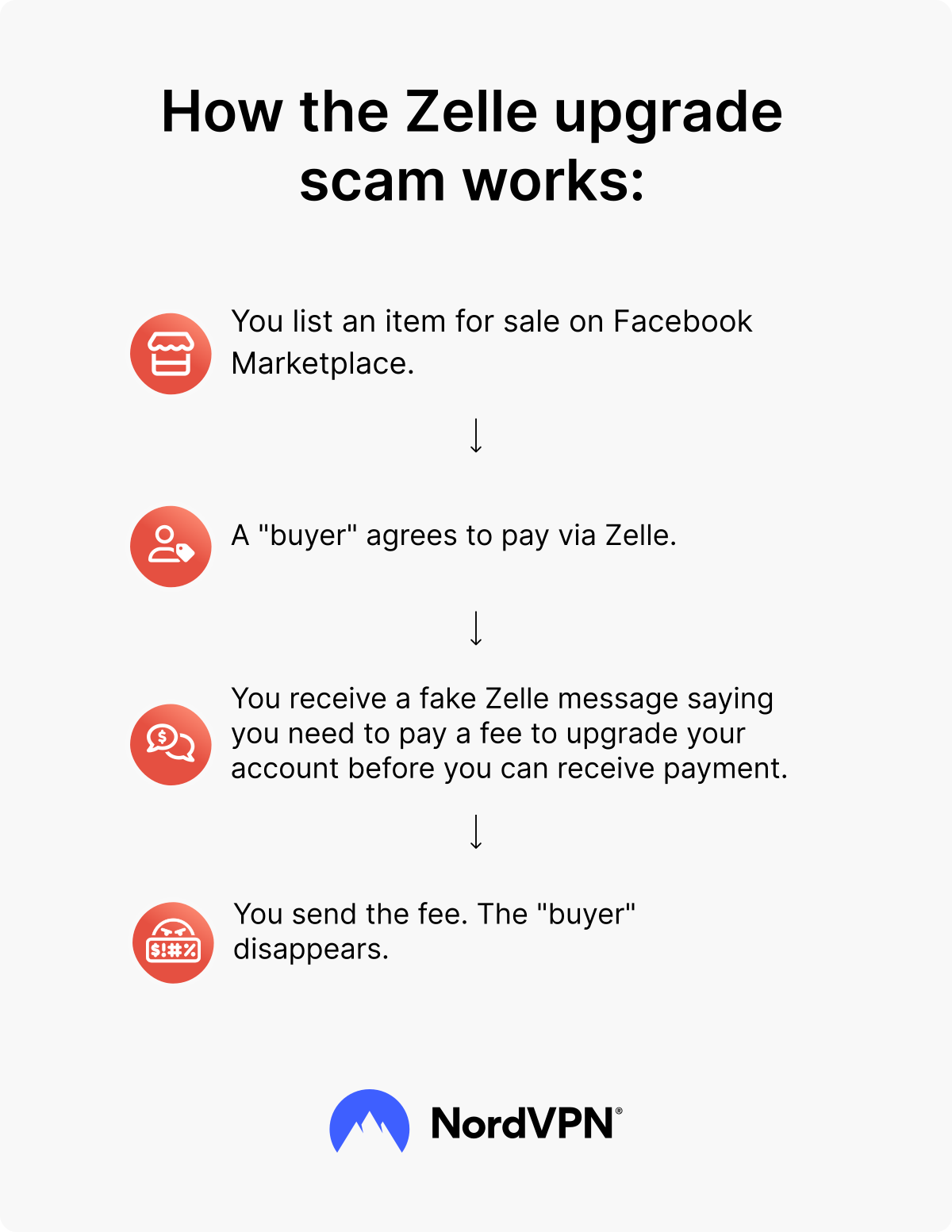
One CNBC journalist — someone who had written about scams for seven years — lost $500 to exactly this type of fraud on Facebook Marketplace. The “buyer” used fake Zelle text messages to convince her she needed to send $500 to unlock a so-called business account upgrade.2
The Facebook scam worked because it created a sense of urgency and exploited the journalist’s stress during a move. Cash App scams, as well as Venmo scams, use the same pressure tactics, so treat payment requests that feel rushed or unusual as a red flag, regardless of the platform.
Many purchases made through Facebook Checkout are covered by Purchase Protection at no extra cost. You can request a refund if your order doesn’t arrive, the product is damaged or significantly different from the listing, the seller didn’t follow their stated refund policy, the purchase was unauthorized, or the seller has been removed from Facebook.
PayPal’s “Paying for an item or service” option is another safe way to pay. Unlike “Sending to a friend,“ which offers no recourse if a transaction goes wrong, the payment type “Paying for an item or service” includes a dispute and refund process.
PRO TIP: Always pay through official channels.
If you decide to pay outside of Facebook Checkout, log in directly through your payment provider’s official app or website rather than clicking a payment link sent by the seller or buyer, to avoid phishing scams.
Gift card payment scams
Gift card transactions are untraceable and non-refundable, which is exactly why scammers prefer them on Facebook Marketplace. The scammer might pose as a seller who only accepts gift cards or claim the payment app isn’t working.
Some pose as potential buyers and ask sellers to purchase gift cards on their behalf as part of a complicated payment scheme. Once you share the card number and PIN, the money is gone.
PRO TIP: Never pay with gift cards.
No legitimate seller or buyer on Facebook Marketplace will ask for gift card payment. Treat every such request as a scam.
Car scams
Vehicle listings are a high-value target for scammers, and car scams on Facebook Marketplace are more common than many buyers expect. Typical tactics include fake listings with stolen photos, forged ownership documents, and deposit requests for cars that don’t exist.
VIN cloning is a serious and growing threat. A scammer takes the Vehicle Identification Number (VIN) from a legitimate, legally registered vehicle and applies it to a stolen one. The cloned car then appears to have a clean history in official checks, which makes the fraud harder to spot. In one documented case in 2025, buyers were defrauded of more than $220,000 through cloned truck VINs on Facebook Marketplace.3
PRO TIP: Do your homework on a vehicle listing.
Run a VIN check through official DMV records or a service like Carfax, and get an independent inspection from a mechanic you trust before you pay. Never pay a deposit to “hold” a car before completing that due diligence.
Verification code scams
Scammers sometimes send a verification code to your phone without warning, then contact you with a cover story. They’ll claim it was a mistake, or that they need the code to confirm you’re a real person before the deal proceeds.
Sharing it hands the scammer access to your account — whether that’s your email, a marketplace profile, or another service entirely. In some cases, the scammer uses the code to create a new account in your name instead.
One of the most common examples of the latter is the Google Voice verification code scam, which targets sellers specifically. A so-called buyer contacts you, expresses interest in your listing, and asks for your phone number, claiming they want to confirm you’re a real person before committing to the purchase.
They send a Google Voice verification code to your number and ask you to read it back. What they’re actually doing is using your phone number to set up a Google Voice account — Google requires a real number to verify the account, and sharing that code hands them exactly that. They can then use the Google Voice number to run other scams while their real identity stays hidden.
PRO TIP: Never share a verification code with anyone.
A genuine buyer has no reason to need it. If someone asks you to read back a code — even if they claim it’s to “verify you’re real” — hang up or stop the chat. Check your account activity immediately to make sure your personal information hasn’t been compromised.
Giveaway scams
Giveaway scams lure you in with the promise of free items — furniture, electronics, clothes, or other goods listed at no cost. Before you can claim your prize, the scammer asks you to fill out a form with your name, home address, email address, and sometimes your phone number or payment details.
That form is a data-collection tool. The personal details you submit can fuel identity theft or get sold to third parties who use your personal data to run other fraud in your name. Be cautious of free listings that require you to fill in personal details before receiving the item.
Malicious QR codes
A scammer who poses as either a buyer or a seller might send you a fake QR code and ask you to scan it to complete a payment or verify a listing. The code might look like a legitimate PayPal or Venmo payment request, a Facebook identity verification step, or even a link to view more photos of the item.
Once you scan it, the code links to a phishing site designed to steal your login credentials or payment details, or it triggers a malicious download onto your device — all without making it obvious that anything went wrong.
The reason this scam works is that QR codes are opaque by design. Unlike a URL you can read and evaluate, a QR code gives you no visible clue about where it leads.
PRO TIP: Preview the destination URL before you scan.
Most camera apps display where a QR code leads before you open it. If the URL looks unfamiliar, shortened, or unrelated to the expected payment platform, don’t open it. Ask the other party to share the payment link directly instead, and run it through a link checker to confirm it’s safe before clicking.
How to avoid scams on Facebook Marketplace
You can avoid most Facebook Marketplace scams with a few consistent habits. These are the steps that make the biggest difference:
- Use secure payment methods. Facebook Checkout and PayPal’s “Paying for an item or service” option both include dispute and refund processes. Credit cards add chargeback rights. When buying from strangers on Marketplace, avoid P2P payment apps, never use PayPal’s “Sending to a friend” option, and don’t pay by wire transfer — these payment methods are meant for personal transfers or irreversible payments and offer little to no protection if the transaction goes wrong.
- Stay on Facebook. If a buyer or seller pushes you to move to WhatsApp, email, or text, treat it as a red flag. Scammers want to take you off-platform because Facebook can’t see or investigate conversations that happen elsewhere.
- Meet in a public place for local transactions. Choose a busy, well-lit location. Some police departments offer designated “safe trade” zones in their parking lots — use them when exchanging high-value items.
- Screen buyers and sellers before the conversation goes further. Facebook Marketplace lets buyers and sellers rate each other, but only seller ratings become public once a seller receives five or more eligible ratings. A history of poor ratings — or no ratings at all on an otherwise active-looking account — is a reason to be cautious. Also, look at how long the account has been active and whether the profile details look genuine.
- Test electronics and inspect items in person. Power on devices, check for damage, and verify model numbers before you pay. For rental properties, tour the space in person before paying a deposit.
- Treat every new contact as suspicious until they’ve earned trust. Don’t share your phone number, home address, or email address with someone who has no transaction history, no reviews, and an account you can’t verify. Scammers use that information to run follow-up fraud long after the original deal falls apart.
- Don’t accept overpayments or pay deposits. A buyer who offers more than the asking price and wants a refund is almost certainly running a scam. Similarly, no legitimate Marketplace transaction requires a deposit before you meet in person.
- Be skeptical of deals that seem too good to be true. Luxury goods at a fraction of the retail price, cars priced thousands below market value, electronics at giveaway prices — if the deal looks too good, it almost certainly is.
- Secure your browsing. If you browse Facebook Marketplace on public Wi-Fi — at a coffee shop or a meetup location, for example — use a VPN to protect your connection from anyone who might be monitoring the network. Pair it with NordVPN’s anti-phishing tool to block scam websites, malicious links, and trackers automatically.
PRO TIP
For more tips on staying safe online, read our guide on how to protect yourself on social media.
What to do if you get scammed on Facebook Marketplace
Acting quickly gives you the best chance of recovering your money or preventing the scammer from misusing your personal information. Take these steps as soon as you realize you’ve been scammed:
- 1.Stop all contact with the scammer. Don’t reply to further messages. Block the account on Facebook.
- 2.Report the listing and the user to Facebook. Go to the listing or the user’s profile, tap the three-dot menu, and select “Report.” Choose the most relevant reason. Facebook reviews reports and removes fraudulent listings and fake accounts.
- 3.File a claim with Facebook. If you paid through Facebook Checkout, you can request a refund through Facebook’s Purchase Protection.
- 4.Contact your payment provider. If you paid by credit card, call your card issuer and dispute the charge. If you used PayPal’s “Paying for an item or service” option, open a dispute through the Resolution Center. For wire transfers or P2P payment apps, contact your bank immediately — the sooner you report it, the better your chances of recovering your funds.
- 5.Report the scam to official agencies. File a complaint with the FTC at reportfraud.ftc.gov (US), Action Fraud (UK), or your country’s equivalent consumer protection body. You can also report the scammer’s website if they directed you off site.
- 6.Monitor your accounts for identity theft. If you shared personal information during the scam, watch your bank accounts, credit reports, and email for signs of unauthorized activity. Consider using an identity theft protection service to get alerts if your personal data appears in data breaches, on the dark web, or in unauthorized credit applications.
- 7.Report to local authorities if the scammer is based nearby, the amount you got scammed for is significant, or you believe other people have been targeted. A police report also creates an official record that may help with insurance or bank disputes.
How safe is Facebook Marketplace?
Facebook Marketplace is about as safe as other P2P buying and selling platforms, which means it’s reasonably safe when you use it carefully, and risky when you don’t. Facebook has built in several safety features, including seller ratings to help you gauge trustworthiness, fraud reporting tools that let you flag suspicious listings and accounts, and Purchase Protection for eligible checkout transactions.
Those protections only go so far, though. Purchase Protection doesn’t cover cash or peer-to-peer app payments, and scammers know how to build convincing fake Facebook accounts, write authentic-sounding listings, and pressure targets into acting fast before they stop to think.
NordVPN adds an extra layer of security on top of what Facebook provides. A VPN secures your connection on public Wi-Fi, while Threat Protection Pro™ blocks known phishing sites and malicious links automatically, so even if a scammer slips a suspicious link into your Marketplace messages, it won’t even load.
Staying informed about the scams is the first step, but having the right tools in place means you’re covered when vigilance alone isn’t enough.
NordVPN is more than just a VPN.
Shop and sell on Marketplace more safely with NordVPN
Disclaimer: The trademarks referenced are for illustrative purposes only. NordVPN is not affiliated with, sponsored by, or endorsed by the owners of those trademarks.
FAQ
References
1 Division of Consumer Response and Operations Staff. (2025, December 22). Rental scams hit home with $65 million in reported losses. Federal Trade Commission.
2 McNair, K. (2025, May 13). I lost $500 getting scammed on Facebook Marketplace: 4 red flags I shouldn’t have ignored. CNBC Make It.
3 Jones, Z. (2025, April 15). Buyers duped in $220K Facebook Marketplace scam as thieves clone truck VINs. KPRC Click2Houston.