Signs your phone might be tapped: What to look for and what steps to take
Your cell phone is your lifeline, but it can also be a threat. Do you ever feel someone’s listening in? Maybe your calls sound off, or your phone’s behaving like it has a mind of its own. It’s probably nothing… or is it? While rare, a phone being tapped isn’t just a plot element from a spy thriller. With tools available today, it’s disturbingly easy for someone to gain unauthorized access to your device. However, no need to panic yet if you hear the occasional weird noise during a call. This article will help you sort fact from fiction, spot suspicious activity, and take smart, practical steps to secure your device.
Is my phone tapped? Common signs
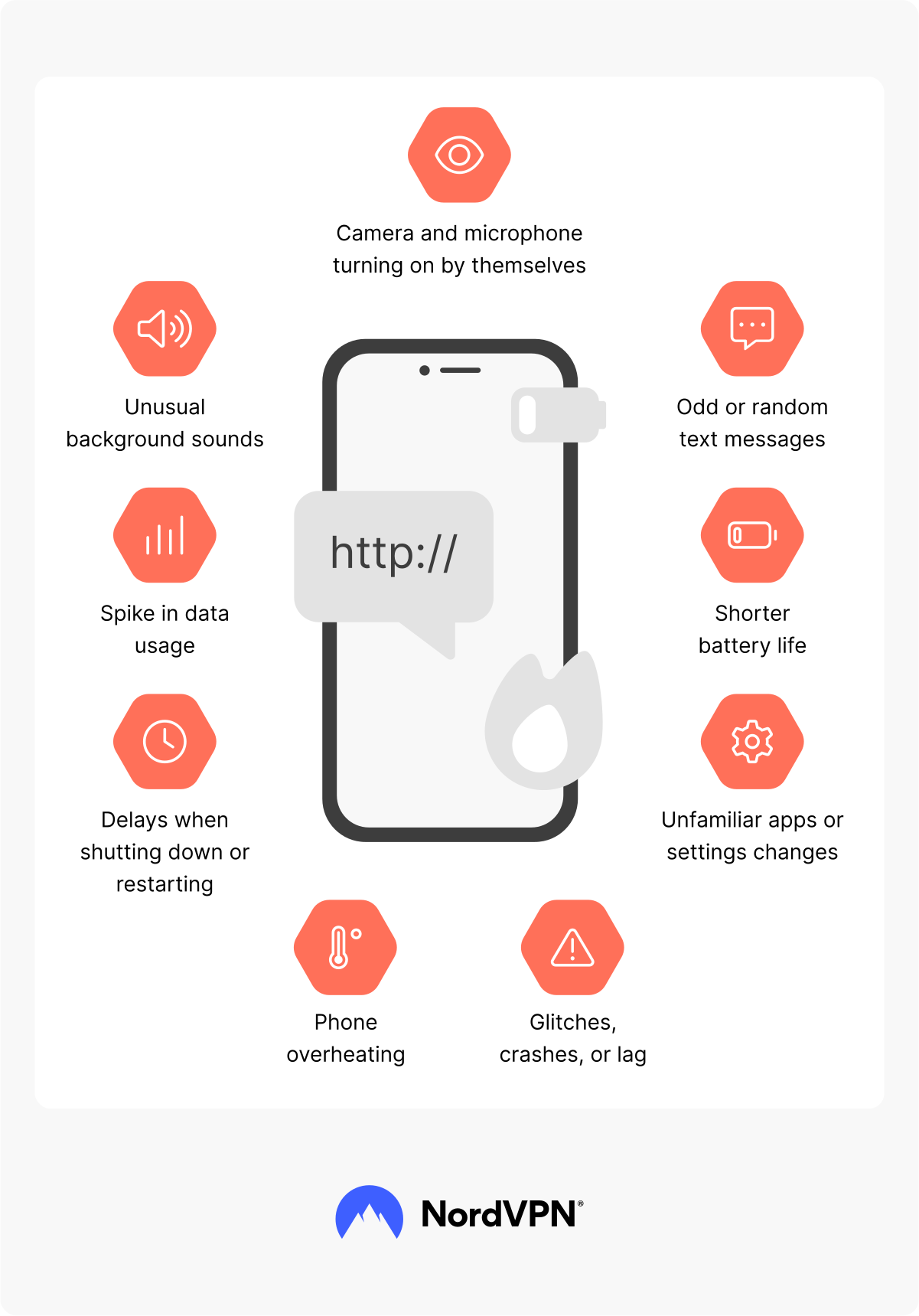
Not every odd blip or buzz means you’re being watched. Phones act up all the time, and usually, it’s just a software glitch. One isolated issue may be nothing, but if you start noticing a pattern of several strange symptoms, they could be signs your phone is tapped. Here are the most common signs to watch for — some subtle, some not so much — that could indicate your phone’s security has been compromised.
1. Unusual background sounds
If you’re hearing weird sounds, strange clicks, static, distant voices, or echoes of your own voice during phone calls, it could be more than bad reception. Tapping software can interfere with audio signals, causing odd background noise. Catching fragments of other people’s conversations during a call (a phenomenon called “crossed lines”) can also be a sign of interception, though it’s more common with landlines.
Occasional interference happens, sure. But if these anomalies keep showing up, it’s a sign that your phone may be listening to you, especially if you’re in areas with good service. If it occurs in different locations or with various callers, take note.
2. Spike in mobile data usage
If you notice a sudden jump in your monthly mobile data consumption without a change in your habits, it could mean spyware or a malicious app is sending information from your cell phone to an outside source. Some surveillance tools run silently in the background, which is why a phone being tapped can be undetected for so long. These tools transmit recorded audio, video, keystrokes, or even screenshots to an external source, which eats up mobile data quickly.
Check your phone bill or data monitoring tools for unexplained surges. While some updates or background processes use data, a persistent spike without a clear source should be taken seriously.
3. Odd or random text messages
If you get strange texts that contain random characters, symbols, or numbers, it can be one of the signs your phone is tapped. While it can also be spam, these messages may be remote commands sent by spyware apps trying to trigger specific actions. Be sure not to interact with these messages in any way.
Your phone might also be sending text messages to others without your knowledge. If friends report odd messages from you, or you spot outgoing texts you didn’t send, investigate immediately. Cybercriminals might be using your phone for smishing attempts to trick your social circle into clicking on malicious links.
4. Shorter battery life
All batteries degrade over time, but if your mobile phone starts dying drastically faster without any change in how you use it, something could be wrong. Spyware that runs in the background can quickly drain power. If your phone suddenly needs charging more often, especially when you’re not using it much, it may be running processes you aren’t aware of.
5. Camera and microphone turning on by themselves
Your camera and microphone should only activate when you explicitly allow them. If you notice that your Android device or iPhone camera turns on randomly or the microphone activates without reason, it’s a serious red flag. Some spyware can remotely activate your device’s camera or microphone, allowing someone to watch or listen in. Be careful if the indicator light flickers or apps like your voice recorder pop open randomly.
6. Phone overheating
It’s normal for phones to heat up during heavy tasks like gaming or video calls. But something might be wrong if your device is consistently warm, even when idle. Persistent overheating doesn’t just wear down your battery and hardware over time but can also point to hidden activity running in the background, and spyware or tracking software may be to blame for that. Its constant background activity can push your phone’s processor to work overtime, generating heat even when the screen is off.
7. Delays when shutting down or restarting
Typically, a phone shuts down quickly when powered off. But if yours takes much longer than usual, doesn't shut down properly, or doesn’t respond promptly when restarting, something’s off. Tapping software or spyware could delay the shutdown process so your phone stays active to finish transmitting data.
A sluggish power cycle should require deeper inspection, especially on a relatively new phone. It doesn’t necessarily mean your phone is tapped — it could just be a sign that your device needs some maintenance.
8. Unfamiliar apps or settings changes
It’s a huge red flag if you notice new apps on your phone that you don’t remember installing or if your settings have changed without your input. Spyware often disguises itself as a system tool or installs additional malicious software without you noticing.
Go through your app list carefully and check for apps you don’t recognize. Be especially careful with apps that use generic icons or names. Also, monitor changes in your privacy or location settings. If settings keep reverting without your input, someone — or something — may be controlling your phone remotely.
9. Glitches, crashes, or lag
All phones occasionally freeze, but if yours constantly crashes, lags, or glitches, it might not just be age catching up. Tapping software can interfere with normal processes or hog system resources, causing the phone to act up.
You might see screens flicker or apps close unexpectedly or get booted out of calls or messages. Persistent issues, especially if your phone ran as usual not so long ago, can be a sign of deeper issues.
What settings should you check for signs of phone tapping?
If you’re worried your phone might be tapped, digging into its settings can help either confirm or ease your suspicions. Both iOS and Android phones have different ways to check if your device has been compromised.
For iOS users
iPhones are known for their strong security, but they're not immune to spyware or unauthorized surveillance, especially if the device has been jailbroken, misconfigured, or physically accessed by someone else. These steps can help you spot signs of tampering or intrusion:
- Missed calls or unusual behavior during calls. Check call forwarding settings in “Settings” > “Apps” > “Phone” > “Call forwarding” and make sure the toggle is off unless you’ve intentionally set it up. Unexpected call forwarding could mean your incoming calls are being secretly redirected.
- A spike in data usage. Check data usage in "Settings" > "Cellular" (or “Mobile service”), then scroll down to see data consumption sorted by app. Look for apps using more data than you’d expect. Spyware apps often transmit recordings or logs to outside servers, which can result in unusually high data consumption.
- Strange text messages. Check which phone numbers or email addresses are set up to send and receive iMessages. Go to “Settings” > “Apps” > “Messages” > “Send & receive” and make sure only your phone numbers or email addresses are listed. You can also check for unknown devices linked to your Apple ID by clicking on your Apple ID name at the top of the “Settings” window and scrolling all the way to the bottom.
- Camera or microphone turning on without reason. Review app permissions by going to “Settings” > “Privacy & security,” then checking “Microphone” and “Camera.” Disable access for apps that don’t need them. Spyware can silently activate these features to record you.
- Battery draining faster than usual. Go to “Settings” > “Battery” to review which apps are using the most power and look for those you don’t recognize. Spyware running in the background often causes unusual battery drain.
For Android users
Android phones offer more customization but can also be more vulnerable to spyware or unauthorized apps if settings are misconfigured or malicious software is installed. The following settings can help you spot signs that your device may be compromised or tapped:
- Missed calls or unusual behavior during calls. Check your phone’s call forwarding settings to see if your calls are being secretly redirected to another number. Open your “Phone” app, tap the three dots (usually in the top-right corner), and go to “Settings” > “Calls” or “Supplementary services” > “Call forwarding.” Make sure “Always forward” is turned off.
- A spike in data consumption. Check if any possibly malicious apps are using your data in “Settings” > “Network & internet” > “Data usage,” then tap “App data usage” and uninstall apps that you don’t know or that seem suspicious.
- Camera or microphone turning on without reason. Check your app permissions by going to “Settings” > “Privacy” > “Permission manager.” Look under “Camera” and “Microphone” to see which apps have access, and remove permissions from apps that shouldn’t need them. Spyware often silently uses these sensors.
- Battery draining faster than usual. Spyware and tapping tools frequently run in the background, using up resources even when you're not actively using your phone. To check, go to “Settings” > “Battery” > “Battery usage” and look for unknown or rarely used apps that are consuming unusually high power.
How to respond if you suspect phone tapping
If you have started to think someone might be listening in on your phone conversations or accessing your data, don’t panic, but do act quickly. Here's a step-by-step guide to help you secure your device and protect your privacy:
- 1.Confirm the signs. Don’t panic if you notice one of the symptoms mentioned above. Look for a combination of unusual behaviors (strange sounds, battery drain, spike in data consumption) to build a clearer picture. Use trusted diagnostic tools and system settings to investigate.
- 2.Disconnect your phone. Put your phone in airplane mode. Doing so turns off all network connections, such as cellular, Wi-Fi, and Bluetooth, which should interrupt potential spying. You can also turn the phone off completely while you figure out your next steps.
- 3.Remove suspicious apps. Go through your installed apps and delete those you don’t recognize or no longer use. Pay extra attention to apps with access to your camera, microphone, or location and revoke those permissions before uninstalling.
- 4.Run a malware scan. Use a reliable mobile antivirus app or security software to remove malware from Android. If you're using an iPhone, you won’t be able to run a full malware scan due to a security method called sandboxing, which isolates apps from one another and prevents third-party apps and security software from scanning the entire device. You can remove malware from iOS by deleting suspicious apps, updating iOS, and performing a factory reset if needed.
- 5.Update your device software. Make sure your operating system is up to date. Security patches often fix vulnerabilities that spyware and tapping tools exploit.
- 6.Factory reset your phone. As a last resort, reset your device to factory settings. Doing so removes all data, apps, and settings, eliminating most malware. But before you do, back up all your essential data to avoid permanent loss.
- 7.Consult a professional. If you still notice unusual behavior or can’t confidently resolve the issue, contact your mobile carrier or go to a trusted tech support provider who can run deeper checks and uncover hidden issues.
- 8.Secure your mobile devices. Using a known, uninfected device and a non-public internet connection, update all passwords, starting with your Apple ID or Google account. Use strong, unique credentials and a trusted password manager like NordPass to avoid reusing passwords. Enable two-factor authentication where possible.
How does your phone get tapped?
If you suspect your phone’s been tapped, or just want to prevent it from happening, it helps to understand how these attacks usually work. Tapping or spying usually isn’t random. It often starts with a small vulnerability being exploited:
- Malicious app installations. Sometimes spyware hides in seemingly harmless apps. If you've downloaded apps outside the official app store or from sketchy ads, you may have unknowingly installed malware along with them. Unusual behavior afterward, like slow performance or strange pop-ups, can be early signs of malware.
- Phishing attacks. A well-crafted phishing email or text might trick you into clicking a fake link or entering your login details on a bogus site. These phishing attacks are one of the most common ways hackers install spyware or steal your credentials.
- Social engineering. Some attackers don’t rely on tech — they rely on people. Through social engineering techniques, someone might pretend to be a tech support agent or a friend in need, convincing you to share sensitive info or install a “helpful” app.
- Network interference. If you’ve ever connected to a public Wi-Fi network, attackers could have intercepted your data or injected malware onto your device. These man-in-the-middle attacks are less common but still a risk, especially on unsecured networks.
- Physical access to your device. If someone had physical access to your phone, even briefly, they could’ve installed spyware manually. It usually happens in cases of domestic spying or workplace snooping.
- System vulnerabilities. Phones running outdated software are more vulnerable to exploits. Hackers can take advantage of known bugs to install spyware or gain access remotely, especially if you haven’t updated your OS or apps in a while.
Tips to prevent phone tapping
While no method can guarantee 100% protection, good cybersecurity habits can go a long way in reducing the risk of phone tapping or spyware:
- 1.Keep your software up to date. Regularly updating software, especially operating systems and apps, ensures you have the latest security patches. Most phone exploits rely on known vulnerabilities, which updates are designed to fix.
- 2.Use secure networks. Avoid connecting to public Wi-Fi unless absolutely necessary. If you do, secure public Wi-Fi using a VPN to encrypt your connection. A VPN won’t prevent phone tapping, but it can help protect your activity on unsecured networks.
- 3.Be cautious with downloads and links. Phishing attacks often start with a single careless tap. Don’t download apps from unofficial sources, and avoid clicking on suspicious links in unfamiliar emails or random texts, especially if they urge you to act fast or claim something's wrong with your account.
- 4.Manage app permissions. Review which apps can access your camera, microphone, location, and other sensitive features. Revoke permissions that seem excessive or unnecessary.
- 5.Enable device security features. Features like screen locks, biometric login, and encryption protect your device if it falls into the wrong hands.
- 6.Educate yourself and others. Stay informed about social engineering techniques, common scams, and the latest online threats. Helping friends and family spot suspicious behavior can also limit the spread of spyware since attackers often rely on human error.
Online security starts with a click.
Stay safe with the world’s leading VPN