What is TCP?
TCP Transmission Control Protocol) is a network protocol that transfers your data over the internet from your device to a web server. You use the TCP protocol whenever you send emails, watch online videos, or simply browse the web.
This type of protocol is associated with the use of “handshakes.” A TCP handshake, or three-way handshake, is a three-step process that establishes a reliable connection between two devices, such as a client and a server, before data is transmitted.
TCP is connection-based, meaning that it establishes a connection between the receiver and sender and maintains it while transferring data. This guarantees that the data arrives completely intact. As one of the most widely used transport layer protocols, TCP underpins many major application protocols.
Pros of TCP
Using TCP provides several advantages:
- TCP is a standardized transport protocol built into operating systems and network stacks, enabling interoperability.
- As it transmits data, TCP checks for errors, ensuring that the data it sends reaches its destination intact.
- TCP optimizes and alters the speed at which it transmits data depending on the capacities of the receiver.
- It confirms that data has reached its destination and attempts a retransfer if the first transmission didn’t work.
Overall, TCP supports many of the applications, services, and devices that we use today, making it a highly versatile protocol.
Cons of TCP
Despite its benefits, TCP also comes with some disadvantages:
- TCP adds overhead due to control messages, acknowledgments, and retransmission logic, which can reduce performance in latency-sensitive or small packet transmissions compared to UDP.
- TCP uses quite a lot of bandwidth and is slower than UDP.
- If even a small amount of data is lost during transmission, TCP may not load other information. For example, if one element (like an image or video) fails to load on a page, the rest of the page data may not load either.
- TCP doesn’t work well across local area networks or personal area networks.
What is TCP used for?
TCP is used for applications requiring reliable and accurate data transmission, such as web browsing (HTTP/HTTPS) and email (SMTP, POP3, IMAP). This protocol is particularly suitable for applications that require high data integrity with ordered and lossless data delivery.
Some specific use cases include:
- File transfers (FTP, SFTP). For transferring files, TCP ensures that the entire file arrives at the destination without any missing or corrupted data.
- Online banking and financial transactions. TCP provides the reliability necessary for securely transmitting sensitive financial data.
- Virtual private networks (VPNs). TCP can be used in VPNs to establish secure and stable communication tunnels.
What is UDP?
UDP stands for User Datagram Protocol. Compared to TCP, the UDP network protocol is less reliable, but it’s faster and more straightforward. This makes it more suitable for situations where higher speeds are crucial, like streaming or gaming.
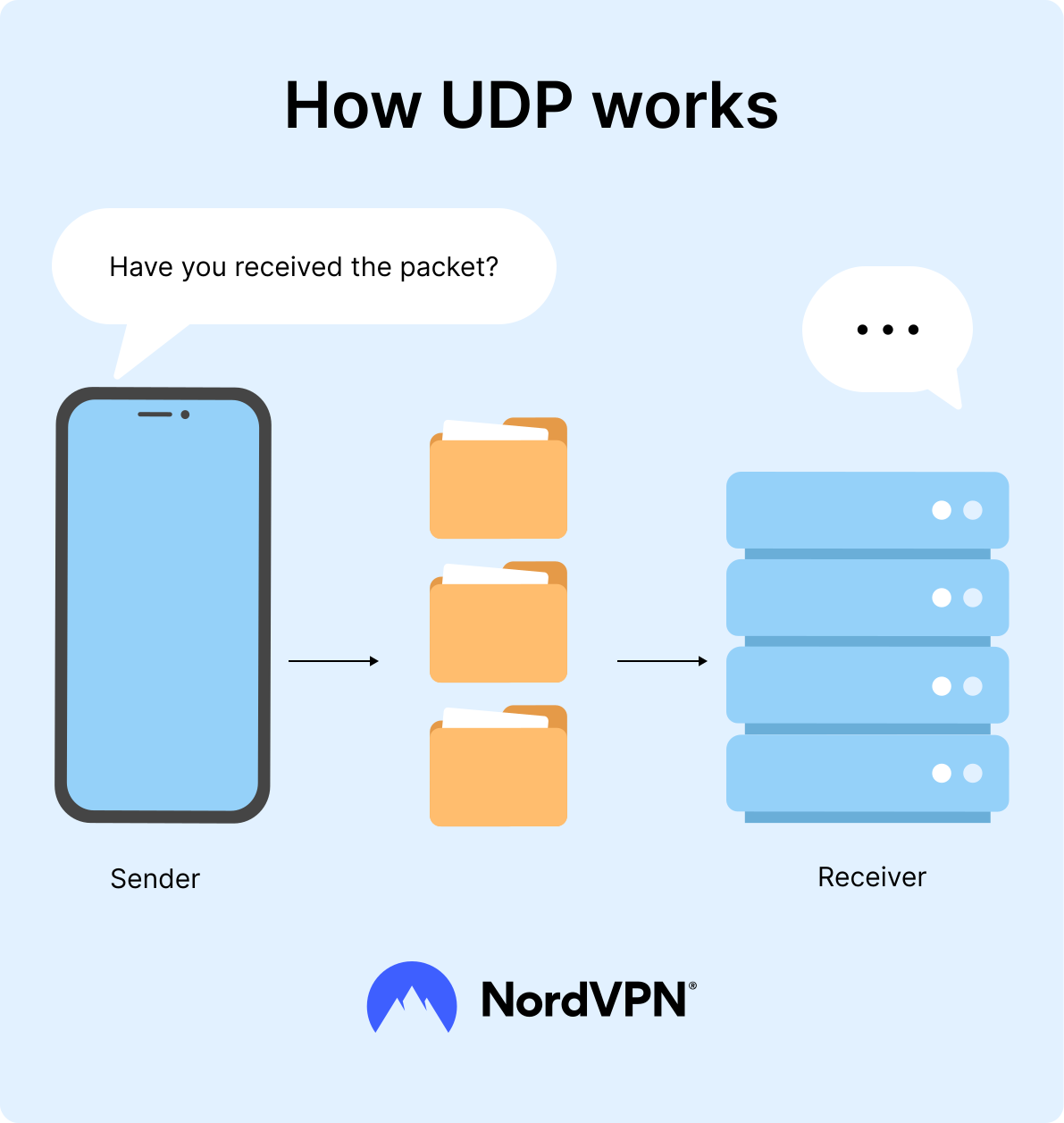
Unlike TCP, UDP doesn’t use a handshake. Instead, it sends data packets without first establishing a connection or verifying that the recipient is ready. This lack of a handshake allows UDP to be faster than TCP, making it especially useful for real-time applications like video streaming and online gaming, where speed is prioritized over guaranteed delivery.
Pros of UDP
The UDP protocol offers several advantages:
- UDP has a smaller fixed header (8 bytes vs. TCP’s 20 bytes), reducing per-packet overhead.
- UDP delivers data even if some of the packets are missing, meaning that packet loss won’t disrupt the entire transmission.
- One UDP transmission can be sent to multiple receivers at once through broadcast and multicast functionalities.
- UDP transmission is faster and more efficient than other options, like TCP.
UDP’s most significant benefit for users is that it doesn’t require a connection setup or handshake before sending data. This approach results in lower latency, which is crucial for real-time applications. If you need a fast protocol, UDP is the better choice.
Cons of UDP
Despite its speed and performance, UDP does have some drawbacks:
- UDP does not check whether or not a data packet reached its destination successfully.
- If a router has to prioritize one data packet over another, it is likely to transmit a TCP packet over a UDP packet.
- UDP does not send data in a specific sequence, so packets can arrive in any order.
UDP belongs to the category of unreliable protocols, meaning it does not guarantee delivery or data order. It also lacks congestion control and is more susceptible to security threats such as DDoS attacks and spoofing. These factors make it unsuitable for some applications, like file transfers. Essentially, UDP sacrifices data integrity for speed and convenience, which can make it less secure for users.
What is UDP used for?
The UDP protocol is used for time-sensitive, real-time applications, where the loss of a few packets is acceptable in exchange for lower latency. If your primary concern is speed and responsiveness over the actual integrity of the data, UDP is ideal.
Some specific use cases include:
- Online gaming. UDP’s low latency is crucial for transmitting player actions and game state in real time, making instant feedback possible even if some packets are lost.
- DNS (domain name system) lookups. UDP allows DNS queries and responses to be sent quickly without the overhead of establishing a connection, which helps resolve domain names efficiently.
- SNMP (simple network management protocol) services. UDP enables efficient monitoring and management of network devices through quick, one-way communication.
- Multicast broadcasting. UDP is efficient for sending data to multiple recipients simultaneously, making it useful for market data distribution or other broadcast scenarios.
How do TCP and UDP work?
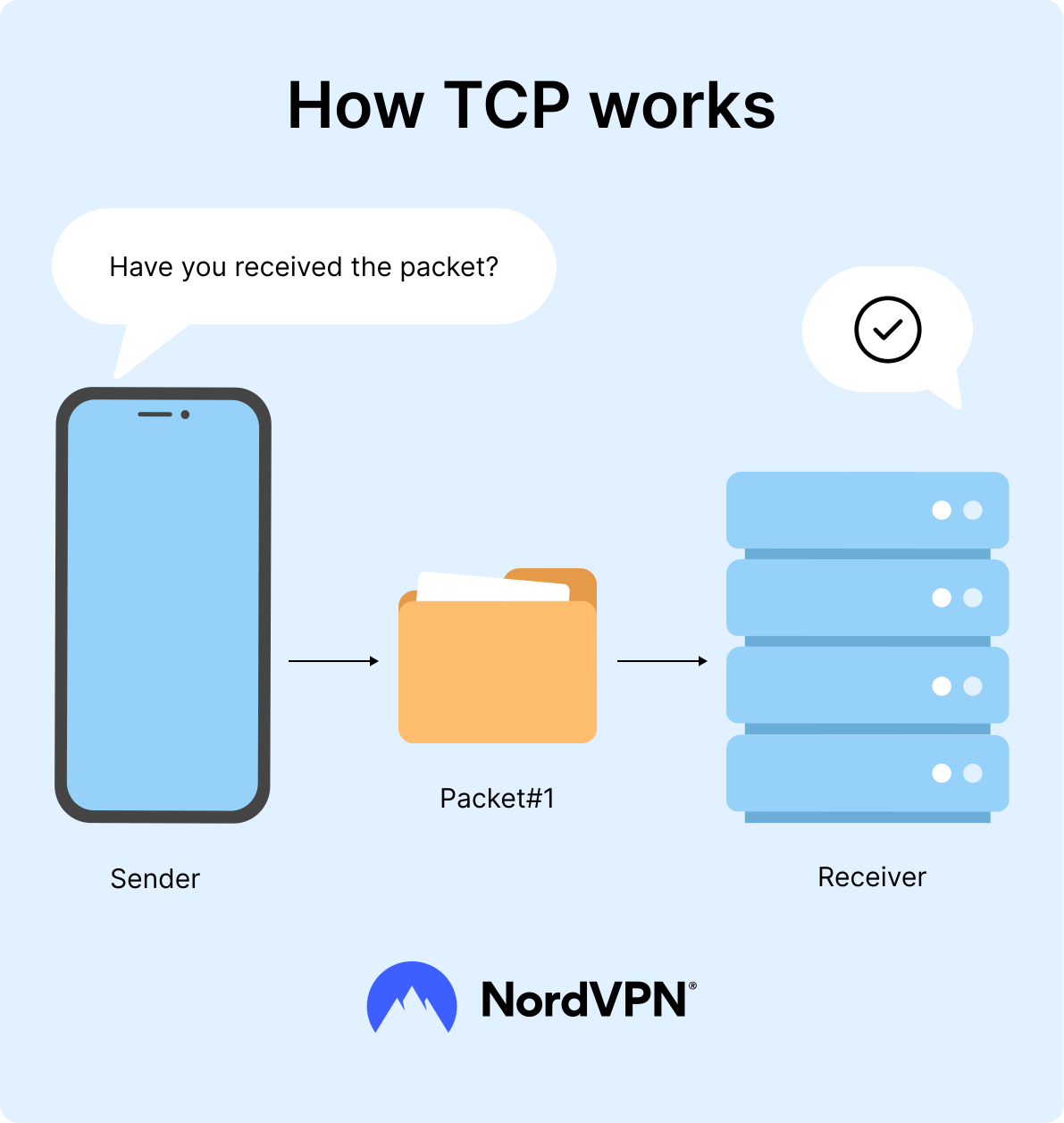
The primary difference between TCP and UDP is how they prioritize reliability and speed. TCP is more reliable than UDP because it transfers your data packets in full and in order from your device to a web server. UDP is faster and simpler since it sends data without performing the same checks, which doesn’t guarantee the delivery of packets.
How does TCP work?
TCP operates in three phases: connection establishment, data transfer (where data is broken into segments, transmitted with sequence numbers and acknowledgments, and retransmitted if lost), and connection termination.
This is how this process looks in practice:
Connection establishment
- 1.SYN (synchronize) segment: The client sends a SYN segment to the server, initiating the connection and including an initial sequence number.
- 2.SYN-ACK (synchronize-acknowledge) segment: The server responds with a SYN-ACK segment, acknowledging the client’s SYN and providing its own sequence number.
- 3.ACK (acknowledge) segment: The client sends an ACK segment back to the server, acknowledging its SYN-ACK and establishing a connection for data transmission.
Data transfer
- 1.Segmentation: The application data is broken into smaller units called segments for transmission.
- 2.Ordered delivery: Each segment is assigned a sequence number to ensure data arrives at the receiver in the correct order.
- 3.Acknowledgments and retransmission: The receiver sends acknowledgments to the sender for received segments. If the sender doesn’t receive an acknowledgment within a set time, it retransmits the lost segment.
- 4.Flow control: A sliding window mechanism manages the volume of data sent to prevent the receiver from being overwhelmed by data.
Connection termination
- 1.FIN (Finish) segment: An application signals the end of data transmission by sending a FIN segment.
- 2.ACK for FIN: The receiver sends an ACK segment to acknowledge the FIN segment.
- 3.Second FIN segment: To close the connection in the opposite direction, the receiver may send another FIN segment, which is then acknowledged by the sender. Alternatively, the connection can be terminated in one direction (a "half-close").
Because the data is sent in sequence, it helps with data congestion and flow control, and makes it easier to spot and fix any errors. This also means that data sent over TCP is more likely to reach its destination in full.
How does UDP work?
UDP works by completing the same job as TCP without needing unique identifiers or sequence numbers. It transmits data as discrete packets called datagrams rather than a continuous stream. It doesn’t guarantee packet order or retransmit lost data. Its header includes source and destination ports, the length of the datagram, and a checksum. UDP has almost no error correction, nor does it care about lost packets.
This is how the process looks in practice:
Sender side
- 1.Data packaging: An application sends data to be transmitted using UDP.
- 2.UDP header addition: The UDP layer adds a header containing:
- 1.Source port: Identifies the sending application’s port.
- 2.Destination port: Identifies the receiving application’s port.
- 3.Length: The length of the UDP datagram, including the header and data.
- 4.Checksum: Used for basic error detection, allowing the receiver to verify data integrity.
- 3.IP layer handoff: The UDP datagram is passed to the Internet Protocol (IP) layer.
- 4.IP encapsulation: The IP layer adds its own header with source and destination IP addresses, creating an IP packet.
- 5.Network transmission: The IP packet is then transmitted over the network to the destination host.
Receiver side
- 1.Packet reception: The destination host receives the IP packet.
- 2.IP header removal: The IP header is removed, and the UDP datagram is extracted.
- 3.UDP header processing: The UDP layer verifies the datagram’s integrity using the checksum.
- 4.Application delivery: The UDP datagram is then forwarded to the appropriate application based on the destination port number in the header.
- 5.Application handling: The receiving application processes the data. UDP doesn’t guarantee delivery or order, so if packets are lost, arrive out of order, or are duplicated, the receiving side is responsible for handling these issues.
UDP’s connectionless and "fire-and-forget" nature allows it to send data much faster than TCP because it skips the overhead of establishing a connection and verifying that packets arrive correctly. The downside to this approach is that speed, low latency, and efficiency are more important than reliable, ordered, and error-free data delivery, which can be a drawback depending on the application.
TCP vs. UDP: The main differences
The main difference between TCP and UDP is that UDP is faster. UDP has a speed advantage because the user doesn’t have to allow or acknowledge receipt of the data to be resent. This feature lets UDP establish connections and transfer data faster. However, it also causes some concerns over how safe UDP actually is.
Let’s take a closer look at how TCP and UDP differ:
| Feature | UDP | TCP |
|---|---|---|
| Connection type | Connectionless, no need for a connection setup before sending data | Connection oriented, requires a handshake to establish a connection |
| Reliability | Unreliable, no guarantee of packet delivery, no retransmission of lost data | Reliable, guarantees delivery through retransmission of lost packets |
| Data ordering | No built-in ordering of packets; data may arrive out of order | Guarantees in-order delivery of data packets |
| Flow control | No flow control, packets are sent without any control over network congestion | Implements flow control using mechanisms like windowing to prevent congestion |
| Speed & overhead | Faster, with less overhead due to no connection setup or error correction | Slower due to connection management, error-checking, and flow control |
The UDP vs. TCP VPN debate often concludes that OpenVPN works best on a UDP port, although it can be configured to run on any port.
So, which is better — UDP or TCP? It all depends on what you use them for. If you need a fast and constant data transmission for an application to work properly, you will have to use UDP. Otherwise, TCP is a stable and reliable protocol for transferring data and not losing any of it along the way.
UDP vs. TCP: Which is faster?
UDP is generally faster than TCP because it doesn’t go through the connection setup and reliability checks that TCP performs, such as retransmission and ordered packet delivery.
As a result, UDP is faster than TCP, but it is also more error prone. TCP sends its data in sequence, so it uses more flow control. It makes the connection safer and smoother but reduces speed due to a lot of back-and-forth communication between the sender and receiver.
UDP vs. TCP: Which is more secure?
While neither protocol inherently provides encryption, TCP’s reliability can improve data integrity by reducing the risk of data corruption. UDP, in contrast, prioritizes speed over reliability, which can result in lost or out-of-order data.
However, data reliability and integrity (retransmission/ordering) are not the same as security. TCP’s reliability mechanisms can help with data integrity in a non-malicious setting, but are not substitutes for encryption or authentication. True data security comes from protocols like TLS (over TCP) or integrated security in QUIC (over UDP).
Does OpenVPN use TCP or UDP?
OpenVPN is compatible with both TCP and UDP, but which you’ll prefer will depend on what you need it for. OpenVPN is an open-source VPN protocol used by many leading VPN providers, including NordVPN.
UDP is a great option if you are gaming, streaming, or using VoIP services. It may lose a packet or two, but it won’t have a huge impact on your overall connection. Using TCP for such services might cause lag (especially if you’re connected to servers on the other side of the world), which can completely ruin your experience. Therefore, OpenVPN via TCP is recommended for static uses, such as emailing, web browsing, and file transfer. When you set up a VPN, it’s important to choose the setup that works best for your specific needs, working on a case-by-case basis. You can switch protocol to OpenVPN UDP or TCP in the NordVPN app.
Check out our video on TCP vs. UDP below.
Which protocol does NordVPN use?
NordVPN wants to provide the best browsing experience without compromising on speed, so we use the UDP protocol by default. We recommend trying the UDP protocol first and only switching to TCP if you experience any issues.
To change UDP to TCP on NordVPN (for Windows users):
- 1.Go to "Settings" by clicking on a gear icon in the top right-hand corner.
- 2.Select "Advanced" from the menu on the left-hand side.
- 3.Under "Protocol" choose TCP.
To change UDP to TCP on NordVPN (for MacOS users):
- 1.Open the "Preferences" panel by clicking on the slider button in the upper left-hand corner or finding NordVPN on your menu bar and selecting "Preferences" (default hotkey: Cmd + ,).
- 2.“Connection: Prefer UDP over TCP" will be on by default. Click on the checkbox to turn it off.
If your speed has dropped, you can also try a few tricks to boost your VPN speed.
Online security starts with a click.
Stay safe with the world’s leading VPN