
Types of VPN servers based on infrastructure
VPNs tend to rely on different types of infrastructure to route and protect your traffic. The two main options are physical VPN servers and virtual VPN servers, each with its own approach to performance, privacy, and flexibility.
Understanding the difference between the two can help you pick the option that best suits your browsing, streaming, or work online habits. Keep in mind that:
- A physical VPN server is a dedicated hardware located in a specific data center. It runs only the VPN service, with its CPU and memory reserved entirely for encrypting and transferring your data. Such a setup can offer more predictable performance and reduce the risk of interference from other services.
- A virtual VPN server, on the other hand, exists as software running on a shared physical machine. Through virtualization technology, multiple virtual servers can operate independently on the same hardware, each with its own operating system and allocated resources.
Let's set the record straight — both types can keep your connection secure, but the way they're built affects speed and cost.
What is a physical server when using a VPN?
A physical VPN server is a dedicated piece of hardware located in a data center. It runs only the VPN server software — no web hosting service, email, or other applications compete for resources.
All of its CPU power, memory, and storage are reserved for encrypting and routing VPN traffic. Such a dedicated setup often delivers more stable speeds, consistent performance, and strong isolation from other server network activity, which makes it a reliable option for VPN users.
For example, if you connect to a physical server in London, your data is routed through an actual machine in that location. It's especially useful for situations where reliability matters, such as working remotely, streaming high-definition video without buffering, or using a virtual private server to access region-specific platforms.
Because the hardware is reserved solely for the VPN, there's less chance of slowdowns from unrelated workloads and fewer risks of resource bottlenecks during peak usage times.
How does a physical VPN server work?
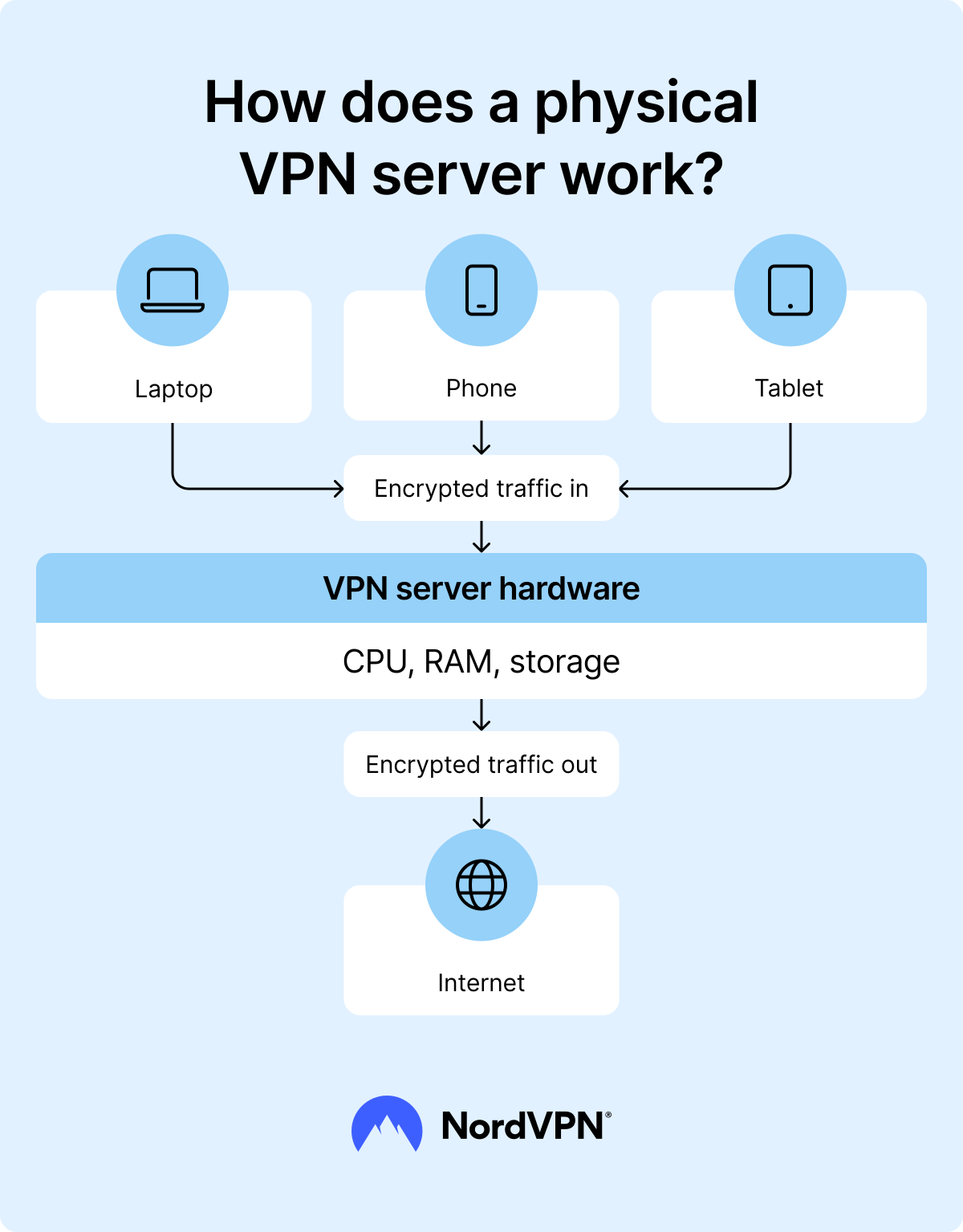
When you connect to a physical VPN server, your encrypted data travels directly through that machine, then out to the internet with your VPN-assigned IP address. Every user on that server shares the same pool of VPN IP addresses, but the processing power behind it remains fully dedicated to VPN connections.
This dedicated setup reduces bottlenecks, improves connection stability, and adds an extra layer of isolation that improves overall security.
What is a virtual server when using a VPN?
A virtual VPN server is a software-based server that runs on top of a physical machine using server virtualization technology. Instead of taking up the entire hardware, it shares the CPU, RAM, and storage with other virtual private servers hosted on the same physical device. Each of these virtual machines operates independently, with its own operating system, configuration, and VPN software.
In simple terms, think of it as one powerful physical server "split" into many smaller servers through software. Such flexibility allows VPN providers to quickly scale resources up or down as needed.
Virtual servers come in different forms, including virtual machines (VMs) that run multiple isolated systems on the same hardware and cloud servers hosted in large-scale data centers. They are often used for scenarios where speed of deployment, location flexibility, and cost efficiency are priorities.
With virtual servers explained, it's easier to see their trade-offs — while they offer flexibility and scalability, performance can vary depending on how heavily the shared resources are used by other virtual servers on the same host machine.
How does a virtual VPN server work?
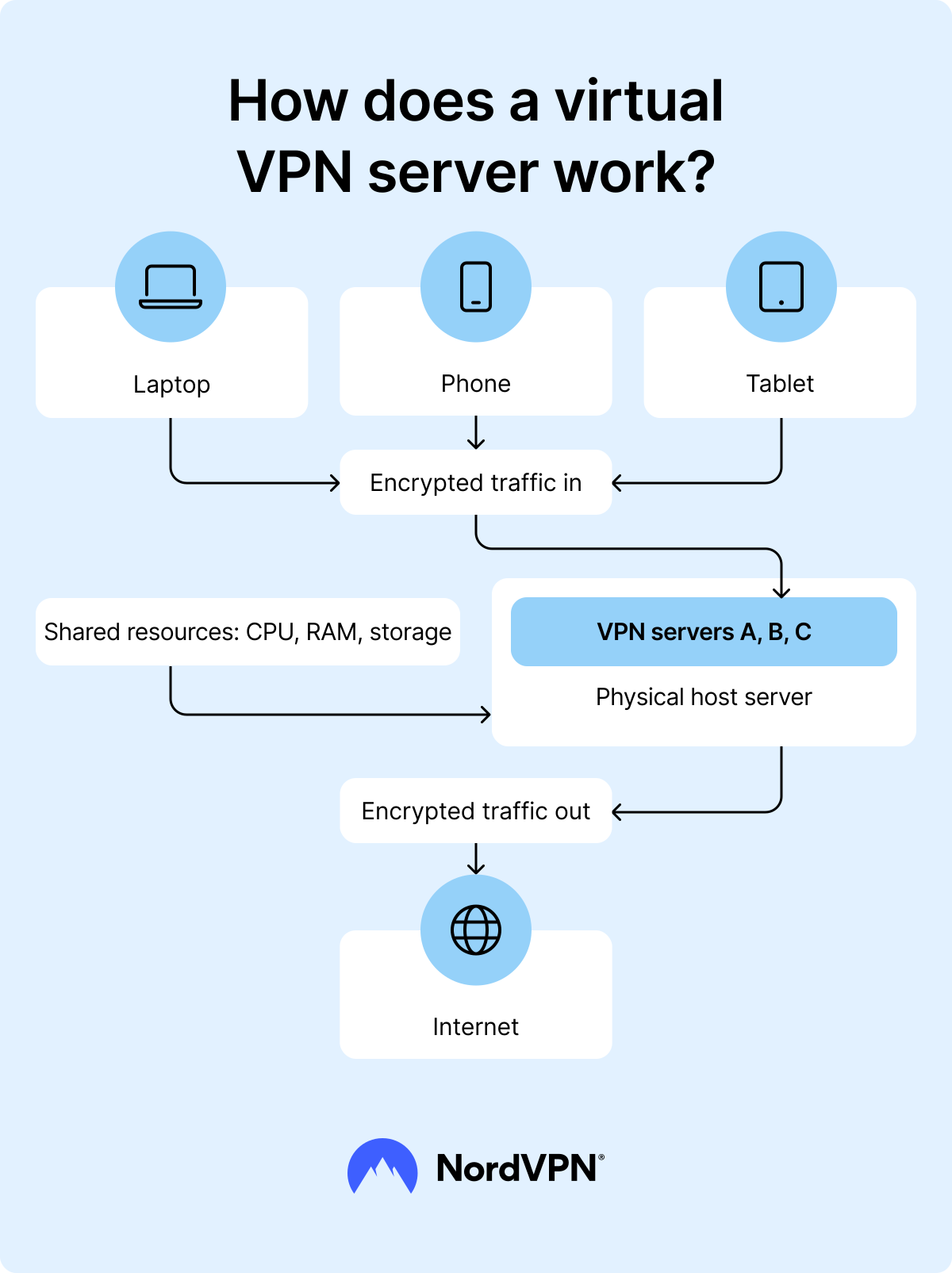
A virtual VPN server runs as software on a physical host machine alongside other virtual servers. All of them share the same pool of resources — CPU power, RAM, and disk space — which makes the setup efficient but can sometimes affect performance if many virtual machines are heavily using those resources at once. VPN providers can adjust resource allocation to ensure each server has what it needs, but traffic spikes or overloaded hosts may still cause slowdowns.
When you connect to a virtual VPN server, your traffic is encrypted, routed through the virtual environment, and sent out to the internet with the server's assigned IP address. Many virtual servers also use RAM-based servers, meaning they store data only in temporary memory, so it's wiped clean every time the server is restarted.
Key differences between physical and virtual VPN servers
A helpful way to conceptualize the key differences between physical vs. virtual servers is to think in terms of VPN hardware vs. VPN software.
Physical VPN servers rely on dedicated hardware, which means everything is tied to a single, independent machine. Virtual VPN servers, on the other hand, are closer to VPN software — they run on shared infrastructure, using virtualization technology to create separate server environments on the same physical host.
To see how the two are different, check the table below.
| Criteria | Physical servers | Virtual servers |
|---|---|---|
| Performance | Generally offer higher and more stable speeds because no other services share the hardware | Speeds can fluctuate since resources are split between several virtual environments |
| Security | Operate in isolation, reducing the chance of cross-server risks | Security depends on the host machine, so issues on the same hardware can have a wider impact |
| Scalability | Expanding capacity means adding or upgrading physical machines | Can be created, moved, or adjusted quickly without adding new hardware |
| Cost | Higher operating costs due to equipment and upkeep | Lower running costs because hardware is shared among multiple servers |
| Reliability | Less affected by problems on other systems and easier to control directly | If the host server fails or slows down, every virtual server on it can be affected |
| Resource use | All CPU, RAM, and storage are reserved for the VPN service | CPU, RAM, and storage are divided among several virtual servers on the same machine |
| Maintenance | Require on-site or hands-on upkeep and hardware replacement when needed | Managed through software tools, with fewer physical interventions required |
Which server type is better for VPN users?
The choice between a physical vs. virtual server often comes down to what you value most — speed, security, flexibility, or cost. While physical servers tend to offer faster and more stable performance thanks to dedicated hardware, virtual private servers can be just as reliable if they're hosted on their own dedicated machine.
To decide between the two types of servers, start by determining your specific use case:
- Casual users. A virtual server is usually enough for browsing, working, or using a VPN for streaming home shows while abroad.
- Privacy-conscious users. A physical server offers stronger isolation from other systems, making it a better pick if you prioritize privacy above all else.
- Gamers or streamers. A physical server is generally best for high-speed, stable performance when using a VPN for gaming or HD streaming. A virtual server can also work if it's dedicated and not overloaded.
- Budget users. Virtual servers are often cheaper to operate and still provide good performance for non-intensive tasks.
Once you have identified your use case, consider the following differences:
| Factor | Physical servers | Virtual servers |
|---|---|---|
| Speed | Consistent, high performance — ideal for gaming, streaming, and large downloads | Can be fast, but speeds may dip if resources are shared with other virtual servers |
| Privacy and security | Strong isolation; lower risk of issues spreading from other servers | Secure for most uses, but shared environments may create more exposure points |
| Scalability | Adding capacity requires installing new hardware | Resources can be scaled up or down quickly without installing new hardware |
| Best for | Users needing top performance, stability, and privacy | Users seeking flexibility and lower costs |
Online security starts with a click.
Stay safe with the world’s leading VPN