Key takeaways:
- A QR code scam uses a fake QR code to trick you into visiting malicious websites, downloading harmful apps, or sharing personal information.
- Scammers place fake QR codes in public spots, on delivery packages, in emails, and on printed materials.
- It's recommended to always check the source before scanning — if it looks suspicious or out of place, don't scan it.
- If you scan a fake QR code, disconnect from the internet and take steps based on what happened — close the site, delete suspicious files, change passwords, or remove untrusted apps.
- Report the scam to help others avoid it.
What is a QR code scam?
A QR code scam is a type of fraud in which a cybercriminal either replaces an existing QR code or creates a new one to carry out malicious activity. On the surface, the code looks like any other QR code — a square filled with black-and-white patterns. But instead of leading you to a safe page, it can:
- Redirect you to phishing sites that mimic legitimate services, tricking you into entering login credentials or payment details.
- Prompt automatic downloads that install malware or spyware on your device.
- Link to payment pages that transfer money directly to the scammer.
- Capture personal information you type into forms.
Because QR codes are quick to scan and hard to verify visually, it's easy to fall for scams that use them — especially if they're placed somewhere you trust, like a favourite café, a package from a well-known store, or an email from what appears to be your bank. Falling for this type of scam can put your personal information and money at risk.
How do fake QR codes work?
A fake QR code works by sending you somewhere you didn't intend to go. Scammers replace legitimate QR codes or create new ones that hide malicious links. To trick victims into scanning a malicious code, scammers use two main approaches:
- Physical placement. In this scenario, a scammer prints their own QR code and sticks it over a real one. You might find these on parking meters, posters, flyers, restaurant tables, or even product packaging. The goal is to catch people when they expect to be scanning something safe.
- Digital distribution. Scammers send a QR code via a phishing email or text message that leads to a fake login page or triggers a malware download. This type of QR code-based phishing is known as quishing.
Whether the code is on a street poster or in your inbox, the risk is the same: You can't tell by looking at it where it will take you. That's why scammers use these codes — they know most people will scan without checking the destination.
Real-life examples of fake QR code scams
Suspicious QR codes have already been used in many real cases, tricking people into giving away personal details or making payments to scammers. Some target large groups, while others catch people in everyday moments — parking the car, opening a package, or scanning a flyer.
Some of the best-known examples of this type of scam include:
Amazon QR code scam
A few years ago, Amazon customers in the US and UK reported receiving packages they never ordered. Inside or printed on the box was a QR code with a message to "claim a prize" or "track the delivery." Scanning it often opened a fake Amazon login page or a phishing site designed to collect personal details. Many reports suggested this was part of a larger brushing scam, where sellers send unexpected packages to boost fake reviews.
Fake parking meter payments
In early 2022, police departments in US cities like Austin and San Antonio, Texas, warned drivers about fraudulent QR code stickers on parking meters. Scammers placed their codes over the official payment QR codes. When scanned, these led to spoofed payment sites, which took the victim's card details and sent the money directly to the scammers.
"Your boyfriend cheated" campaign
Over the past few years, different brands around the world have used a similar tactic — posting flyers all over the cities that read, "Your boyfriend cheated. Scan for proof." The QR codes never revealed any scandal. Instead, they linked to discounts, promotions, or event pages. While harmless, these campaigns showed how easily curiosity or emotions can get people to scan without thinking. Scammers quickly copied this ploy, using identical-looking flyers to direct victims to phishing sites designed to steal their personal data.rel
How to identify a fake QR code
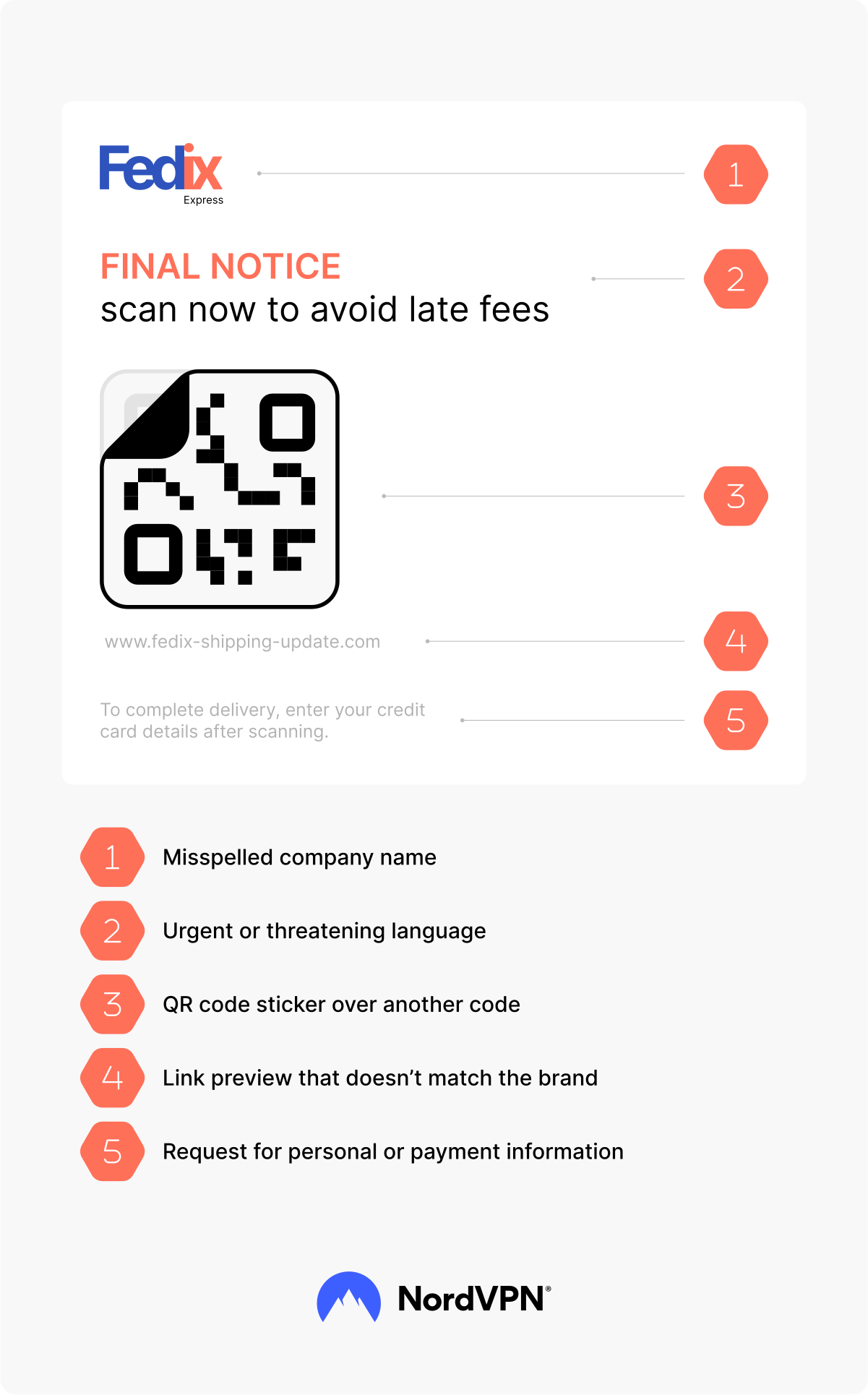
A QR code itself doesn't show you where it will take you, but its context can reveal a lot. Before you scan, look at where the code appears, who shared it, and what it's asking you to do. If it leads to a suspicious-looking site that asks for your login details, it may be part of a phishing scam.
Be on the lookout for these common red flags:
- The QR code is placed over another one or looks like a sticker added on top of printed material.
- It appears in unusual places — like a street pole, random flyer, or on a package you weren't expecting.
- The message or sign near the code uses urgent or threatening language ("act now," "final notice," or "fee will apply").
- It comes in an unexpected email or message from an unknown sender.
- The message also contains requests for personal or payment information.
- The code is paired with suspicious attachments or files.
- The link preview (if your phone shows it) doesn't match the company's official website.
What does a real QR code look like?
No single visual sign proves a QR code is safe — genuine and fake ones can look identical. However, legitimate QR codes will usually be shared in a trusted context: printed directly on official packaging, built into a product label, displayed on a verified company website, or part of a well-known app. If the QR code is a loose sticker, looks tampered with, or appears in an unusual place, check the link before opening it.
What to do if you scanned a fake QR code
If you suspect you've scanned a fake QR code, don't panic — but do act fast. The sooner you respond, the better you can shield yourself from potential damage. Follow these steps:
- 1.Close the page right away, then clear your browser cache and history to remove any stored data.
- 2.Delete any downloaded files without opening them and run a malware scan. Using tools with protection against quishing can help detect similar threats in the future.
- 3.Uninstall any suspicious apps and run a full system scan with a reliable antivirus.
- 4.Change passwords for any accounts you entered details into and enable two-factor authentication to protect your personal information.
- 5.Review your bank accounts, email, and shopping accounts for unusual activity. Such quick action can prevent further harm caused by social engineering tactics.
- 6.Report the scam to the company that was impersonated to prevent the cybercrime from escalating.
How can you avoid fake QR code fraud?
As QR code fraud is getting more common, it's key to learn how to protect yourself and your personal data. While you can't always tell if a QR code is safe just by looking at it, a few habits can help you avoid falling for a scam:
- Always check where a link — whether it's from a QR code, an email, or anywhere else — will take you before opening it.
- Only scan QR codes from trusted sources.
- Use your phone's link preview feature to see the destination before visiting it.
- Avoid codes that are taped or stickered over another one.
- Keep your device's security software up to date.
- Be cautious when scanning QR codes found in public spaces or on unexpected packages.
Select the best VPN provider to encrypt your data when browsing.
Online security starts with a click.
Stay safe with the world’s leading VPN