What is the crypto wallet address checker feature?
Considering the growing number of scams and unsafe addresses floating around online, NordVPN has expanded its Threat Protection Pro™ toolset with a crypto wallet address checker. It helps protect you by identifying potentially dangerous crypto wallet addresses that appear while you browse the web. This feature helps users avoid risky transactions and prevents common errors when managing digital assets.
And because it’s built into Threat Protection Pro™, it’s part of a broader ecosystem of security tools. Alongside the wallet address checker, it also blocks ads and trackers, scans downloads for malware, warns you about phishing sites, and helps prevent access to scam domains — all designed to help you interact with the internet more safely, whether or not you're actively using cryptocurrency at the time.
How does the crypto wallet address checker work?
When the feature is active, Threat Protection Pro™ scans the text of every page you visit. It looks for wallet addresses and flags the ones that can be potentially dangerous. To break it down in more detail, the process starts with:
- 1.Page scanning. As you browse the web, the tool scans all the text locally on your device to identify cryptocurrency wallet addresses. These addresses, while different in format depending on the blockchain (for example, Bitcoin, Ethereum, and Solana), follow recognizable patterns. The tool looks for these patterns in the page content you're viewing — no data ever leaves your device during this scanning process.
- 2.Reputation check. If the tool detects a wallet address, only that address is sent outside your device to check whether it has previously been reported or is known to be linked to fraudulent activity, such as phishing schemes or fraud. To protect your privacy, only the wallet address is sent, strictly for verification purposes — no personal information, browsing history, or page content is ever shared.
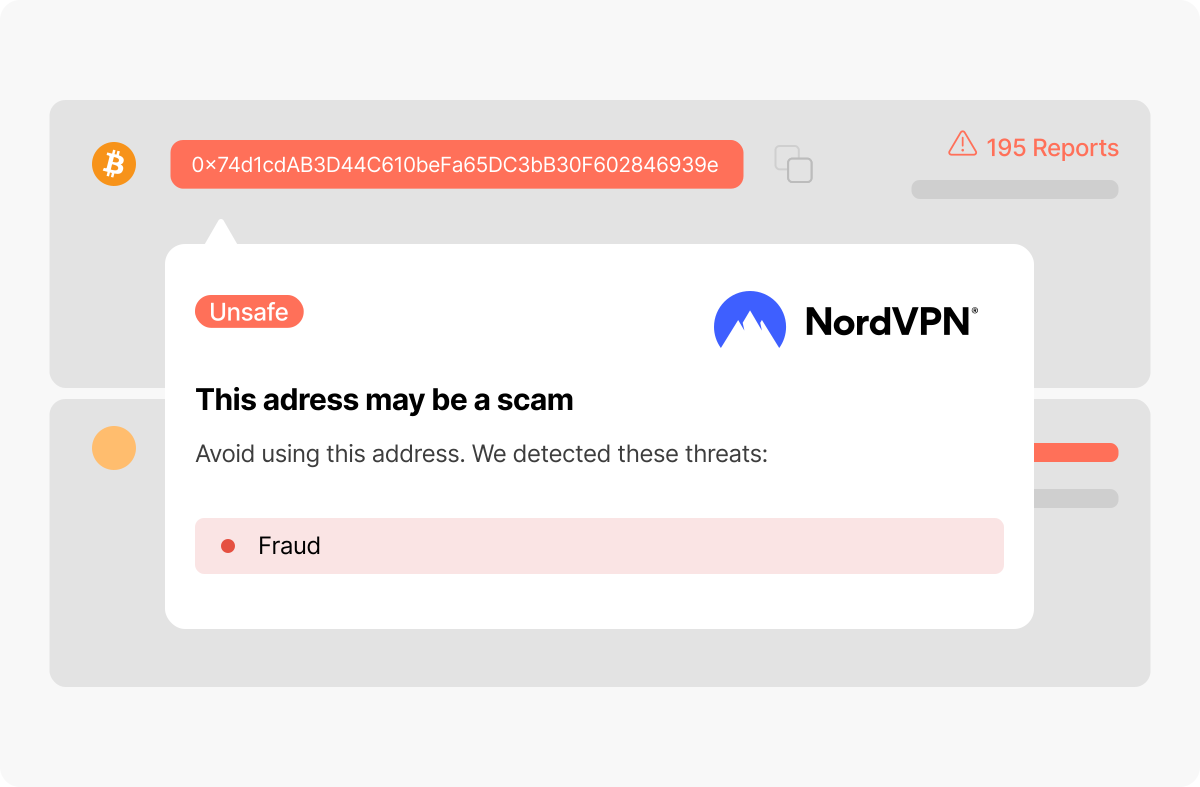
- 3.Warning. If an address matches one of those records, it gets marked on the screen. If you hover your mouse over it, a small notification warns you that this address may be unsafe.
How to turn on the crypto wallet address checker
Like any other feature by Threat Protection Pro™, the crypto wallet address checker only works when Threat Protection Pro™ is turned on in the app and the feature is enabled:
- 1.Open your NordVPN app and click on the shield icon in the left panel.
- 2.Click “Turn on” to activate Threat Protection Pro™. If you only need browsing protection features, like the wallet address checker, you can enable them separately under the “Advanced browsing protection” section.
- 3.Ensure the toggle next to “Crypto wallet address checker” is also turned on.
And here you go — the tool will now continuously work to keep your funds safer.
Of course, you can turn the wallet address checker off separately, even if the advanced browsing protection is on. However, we advise keeping the feature on at all times.
Why is crypto wallet address verification important?
Using cryptocurrency puts you in full control of your funds, but also makes you responsible for keeping them safe. Unlike traditional financial systems, crypto is decentralized, so no banks, support teams, or intermediaries exist to control the transactions and fix errors. If you send funds to the wrong wallet address, that transaction is permanent.
And because cryptocurrency is untraceable, scammers take full advantage. They spread fraudulent addresses across fake websites, shady Telegram channels, phishing emails, and even comment sections.
Now, if you need features like the crypto wallet checker, you might start wondering — is a blockchain wallet safe? And the truth is that blockchain technology, by design, is transparent and secure. Transactions are recorded immutably and, depending on the network, are visible to anyone. However, that transparency only applies to the blockchain itself, not to the broader web, where wallet addresses are shared and used in all kinds of ways.
What are the risks associated with crypto wallet addresses?
Crypto wallet addresses let you send and receive digital currency, but if you’re not careful, they can also lead to costly mistakes and scams:
- Loss of funds. Crypto transactions are irreversible. If you accidentally send funds to the wrong wallet address due to a typo, wrong copy-paste, or scam, that’s it.
- Public exposure of transaction history. Your wallet address publicly allows anyone to view your entire transaction history on the blockchain. So if your identity is ever linked to your address, anyone can trace all past and future transactions back to you.
- Scams. If people know your address holds valuable digital assets, you could become a target for cryptocurrency scams, phishing, or hacking attempts.
- Malware. Some crypto malware can change a copied address on your clipboard to the attacker’s address to trick you into sending funds to the wrong place.
- Address poisoning and lookalike addresses. Scammers may create addresses that closely resemble yours or someone you trust to trick you into sending funds to them. There's also address poisoning — when scammers send a tiny amount of crypto from an address that looks very similar to one you’ve interacted with to trick you into copying and using their fake address in the future.
How to ensure the crypto wallet’s safety
So what can you do beyond relying on a tool like the wallet address checker? Here are some additional ways for securing cryptocurrency in your day-to-day activity:
- 1.Double-check wallet addresses before making a transaction. Look at the first and last few characters and compare them to the intended destination.
- 2.Avoid copying addresses from suspicious or unverified sources, especially social media posts or anonymous comments.
- 3.Use trusted platforms and wallets that offer additional validation features like address allowlisting or transaction confirmation delays.
- 4.Enable two-factor authentication on all accounts associated with crypto activity.
- 5.Keep your browser, extensions, and antivirus software updated to defend against clipboard hijackers and phishing sites.
- 6.Use a hardware wallet whenever possible to isolate your private keys from your device.
- 7.Don’t click blindly on crypto links, especially those promising free coins, airdrops, or urgent financial returns.
Online security starts with a click.
Stay safe with the world’s leading VPN