
What is single sign-on (SSO)?
Single sign-on (SSO) is an authentication method that lets a user log in to an entire set of applications at once with a single set of credentials (such as a username and password, smart card, or one-time code). After this first login, the identity provider (SSO provider) confirms the user's identity and gives them access to all connected service providers, which means the user won’t have to enter their SSO credentials on every login page or remember different credentials for dozens of services.
Without SSO, every application would require its own login. Let’s look at this practically: Imagine an employee at a large company who works across email, HR software, time-tracking tools, third-party services, and specialized cloud applications. If each system required a separate login, they would be juggling at least five or six sets of user credentials. That can not only lead to forgotten passwords but also increase the likelihood of security risks like brute-force attacks.
The whole concept behind SSO came about because modern work life has become more complex. Research shows that the average office worker uses 11 different applications for work every single day, and that number keeps growing. Each service provider potentially needs its own username and password, creating a nightmare scenario where you're constantly trying to remember which password goes where. SSO sweeps away this confusion by giving you one secure login that works everywhere.
What is the difference between SSO and normal login?
The biggest difference between SSO and a standard sign-on system is how many times the user must prove their identity.
In a regular login process, each application manages its own authentication separately. Even if you reuse the same username and password, you still have to enter them on every login page because there’s no central identity system connecting them.
Single sign-on flips this whole process on its head. After you’ve logged in via SSO, you have access to all company applications and websites without the need to log in separately. Take an employee working with Gmail, Google Drive, and Google Calendar as an example. With normal logins, they would type a password into each app. With the SSO solution, a single login to the SSO portal allows them to use all of Google’s multiple systems without further sign-ons.
This difference eliminates redundancy, saves time, cuts down on errors, and can even improve security, especially when combined with multifactor authentication (MFA) or passwordless authentication.
How does SSO work?
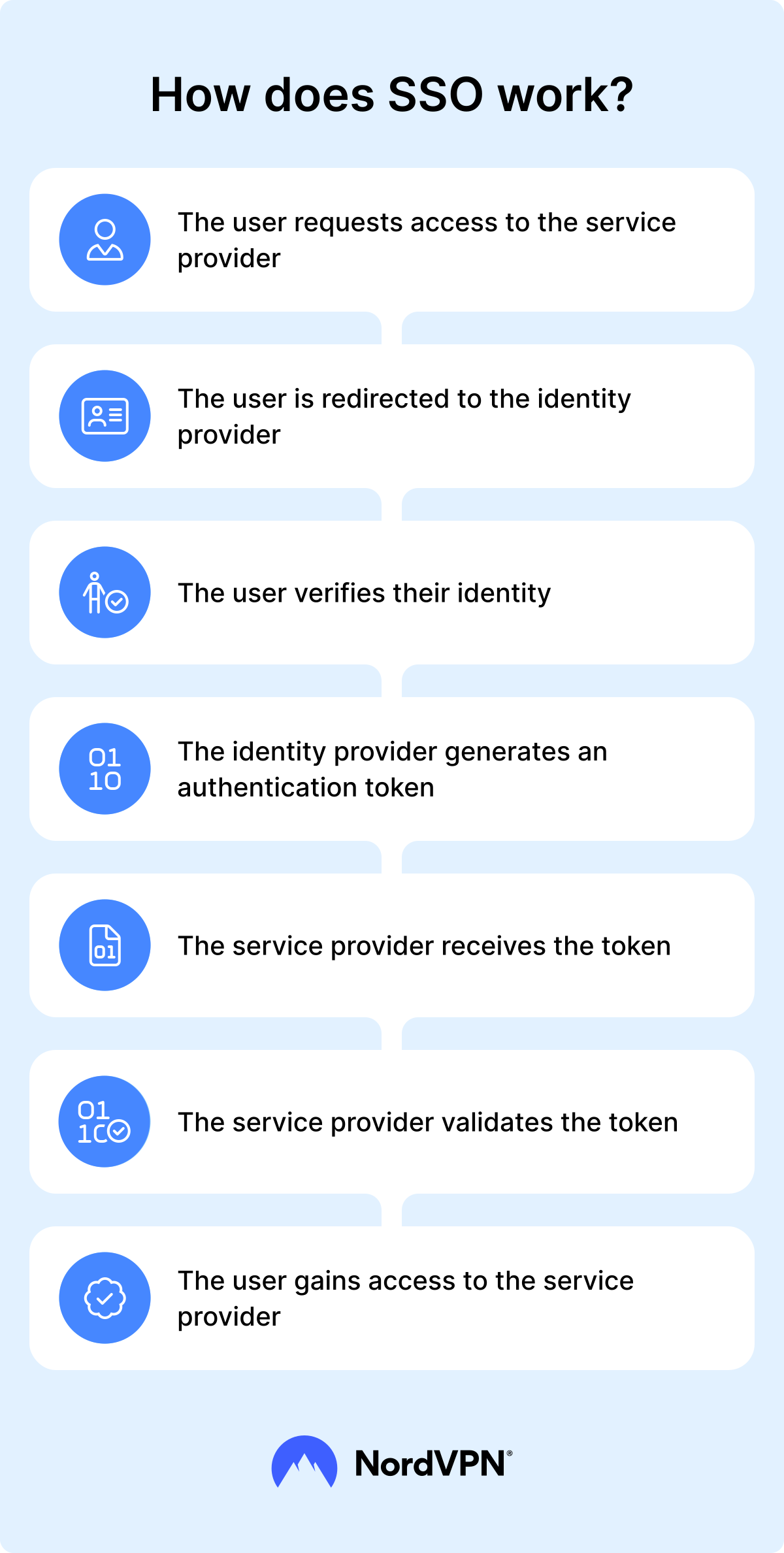
SSO works on the principle of federated identity management, where identity information is shared across different but trusted platforms. The process involves three main components: the user, the identity provider, and one or more service providers. Let’s take it step-by-step:
- 1.Initial access request. You try to access the service provider (an application, like your email).
- 2.Redirect to identity provider. Since you haven't logged in yet, the app redirects you to a central login page.
- 3.User identity verification. You type in your username and password (or use other authentication methods like a fingerprint).
- 4.Token generation. Once the identity provider confirms you are who you say you are, it creates an authentication token.
- 5.Token exchange. Your browser carries this token back to the original application — the service provider.
- 6.Token validation. The service provider verifies that the token is real and hasn't been tampered with.
- 7.Granting of access. Once validated, you gain access to the service provider without entering credentials again.
The next time you open a different app in the same SSO network, it checks if you already have a valid token. If you do, you get instant access without entering a password.
How does the SSO authentication token work?
SSO is essentially token-based authentication, with tokens serving as temporary ID badges that prove you've already been verified. The identity provider creates these tokens when you log in through SSO, and each of them contains:
- Your identifying information (like your email address or username).
- Token metadata (when the token was created and when it expires).
- A digital signature that proves it’s legitimate.
- A list of platforms you’re allowed to access.
These tokens follow a specific standardized authentication protocol, such as Security Assertion Markup Language (SAML), OAuth, OpenID Connect, or the Kerberos authentication protocol, so that all applications can correctly interpret and verify a user’s identity and access rights. The token is stored on the client side (for example, in your browser’s session cookies, local storage, or an application’s memory) and eventually expires. Once that happens, you need to log in again.
This approach means your actual password never gets shared with individual apps. Instead, the SSO system acts like a security guard who vouches for you. Once the guard confirms you're on the list, every door opens without you having to prove your identity repeatedly.
Types of single sign-on
Choosing the right SSO type can make or break your implementation. Understanding these variations can help you pick the best fit for your needs.
Web SSO
Web SSO allows users to access multiple services with a single set of credentials, often using cookies for user authentication. This type works exclusively with browser-based applications and relies on protocols like Security Assertion Markup Language (SAML), OAuth, or OpenID Connect. It’s one of the most used types of SSO, and probably the best-known example is the Google account, which grants access to Gmail, Google Drive, YouTube, and a plethora of other services.
Enterprise SSO
Enterprise SSO, sometimes referred to as eSSO, gives employees across the company access to on-premise and corporate network applications. Unlike web SSO, this type handles desktop applications, legacy systems, and internal network resources. It often uses Active Directory Federation Services (AD FS) or Lightweight Directory Access Protocol (LDAP) for user verification and can include password vaulting for service providers that don't support modern protocols. Employees log in once when starting their workday and gain access to all corporate resources.
Federated SSO
Federated SSO connects users across different organizations, letting them access partner resources without creating new accounts. First, organizations set up trust agreements that recognize each other's logins. Based on these agreements, university students can use their school credentials to access research databases at partner universities, or contractors can log into client systems using their company accounts. Each organization keeps control of its own user data while sharing user access through standards like SAML and OAuth.
Social SSO
Social SSO is the type of single sign-on most regular internet users are familiar with. It lets users log in to applications using their existing credentials from platforms like Google or Facebook. To register for a service provider, all users need to do is click “Sign in with Google/Facebook” instead of creating new passwords for every website. This approach makes signing up faster and gives users fewer passwords to remember. However, companies using social SSO depend on these platforms staying available and must handle user privacy carefully.
Device-specific SSO
Device-specific SSO works with applications installed on a single device. Once you authenticate to your operating system (e.g., Windows, macOS, or iOS), that session can grant access to apps on the same device without prompting for additional credentials. This type often uses biometric authentication (fingerprints or face scans), PIN codes, or device certificates.
What advantages does SSO offer?
Many companies employ SSO not just because it makes the login process that much simpler and more convenient. Additional reasons to use SSO are:
Reduced password fatigue. You only need to remember one strong password instead of dozens for different applications. Password managers like NordPass can also help with password fatigue, or you can use both solutions to make the login process even more headache-free.
Improved network security. Complex password management often leads to breaches when users write down passwords or reuse weak ones. SSO reduces password sprawl and makes credential management easier, lowering the risk of users relying on weak or reused passwords. To strengthen security even further, organizations can add VPN solutions like NordLayer and reduce the attack surface even more.
Higher productivity. Employees save significant time by avoiding delays due to forgotten passwords throughout their workday.
Reduced IT costs. Help desk tickets drop dramatically when password resets become rare.
Centralized access control. All user management happens in one repository, giving administrators a unified view of network privileges. Admins can instantly grant, modify, or revoke user access across multiple applications from a single interface.
What are the disadvantages of using SSO?
Now, while many boast about the convenience and added security of SSO, it doesn’t come without concerns:
Single point of failure. The centralization that makes SSO powerful also creates a critical dependency. If your identity provider goes down, users can't access any of their applications. Companies need backup systems and fail-safes to prevent total lockouts.
Implementation complexity. Successfully deploying SSO requires significant technical expertise and careful planning. You need to check which apps work with SSO and which ones don't, and sometimes you need to replace old software that can't connect to modern login protocols.
Security concentration risks. While SSO improves overall security, if someone steals a user's SSO password, they get access to all that person's applications, potentially amplifying the impact of a breach.
Limited application. Not all software works with SSO, which is especially true for older programs. Some applications use their own login systems that won't connect to your SSO solution, forcing users to maintain separate passwords for these tools.
Dependency on third-party apps. When you use an external identity provider like Google or Microsoft, your security depends on its security. If the identity provider’s systems get compromised or experience outages, your organization feels the impact too. You're essentially trusting another company to protect your access to everything.
What are the risks of not having SSO?
When companies rely on separate logins for every system, it opens the door to security threats. Without SSO, the following risks become much more likely:
Weaker security. Users are forced to remember multiple usernames and passwords, often leading to poor password practices such as reusing credentials across systems or storing them insecurely. These habits increase vulnerability to credential theft and brute-force attacks.
Phishing attacks. More login prompts mean more opportunities for attackers to trick employees into entering their credentials on fraudulent sites.
Inconsistent access control. Without centralized identity management, it’s harder to uniformly enforce strong authentication policies, like MFA, across all applications.
Abandoned accounts. When employees leave, IT teams may overlook some active accounts spread across different systems, which creates unauthorized access points that attackers could exploit.
Employee frustration. Constantly entering logins slows people down and makes them more likely to look for shortcuts that undermine security.
How does SSO enhance secure authentication?
SSO protects the organization by adding multiple layers of security to the login process. First, it centralizes authentication, so organizations can implement the same security policies for all their work tools. To make this process more secure, the company can set up strong password requirements, MFA, and even one-time password (OTP) systems in the main login system. SSO also works with newer security methods like fingerprint scans and smart cards.
Since users only log into a single system instead of many, it's easier to spot suspicious activity. Security teams can watch for hackers more effectively and respond faster when something looks off.
Finally, SSO never shares your actual password with the apps you use. Instead, it sends encrypted tokens that prove you logged in correctly. This process keeps your password safer even if one app gets hacked.
How to implement SSO
Implementing SSO requires careful planning and execution. It’s not something you want to rush. Usually, setting up SSO involves the following steps:
- 1.Assess current infrastructure. Map out which applications your users need to access and group them by department or function. Identify which tools are used most and which can integrate with SSO.
- 2.Choose an SSO provider. Select an identity provider that meets your organization's needs. Consider factors like cost, technical requirements, and supported SSO protocols.
- 3.Update user identity information. Verify that all user accounts in your directory are current and accurate. Remove inactive users, correct inconsistent email formats, and establish uniform naming standards.
- 4.Define roles and permissions. Apply the principle of least privilege when configuring access. Assign user permissions based on defined roles, ensuring users can only access resources necessary for their responsibilities.
- 5.Implement security measures. Since SSO centralizes user verification, protecting this system is crucial. Enable MFA, deploy backup authentication methods, and establish monitoring for unusual access patterns.
- 6.Train employees. Educate users about the new authentication process before launch. Provide clear instructions on how to log in, what changes to expect, and who to contact for support.
- 7.Plan for contingencies. Set up backup user verification methods and recovery procedures for employees, so that they can access critical applications during outages.
Online security starts with a click.
Stay safe with the world’s leading VPN