Please note that our platform is intended for adults only. All content in this quiz is for informational purposes only and is designed to help parents and caregivers start conversations about online safety with their children.
Why is internet safety important for kids?
Teaching kids about internet safety helps protect them from cyberbullying, sexual exploitation, and predatory grooming. It also helps them avoid scams, identity theft, and exposure to harmful content. The earlier children learn safe online habits, the better equipped they are to navigate the internet with confidence.
PRO TIP
Download our internet safety family guide opens in a new tab to use alongside this quiz and get more talking points and tips.
Test your child’s cybersecurity knowledge with an internet safety quiz
QUESTIONS ABOUT PASSWORD SECURITY
1. Which password is the strongest? 🥇
-
A) Your pet’s name
-
B) 123456
-
C) PurpleFish!392$
2. Is it okay to share your password with your best friend? 🤫
-
A) Yes, you share everything with them!
-
B) No, never
-
C) Yes, if your best friend promises to not tell anyone else
3. Should you reuse the same password for your email, gaming, and school accounts? 🔄
-
A) Yes, it’s easier to remember just one password
-
B) No, each account should have a unique password
-
C) Yes, if the password is strong
QUESTIONS ABOUT PERSONAL INFORMATION
4. Which of these options is personal information you should NOT share online? ❌
-
A) Your birthday
-
B) Your full name and home address
-
C) Your pet’s name
-
D) All options
5. What does it mean to “protect your privacy” online? 🔐
-
A) Keeping your personal information safe and not sharing it with strangers
-
B) Using a secret code to talk to your friends
-
C) Sharing your information with people who follow you or are online friends
6. Is it okay to send a photo of yourself to someone you only know online? 📸
-
A) Yes, if they seem trustworthy
-
B) Yes, if they send one first
-
C) No, never send photos of yourself to someone you haven’t met in real life
-
D) Yes, as long as you don’t show your face
7. Someone you’ve never met starts chatting with you on a game or TikTok. What should you do? 🚨
-
A) Chat with them — they seem friendly
-
B) Give them your name and school so they know you’re real
-
C) Don’t respond yet — tell a trusted adult first, and decide together whether it’s safe to chat
-
D) Add them as a friend to find out more about them
PRO TIP
TikTok is one of the most popular platforms among children and teens. Read our guide to TikTok safety for kids to learn how to set up the “Family pairing” mode, manage screen time, and enable “Restricted mode.”
8. Why shouldn’t you share your exact location on social media? 📍
-
A) It uses too much of your battery
-
B) Strangers can find out where you live or go to school
-
C) It makes your photos blurry
-
D) Your followers don’t care
9. You want to post a video of your friend online. Do you need to ask them for permission first? ▶️
-
A) No, it’s okay as long as you think it’s a funny video
-
B) Yes, always ask for permission before posting a picture or video of someone else
-
C) Only if they look bad in the video
QUESTIONS ABOUT FAKE LINKS
10. What does “think before you click” mean? 🖱
-
A) Click every link you see
-
B) Stop and check if a link, button, or message is safe
-
C) It’s fine to click links from strangers
11. Your family member sends you a strange link through text or chat. What’s the safest thing to do? 🔗
-
A) Click it immediately because it’s from a trusted person
-
B) Ask your family member in person if they really sent it before clicking
-
C) Never click any links ever
12. Your friend sends you a link to download a free game. You don’t know the website. What should you do? 🎮
-
A) Download the game right away! Free stuff is great!
-
B) Ask a trusted adult if the website is safe before you download anything
-
C) Download it — your friend wouldn’t send you anything dangerous
13. Which link looks real and safe to use? 🤔
-
A) www.robllox-login.com
-
B) www.roblox-free-now.net
-
C) www.roblox.com
-
D) www.r0blox.com
You’re halfway through — great work! Collect your reward badges and keep going.
QUESTIONS ABOUT PHISHING AND WARNINGS
14. Your browser shows a warning that a website might be dangerous. What should you do next? ⚠
-
A) Click through anyway to see what’s there
-
B) Tell a parent and don’t visit that website
-
C) Try that same website on a different browser
-
D) Assume it’s a mistake and visit the website anyway
15. Which message is the most suspicious? 🤨
-
A) “Here is a homework link from your teacher.”
-
B) “Here is the class reading page.”
-
C) “Your friend sent you a game invite.”
-
D) “Click now, or your game account will be deleted!”
PRO TIP
On Roblox, children can chat, trade, and play with strangers. Read our guide to Roblox safety for kids to learn how to protect your child’s account and set the right privacy controls.
16. You see a QR code in a YouTube video or on a game’s packaging. You should:
-
A) Just scan it immediately
-
B) Scan it on someone else’s phone
-
C) Ask a trusted adult to check what it links to before you scan it
QUESTIONS ABOUT ARTIFICIAL INTELLIGENCE
17. What does AI mean?🤔
-
A) A type of robot that only exists in movies
-
B) A tool only adults use
-
C) A video game character
-
D) Artificial intelligence
18. You see a photo of your favorite celebrity online. The post claims they’ll give away free game codes if you click a link. What should you do? 📸
-
A) Click the link — it looks real!
-
B) Share it with your friends so they can get free codes too
-
C) Check whether the celebrity posted it on their official account, and ask a trusted adult before clicking
19. What should you remember when talking to an AI chatbot or an AI assistant? 🤖
-
A) Everything it says is always true and correct
-
B) It never makes mistakes
-
C) It might give wrong information, and you should verify facts with other sources
-
D) You should share your personal information with it
You’re doing great — only a few questions left! We have a little gift for you.
QUESTIONS ABOUT CYBERBULLYING
20. What is “cyberbullying”? 😢
-
A) Using the internet to learn new things
-
B) Playing games online with your friends
-
C) Using the internet to hurt, embarrass, or be cruel to someone
21. If someone is bullying you online, what should you do? 🤬
-
A) Respond angrily to teach them a lesson
-
B) Tell a trusted adult, block the person, and report them to the platform
-
C) Delete your account
-
D) Ignore it and hope it stops
22. Your friend is being mocked in a group chat you’re in. What should you do? 👀
-
A) Join in — everyone else is doing it
-
B) Stay silent and hope it stops
-
C) Tell a trusted adult and check in with your friend privately
-
D) Leave the group chat without saying anything
OTHER IMPORTANT QUESTIONS
23. You want to use a new social media app, but you’re under 13. The app asks for your age. What should you do? 📋
-
A) Enter a fake age so you can sign up
-
B) Ask a trusted adult whether the app is appropriate, and sign up together
-
C) Use an older friend’s or sibling’s account instead
-
D) Create a fake profile with a made-up name and age
24. You get a message saying you’ve won a prize and need to enter your home address to claim it. What should you do? 🏆
-
A) Enter your address — you might have actually won
-
B) Ask a parent or trusted adult before responding to a message
-
C) Enter a neighbor’s address just in case
-
D) Reply to ask for more details about the prize
25. How should you balance your online activity?
-
A) Play online games all day and night
-
B) Mix online time with outdoor play, homework, and sleep
-
C) Only use the internet on weekends
-
D) Stop using the internet completely
Hooray, you completed the quiz — you’ve earned your cyber safety certificate!
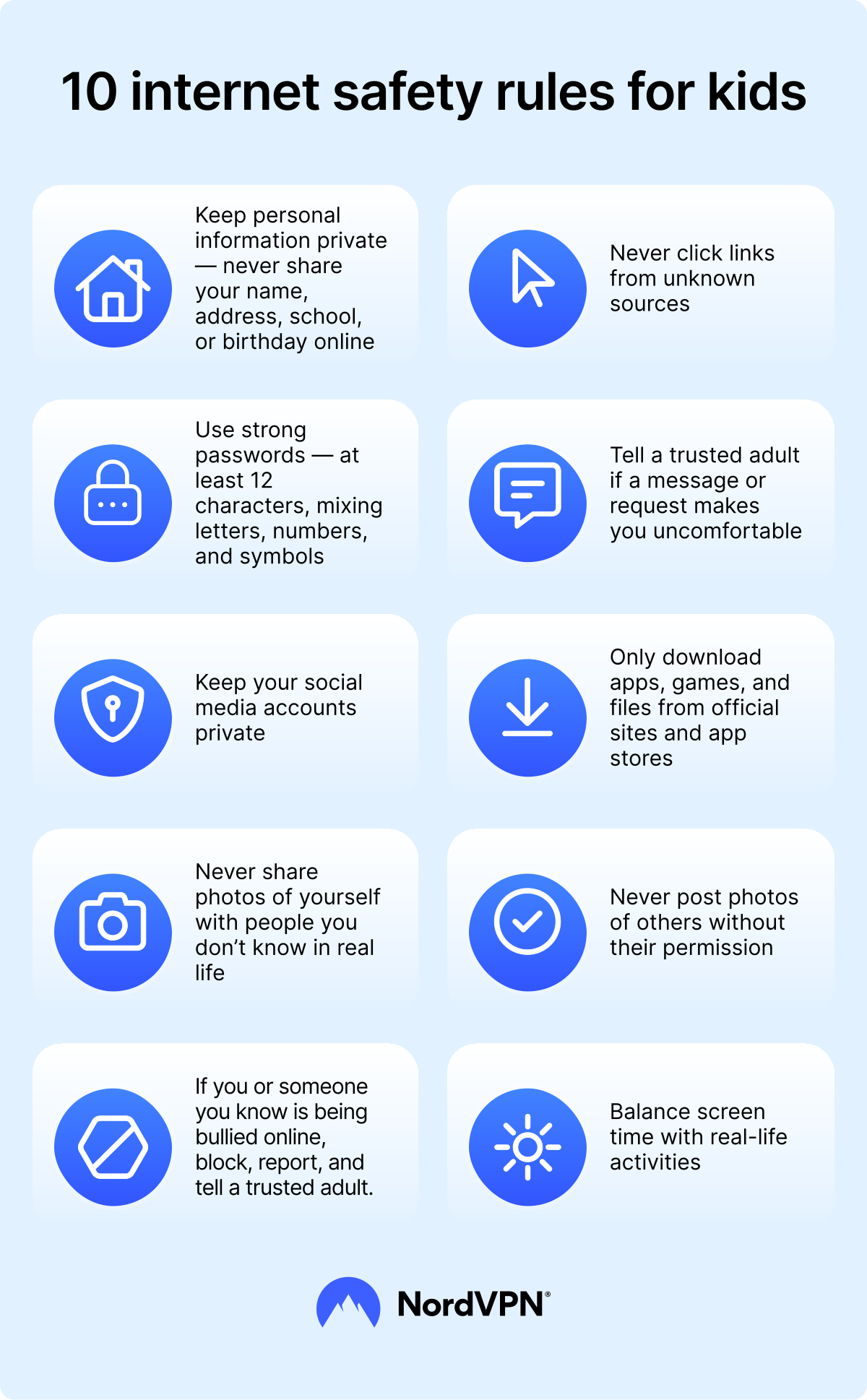
What are the 10 important internet safety rules for kids that parents must communicate?
The internet safety rules for kids below cover the most critical habits children need to develop. Use the infographic as a quick visual reference to display at home.
PRO TIP
Teaching kids internet safety starts with knowing it yourself. Before you start the conversation, take our cybersecurity quiz for adults to make sure your own foundations are solid.
Make it stick: Memory techniques
Three simple methods can help children remember how to make safe decisions before they post, click, or share content online.
The PAUSE method
Before you post, click, or share, ask yourself:
-
P for “permission” — do you have permission to share this?
-
A for “address” — does your post reveal where you are?
-
U for “uncomfortable” — does clicking, posting, or sharing this feel wrong?
-
S for “safe” — is this safe to share with strangers?
-
E for “embarrass” — could this embarrass you or someone else later?
If any answer is “no,” don’t do it.
The THINK method
Before you send a message or comment, ask yourself:
-
T for “true” — is it true?
-
H for “helpful” — is it helpful?
-
I for “inclusive” — is it kind to everyone it involves?
-
N for “necessary” — is it necessary?
-
K for “kind” — is it kind?
If not all are “yes,” don’t send it.
The ASK method
When you’re unsure about a situation, ask yourself:
-
A for “Am I safe?”
-
S for “Should an adult know?”
-
K for “Could doing this get me into trouble or put me at risk?”
These questions are about keeping you safe, not about getting into trouble. If any answer is no, talk to a trusted adult straight away.
Ready to take the next step? The Cybersecurity Hub gives parents the tools and knowledge to keep their families safer online.
Disclaimer: The trademarks referenced are for illustrative purposes only. NordVPN is not affiliated with, sponsored by, or endorsed by the owners of those trademarks.
