Add extra layers to your online privacy with Onion Over VPN
Combine the privacy of the Tor browser with extra VPN security.
Protect your online activities and access the Onion Network with more privacy.
No extra setup to use the Onion network — one click is all you need.
What is Onion Over VPN?
Onion Over VPN is a special feature of NordVPN. It combines the relay mechanism of the The Onion Router (Tor) with virtual private network (VPN) encryption, resulting in a solution that offers more security and privacy than just using the Tor browser. In fact, Onion Over VPN makes the Tor browser unnecessary — once connected, you can explore the Onion network on Chrome, Firefox, Edge, or any other browser.
How does the Onion network work?
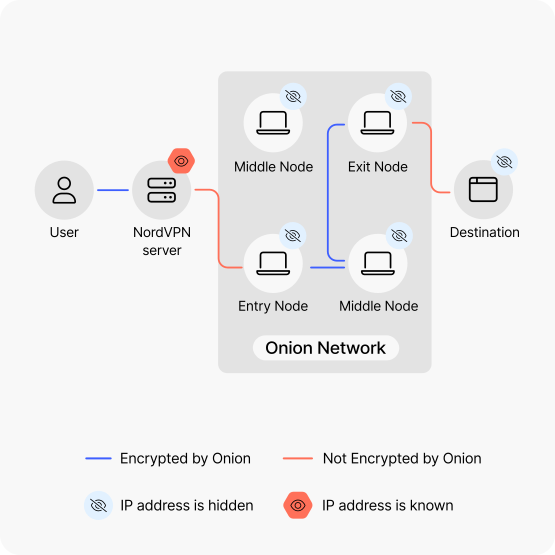
In the Onion network, you send your web traffic through a network of volunteer-operated servers known as relay nodes. At every point of connection, your traffic goes through additional layers of encryption, making it difficult to piece together the whole message or identify its origin.
01
Entry
You connect to the Onion network using a long-term guard node, which typically changes every few months. Only this initial guard node can see your real IP address.
02
Maze of servers
While traveling through multiple servers, your data is enveloped in layers of encryption. These layers prevent independent node operators from seeing the whole of your journey to track you.
03
Decryption
Further down the road, the layers of encryption are peeled off one by one. Such gradual decryption prevents any single operator on the chain from deciphering the whole package before it can leave the network.
04
Exit
Your data is decrypted, and your traffic enters the web through a random node. Keep in mind that unless your destination is a secure service (for example, an HTTPS website), the exit node will be able to see your unencrypted traffic.
Why do you need Onion Over VPN?
Onion servers are volunteer-operated — anyone can set up and run one. That means bad actors could deploy thousands of compromised servers to track you online. But using Onion Over VPN hides your real IP address from the entry node, meaning your identity is protected even from someone monitoring vast portions of the Onion network.
How to use Onion Over VPN
Start using our Onion Over VPN feature in three easy steps.
02
Find specialty servers
The “Specialty servers” tab is on the left-hand side of the screen on desktop devices. On mobile devices, simply swipe up.
03
Connect to Onion Over VPN
Press “Onion Over VPN” to automatically connect to the best available server.
Who should use Onion Over VPN?
The Onion network lets journalists and political activists operate freely without fear of surveillance and censorship. The extra layers of protection offered by Onion Over VPN make it possible to better protect journalistic sources, organize movements, and speak to the community.
When don’t you need Onion Over VPN?
A VPN tunnel is more than enough to guarantee your safety. You already have increased security when you’re connected to a NordVPN server.
Tor over VPN or VPN over Tor?
Our Onion Over VPN feature operates under the principle known as Tor over VPN — that is, you connect to a VPN server first, then access the Onion network. But it’s not the only privacy solution to combine Tor anonymity with VPN security. VPN over Tor reverses the steps, first plugging you into the Onion network, and then adding VPN protection to the mix.
VPN over Tor lets you reach websites that normally block Tor traffic, but suffers from serious drawbacks compared to Tor over VPN. Notably, it’s more difficult to set up, doesn’t shield your IP address from the entry node, and doesn’t hide the fact that you’re using Tor from your ISP. You’re trading the biggest plus of Tor over VPN — increased privacy — for a few extra websites.
Tor over VPN
ISP can't see you using Tor
ISP can see you’re using a VPN
Can access
.onion sitesCan’t access sites that block Tor traffic
Protects your IP from the entry node
VPN over Tor
ISP can see you using Tor
ISP can’t see you using a VPN
Can’t access
.onion sitesCan access sites that block Tor traffic
Keeps traffic encrypted at the exit node